1. Sarrera
This user manual provides detailed instructions for the operation and maintenance of your Sunbuck AS-60BU Home Audio Amplifier Stereo Receiver. This 2-channel amplifier is designed to enhance your home audio experience, offering versatile input options including Bluetooth 5.0, USB, SD card, AUX, CD, Line-in, and microphone inputs. Please read this manual thoroughly before using the product to ensure proper function and safety.

Figure 1: Sunbuck AS-60BU Amplifier and Remote Control
2. Segurtasun-argibideak
- Ez jarri aparatu hau euri edo hezetasunera.
- Ez kendu estalkia. Ez dago barruan erabiltzaileak konpondu dezakeen piezarik. Jo ezazu mantentze-lanetarako langile kualifikatuen esku.
- Ziurtatu unitatearen inguruko aireztapen egokia dagoela. Ez blokeatu aireztapen-irekidurak.
- Lurrera konektatutako korronte alternoko entxufe batera soilik konektatu.
- Ez gainkargatu entxufe elektrikoak edo luzapen-kableak.
- Saihestu unitatea bero-iturrien ondoan edo eguzki-argiaren eraginpean jartzea.
- Deskonektatu argindarra tximista-ekaitzetan edo denbora luzez erabili gabe zaudenean.
- Mantendu haurren eskura.
3. Paketearen edukia
Egiaztatu elementu guztiak zure paketean sartuta daudela:
- Sunbuck AS-60BU Amphargailu biziagoa
- AC korronte kablea
- Erabiltzailearen eskuliburua (dokumentu hau)
- Urruneko Kontrola

2. irudia: Zer dago kutxan
4. Produktua amaitu daview
4.1 Aurreko panela

3. irudia: aurreko eta atzeko panelen diseinua
| Ezaugarri | Deskribapena |
|---|---|
| PIZTU (PIZTU/ITZAT) | Unitateko etengailu nagusia. |
| LAGUNTZA AUX | 3.5 mm-ko jack-a kanpoko audio gailuak konektatzeko. |
| Sarrera hautatzailea | Rotary knob to select audio input source: LINE, CD, AUX, MEDIA PLAYER. |
| BASS Kontrola | Maiztasun baxuko audio irteera doitzen du. |
| TREBLE Kontrola | Maiztasun handiko audio irteera doitzen du. |
| ECHO Kontrola | Adjusts the echo effect for microphone inputs. |
| M.TONE Control | Adjusts the microphone tone. |
| MIC BOLUMENA Kontrola | Adjusts the volume of the microphone inputs. |
| MASTER BOLUMENA | Audio irteera guztietarako bolumen nagusiaren kontrola. |
| USB/SD/MMC Port | Input for USB flash drives and SD/MMC cards for media playback. |
| MEDIA PLAYER Display & Buttons | Digital display and controls (MODE, Play/Pause, Previous, Next) for USB/SD/Bluetooth playback. |
| MIC 1 / MIC 2 | 6.35 mm-ko mikrofonoaren sarrera-jakinak. |
4.2 Atzeko panela
| Ezaugarri | Deskribapena |
|---|---|
| CD L/R IN | RCA stereo input for CD players. |
| LINE L/R IN | RCA stereo input for general line-level audio sources. |
| FM antena | Connection point for the FM radio antenna. |
| DC potentzia sarrera | Power input for the ampbiziagoa. |
| Speaker Output (L/R) | Binding posts for connecting passive speakers (4-16 ohms). |
5. Konfigurazioa
Follow these steps to set up your Sunbuck AS-60BU ampbiziagoa:
- Bozgorailuaren konexioa: Connect your passive speakers to the "Speaker Output (L/R)" binding posts on the rear panel. Ensure correct polarity (+ to + and - to -) for optimal sound. This amplifier supports speakers with an impedance range of 4 to 16 ohms.
- Audio-iturburuaren konexioa:
- For CD players, connect RCA cables from the CD player's output to the "CD L/R IN" on the ampbiziagoa.
- For other line-level devices (e.g., tape drive, tuner), connect RCA cables to the "LINE L/R IN".
- For devices with a 3.5mm output (e.g., smartphones, tablets), use a 3.5mm audio cable to connect to the "AUX INPUT" on the front panel.
- For PC connection, use appropriate cables to connect your PC's audio output to either the LINE IN or AUX IN.

4. irudia: Konexio-diagrama
- FM antenaren konexioa: If you plan to use the FM radio function, connect an FM antenna to the "FM Antenna" terminal on the rear panel.
- Potentzia-konexioa: Ziurtatu amplifier's POWER switch is in the OFF position. Connect the supplied AC power cord to the "DC Power Input" on the rear panel and then to a suitable wall outlet.
6. Funtzionamendu-argibideak
6.1 Piztu/Itzali
Aktibatzeko ampbizigarria, sakatu botoia BOTEREA switch to the ON position. The LED display will illuminate. To turn off, press the BOTEREA aldatu OFF posiziora.
6.2 Sarrera hautatzea
Biratu Sarrera hautatzailea knob on the front panel to choose your desired audio source (LINE, CD, AUX, MEDIA PLAYER). When selecting MEDIA PLAYER, you can then use the MODE button on the front panel or remote to switch between USB, SD, and Bluetooth modes.
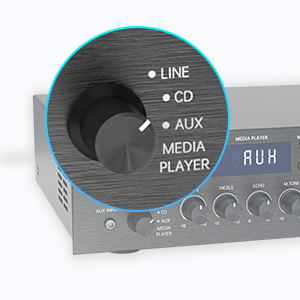
Figure 5: Input Selector
6.3 Bluetooth konexioa
Bluetooth bidez konektatzeko:
- Ezarri Sarrera hautatzailea to MEDIA PLAYER.
- Sakatu MODUA button until "BLUETOOTH" or "BT" appears on the display.
- Zure gailu mugikorrean (smartphone-a, tableta, ordenagailu eramangarria), gaitu Bluetooth-a eta bilatu eskuragarri dauden gailuak.
- Select "SUNBUCK" or "AS-60BU" from the list to pair.
- Behin parekatuta, audioa haririk gabe erreproduzitu dezakezu zure gailutik ampbiziagoa.
The Bluetooth range is approximately 40+ feet, but can be affected by obstacles and interference.

6. irudia: Bluetooth konexioa
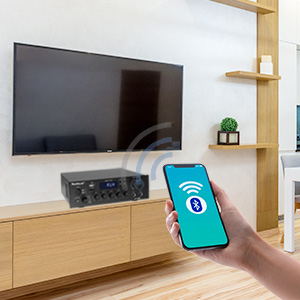
Figure 7: Bluetooth Connection Indicator
6.4 USB/SD txartelaren erreprodukzioa
To play media from a USB drive or SD/MMC card:
- Insert your USB flash drive or SD/MMC card into the corresponding port on the front panel.
- Ezarri Sarrera hautatzailea to MEDIA PLAYER.
- The amplifier will automatically detect and begin playing supported audio files (MP3, WAV, WMA, APE, FLAC).
- Use the Play/Pause, Previous, and Next buttons on the front panel or remote to control playback.
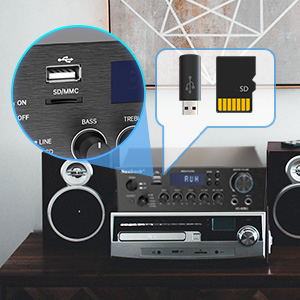
Figure 8: USB/SD Card Slots
6.5 Mikrofonoaren erabilera
Connect up to two microphones to the MIC 1 and MIC 2 jacks on the front panel. Adjust the MIK BOLUMENA, OHARRA, eta M.TONE controls to achieve your desired sound for karaoke or public address.

Figure 9: Ideal for Karaoke and Home Entertainment
6.6 FM Irratia
FM irratia erabiltzeko:
- Ensure an FM antenna is connected to the rear panel.
- Ezarri Sarrera hautatzailea to MEDIA PLAYER.
- Sakatu MODUA botoia sakatu pantailan "FM" agertu arte.
- Use the Previous/Next buttons to scan for stations. Note that this model cannot fix and save FM stations.

Figure 10: FM Mode Display
6.7 Audio doikuntzak
Erabili BASS, ALTZARRA, eta MASTER BOLUMENA knobs on the front panel to fine-tune your audio output. The MASTER BOLUMENA controls the overall sound level.
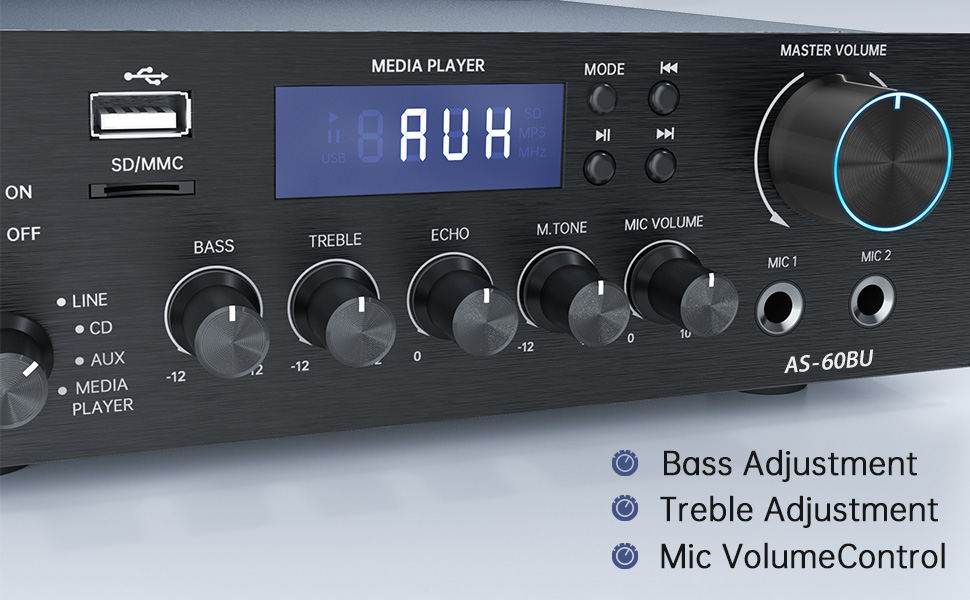
Figure 11: Audio Adjustment Controls
Video 1: Demonstration of Sunbuck AS-60BU amplifier features and sound quality.
7. Mantentzea
- Garbiketa: Erabili zapi leun eta lehor bat kanpoaldea garbitzeko ampEz erabili garbitzaile likidorik edo aerosolik.
- Biltegiratzea: Denbora luzez erabiltzen ez denean, gorde amplifizer-a leku fresko eta lehor batean gorde, eguzki-argitik eta muturreko tenperaturetatik urrun.
- Aireztapena: Ziurtatu aireztapen-irekidurak hautsik eta hondakinik gabe daudela gehiegi berotzea saihesteko.
8. Arazoak
| Arazoa | Kausa posiblea | Irtenbidea |
|---|---|---|
| Ez dago soinu irteerarik. | Incorrect input selected, loose speaker connections, low volume. | Verify input selection, check speaker wiring polarity and tightness, increase MASTER VOLUME. |
| Bluetooth connection unstable or short range. | Obstacles between device and amplifier, interference, device too far. | Reduce distance between devices, remove obstacles, avoid other wireless devices. |
| Urruneko kontrola ez dabil. | Dead batteries, line of sight blocked. | Replace batteries, ensure clear path to amplifijagailuaren IR hartzailea. |
| Settings not saved after power off. | This is normal behavior for some settings (e.g., input mode). | Re-select desired input mode after powering on. |
| Audio distortsionatua. | Input signal too high, speaker impedance mismatch, faulty cables. | Reduce source volume, ensure speakers are within 4-16 ohm range, check/replace cables. |
9. Zehaztapenak
- Eredua: AS-60BU
- Potentzia irteera: MAX 400W x 2 (RMS 70W x 2)
- Kanalak: 2-Kanal
- Bozgorailuaren inpedantzia: 4-16 ohmio
- Irteerako inpedantzia: 0.1 ohmio
- Sarrerak: 2 x RCA Audio (CD, Line), 2 x Microphone (6.35mm), USB 2.0, SD Card, Bluetooth 5.0, AUX In (3.5mm), FM Radio
- Supported Audio Formats (USB/SD): MP3, WAV, WMA, APE, FLAC
- Produktuaren neurriak: 8.27 x 7.68 x 2.44 hazbete
- Pisua: 3.24 kilo
- Fabrikatzailea: JS Electronics Limited
- Lehenengo eskuragarri: 9ko irailaren 2021a
10. Bermea eta Laguntza
Sunbuck products are designed for reliability and performance. For warranty information or technical support, please refer to the contact details provided with your purchase documentation or visit the official Sunbuck webgunea. Gorde erosketa-agiria erosketaren frogagiri gisa berme-erreklamazioetarako.
For further assistance, you may contact the manufacturer, JS Electronics Limited.


