Sarrera
This manual provides detailed instructions for the safe and effective use of your Brookstone Powershine Platinum Micro Hair Dryer. Please read all instructions carefully before use and retain this manual for future reference.
Produktua amaituview
The Brookstone Powershine Platinum Micro Hair Dryer is designed for efficient hair drying with features aimed at reducing frizz and enhancing shine. Its compact and lightweight design makes it suitable for both home use and travel.

Image: The Brookstone Powershine Platinum Micro Hair Dryer, showcasing its sleek black and rose gold design.
Ezaugarri nagusiak
- Ionic Generator: Helps to reduce frizz and enhance hair shine by drying hair faster with lower heat.
- Hot Shot botoia: Provides a burst of cool air to set your hairstyle for a long-lasting hold and added shine.
- Infinity Temperature and Speed Control Wheel: Offers precise adjustment of heat and airflow settings for various hair types and styling needs.
- Diseinu Profesionala: Engineered for quiet operation and powerful performance, delivering superior styling results.
- Zintzilikatzeko begizta erosoa: Allows for easy storage, saving counter and cabinet space.
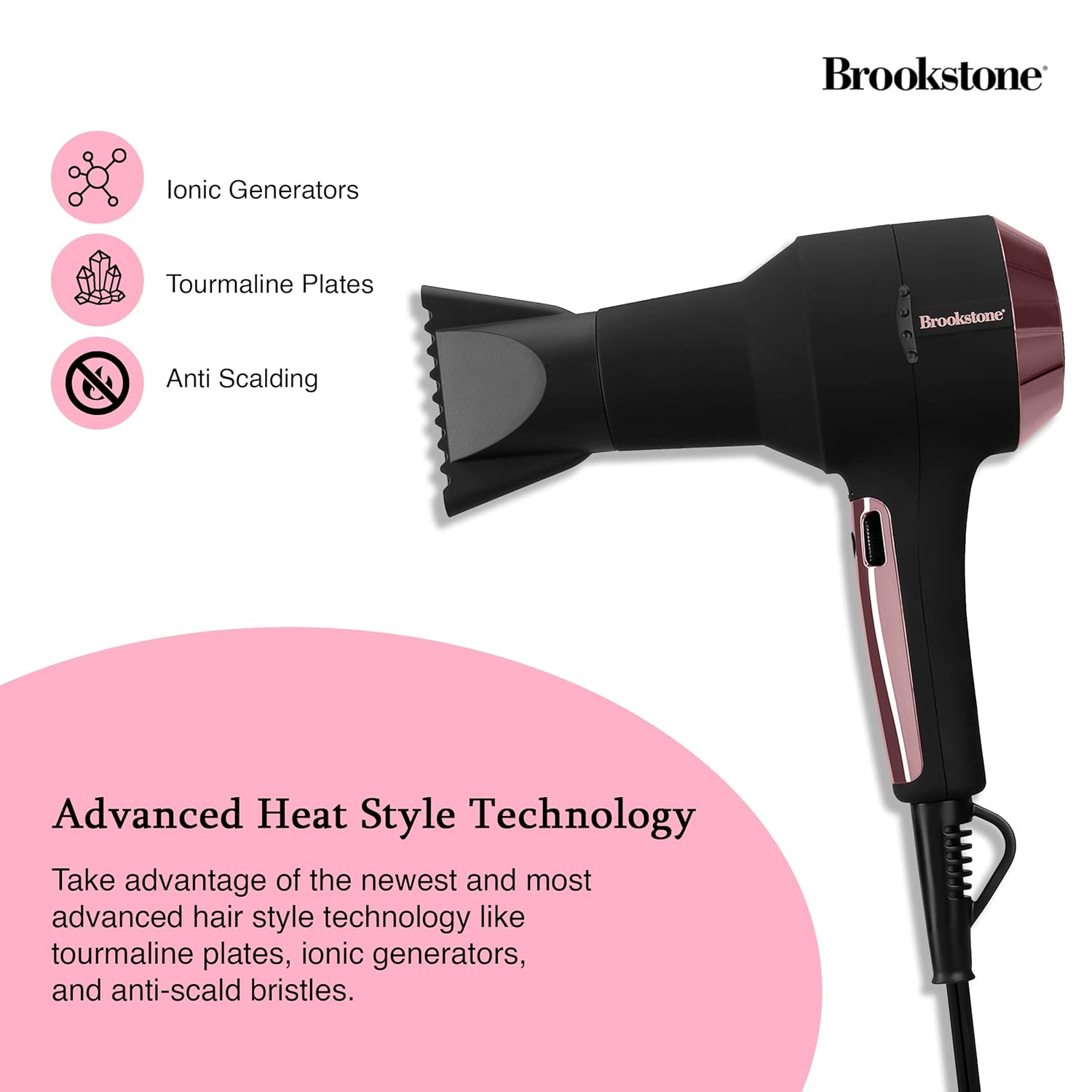
Image: Close-up of the hair dryer with icons indicating Ionic Generators, Tourmaline Plates, and Anti Scalding technology.
Segurtasun informazio garrantzitsua
Deskarga elektriko, erredura, sute edo lesio arriskua murrizteko, jarraitu beti oinarrizko segurtasun neurri hauek:
- Mantendu haurren eskura.
- Do not use while bathing or near water.
- Ez murgildu aparatua uretan edo beste likidoren batean.
- Mantendu entxufea eta kablea gainazal beroetatik urrun.
- Allow the hair dryer to cool completely before storing.
- Always unplug the hair dryer immediately after use and before cleaning.
- Ez erabili tresnarik kablea edo entxufea hondatuta badu, edo tresna gaizki funtzionatzen badu, erori edo edozein modutan kaltetu bada.
- Do not block the air openings or place the appliance on a soft surface, such as a bed or couch, where the air openings may be blocked.
- Ez erabili inoiz lo egiten duzun bitartean.

Image: The hair dryer illustrating protective features such as prevention of scalp burns, overheating, and the inclusion of protective heat sleeves.
Konfigurazioa
- Desegin: Kontu handiz atera ile-lehorgailua eta osagarri guztiak paketetik.
- Ikuskatu: Egiaztatu tresna kalterik dagoen. Ez erabili kaltetuta badago.
- Potentzia-konexioa: Ensure your hands are dry, then plug the power cord into a standard electrical outlet (120V AC, 60Hz).
- Attachment (Optional): If using a concentrator nozzle, align it with the front of the dryer and push it firmly into place.
Funtzionamendu-argibideak
Piztu/Itzaltzea
- To turn the dryer ON, slide the power switch to the desired setting.
- To turn the dryer OFF, slide the power switch to the '0' position.
Adjusting Temperature and Speed
The hair dryer features an infinity control wheel for precise adjustment of both temperature and airflow speed.
- Tenperatura kontrola: Rotate the infinity control wheel to increase or decrease the heat level. Lower settings are ideal for fine, fragile, or sensitive hair, while higher settings are suitable for faster drying of thicker hair.
- Abiadura kontrola: The same infinity control wheel also adjusts the airflow speed. Rotate it to find the optimal speed for your styling needs.
Using the Cool Shot Button
After drying and styling your hair with heat, press and hold the Cool Shot button to deliver a stream of cool air. This helps to seal the hair cuticle, lock in your style, and add shine. Release the button to return to the previous heat setting.
Mantentzea
Aire-iragazkia garbitzea
Regular cleaning of the air filter is essential for optimal performance and to prolong the life of your hair dryer.
- Deskonektatu: Always unplug the hair dryer from the electrical outlet before cleaning.
- Kendu iragazkiaren estalkia: Locate the removable rear filter cover. Gently twist or pull to detach it.
- Garbitu iragazkia: Use a soft brush or a vacuum cleaner with a brush attachment to remove any accumulated dust, lint, or hair from the filter screen.
- Berriro erantsi: Once clean, securely reattach the filter cover.
Biltegiratzea
When not in use, ensure the hair dryer is unplugged and completely cool. Store it in a dry location. The integrated hanging loop allows for convenient storage on a hook, saving space.

Image: The hair dryer with its integrated hanging loop, illustrating a convenient storage option.
Arazoak konpontzea
If you encounter any issues with your Brookstone Powershine Platinum Micro Hair Dryer, please refer to the following common problems and solutions:
- Dryer does not turn on:
- Ziurtatu kablea ondo konektatuta dagoela funtzionatzen duen entxufe elektriko batera.
- Egiaztatu pizteko etengailua 'ON' posizioan dagoen.
- Ziurtatu zirkuitu-etengailua ez dela jauzi egin.
- Insufficient heat or airflow:
- Check the infinity control wheel to ensure it is set to a higher heat/speed setting.
- Clean the air intake filter at the rear of the dryer, as a blocked filter can restrict airflow.
- Dryer is excessively noisy:
- A clogged air filter can cause increased noise. Clean the air intake filter.
- Ensure no foreign objects are obstructing the air vents.
- Hair is still frizzy:
- Ensure the ionic generator is functioning (though not visibly indicated, it operates automatically).
- Use the Cool Shot button at the end of your drying routine to help seal the hair cuticle.
- Consider using a heat protectant or anti-frizz styling product in conjunction with the dryer.
Konponbide hauek saiatu ondoren arazoa konpontzen ez bada, jarri harremanetan bezeroarentzako arreta-zerbitzuarekin.
Zehaztapenak
| Produktuaren neurriak | 9.5 x 4 x 12 hazbete |
| Elementuaren pisua | 3.4 kilo |
| Modelo zenbakia | HS1002-BK8 |
| Marka | Brookstone |
| Kolorea | Black/Rose Gold |
| Energia iturria | Kable elektrikoa |
| Ezaugarri bereziak | Compact, Cool Shot Button, Hanging Loop |
| Gomendatutako Erabilerak | Lehortzea |
| UPC | 191205489919 |
Bermea eta Laguntza
Your Brookstone Powershine Platinum Micro Hair Dryer is covered by a limited warranty. Please refer to the warranty card included with your purchase for specific terms and conditions.
For technical support, warranty claims, or further assistance, please visit the official Brookstone website or contact their customer service department using the contact information provided in your product packaging.


