1. Sarrera
This manual provides essential information for the setup, operation, and maintenance of your Donner DDP-100 88-Key Weighted Action Digital Piano. Please read it thoroughly to ensure proper use and to maximize your instrument's lifespan.
Ezaugarri nagusiak:
- 88 Fully-Weighted Keys: Designed to precisely match finger strength changes, restoring the feel of an acoustic piano for stable and responsive touch.
- Soinu errealista: Features a pure tone sampled from real acoustic grand pianos, utilizing AWM sampling technology for realistic and excellent sound quality.
- Konektibitate polifazetikoa: Supports MP3 input, external sound systems, and headphones for varied practice and performance needs.
- Integratua Ampbiziagoa: Eraikituta amplifier for direct sound output.
- Diseinu erraztua: Wooden cabinet with a sliding key cover for key protection and a modern aesthetic.
- 128 notako polifonia: Ensures complex musical passages can be played without notes cutting off.

Figure 1: The Donner DDP-100 Digital Piano in white, showcasing its full 88-key keyboard, integrated music stand, and three foot pedals.
2. Konfiguratzeko argibideak
2.1 Desontziratzea eta osagaien egiaztapena
Carefully unpack all components from the packaging. Ensure all items listed below are present:
- Donner DDP-100 Digital Piano Unit
- Altzarien euskarria
- Elikatze-moldagailua
- Giltza-estalkia irristakorra
- Three-Pedal Unit
- Musika Atsedenaldia
2.2 Muntaketa
- Assemble the Furniture Stand: Follow the instructions provided with the furniture stand to securely assemble its components.
- Attach the Piano Unit: Carefully place the DDP-100 digital piano unit onto the assembled furniture stand. Secure it using the provided screws or fasteners.
- Connect the Pedal Unit: Locate the pedal unit cable and connect it to the corresponding port on the underside of the piano unit.
- Install the Music Rest: Sartu partitura-euskarria pianoaren goiko panelean dauden zirrikituetan.
- Konektatu korronte-moldagailua: Plug the power adapter into the DC IN port on the piano's rear panel, then plug the adapter into a wall outlet.

Figure 2: Dimensions of the Donner DDP-100 Digital Piano, illustrating its compact design for home integration.
3. Funtzionamendu-argibideak
3.1 Piztea/Itzaltzea eta Bolumenaren Kontrola
- Piztu: Locate the 'POWER' button on the left side of the keyboard. Press it to turn on the piano. A red indicator light will illuminate.
- Bolumenaren doikuntza: Use the 'VOLUME' knob to adjust the overall sound level. Turn clockwise to increase volume, counter-clockwise to decrease.
- Itzali: Press the 'POWER' button again to turn off the piano.
1. bideoa: Amaitu daview of the Donner DDP-100 Digital Piano, demonstrating power on, volume control, and key action.
3.2 Pianoa jotzea
- Weighted Keys: The 88 fully-weighted keys provide a realistic piano feel, with heavier touch in lower registers and lighter touch in higher registers.
- Pedalak: The three pedals (soft, sostenuto, sustain) allow for expressive playing, similar to an acoustic grand piano.
- Soinuaren kalitatea: The DDP-100 features a single, high-quality grand piano tone, sampled for authenticity.

Figure 3: Diagram illustrating the graded hammer action of the 88 weighted keys, providing a realistic playing experience.
3.3 Headphone Mode
For private practice, connect headphones to the 3.5mm headphone jack located on the rear panel. This mutes the internal speakers, allowing you to play without disturbing others.

Figure 4: Demonstrating the headphone mode for silent practice, ideal for shared living spaces.
3.4 Kanpoko gailuen konexioa
The rear panel of the DDP-100 offers various ports for connecting external devices:
- MP3 interfazea: Connect an MP3 player for audio playback.
- USB Transmission Interface: Connect to a computer for MIDI data transfer.
- Audio Interface (IN/OUT): Connect to external audio systems or recording devices.
- Sustain Pedal Socket: For connecting the included three-pedal unit.
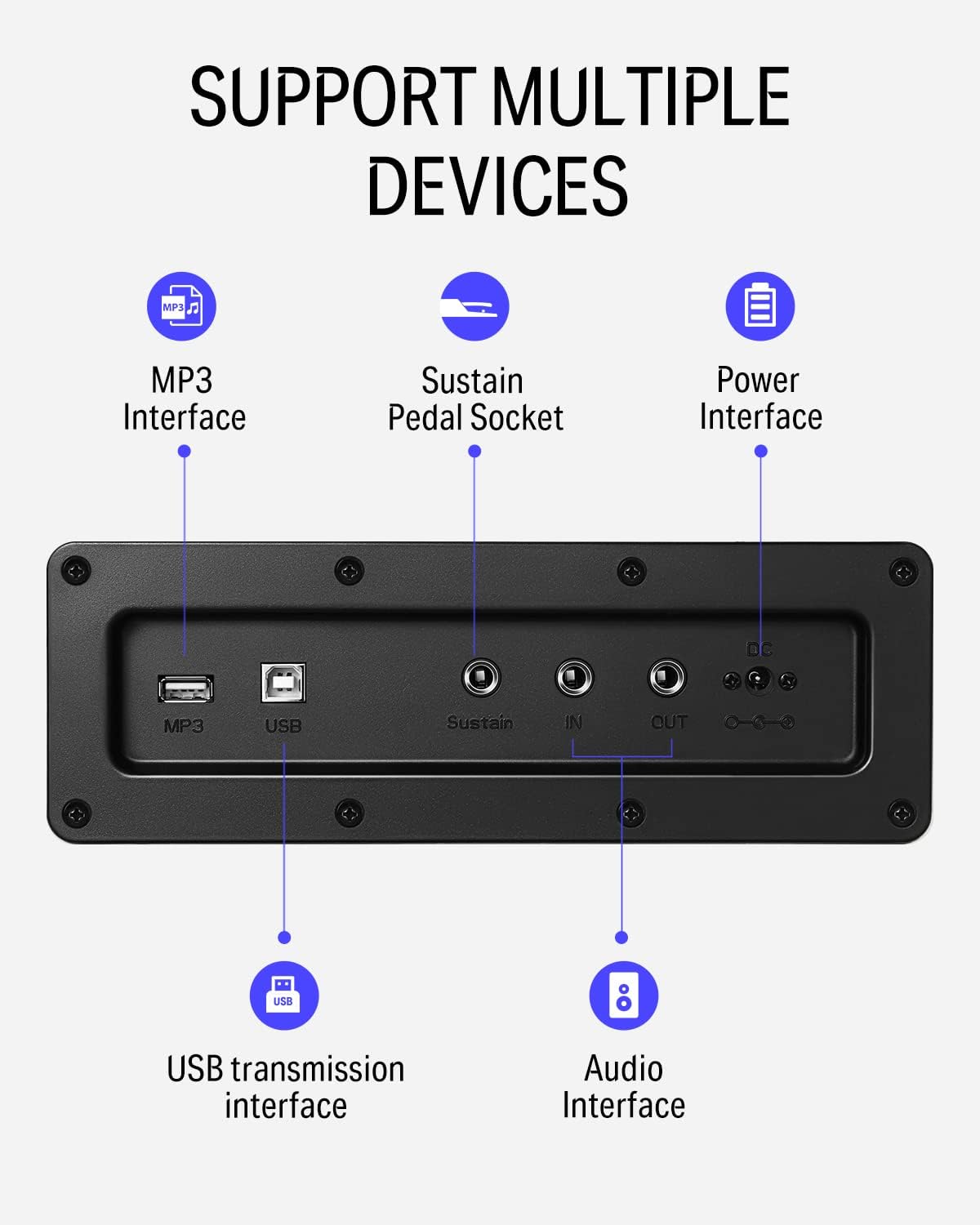
5. irudia: Xehetasuna view of the rear panel connectivity options, including MP3, USB, Sustain, and Audio In/Out ports.
Video 2: Demonstrates the versatility of the DDP-100 when connected to other devices, such as DJ equipment.
4. Mantentzea
4.1 Garbiketa
- Use a soft, dry cloth to wipe the surface of the piano.
- Zikinkeria egoskorrerako, apur bat lehortuampGarbitu oihalak urarekin eta garbitzaile leun eta ez-urratzaile batekin. Saihestu gehiegizko hezetasuna.
- Do not use chemical solvents, alcohol, or abrasive cleaning agents, as these can damage the finish.
4.2 Biltegiratzea eta zaintzea
- Keep the piano away from direct sunlight, heat sources, and excessive humidity to prevent damage to the wood and electronic components.
- Use the sliding key cover to protect the keys from dust and spills when not in use.
- Avoid placing heavy objects on the piano.
5. Arazoak
5.1 Soinurik ez
- Ensure the power adapter is securely connected and the piano is turned on.
- Check the volume knob and ensure it is turned up.
- Entzungailuak konektatuta badaude, deskonektatu itzazu barneko bozgorailuak gaitzeko.
- If connected to an external sound system, check the system's volume and connections.
5.2 Teklek ez dute erantzuten
- Ziurtatu pianoa piztuta dagoela.
- Tekla batzuk bakarrik eragiten baditu, jarri harremanetan bezeroarentzako arreta-zerbitzuarekin.
5.3 Soinu anormala
- Check for loose connections of cables (power, pedals, audio).
- Ensure the volume is not set too high, causing distortion.
- If the issue persists, power cycle the unit (turn off, wait 10 seconds, turn on).
6. Zehaztapenak
| Ezaugarri | Xehetasuna |
|---|---|
| Marka | Donner |
| Ereduaren izena | DDP-100 |
| Gako kopurua | 88 |
| Gako mota | Fully-Weighted Action |
| Polifonia | 128-Note |
| Soinu iturria | AWM Sampling Technology (Grand Piano Tone) |
| Pedalak | 3-Pedal Unit (Sustain, Sostenuto, Soft) |
| Konektibitatea | MP3 Interface, USB Transmission, Audio In/Out, 3.5mm Headphone Jack |
| Energia iturria | Egokigailua, elektrikoa |
| Produktuaren neurriak | 54.33" L x 16.14" W x 33.27" H |
| Elementuaren pisua | 97.7 kilo |
| Gorputzaren Materiala | Egurra |
| Kolorea | Zuria |
7. Bermea eta Laguntza
For warranty information, please refer to the documentation included with your purchase or contact Donner customer support. General customer support is available for assistance with product inquiries, troubleshooting, and service requests.
For additional support, visit the official Donner webgunea edo jarri harremanetan haien bezeroarentzako arreta-zerbitzuko kanalekin.


