Produktua amaituview
The Cosmic Byte CB-GK-22 Veritas is a Tenkeyless (TKL) membrane keyboard designed for various computing tasks, including gaming. It features RGB LED backlighting with multiple effects, double injection keycaps for durability, and 25-key anti-ghosting capabilities.

1. irudia: Goitik behera view of the Cosmic Byte CB-GK-22 Veritas TKL Membrane Keyboard with RGB lighting activated.
Konfigurazio Argibideak
Follow these steps to set up your Cosmic Byte CB-GK-22 Veritas keyboard:
- Deskonprimitu teklatua: Kontu handiz atera teklatua eta barne dauden osagarriak paketetik.
- Konektatu ordenagailura: Locate an available USB port on your computer. Insert the USB connector of the keyboard into the USB port.
- Gidariaren instalazioa: The keyboard is plug-and-play. Your operating system (Windows, Linux, macOS) should automatically detect and install the necessary drivers. No additional software installation is typically required.
- Egiaztatu funtzionaltasuna: Once connected, the keyboard's RGB lighting should illuminate. Test typing in a text editor to ensure all keys are responsive.
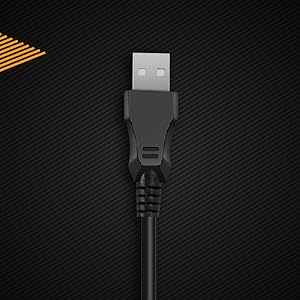
2. irudia: hurbileko planoa view of the keyboard's USB connector, ready for connection to a computer.

Figure 3: The keyboard is compatible with various operating systems, including Windows, Linux, and macOS.
Funtzionamendu-argibideak
Oinarrizko teklatuaren funtzioak
The CB-GK-22 Veritas functions as a standard TKL keyboard. All keys perform their labeled functions. The keyboard features 25-key anti-ghosting, allowing multiple key presses to be registered simultaneously, which is beneficial for fast-paced typing and gaming.
RGB atzeko argiaren kontrola
The keyboard features 7-color RGB backlighting with various effects. Use the following key combinations to control the lighting:
- Distira doitzea: Sakatu Fn + Orrialde gora distira handitzeko (5 maila). Sakatu Fn + Orria behera distira gutxitzeko (5 maila).
- Atzeko argiaren efektuak: The keyboard supports 9 backlight effects, including 6 dazzling effects. Specific key combinations for cycling through effects are typically indicated on the keyboard itself or in a quick start guide. Common combinations include Fn + Desplazamendu blokeoa or Fn + Txertatu.
- Sonic Spectrum Mode: This mode allows the RGB lighting to react to ambient sound. Activate this mode using the designated key combination, often Fn + Etxea or Fn + amaiera.

Figure 4: The keyboard features a Tenkeyless layout and includes Sonic Spectrum and sound-reactive LED lighting modes.
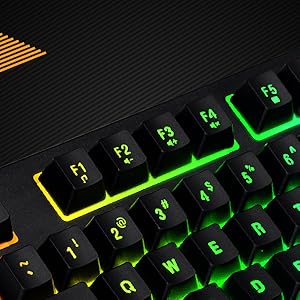
Figure 5: Detail of the function keys (F1-F12) with active RGB backlighting.
Double Injection Keycaps
The keycaps are manufactured using a double injection process, which ensures that the legends (characters on the keys) are scratch-resistant and will not fade over time. This design also makes the keys easier to clean.
Mantentzea
Proper maintenance helps extend the lifespan of your keyboard:
- Ohiko garbiketa: Use a soft, dry cloth to wipe down the keycaps and keyboard surface. For dust and debris between keys, use compressed air.
- Garbiketa sakona: Zikinkeria egoskorrerako, apur bat lehortuampen a cloth with water or a mild, non-abrasive cleaning solution. Ensure no liquid enters the keyboard.
- Saihestu isurketak: Keep liquids away from the keyboard to prevent damage to internal components. If a spill occurs, immediately disconnect the keyboard and allow it to dry completely before reconnecting.
- Biltegiratzea: When not in use for extended periods, store the keyboard in a clean, dry environment away from direct sunlight or extreme temperatures.
Arazoak konpontzea
Teklatuarekin arazoak badituzu, jo ezazu ohiko irtenbide hauetara:
- Teklatuak ez du erantzuten:
- Ziurtatu USB kablea ondo konektatuta dagoela bai teklatura bai ordenagailura.
- Saiatu teklatua ordenagailuko beste USB ataka batera konektatzen.
- Probatu teklatua beste ordenagailu batean arazoa teklatuan edo jatorrizko ordenagailuan dagoen zehazteko.
- Berrabiarazi ordenagailua.
- Atzeko argia ez dabil edo ez dabil ondo:
- Check if the brightness is set to the lowest level. Use Fn + Orrialde gora distira handitzeko.
- Cycle through backlight effects using the designated key combinations (e.g., Fn + Desplazamendu blokeoa or Fn + Txertatu).
- Ensure no software is overriding the keyboard's lighting settings (though this keyboard typically does not require software).
- Giltzak ez dira erregistratzen edo mamuak agertzen dira:
- Clean around the affected keys to remove any debris that might be obstructing the key mechanism.
- The keyboard supports 25-key anti-ghosting. If more than 25 keys are pressed simultaneously, some inputs may not register.
Zehaztapenak
| Ezaugarri | Xehetasuna |
|---|---|
| Ereduaren izena | CB-GK-22 Veritas |
| Marka | Byte kosmikoa |
| Teklatu mota | TKL Membrane Keyboard |
| Atzeko argia | 7-Color RGB Backlit, 9 Effects, Sonic Spectrum Mode |
| Distira-mailak | 5 Maila |
| Ghostingaren aurkakoa | 25 giltzak |
| Giltzak | Injekzio bikoitza |
| Konektibitatea | USBa |
| Produktuaren neurriak | 37.2 x 15.1 x 3.7 cm |
| Elementuaren pisua | 629 g |
| Dakarten osagaiak | USB kablea |
| Hizkuntza | ingelesa |
| ASIN | B09K5GYWBH |
Bermea eta laguntza
Bermearen informazioa
The Cosmic Byte CB-GK-22 Veritas TKL Membrane Keyboard comes with a 1 urteko berme mugatua erosketa-datatik aurrera. Berme honek erabilera normalaren ondoriozko fabrikazio-akatsak estaltzen ditu. Ez ditu estaltzen erabilera okerrak, istripuek, baimenik gabeko aldaketek edo higadura normalak eragindako kalteak.
Mesedez, gorde zure erosketa-froga berme-erreklamazioetarako.
Bezeroarentzako Arreta
For technical assistance, warranty claims, or any product-related inquiries, please contact Cosmic Byte customer support:
- Fabrikatzailearen kontaktua: 1800 31300 7700
- Marka Webgunea: Visit the official Cosmic Byte webbaliabide eta laguntza gehigarrietarako gunea.


