Sarrera
The TabTime Big Button TV Remote Control is designed for simplicity and ease of use, making TV control accessible for everyone, especially those with limited dexterity or impaired vision. This universal remote features large, clearly labeled buttons for essential functions, ensuring a straightforward and stress-free experience. This manual provides comprehensive instructions for setting up and operating your new remote control.

Image: The TabTime Big Button TV Remote Control, designed for ease of use, held by an elderly person. It highlights features like large, easy-press buttons and a memory-friendly design, making TV access simple.
Produktua amaituview
The TabTime Big Button TV Remote Control features a streamlined design with only the most essential buttons, making it intuitive to operate. It includes buttons for Power, Volume Up/Down, Channel Up/Down, Mute, and a customizable 'F' (Function) button.
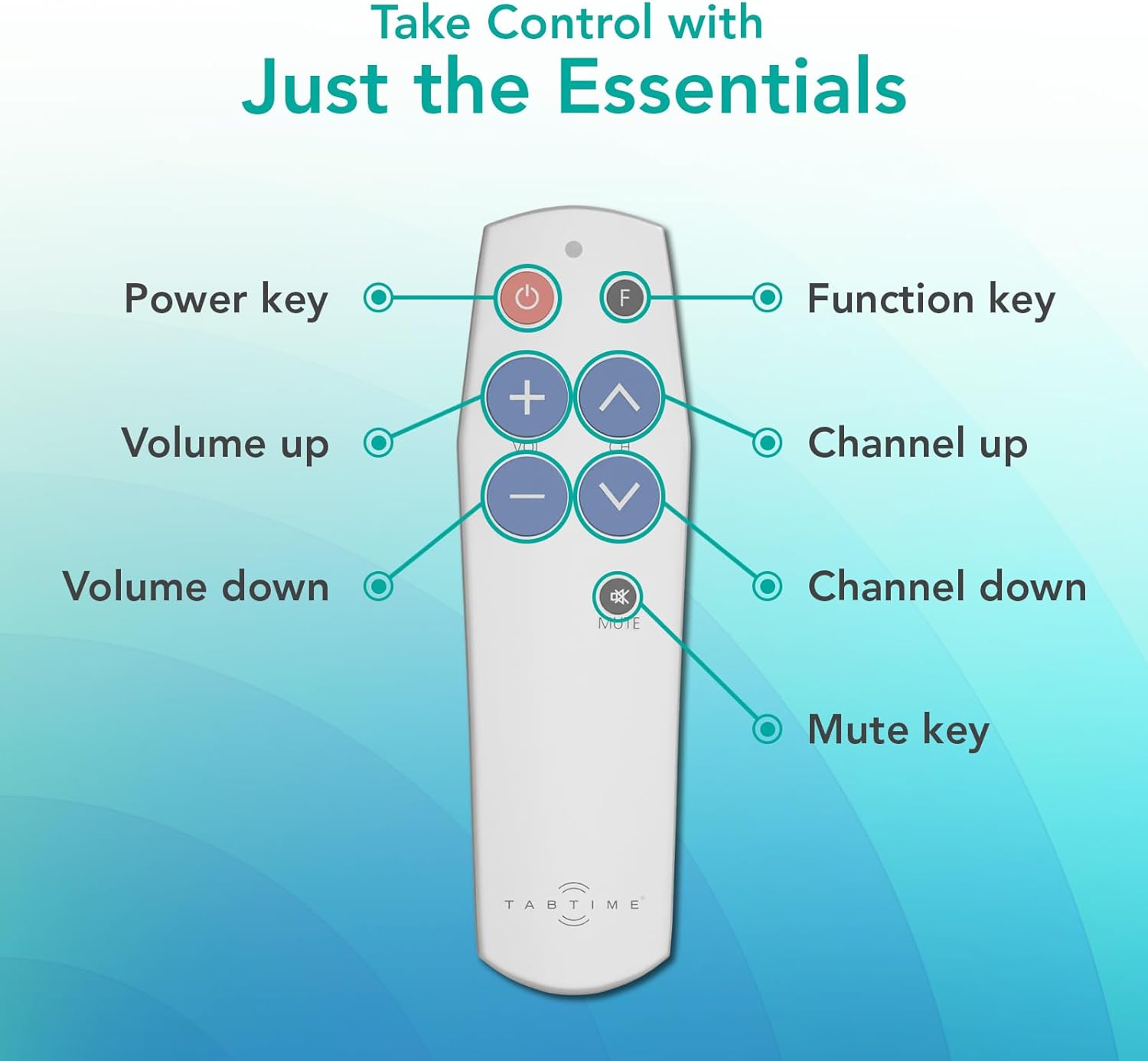
Image: A clear diagram of the TabTime Big Button TV Remote Control, illustrating the location and function of each key: Power, Function (F), Volume Up (+), Volume Down (-), Channel Up (CH ^), Channel Down (CH v), and Mute.
Konfigurazioa eta Programazioa
1. Bateriaren instalazioa
Your TabTime remote requires 2 AAA batteries (included). Open the battery compartment on the back of the remote and insert the batteries, ensuring correct polarity (+ and - signs).

Image: The TabTime Big Button TV Remote Control displayed alongside two AAA batteries, indicating the power source for the device.
2. Urruneko kontrola programatzea
The TabTime remote is programmed by learning signals from your existing TV remote control. You will need your original TV remote for this process. Ensure both remotes have fresh batteries and are placed on a flat surface, 2-5 cm apart, with their infrared emitters facing each other.
- Step 1: Enter Learning Mode. Simultaneously press and hold the Power button and the Volume Up (+) button on the TabTime remote until the red indicator light flashes rapidly three times, then stays lit. This indicates the remote is in learning mode.
- Step 2: Select Button to Program. Immediately press the button on the TabTime remote that you wish to program (e.g., Volume Up). The red indicator light will start flashing slowly.
- Step 3: Transmit Signal. Point your original TV remote at the TabTime remote and press and hold the corresponding button (e.g., Volume Up on your original remote). Keep holding until the red indicator light on the TabTime remote flashes rapidly three times, then turns off. This confirms successful programming.
- Step 4: Repeat for Other Buttons. Repeat Steps 1-3 for all other buttons you wish to program (Volume Down, Channel Up, Channel Down, Mute).
- Programming the 'F' Button: The 'F' button can be programmed to replicate any single function from your existing remote, such as a favorite channel, input source, or menu button. Follow Steps 1-3, selecting the 'F' button in Step 2 and the desired button on your original remote in Step 3.

Image: A visual guide demonstrating the pairing process between an original TV remote and the TabTime remote, illustrating the simple steps for a hassle-free setup.
Video Guide: Remote Control Setup
Video: An official guide demonstrating the setup and programming of the TabTime Big Button TV Remote Control. This video provides a step-by-step visual walkthrough of the pairing process with an existing TV remote.
Funtzionamendua
Once programmed, your TabTime remote is ready for use. Point the remote directly at your TV or other infrared-controlled device.
- Pizteko botoia: Press to turn your TV or device on/off.
- Bolumen botoiak (+/-): Sakatu '+' bolumena igotzeko, '-' bolumena jaisteko.
- Channel Buttons (CH ^/v): Press 'CH ^' to go to the next channel, 'CH v' to go to the previous channel.
- Mututu botoia: Sakatu audioa isilarazteko edo desaktibatzeko.
- 'F' Button: Activates the custom function you programmed during setup.
Bateragarritasuna
The TabTime Big Button TV Remote Control is a universal remote designed to work with a wide range of devices that use infrared (IR) technology, including most TVs, set-top boxes, and DVD players. It learns commands directly from your existing IR remote.
Ohar garrantzitsua: This remote control will EZ work with devices that use Bluetooth or RF (Radio Frequency) technology. It is strictly for infrared-controlled devices.

Image: The TabTime remote control displayed alongside logos of various popular TV brands (Panasonic, Sony, Toshiba, Samsung, LG, Sharp), illustrating its universal compatibility with infrared-controlled televisions.
Arazoak konpontzea
| Arazoa | Irtenbidea |
|---|---|
| Remote not responding after programming. | Ensure the original remote is IR-based, not Bluetooth. Re-attempt programming, making sure the remotes are 2-5 cm apart and the indicator light flashes correctly. Check battery levels in both remotes. |
| Indicator light on TabTime remote doesn't flash. | Check if batteries are inserted correctly and are not depleted. Ensure you are pressing the correct combination of buttons to enter learning mode. |
| Botoi batzuk funtzionatzen dute, beste batzuk ez. | Re-program the specific non-working buttons. Ensure a strong, direct signal from the original remote during programming. |
| Urrutiko agintea tarteka funtzionatzen du. | Replace batteries. Ensure there are no obstructions between the remote and the device's IR receiver. |
Zehaztapenak
| Ezaugarri | Xehetasuna |
|---|---|
| Marka | TabTime |
| Modelo zenbakia | TabTime Simple TV Remote |
| Kolorea | Zilarrezkoa |
| Konektibitate Teknologia | Infragorriak (IR) |
| Botoi kopurua | 7 (Power, Vol+, Vol-, CH+, CH-, Mute, F) |
| Energia iturria | 2 x AAA bateria |
| Gehienezko irismena | 10 metro |
| Gailu bateragarriak | Universal (TV, set-top box, DVD player, etc. - IR only) |
| Ezaugarri bereziak | Easy to Install, Easy to Use, Large Buttons |

Image: A detailed diagram outlining the physical dimensions (155mm length, 46mm width) and key specifications of the TabTime Big Button TV Remote Control, including its special feature (Universal Control - Infrared), color (Silver), power source (2x AAA Batteries), material (Plastic), and connectivity (Infrared).
Bermea eta Laguntza
For any issues not covered in this manual or for further assistance, please contact TabTime customer support. Refer to your product packaging or the retailer's webwebgunea bermearen informazio zehatza eta harremanetarako datuak lortzeko.
TabTime is committed to providing clear and simple instructions for all our products. If you encounter any difficulties, our team is ready to assist you.


