Sarrera
The Tzone TempU03 is a versatile temperature and humidity USB data logger designed for monitoring and recording environmental conditions. Its compact design and user-friendly interface make it suitable for various applications, including storage facilities, laboratories, greenhouses, and residential use. This device accurately tracks temperature and humidity levels over time, ensuring optimal conditions. The integrated LCD provides real-time readings, and USB connectivity facilitates seamless data transfer for analysis and record-keeping. This manual provides essential information for the proper setup, operation, and maintenance of your TempU03 data logger.
Produktuaren Ezaugarriak
- Diseinu trinkoa: This multi-use temperature and humidity data logger features a sleek, portable design for convenient monitoring.
- Garbitu pantaila: The large LCD screen displays temperature and humidity readings in real-time, allowing for easy data tracking.
- USB konexioa: Simply connect the device to a computer via USB to access recorded data and configure settings.
- Sorta zabala: Capable of measuring temperatures from -40°C to 70°C and humidity levels from 0% to 100% RH.
- Bateriaren iraupen luzea: Powered by a replaceable CR2032 coin cell battery, ensuring extended operation without frequent battery changes.
Gailua amaitu daview

1. irudia: Aurrealdea view of the Tzone TempU03 data logger, showing the LCD screen and control buttons.

Figure 2: Detailed diagram of the TempU03, highlighting the LCD screen elements (Alarm, Battery Life, Temp Unit, Temperature Value), Status Indicator Light (OK, Alarm), Start/Scroll/Mark button, Stop button, and USB Port.
The TempU03 features a clear LCD display for real-time data. It includes an 'OK' status indicator and an 'ALARM' indicator. Control is managed via 'Start/Scroll/Mark' and 'Stop' buttons. A USB port is located at the bottom for data transfer and configuration.
Konfigurazioa
1. Bateriaren instalazioa
The TempU03 comes with a pre-installed CR2032 coin cell battery. If replacement is needed:
- Kokatu bateriaren konpartimendua gailuan.
- Ireki konpartimenduaren estalkia.
- Sartu CR2032 bateria berri bat, polaritate zuzena (+/-) ziurtatuz.
- Itxi bateriaren konpartimendua ongi.
2. Software Installation (Optional for Advanced Configuration)
While the device can generate basic reports without software, advanced configuration (e.g., logging interval, alarm limits, temperature unit) requires the Tzone software. Refer to the included instructions or the manufacturer's website for software download and installation. It is recommended to install the software on a dedicated or test computer due to potential security warnings reported by some users.
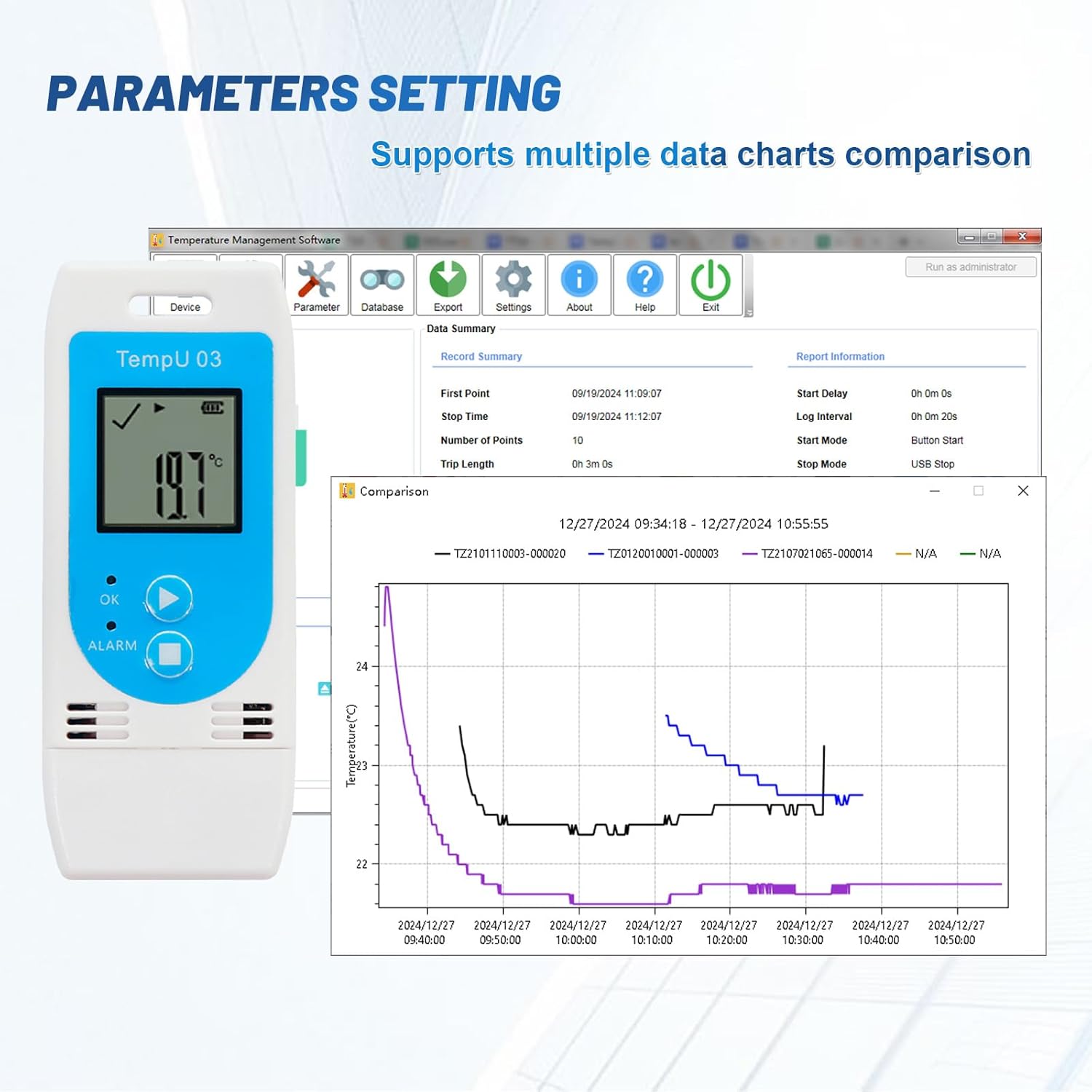
Figure 3: Screenshot illustrating the Tzone software interface for setting parameters such as logging interval, start mode, and comparing multiple data charts.
Funtzionamendu-argibideak
1. Starting a New Data Run
To begin recording data:
- Press and hold the 'Start/Scroll/Mark' button for approximately 3 seconds until the 'OK' indicator light flashes.
- The device will begin logging data according to its current configuration.
- Note: Starting a new data run will erase any previously stored data on the device. Ensure all necessary data has been downloaded before initiating a new run.
2. Stopping Data Logging
To stop recording data:
- Press and hold the 'Stop' button for approximately 3 seconds.
- The device will cease logging, and the 'OK' indicator light will turn off.
3. ViewDenbora errealeko datuak
The LCD screen continuously displays the current temperature and humidity readings. Press the 'Start/Scroll/Mark' button briefly to cycle through different display modes or mark data points during logging.
4. Data Download and Report Generation
To retrieve recorded data:
- Connect the TempU03 to a computer's USB port.
- Gailua unitate aldagarri gisa agertuko da.
- Automatically generated PDF and CSV files containing the logged data from the last measurement run will be accessible.
- For more detailed analysis and custom reports, use the Tzone software.
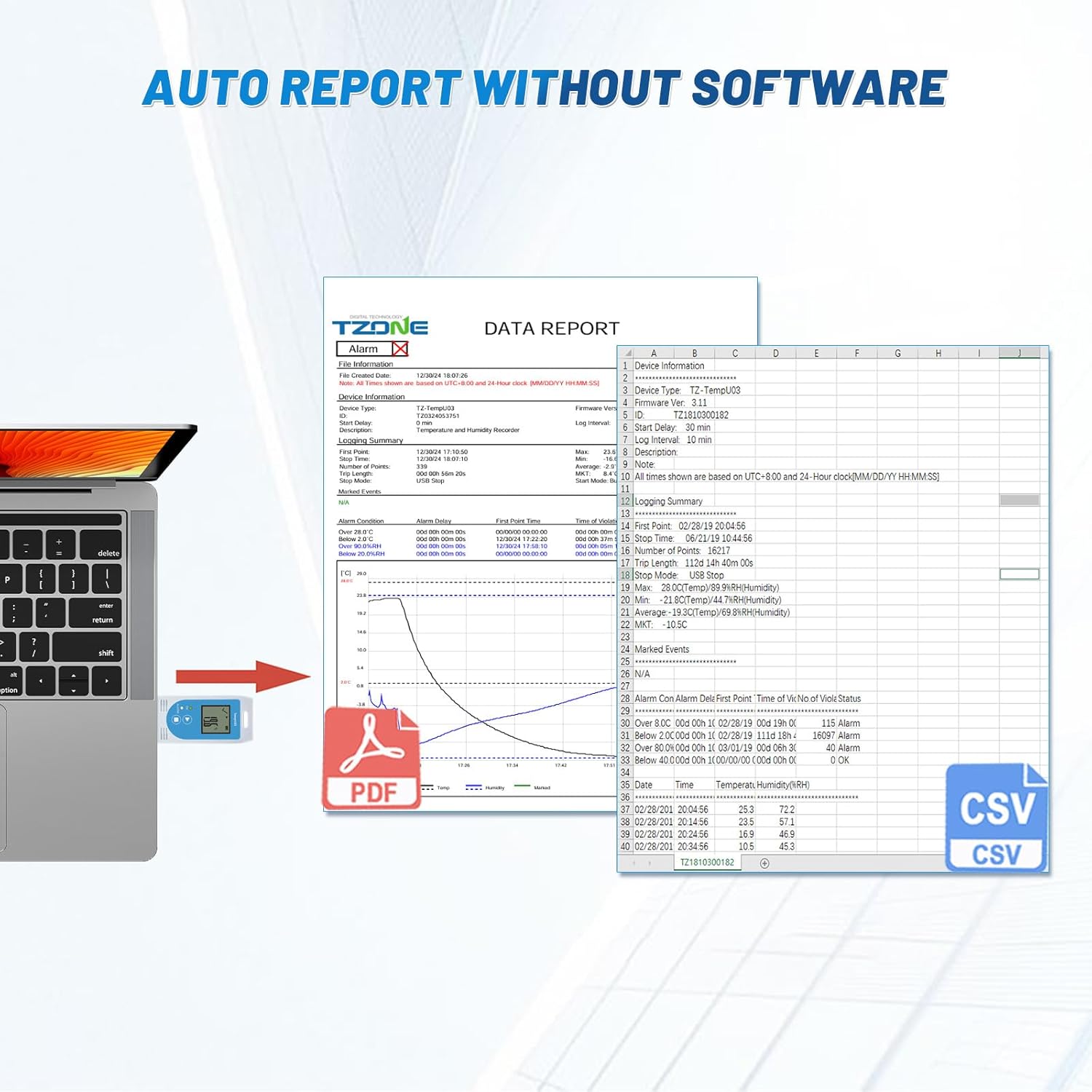
Figure 4: Illustration of the automatic report generation feature, showing the TempU03 connected to a laptop and displaying PDF and CSV file icons, indicating data can be accessed without additional software.
Mantentzea
1. Garbiketa
Garbitu gailua zapi leun eta lehor batekin. Ez erabili garbitzaile urratzailerik eta ez sartu gailua uretan.
2. Bateria ordezkatzea
When the battery indicator on the LCD shows low power, replace the CR2032 battery as described in the Setup section.
3. Biltegiratzea
Denbora luzez erabiltzen ez duzunean, gorde gailua leku fresko eta lehor batean, eguzki-argitik eta muturreko tenperaturetatik babestuta.
Arazoak konpontzea
| Arazoa | Kausa posiblea | Irtenbidea |
|---|---|---|
| Gailua ez da pizten. | Bateria baxua edo agortuta; bateria gaizki instalatuta. | Replace the CR2032 battery; ensure correct polarity. |
| No data recorded. | Logging not started; device stopped prematurely. | Ensure you press and hold the 'Start' button until the indicator flashes; avoid accidental 'Stop' button presses. |
| Cannot access data via USB. | Improper USB connection; computer driver issue. | Ensure the device is fully inserted into the USB port; try a different USB port or computer. |
| Irakurketa okerrak. | Device not calibrated; environmental interference. | Refer to software for calibration options if available; ensure device is placed in a stable environment away from direct heat/cold sources or strong air currents. Note that accuracy may vary at extreme temperatures. |
Zehaztapenak

Figure 5: Visual representation of the TempU03's physical dimensions and key performance specifications, including measurement ranges, accuracy, and data storage capacity.
- Modelo zenbakia: TenperaturaU03
- Produktuaren neurriak: 9 x 3.7 x 1.6 cm
- Elementuaren pisua: 40 g
- Neurketa-tartea (tenperatura): -40 °C eta 70 °C (-40 °F eta 158 °F)
- Neurketa-tartea (hezetasuna): % 0 eta % 100 RH
- Zehaztasuna (tenperatura): ±0.5°C (-20°C to +40°C), ±1.0°C (other range)
- Zehaztasuna (hezetasuna): ±% 5 RH
- Datuak biltegiratzeko gaitasuna: 32000 erregistro
- Bateria: 1 x CR2032 (barne)
- Konektibitatea: USBa
- Kolorea: Urdina
Bermea eta Laguntza
For warranty information and technical support, please refer to the documentation provided with your purchase or contact Tzone customer service through their official webgunea. Gorde erosketa-agiria erosketaren frogagiri gisa berme-erreklamazioetarako.

Figure 6: Image of the Certificate of Compliance for the Tzone TempU03, indicating adherence to various standards and regulations.
Aplikazioak
The Tzone TempU03 is suitable for a wide range of applications requiring temperature and humidity monitoring:

Figure 7: Collage showing various applications for the TempU03 data logger, including laboratory testing, cold chain transportation, medical refrigeration, food storage, greenhouse monitoring, and medical research.
- Laborategiko Probak
- Cold Chain Transportation
- Hozkailu medikoak
- Elikagaien biltegiratzea
- Negutegiak
- Ikerketa Medikoa
- Environmental Monitoring in homes or offices

Figure 8: The TempU03 data logger shown hanging inside a refrigerator, demonstrating its use in cold environments and highlighting its clear LCD display for both temperature and humidity readings.


