Erabiltzailearen eskuliburua
Strong SRT 8119 Digital Terrestrial DVB-T2 HDMI Decoder with Display
Eredua: SRT8119
1. Sarrera
This manual provides comprehensive instructions for the installation, operation, and maintenance of your Strong SRT 8119 Digital Terrestrial DVB-T2 HDMI Decoder. Please read this manual carefully before using the device to ensure proper functionality and to prevent damage.
The Strong SRT 8119 is designed to receive free-to-air TV programs in high definition, supporting the H.265 standard. It offers features such as recording capabilities, a 700-channel memory capacity, Electronic Program Guide (EPG), parental controls, and various channel editing options for an enhanced viewesperientzia.
2. Segurtasun informazioa
Always observe the following safety precautions to avoid electric shock, fire, or damage to the device:
- Ez jarri gailua euri edo hezetasunera.
- Ez ireki c-a.asing. Konponketa guztiak langile kualifikatuen esku utzi.
- Ziurtatu gailuaren inguruko aireztapen egokia dagoela. Ez blokeatu aireztapen-irekidurak.
- Erabili gailuarekin hornitutako korronte-egokigailua soilik.
- Disconnect the device from the power outlet during lightning storms or when unused for long periods.
- Mantendu gailua eguzki-argitik, bero-iturrietatik eta eremu magnetiko indartsuetatik urrun.
3. Paketearen edukia
Egiaztatu elementu guztiak paketean daudela:
- Strong SRT 8119 Digital Terrestrial DVB-T2 HDMI Decoder
- Urrutiko agintea (2 AAA bateria barne)
- Erabiltzailearen eskuliburua (dokumentu hau)
- Elikatze-moldagailua

Figure 3.1: Packaging of the Strong SRT 8119 decoder, showing the product box with branding and key features listed.
4. Produktua amaitu daview
4.1. Aurreko panela

4.1. irudia: Aurrealdea view of the Strong SRT 8119 decoder, featuring the display, Strong logo, Dolby Audio branding, and a USB port on the right.
- Pantaila: Kanal zenbakia edo ordua erakusten du.
- USB ataka: For connecting USB storage devices for media playback and software updates.
- Potentzia adierazlea: Indicates the device's power status.
4.2. Atzeko panela

4.2. Irudia: Atzealdea view of the Strong SRT 8119 decoder, clearly showing the input and output ports labeled for connection to a terrestrial antenna, HDMI TV, SCART TV, and S/PDIF coaxial audio output.
- INURRIA: Connects to your terrestrial antenna.
- HDMI: High-Definition Multimedia Interface output for connecting to an HD TV.
- TELEBISTA-SCART: SCART output for connecting to older TVs.
- Coaxial S/PDIF: Audio irteera digitala.
- DC IN: Kanpoko elikatze-egokitzailearen sarrera.
4.3. Urruneko kontrola

Figure 4.3: The remote control for the Strong SRT 8119 decoder, showing various buttons for power, channel navigation, volume, menu access, EPG, media playback, and numeric input.
The remote control allows full operation of the decoder. Familiarize yourself with the button layout for easy navigation.
5. Konfigurazioa
5.1. Connecting the Decoder
- Antena konektatu: Connect your terrestrial antenna cable to the INURRIA SARTU ataka deskodetzailearen atzeko panelean.
- Telebistara konektatu:
- For HD TVs: Connect an HDMI cable from the HDMI port on the decoder to an available HDMI input on your TV.
- For older TVs: Connect a SCART cable from the TELEBISTA-SCART port on the decoder to the SCART input on your TV.
- Konektatu energia: Insert the power adapter cable into the DC IN port on the decoder, then plug the adapter into a wall outlet.
- Sartu bateriak: Open the battery compartment on the remote control and insert the two AAA batteries, observing polarity.
5.2. Lehen Instalazioa
Upon first power-on, the decoder will guide you through the initial setup process:
- Hautatu zure gogokoena Hizkuntza.
- Aukeratu zure Herrialdea.
- The decoder will then perform an automatic channel scan. This may take several minutes. Do not interrupt this process.
- Once the scan is complete, the decoder will display the first available channel.
6. Funtzionamendu-argibideak
6.1. Oinarrizko Funtzionamendua
- Piztu/Itzali: Sakatu BOTEREA urrutiko aginteko botoia.
- Kanal aldaketa: Erabili CH +/- buttons or enter the channel number directly using the numeric keypad.
- Bolumen kontrola: Erabili VOL +/- botoiak.
- Menurako sarbidea: Sakatu MENUA button to access system settings and features. Use arrow keys to navigate and OK baieztatzeko.
6.2. Electronic Program Guide (EPG)
The EPG provides a schedule of current and upcoming programs.
- Sakatu EPG urrutiko aginteko botoia.
- Navigate through channels and program times using the arrow keys.
- Sakatu OK to view details about a selected program.
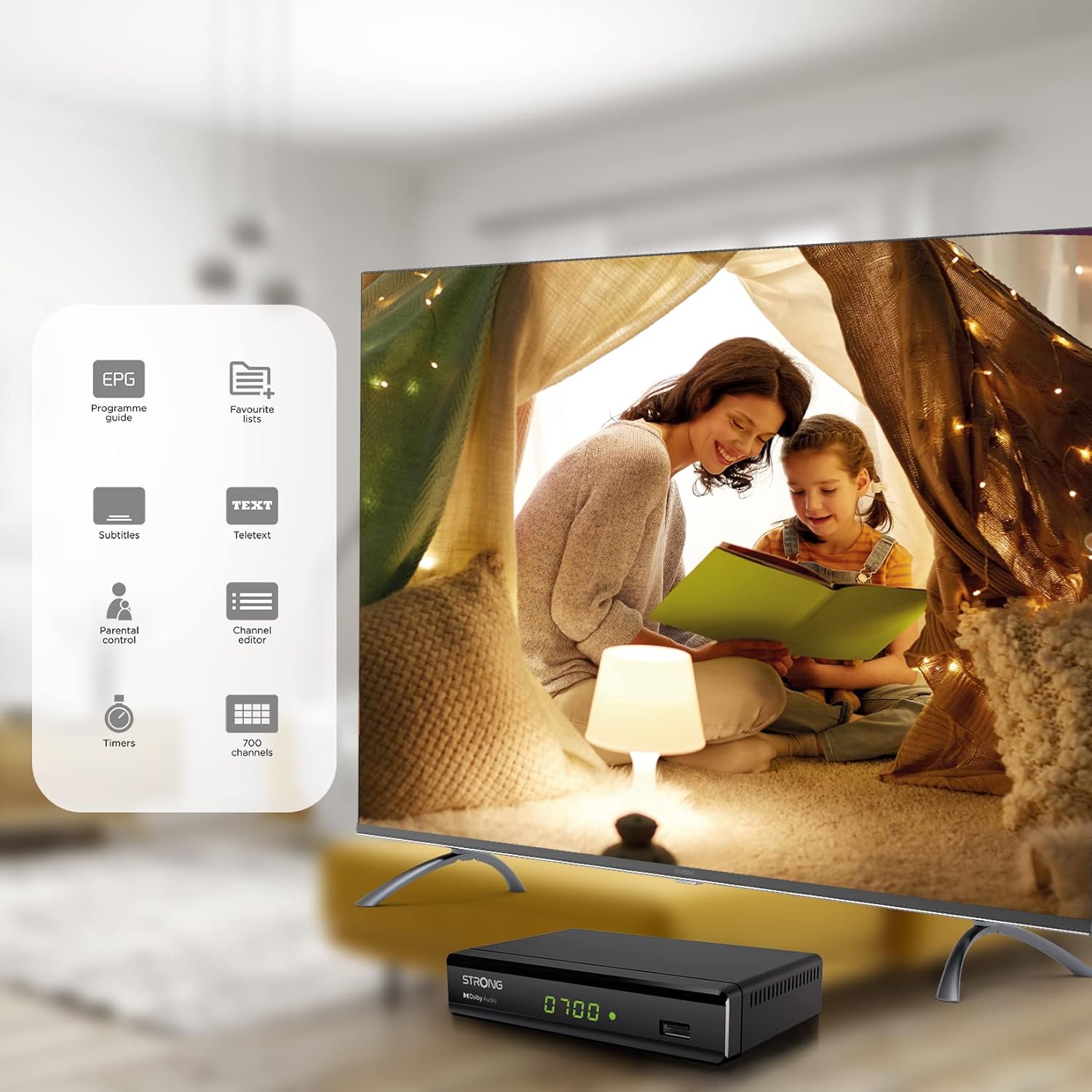
Figure 6.1: Visual representation of the Strong SRT 8119's features, including Electronic Program Guide (EPG), favorite lists, subtitles, teletext, parental control, channel editor, timers, and 700 channel capacity.
6.3. Media Playback and Recording (USB)
The decoder supports media playback from a USB storage device connected to the front USB port. Note: Recording function may not be active in all regions (e.g., Italy).
- Insert a USB flash drive or external hard drive into the front USB port.
- Sakatu HEDABIDEAK button on the remote control to access the media player.
- Nabigatu nahi duzunera file (video, audio, image) and press OK jolasteko.
- To record a program, press the REC button during live TV. Ensure a USB device with sufficient free space is connected.
- To schedule a recording, use the EPG and select the program, then follow the on-screen prompts to set a timer.

Figure 6.2: The Strong SRT 8119 decoder shown in a living room setting, highlighting its USB playback and recording capabilities. A note indicates that recording is not implemented for Italy.
6.4. Channel Management
- Channel Editor: Access the channel editor via the MENUA to move, delete, or lock channels.
- Gogokoen zerrendak: Create up to 4 favorite lists for TV and radio programs for quick access to your preferred channels.
- Gurasoen kontrola: Set a password to restrict access to certain channels or programs.
7. Mantentzea
- Garbiketa: Use a soft, dry cloth to clean the exterior of the decoder. Do not use liquid or aerosol cleaners.
- Software eguneratzea: Periodically check the Strong website for available software updates. Updates can typically be installed via the USB port.
- Biltegiratzea: If storing the device for an extended period, disconnect it from power and store in a cool, dry place.
8. Arazoak
| Arazoa | Kausa posiblea | Irtenbidea |
|---|---|---|
| Botererik ez | Kable elektrikoa ez dago konektatuta; Entxufe elektrikoa akastuna. | Egiaztatu konexio elektrikoak; Saiatu beste entxufe batekin. |
| Seinalerik ez / "Seinalerik ez" mezua | Antenna not connected; Antenna faulty; Incorrect input selected on TV. | Check antenna connection; Ensure antenna is working; Select correct HDMI/SCART input on your TV. |
| Ez dago irudirik, baina soinua badago | Video cable (HDMI/SCART) loose or faulty. | Check video cable connections; Try a different cable. |
| Urruneko kontrola ez dabil | Batteries depleted or inserted incorrectly; Obstruction between remote and decoder. | Replace batteries; Ensure correct polarity; Remove obstructions; Point remote directly at the decoder. |
| Cannot record programs | USB device not connected or full; Recording function not available in your region. | Connect a USB device with sufficient space; Check regional limitations for recording. |
9. Zehaztapenak
| Modelo zenbakia | SRT8119 |
| Produktuaren neurriak | 4.41 x 5.98 x 1.5 hazbete |
| Elementuaren pisua | 9.5 ontza |
| Konektibitate Teknologia | Antenna (DVB-T2), HDMI, SCART, USB, Coaxial S/PDIF |
| Bideo-kodeketa | H.265 |
| Kanalaren Edukiera | 700 kanal |
| Pilak | 2 AAA bateria (urrutiko agintearentzat barne) |
| Audio irteera modua | Inguratu |
| Inguruko soinu-kanalaren konfigurazioa | 5.1 |
10. Laguntza
For further assistance, technical support, or to find useful resources, please visit the official Strong website. You can also find information and support on their Facebook profile and LinkedIn page.
Note: Specific contact numbers or direct links are not provided in this manual. Please refer to the official Strong webgunea laguntza-informazio eguneratuena lortzeko.


