1. Sarrera
Thank you for choosing the Dalton 2000VA Uninterruptible Power Supply (UPS). This device is designed to provide reliable power backup and protection for your electronic equipment against power outages, surges, and fluctuations. Please read this manual thoroughly before installation and operation to ensure optimal performance and safety.
2. Segurtasun-argibide garrantzitsuak
Always follow these basic safety precautions to reduce the risk of fire, electric shock, and injury:
- Ez ireki UPSa.asing. Ez dago erabiltzaileak konpondu beharreko piezarik barruan. Jo ezazu mantentze-lanetarako zerbitzu-langile kualifikatuei.
- Do not use the UPS in environments with excessive dust, humidity, or extreme temperatures.
- Ziurtatu UPSa lurrera konektatutako entxufe batera konektatuta dagoela.
- Do not connect non-computer related items like medical equipment, life support equipment, or household appliances to the UPS.
- Jarri UPSa ondo aireztatutako leku batean, eguzki-argitik edo bero-iturrietatik urrun.
- In case of emergency, press the power button to turn off the UPS and disconnect it from the AC power source.
3. Paketearen edukia
Egiaztatu elementu guztiak zure paketean daudela:
- Dalton 2000VA UPS Unit
- Elikatze kablea
- USB komunikazio kablea (hala badagokio)
- Erabiltzailearen eskuliburua (dokumentu hau)

3.1. irudia: Aurrealdea view of the Dalton 2000VA UPS unit, showing the display screen and power button.
4. Konfigurazioa eta instalazioa
Follow these steps to set up your UPS:
- Despaketatzea: Kontu handiz atera UPSa paketetik. Begiratu bidalketa-kalterik dagoen.
- Lekua: Place the UPS on a flat, stable surface in a cool, dry, and well-ventilated area. Ensure there is adequate space around the unit for airflow.
- Hasierako karga: Before connecting any devices, plug the UPS power cord into a grounded wall outlet. Allow the unit to charge for at least 8 hours to ensure the battery is fully charged. The display will indicate charging status.
- Gailuak konektatzea:
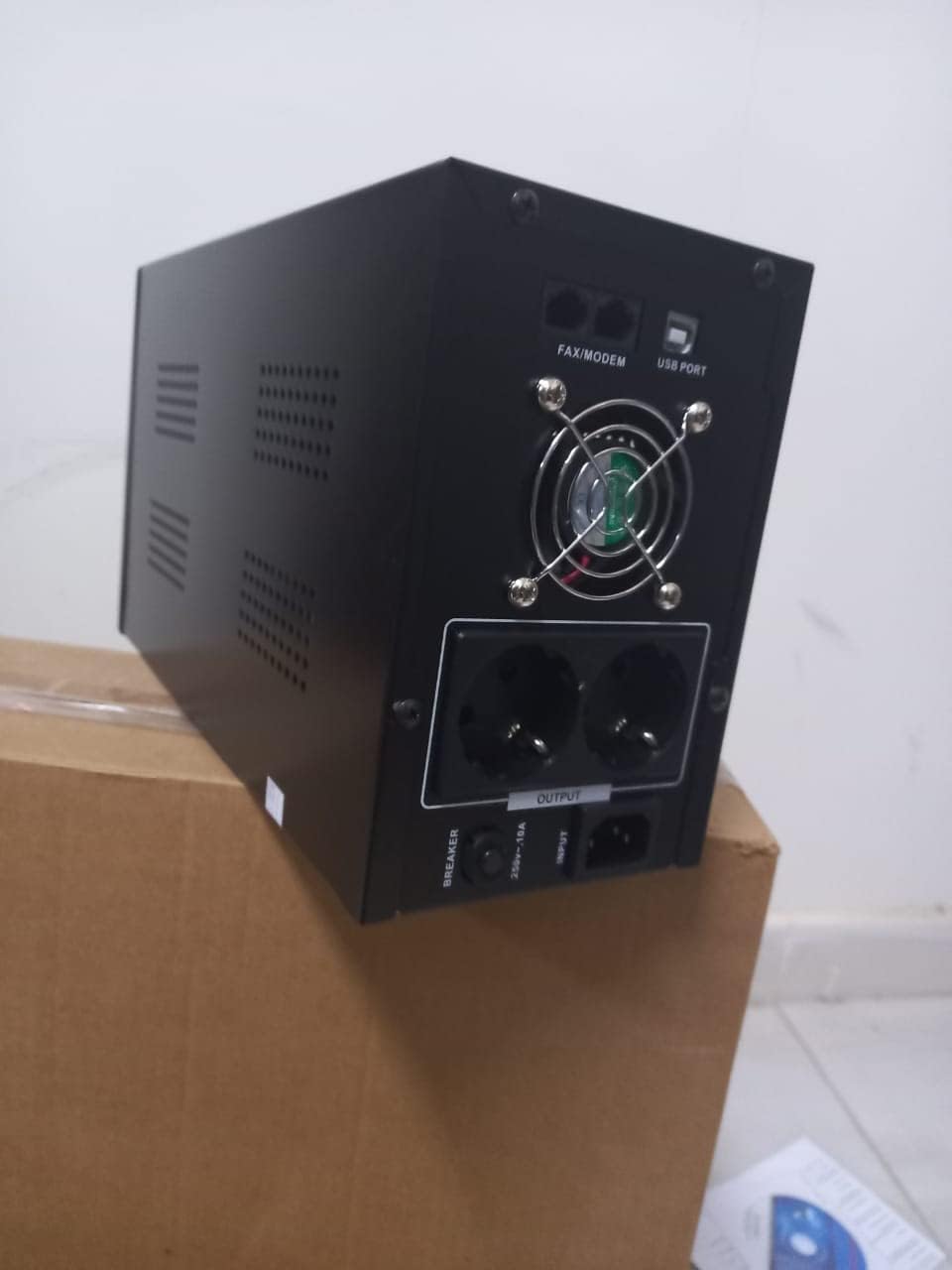
4.1. Irudia: Atzealdea view of the Dalton 2000VA UPS, highlighting the input power port, output sockets, and USB/Modem ports.
- Once the battery is charged, connect your computer, monitor, and other critical electronic devices to the UPS output sockets.
- Do not overload the UPS. Refer to the specifications section for maximum load capacity.
- If applicable, connect the USB communication cable from the UPS to your computer for monitoring software (software not included, check manufacturer's webgunea).
5. UPSaren funtzionamendua
5.1 Piztu/Itzaltzea
- Pizteko: After connecting to AC power and charging, press and hold the power button on the front panel for approximately 3 seconds until you hear a beep and the display illuminates.
- Itzaltzeko: Press and hold the power button for approximately 3 seconds until you hear a beep and the display turns off. If the UPS is running on battery, it will shut down immediately. If connected to AC, it will switch to bypass mode before shutting down.
5.2 Pantaila ulertzea
The front panel LCD display provides real-time status information:
- IN: Sarrerako bolumena bistaratzen dutage from the utility power.
- IRTEERA: Irteerako bolumena bistaratzen dutage provided by the UPS to connected devices.
- NORMALA: Indicates the UPS is operating on utility power.
- Bat: Shows the current battery charge level.
- Karga: ehunekoa adierazten dutagKonektatutako gailuek erabiltzen duten UPSaren edukieraren e.
- Battery Mode Icon: Appears when the UPS is running on battery power during an outage.

5.1. irudia: Aldea view of the UPS, showing the illuminated display with power status indicators.
5.3 Battery Backup Function
Potentzia bat gertatuz gerotage, the UPS will automatically switch to battery power, providing continuous power to your connected devices. The duration of backup power depends on the load connected and the battery's charge level. The UPS will emit an audible alarm during battery operation.
When utility power returns, the UPS will automatically switch back to AC power and begin recharging its battery.
6. Mantentzea
- Bateria zaintzea: To maximize battery life, ensure the UPS is always connected to an AC outlet to keep the battery charged. If the UPS is stored for an extended period, recharge it every three months for at least 8 hours.
- Garbiketa: Disconnect the UPS from all power sources before cleaning. Use a soft, dry cloth to wipe the exterior. Do not use liquid or aerosol cleaners.
- Aireztapena: Regularly check that the ventilation openings are not blocked by dust or debris to prevent overheating.
7. Arazoak
Ikusi beheko taula arazo ohikoenak eta haien irtenbideak ikusteko:
| Arazoa | Kausa posiblea | Irtenbidea |
|---|---|---|
| UPSa ez da pizten. | Battery not charged or power cord disconnected. | Ensure power cord is securely plugged in and allow battery to charge for 8 hours. |
| UPSak etengabe bip egiten du modu normalean. | Gainkarga egoera. | Disconnect non-essential equipment until the alarm stops. Check total load. |
| Babeskopia-denbora laburra. | Battery not fully charged or battery nearing end of life. | Allow UPS to charge for 8 hours. If issue persists, battery may need replacement (contact service center). |
| UPS does not provide power during outage. | Battery discharged or internal fault. | Ensure UPS was fully charged. If problem persists, contact authorized service center. |
8. Zehaztapen Teknikoak
| Ezaugarri | Xehetasuna |
|---|---|
| Produktuaren neurriak | 12.5 x 22.5 x 38 cm |
| Fabrikatzailea | Dalton |
| Marka Izena | Generikoa |
| Kolorea | Beltza |
| Materiala | Metala |
| Oraingoa | 5 Ampere |
| Forma-faktorea | Rack |
| Maiztasun barrutia | 50-60 Hz |
| Irteera boltage | 220 Volt |
| Konektore mota | AC |
9. Bermea eta Laguntza
Dalton provides an authorized maintenance center for all Uninterruptible Power Supply units. For warranty claims, technical support, or service inquiries, please contact your local Dalton authorized distributor or service center. Keep your purchase receipt as proof of purchase for warranty validation.
For further assistance, please visit the official Dalton webwebgunean edo jarri harremanetan bezeroarentzako laguntzarekin.


