1. Sarrera
Thank you for choosing the LEICKE DJ Roxxx Portable Bluetooth Speaker. This manual provides essential information for setting up, operating, and maintaining your speaker. Please read it carefully before use to ensure optimal performance and longevity of your device.
2. Segurtasun-argibideak
- Ez jarri bozgorailua tenperatura altuen, eguzki-argiaren eraginpean edo hezetasun handiaren eraginpean.
- Saihestu bozgorailua kolpe gogorrak erortzea edo jasaten.
- Ez desmuntatu edo konpontzen saiatu bozgorailua zeuk. Honek bermea baliogabetuko du.
- Keep the speaker away from water and liquids. While splashproof, it is not waterproof and should not be submerged.
- Erabili emandako kargatzeko kablea edo baliokide ziurtatu bat soilik.
3. Paketearen edukia
Mesedez, egiaztatu paketea elementu hauek dituen:
- LEICKE DJ Roxxx Portable Bluetooth Speaker
- USB kargatzeko kablea
- Auxiliary Audio Cable (3.5mm Stereo Plug)
- carabiner
- Argibide eskuliburua
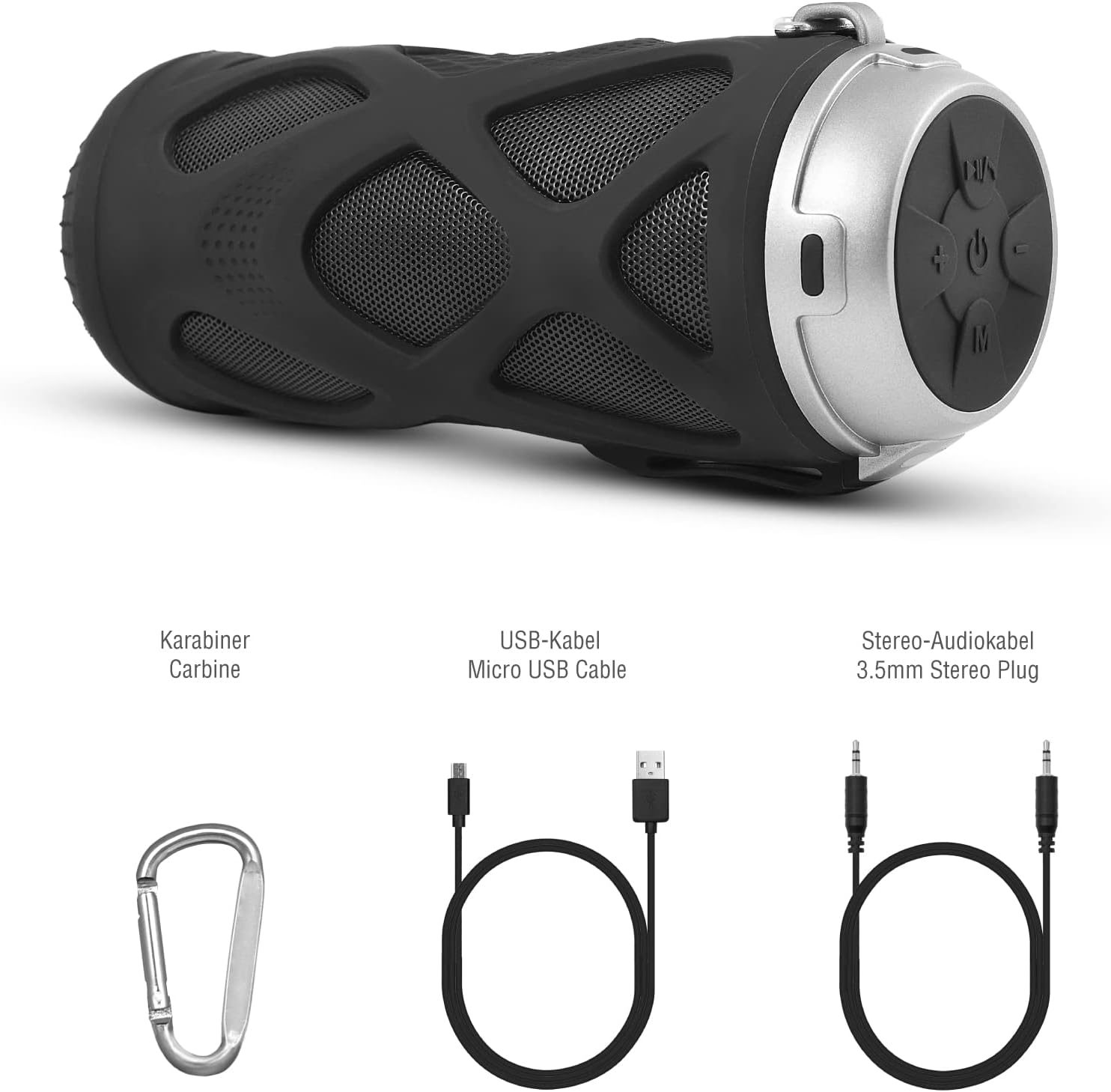
3.1. irudia: Osagarriak barne
4. Produktua amaitu daview
4.1 Kontrol-panela

4.1. irudia: Kontrol panelaren diseinua
- Piztu/Itzali botoia: Bozgorailua piztu edo itzaltzen du.
- Play/Pause/Call/Voice Assistant Button: Controls music playback, answers/ends calls, and activates voice assistant (Siri/Google Assistant).
- Bolumena jaisteko / Aurreko abestia botoia: Bolumena jaisten du edo aurreko abestira salto egiten du.
- Bolumena igotzeko / Hurrengo abestia botoia: Bolumena igotzen du edo hurrengo abestira salto egiten du.
- Modu botoia: Switches between Bluetooth, MicroSD/TF, Aux, and FM Radio modes.
4.2 Portuak eta adierazleak
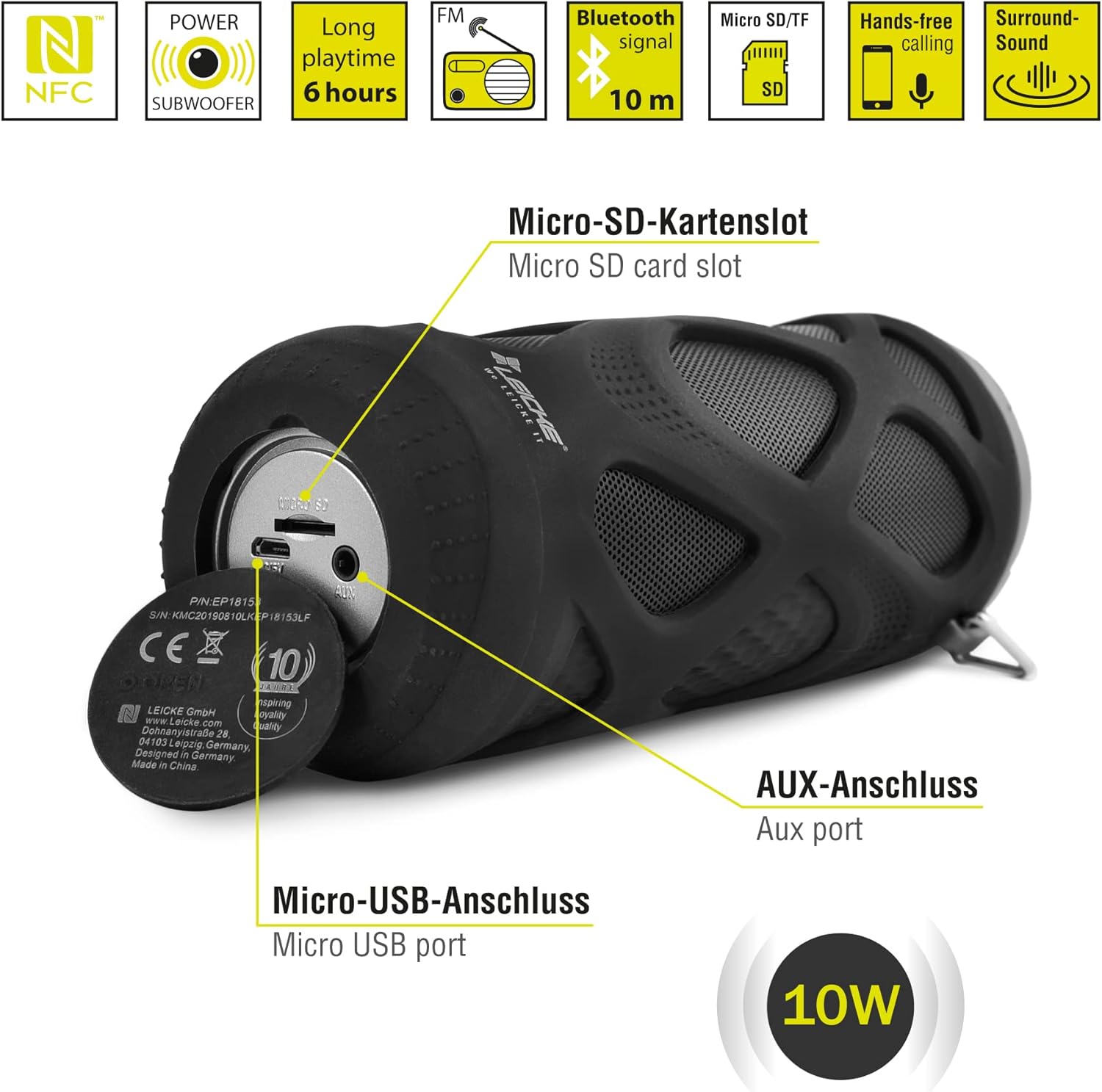
4.2. irudia: Portuak Overview
- Mikro SD/TF txartelaren zirrikitua: Insert a Micro SD or TF card for MP3 playback.
- AUX ataka: Connect external audio devices using the 3.5mm auxiliary cable.
- Mikro USB ataka: Bozgorailua kargatzeko erabiltzen da.
- LED adierazlea: (Typically near the charging port or control panel) Indicates power status, charging status, and Bluetooth pairing status.
5. Konfigurazioa eta funtzionamendua
5.1 Bozgorailua kargatzea
- Connect the Micro USB end of the charging cable to the speaker's Micro USB port.
- Connect the USB-A end to a USB power adapter (not included) or a computer's USB port.
- The LED indicator will typically show red while charging and turn off or change color when fully charged.
- A full charge takes approximately 2-3 hours and provides up to 6 hours of playtime.
5.2 Piztu/Itzaltzea
- Pizteko: Eduki sakatuta Piztu/Itzali botoia for a few seconds until you hear an audible prompt and the LED indicator lights up.
- Itzaltzeko: Eduki sakatuta Piztu/Itzali botoia again for a few seconds until you hear an audible prompt and the LED indicator turns off.
5.3 Bluetooth parekatzea
- Ensure the speaker is powered on and in Bluetooth mode (the LED indicator will typically flash blue). If not, press the Modu botoia Bluetooth modura aldatzeko.
- Zure telefonoan, tabletan edo beste Bluetooth gaitutako gailu batean, joan Bluetooth ezarpenetara.
- Bilatu eskuragarri dauden gailuak eta hautatu "LEICKE DJ Roxxx" zerrendatik.
- Behin parekatuta, LED adierazlea keinuka utziko du eta urdin finko geratuko da, eta baieztapen soinu bat entzungo duzu.
- Bozgorailuak automatikoki konektatuko da azken parekatutako gailura piztean, gailua irismen-eremuan badago eta Bluetooth-a gaituta badago.
5.4 MicroSD/TF txartelaren erreprodukzioa
- Insert a Micro SD or TF card (pre-loaded with MP3 audio files) into the Micro SD/TF card slot.
- The speaker will automatically switch to MicroSD/TF mode and begin playing music. If not, press the Modu botoia to select MicroSD/TF mode.
- Erabili Erreproduzitu/Pausatu, Bolumena igo / Hurrengo pista, eta Bolumena jaitsi / Aurreko pista erreprodukzioa kontrolatzeko botoiak.
5.5 AUX sarrera
- Connect one end of the 3.5mm auxiliary cable to the speaker's AUX port.
- Connect the other end to the headphone jack of your audio device (e.g., MP3 player, laptop).
- The speaker will automatically switch to AUX mode. If not, press the Modu botoia AUX modua hautatzeko.
- Volume can be controlled via the speaker or your connected device. Track control must be done from the connected device.
5.6 FM irratiaren funtzionamendua
- Sakatu Modu botoia behin eta berriz FM irrati moduan sartu arte.
- FM moduan, sakatu Erreproduzitu/Pausatu botoia once to automatically scan and save available FM stations. The speaker will then play the first saved station.
- Erabili Bolumena igo / Hurrengo pista eta Bolumena jaitsi / Aurreko pista buttons to switch between saved stations.
5.7 Benetako Haririk gabeko Estereo (TWS) Funtzioa
The LEICKE DJ Roxxx speaker supports TWS pairing, allowing you to connect two DJ Roxxx speakers for a stereo sound experience (20W total output).

5.1. irudia: True Wireless Stereo (TWS) parekatzea
- Ensure both DJ Roxxx speakers are powered on and in Bluetooth pairing mode (LED flashing blue).
- Bozgorailuetako batean, sakatu eta eutsi botoiari Modu botoia for a few seconds until you hear a pairing tone. The speakers will attempt to connect to each other.
- Once successfully paired, you will hear a confirmation sound, and the LED indicator on one speaker will flash blue (master), while the other will be solid blue (slave).
- Now, connect your device to the master speaker via Bluetooth as described in section 5.3. Both speakers will play audio in stereo.
6. Funtzionamendu-argibideak
6.1 Musika erreproduzitzea
- Erreproduzitu/Pausatu: Sakatu Erreproduzitu/Pausatu botoia behin.
- Hurrengo ibilbidea: Eduki sakatuta Bolumena igotzeko / Hurrengo pista botoia.
- Aurreko pista: Eduki sakatuta Bolumena jaitsi / Aurreko pista botoia.
- Bolumena igo: Sakatu Bolumena igotzeko / Hurrengo pista botoia labur-labur.
- Bolumena jaitsi: Sakatu Bolumena jaitsi / Aurreko pista botoia labur-labur.
6.2 Eskurik gabeko deiak
- Erantzun deia: Dei bat jasotzen denean, sakatu Erreproduzitu/Pausatu/Deitu botoia behin.
- Amaitu deia: Dei batean zehar, sakatu Erreproduzitu/Pausatu/Deitu botoia behin.
- Deia baztertu: When a call comes in, press and hold the Erreproduzitu/Pausatu/Deitu botoia 2 segundoz.
- Berriz markatu azken zenbakia: In standby mode, double-press the Erreproduzitu/Pausatu/Deitu botoia.
6.3 Ahots-laguntzailearen aktibazioa
- With one click, you can activate Siri (iOS) or Google Assistant (Android) on your connected smartphone. Press the Play/Pause/Call/Voice Assistant button behin aktibatzeko.
7. Mantentzea
7.1 Garbiketa
- Garbitu bozgorailua zapi leun, lehor edo apur bat lehor batekin.amp oihal.
- Ez erabili garbitzaile urratzailerik, alkoholik edo disolbatzaile kimikorik, gainazala kaltetu baitezakete.
- Ziurtatu ataka guztiak lehor daudela kargatu edo beste gailu batzuk konektatu aurretik.
7.2 Biltegiratzea
- Gorde bozgorailua leku fresko eta lehor batean, eguzki-argitik eta muturreko tenperaturetatik babestuta.
- Denbora luzez gordetzen baduzu, kargatu bateria % 50era arte hilabete batzuk behin bateriaren osasuna mantentzeko.
7.3 Urarekiko erresistentzia
The LEICKE DJ Roxxx speaker is designed to be splashproof, offering protection against light rain or splashes. It is ez iragazgaitza and should not be submerged in water or exposed to heavy rain. Ensure the port cover is securely closed to maintain splash resistance.

7.1. irudia: Splashproof Design for Outdoor Use
8. Arazoak
| Arazoa | Kausa posiblea | Irtenbidea |
|---|---|---|
| Bozgorailua ez da pizten. | Bateria baxua. | Kargatu bozgorailua gutxienez 30 minutuz. |
| Ezin da Bluetooth bidez parekatu. | Bozgorailua ez dago parekatze moduan; gailua Bluetooth itzalita; gailutik urrunegi. | Ensure speaker is in Bluetooth mode (flashing blue LED). Turn on Bluetooth on your device. Move speaker closer to device (within 10m). Forget previous pairings on your device and try again. |
| Soinurik ez. | Bolumena baxuegia; modu okerra; gailua ez dabil erreproduzitzen. | Increase speaker and device volume. Ensure correct mode (Bluetooth, AUX, MicroSD). Check if audio is playing on your source device. |
| FM irratiaren harrera eskasa. | Seinale ahula; interferentziak. | Move the speaker to a different location. Re-scan for stations. |
| MicroSD txartela ez da ezagutzen. | Card not inserted correctly; unsupported format; corrupted files. | Reinsert the card. Ensure files are in MP3 format. Try a different MicroSD card. |
9. Zehaztapenak
| Ereduaren izena | DJ Roxxx |
| Modelo zenbakia | B09P4Z5MN5 |
| Marka | LEICKE |
| Konektibitate Teknologia | Bluetootha |
| Haririk gabeko Komunikazio Teknologia | Bluetootha |
| Hizlari mota | Bluetooth bozgorailu eramangarria |
| Bozgorailuen irteerako potentzia maximoa | 10 Watt |
| Kontrol-metodoa | Tactile Buttons |
| Ezaugarri bereziak | Integrated Microphone, Portable Wireless, MicroSD/TF Player, Aux Input, FM Radio, Hands-Free Calling, Voice Assistant Support, TWS Function, Splashproof |
| Energia iturria | Cable Electric (Rechargeable Battery) |
| Produktuaren neurriak (L x W x H) | 7 x 7 x 18 cm |
| Elementuaren pisua | 400 gramo |
| Gomendatutako Erabilerak | Smartphone edo tableterako |
| Gailu bateragarriak | Ordenagailu eramangarria, Smartphone |
| Iragazgaitza da | False (Splashproof only) |
10. Bermea eta Laguntza
LEICKE products come with a standard manufacturer's warranty. For detailed warranty information, please refer to the warranty card included in your package or visit the official LEICKE webgunea.
If you encounter any issues or have questions regarding your LEICKE DJ Roxxx speaker, please contact LEICKE customer support:
- Fabrikatzailea: LEICKE
- Saltzailea: LEICKE - Leipzig (as per Amazon listing)
- Laguntza: Refer to the official LEICKE website or contact information provided with your purchase for the most up-to-date support channels.


