Sarrera
Thank you for choosing the MageGee GT860 96-Key Wired RGB Backlit Gaming Keyboard. This keyboard is designed for both gaming and daily use, featuring a compact layout, ergonomic design, and customizable RGB backlighting. This manual will guide you through the setup, operation, and maintenance of your new keyboard to ensure optimal performance and user experience.
Paketearen edukia
- MageGee GT860 96-Key Wired RGB Backlit Gaming Keyboard
- Erabiltzailearen eskuliburua
Produktua amaituview
Teklatuaren diseinua
The MageGee GT860 features a 92% compact layout, retaining essential keys while offering a space-saving design. It includes a full numeric keypad and function keys.

Image: The MageGee GT860 keyboard showcasing its 96-key layout with RGB backlighting and black and yellow keycaps.

Irudia: Xehetasun zehatza view of the standard 96-key layout with full RGB backlighting, highlighting the compact yet functional design.
Ezaugarri nagusiak
- % 92ko diseinu trinkoa: Offers a balance between full functionality and a space-saving design.
- Mintza sentsazio mekanikoarekin: Utilizes advanced imitation mechanical technology for a tactile typing experience.
- Diseinu ergonomikoa: Key layout is engineered for comfortable use during extended periods, reducing fatigue.
- RGB atzeko argiztapena: Features multiple lighting modes and colors, with adjustable brightness and breathing speed.
- Plug and Play: No drivers required for basic functionality.
- Bateragarritasun zabala: Supports Windows 10, 8, 7, XP, VISTA, and Mac OS.
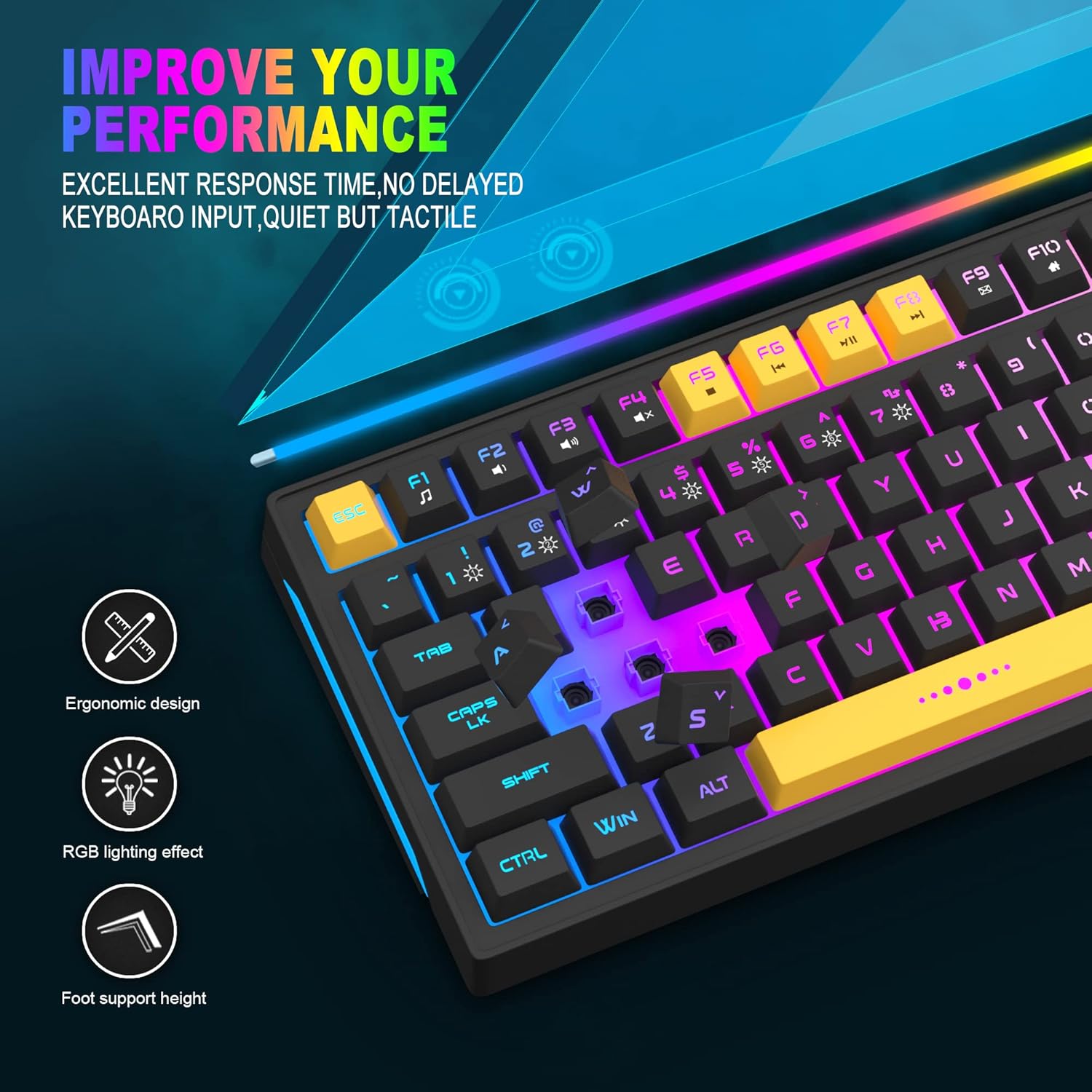
Image: Close-up showing the ergonomic design and RGB lighting effect of the keyboard, emphasizing comfort and visual appeal.

Irudia: Alde bat view of the keyboard illustrating its thoughtful ergonomic design with a 7-degree tilt for improved typing posture.
Konfigurazio Argibideak
- Unpack the keyboard and ensure all package contents are present.
- Connect the USB cable from the keyboard to an available USB port on your computer.
- The keyboard is plug-and-play and should be automatically recognized by your operating system (Windows, Mac OS). No additional drivers are typically required for basic functionality.
- Once connected, the RGB backlighting will illuminate, indicating the keyboard is powered on and ready for use.
Funtzionamendu-argibideak
RGB atzeko argiaren kontrola
The MageGee GT860 keyboard features customizable RGB backlighting with various modes and effects.
- Argiztapen moduak aldatzea: Sakatu FN key combined with keys 1 bidez 6 to cycle through different RGB lighting effects and colors.
- Distira doitzea: Use specific key combinations (refer to keyboard legends or experiment with FN + Arrow keys if not explicitly labeled) to increase or decrease backlight brightness.
- Arnasketa-abiadura doitzea: Some modes allow adjustment of the breathing or animation speed.

Image: The keyboard displaying various RGB backlit lighting modes, illustrating the range of color options available.

Image: A dynamic view teklatuaren erakustaldiarenasing its 18 RGB LED light effects, highlighting the vibrant backlighting.
Multimedia eta funtzio teklak
The keyboard includes dedicated function keys (F1-F12) that can be accessed by pressing the FN tekla nahi den F teklarekin batera sakatu.
| Tekla-konbinazioa | Funtzioa |
|---|---|
| FN + F1 | Multimedia erreproduzitzailea |
| FN + F2 | Bolumena jaitsi |
| FN + F3 | Bolumena igo |
| FN + F4 | Isildu |
| FN + F5 | Aurreko Pista |
| FN + F6 | Hurrengo Pista |
| FN + F7 | Erreproduzitu/Pausatu |
| FN + F8 | Gelditu |
| FN + F9 | Posta elektronikoa |
| FN + F10 | Hasiera Orria |
| FN + F11 | Korritzeko blokeoa |
| FN + F12 | Kalkulagailua |

Image: Diagram illustrating the various multimedia and function key combinations using the FN key (FN + F1-F12).
Mantentzea
To ensure the longevity and optimal performance of your MageGee GT860 keyboard, follow these maintenance guidelines:
- Garbiketa: Regularly clean the keyboard with a soft, dry cloth. For deeper cleaning, use compressed air to remove dust and debris from between the keys. A slightly damp cloth (not wet) can be used for keycap surfaces.
- Saihestu likidoak: Do not spill liquids on the keyboard. If a spill occurs, immediately disconnect the keyboard from your computer and allow it to dry completely before reconnecting.
- Biltegiratzea: Gorde teklatua leku fresko eta lehor batean, eguzki-argitik eta muturreko tenperaturetatik babestuta, denbora luzez erabiltzen ez duzunean.
- Kableen zainketa: Barne-kalteak saihesteko, saihestu USB kablea gehiegi tolestea edo bihurritzea.

Irudia: Gertutik view of the keyboard with some keycaps removed, showing the underlying switches. This illustrates the internal structure for cleaning purposes.
Arazoak konpontzea
If you encounter issues with your MageGee GT860 keyboard, please refer to the following common troubleshooting steps:
- Teklatuak ez du erantzuten:
- Ensure the USB cable is securely connected to both the keyboard and your computer's USB port.
- Saiatu teklatua ordenagailuko beste USB ataka batera konektatzen.
- Probatu teklatua beste ordenagailu batean arazoa teklatuan edo zure sisteman dagoen zehazteko.
- Atzeko argiztapena ez dabil edo okerra da:
- Egiaztatu teklatua behar bezala konektatuta dagoela eta energia jasotzen duela.
- Cycle through the RGB lighting modes using FN + 1-6 to ensure a mode is selected.
- Adjust the brightness settings.
- Giltzak ez dira erregistratzen:
- Clean the affected keys to remove any debris that might be obstructing the switch.
- Ensure no software conflicts are present (e.g., other keyboard drivers or gaming software).
- Ustekabeko portaera:
- Berrabiarazi ordenagailua.
- If the issue persists, contact MageGee customer support for further assistance.
Zehaztapenak
| Ezaugarri | Xehetasuna |
|---|---|
| Marka | MageGee |
| Eredua | GT860 |
| Diseinua | 96 tekla (% 92 trinkoa) |
| Konektibitatea | USB kableduna |
| Atzeko argiztapena | RGB Backlit (Multiple modes) |
| Gako mota | Membrane with Mechanical Feeling |
| Ergonomia | Diseinu Ergonomikoa |
| OS bateragarria | Windows 10, 8, 7, XP, VISTA, Mac OS |
| Produktuaren neurriak | 35.56 x 10.16 x 5.08 cm (14 x 4 x 2 hazbete) |
| Pisua | 744 g (1.64 lb) |
| liburukiatage | 5 Volt |
| Kolorea | Beltza Horia |
Bermea eta Laguntza
For warranty information or technical support, please refer to the documentation provided with your purchase or contact MageGee customer service directly. Contact details can typically be found on the manufacturer's official webgunean edo produktuaren ontzian.
Gorde erosketaren egiaztagiria bermearen erreklamazioetarako.


