Sarrera
This manual provides essential instructions for the safe and effective use of your Technics EAH-A800 Wireless Noise Cancelling Over-Ear Headphones. Please read this manual thoroughly before using the product and retain it for future reference.

Image: Technics EAH-A800 Wireless Noise Cancelling Over-Ear Headphones in black, showcasinhaien diseinu dotorea.
The Technics EAH-A800 headphones are designed to deliver high-fidelity audio with advanced noise-cancelling technology and superior call clarity. They feature multi-point connectivity for seamless switching between devices and comfortable over-ear earpads for extended wear.
Kutxan dagoena
Egiaztatu elementu guztiak paketean daudela:
- Technics EAH-A800 Over-Ear Headphones
- USB kargatzeko kablea
- Audio Cable (3.5 mm jack)
- Babes-estalkia

Image: The complete package contents, including the headphones, charging cable, audio cable, and protective case.
Konfigurazioa
1. Entzungailuak kargatzea
Before first use, fully charge the headphones. Connect the USB charging cable to the headphone's charging port and a USB power source. The charging indicator will show the charging status.
2. Bluetooth parekatzea
- Ziurtatu entzungailuak itzalita daudela.
- Sakatu eta eutsi pizteko botoia LED adierazlea urdin eta gorri keinuka hasi arte, parekatze modua adieraziz.
- Zure gailuan (telefono adimenduna, tableta, ordenagailua), gaitu Bluetooth eta bilatu eskuragarri dauden gailuak.
- Select "Technics EAH-A800" from the list of found devices.
- Konektatu ondoren, LED adierazlea urdin argituko da poliki-poliki.
3. Technics Audio Connect App
For enhanced control and customization, download the Technics Audio Connect app from your device's app store. The app allows you to adjust sound settings, noise cancellation levels, and other features.

Image: Screenshots of the Technics Audio Connect app, illustrating its interface for sound and ambient control settings.
Funtzionamendu-argibideak
1. Piztu/Itzali
- To power on: Press and hold the power button until the LED indicator lights up.
- To power off: Press and hold the power button until the LED indicator turns off.
2. Noise Cancelling and Ambient Sound Modes
The EAH-A800 features active noise cancellation to reduce external distractions and an ambient sound mode to allow you to hear your surroundings.
- Zarata ezabatzea: Reduces environmental noise for an immersive listening experience.
- Giro modua: Allows external sounds to be heard, useful for awareness in public spaces.
Switch between modes using the dedicated button on the headphones or through the Technics Audio Connect app.

Image: A visual representation of the noise cancelling technology in action, showing how external sounds are minimized.
3. Puntu anitzeko konexioa
The headphones can connect to more than two Bluetooth devices simultaneously, allowing for seamless audio switching. For example, you can listen to music from your laptop and instantly answer a call from your smartphone without re-pairing.

Image: A user seamlessly switching audio between a smartphone and a laptop, highlighting the multi-point connectivity feature.
4. Deitu funtzioak
The EAH-A800 headphones are equipped with 8 microphones and advanced wind noise reduction for clear voice transmission during calls. Use the integrated controls to answer, end, or reject calls.
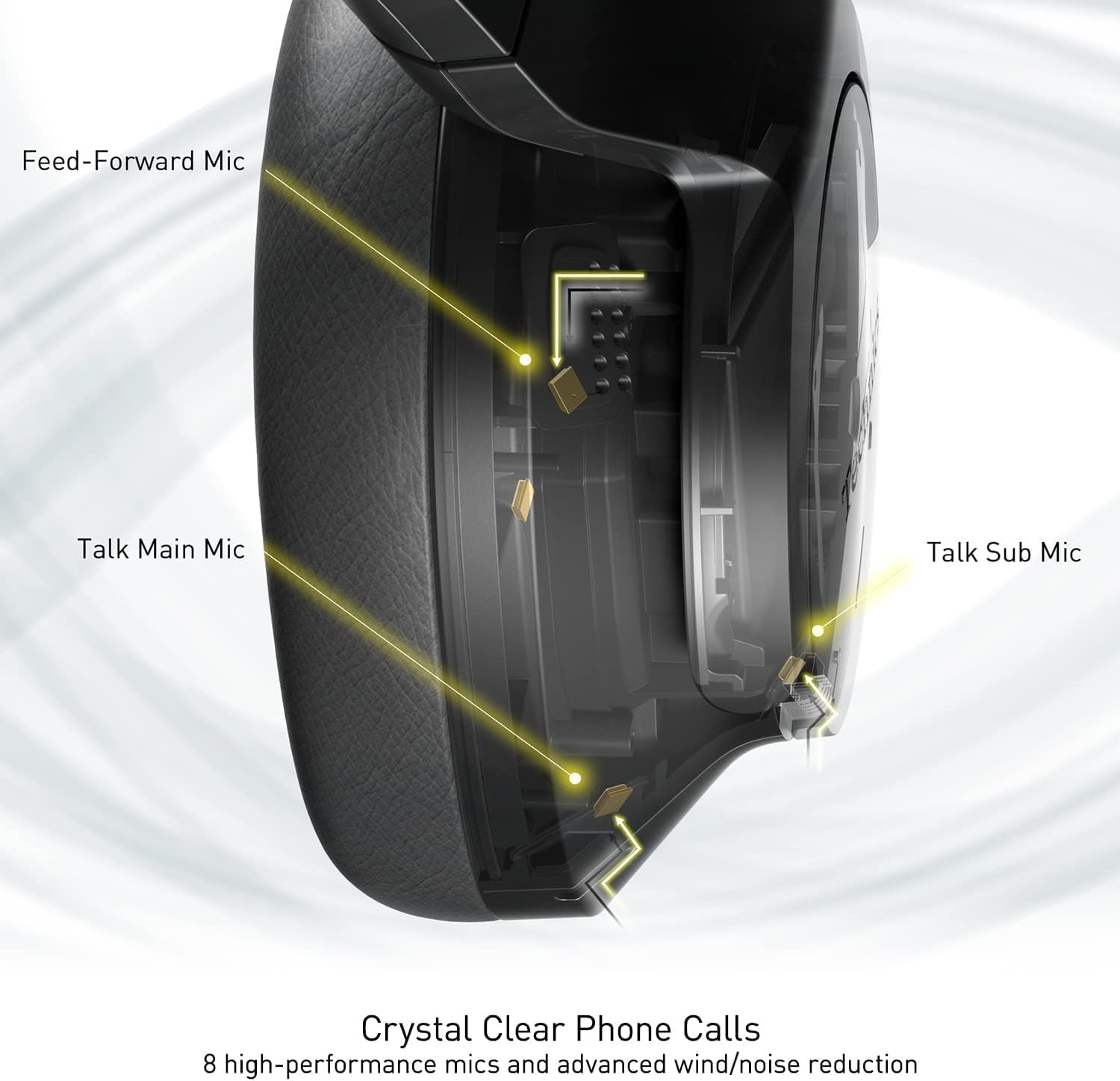
Image: An internal diagram illustrating the strategic placement of 8 microphones within the headphone for optimal call clarity.
5. Kontrolak
The headphones feature physical buttons for power, volume, and mode switching, as well as a touch-sensitive panel on one earcup for additional functions. Refer to the quick start guide for a detailed layout of controls.
6. Bateriaren iraupena eta kargatzea
The EAH-A800 offers up to 50 hours of playback with Active Noise Cancellation (ANC) enabled on a single charge. A quick 15-minute charge provides approximately 10 hours of playback.

Image: A graphic detailing the impressive battery life and quick charge capabilities of the headphones.
Mantentzea
1. Garbiketa
- Garbitu entzungailuak zapi leun eta lehor batekin.
- Belarri-kuxinetarako, garbitu astiro-astiro zapi batekin.amp oihal bat eta utzi airean guztiz lehortzen erabili aurretik.
- Ez erabili produktu kimiko gogorrik, disolbatzailerik edo garbitzaile urratzailerik.
2. Biltegiratzea
When not in use, store the headphones in their protective carrying case to prevent damage from dust, scratches, and impacts. Avoid exposing the headphones to extreme temperatures or humidity.
Arazoak konpontzea
| Arazoa | Kausa posiblea | Irtenbidea |
|---|---|---|
| Entzungailuak ez dira pizten | Bateria baxua | Kargatu entzungailuak guztiz. |
| Ezin da Bluetooth bidez parekatu | Headphones not in pairing mode; Device Bluetooth off; Out of range | Ensure headphones are in pairing mode (flashing blue/red). Turn on Bluetooth on your device. Move device closer to headphones. |
| Soinurik ez edo bolumen txikia | Volume too low; Incorrect audio output selected; Device not connected | Increase headphone and device volume. Check device's audio output settings. Re-establish Bluetooth connection. |
| Deien kalitate eskasa | Microphone obstructed; Weak signal; Environmental noise | Ensure microphones are clear. Move to an area with better signal. Adjust noise cancelling settings via the app. |
| Multi-point connectivity issues | Connection conflict; Device not properly paired | Disconnect from one device and reconnect. Ensure both devices are paired correctly. |
If problems persist, consult the Technics Audio Connect app for further diagnostics or visit the official Technics support webgunea.
Zehaztapenak
| Ereduaren izena | Technics EAH-A800 |
| Konektibitate Teknologia | Bluetooth 5.2 |
| Maiztasun Erantzuna | 4 Hz - 40 kHz |
| Zarata Kontrola | Zarata Deuseztatze Aktiboa |
| Bateriaren iraupena | Up to 50 Hours (with ANC ON) |
| Kargatzeko Denbora | Approximately 3 Hours (15 min quick charge for 10 hrs playback) |
| Elementuaren pisua | 10.5 ontza (298 gramo) |
| Materiala | Poliuretanoa (PU) |
| Aurikularretarako Jack | 3.5 mm Jack |
| Gailu bateragarriak | Cellphones, Desktops, Laptops, Tablets, Telephones |
| Ezaugarri bereziak | Fast Charging, Foldable, Microphone Included |
| UPC | 885170381162 |
Bermea eta Laguntza
Your Technics EAH-A800 headphones are covered by a manufacturer's warranty. For specific warranty terms, registration, and support inquiries, please refer to the official Technics webwebgunean edo jarri harremanetan bere bezeroarentzako zerbitzuarekin.
For additional information, FAQs, and software updates, please visit the official Technics brand store or support pages:


