1. Sarrera
This manual provides comprehensive instructions for the operation, maintenance, and troubleshooting of the LAUNCH X431 PRO 5 Scan Tool. The LAUNCH X431 PRO 5 is an advanced diagnostic scanner designed for professional automotive technicians and repair shops, offering extensive vehicle coverage and a wide range of diagnostic and service functions.
It is an upgraded version of the X431 V+ and PRO3, featuring J2534 ECU Programming, ECU Online Coding, Topology Mapping, bi-directional control, and over 50 reset functions. This tool is equipped with a SmartLink C VCI for enhanced communication capabilities, including CANFD and DOIP protocols.
2. Produktua amaitu daview eta Ezaugarri nagusiak
The LAUNCH X431 PRO 5 Scan Tool is engineered to provide OE-level diagnostic capabilities. Its robust feature set includes:
- J2534 ECU Programming: Enables advanced OEM J2534 reprogramming for various vehicle brands, facilitating data transfer and module updates.
- ECU Online Coding: Allows direct connection to OEM servers for coding functions, enhancing vehicle performance and customizing settings.
- Topologiaren mapaketa: Provides a visual representation of the vehicle's data bus configurations, improving diagnostic efficiency.
- Bi-directional Control (Active Test): Permits sending commands to vehicle systems and components to test their functionality, aiding in rapid troubleshooting.
- 50+ Reset Functions: Comprehensive suite of maintenance and service functions including Oil Reset, EPB Reset, TPMS Reset, BMS, Injector Coding, ABS Bleeding, SAS Reset, Throttle Matching, and more.
- Sistemaren diagnostiko guztiak: Full-function diagnostics for all on-board systems, including Engine, Transmission, ABS, Airbags, TPMS, BCM, and more. Supports reading/clearing codes, viewing live data, and VIN information.
- SmartLink C VCI: A wireless Vehicle Communication Interface supporting ISO9141, J1850, SAE J2610, CANFD, and DOIP protocols for faster data transmission and remote diagnostics.
- Funtzio aurreratuak: Includes VAG Guided functions, personalization options, ADAS calibration support, and AutoAuth for FCA vehicles.
- Ibilgailuen estaldura zabala: Supports 99% of vehicles manufactured from 1996-2024, covering American, Asian, and European models without IP limitations.

Figure 2.1: LAUNCH X431 PRO 5 Scan Tool and its comprehensive accessory kit.

2.2 Irudia: Gainetikview of the LAUNCH X431 PRO 5's primary advanced capabilities.
3. Osagaiak eta paketearen edukia
The LAUNCH X431 PRO 5 package includes the following main components:
- LAUNCH X-431 PRO5 Main Unit (Diagnostic Tablet)
- SmartLink C VCI Module
- Diagnostic Cables and Connectors (various vehicle-specific adapters)
- Elikatze-moldagailua
- USB kablea
- Erabiltzailearen eskuliburua (dokumentu hau)
- Biltegiratze-zorroa
The main unit is powered by a Lithium Ion battery (included).
4. Konfigurazio gida
4.1 Hasierako piztea eta konfigurazioa
- Gailua kargatu: Before first use, connect the LAUNCH X431 PRO 5 main unit to the power adapter and charge it fully. The device uses a Lithium Ion battery.
- Piztu: Press and hold the power button on the main unit to turn it on.
- Hasierako konfigurazioa: Follow the on-screen prompts to select your language, time zone, and connect to a Wi-Fi network. A stable internet connection is crucial for software updates and online functions.
- Software eguneratzea: Navigate to the "Software Update" section within the diagnostic application. It is highly recommended to update all available software packages to the latest version to ensure optimal performance and vehicle compatibility, including the Topology Mapping function (requires V 7.03.014 or higher).
4.2 Connecting the SmartLink C VCI Module
The SmartLink C VCI module acts as the communication bridge between the diagnostic tablet and the vehicle's OBD-II port.

Figure 4.1: SmartLink C VCI Module with port descriptions.
- Connect VCI to Vehicle: Locate the vehicle's OBD-II diagnostic port (usually under the dashboard) and securely plug in the SmartLink C VCI module.
- Pair VCI with Tablet: The SmartLink C VCI connects wirelessly (Bluetooth/Wi-Fi) to the X431 PRO 5 tablet. Ensure Bluetooth is enabled on the tablet. The VCI should automatically pair or be discoverable within the diagnostic application.
- Potentzia-egoera: Verify the indicator lights on the SmartLink C VCI module to confirm it is powered on and communicating with the tablet.
5. Funtzionamendu-argibideak
5.1 Sistemaren diagnostiko osoa
The X431 PRO 5 can perform comprehensive diagnostics on all available vehicle systems.

Figure 5.1: Full System Diagnostics capability covering all on-board systems.
- Ibilgailuaren konexioa: Ensure the SmartLink C VCI is properly connected to the vehicle's OBD-II port and paired with the tablet.
- Select Diagnostic Mode: From the main menu, select "Intelligent Diagnose" or "Local Diagnose" depending on your preference. Intelligent Diagnose can automatically identify the VIN.
- Sistemaren eskaneatzea: The tool will scan all accessible electronic control units (ECUs) in the vehicle.
- Review Datuak:
- Irakurri kodeak: Retrieve Diagnostic Trouble Codes (DTCs) from all systems.
- Ezabatu kodeak: Clear DTCs after repairs are completed.
- View Zuzeneko datuak: Monitor real-time sensor data and parameters.
- VIN informazioa: Access vehicle identification number details.
5.2 J2534 ECU Programming
The J2534 programming function allows for advanced module reprogramming, typically required for replacing ECUs, updating software versions, or repairing data loss issues.

Figure 5.2: J2534 ECU Programming and Coding capabilities.
This function requires the SmartLink C VCI and may necessitate access to OEM software subscriptions for specific vehicle brands (e.g., BMW, Mercedes-Benz, Ford, Jaguar, Land Rover, Volvo). Refer to the specific vehicle manufacturer's J2534 pass-thru programming instructions for detailed steps.
5.3 ECU Online Coding
Online coding allows for advanced vehicle customization and module matching by connecting directly to OEM servers.

Figure 5.3: ECU Online Coding and Bi-directional Control in action.
- Match component control modules.
- Flash hidden features.
- Customize OE-settings.
- Disable or unlock specific functions.
This feature is particularly useful for brands like BMW, VW, Porsche, and Mercedes-Benz.
5.4 Topologiaren mapaketa
Topology Mapping provides an intuitive graphical display of the vehicle's communication network, showing the status and relationships of all ECUs.

Figure 5.4: Topology Mapping interface for intuitive problem presentation.
To access this feature, ensure your X431 PRO 5 software is updated to V 7.03.014 or higher. This function allows for quick identification of problematic modules and streamlines the diagnostic process.
5.5 Bi norabideko kontrola (proba aktiboa)
Bi-directional control allows the technician to send commands from the scan tool to the vehicle's ECUs to activate specific components or perform system tests.

5.5. irudia: Adibamples of bi-directional control functions.
Examples include: Injector Buzz Test, Switch Cylinder Correction On/Off, Solenoid Valve activation, Tank Ventilation, Fuel Pump & Valve Tests, A/C Compressor Activation, turning windows on/off, EGR test, turning wipers on/off, and turning the radiator fan on/off.
5.6 50+ Berrezarri funtzioak
The X431 PRO 5 offers a comprehensive suite of service and maintenance functions.

Figure 5.6: A selection of the 50+ available reset functions.
Funtzio ohikoenen artean hauek daude:
- Olioa Berrezarri
- EPB Berrezarri (Aparkaleku Balazta Elektronikoa)
- TPMS Berrezarri (Pneumatikoen Presioaren Jarraipen Sistema)
- BMS Berrezarri (Bateria Kudeatzeko Sistema)
- Injektorearen kodeketa
- SAS Berrezarri (Gidatze-angeluaren sentsorea)
- Azeleragailuaren parekatzea
- ABS odoljarioa
- Suspensioaren kalibrazioa
- Buruaamp Egokitzapena
- WIN DR ROOF (Window/Door/Roof Initialization)
- TEC Learning (Transmission Electronic Control)
- Airbag berrezarri
- ODO Reset (Odometer)
- A/F Setting (Air/Fuel Ratio)
- Misfire Check
Access these functions via the "Service Function" menu on the main screen.
5.7 Funtzio aurreratuak
Beyond core diagnostics, the X431 PRO 5 offers several advanced features to boost repair efficiency:

5.7 Irudia: Gainetikview of advanced functions.
- Online Functions: Obtain data directly from OEM servers for various diagnostic and programming tasks.
- Pertsonalizazioa: Customize vehicle settings, such as enabling or disabling certain features (e.g., auto start/stop, daytime running lights).
- Funtzio gidatuak: Provides step-by-step instructions for complex procedures, particularly useful for VAG group vehicles (VW, Audi, Skoda, Seat).
- AutoAuth for FCA Vehicles: Allows access to protected FCA (Fiat Chrysler Automobiles) vehicle functions.
- Osagaien parekatzea: Facilitates the matching and adaptation of new or replaced vehicle components.
- ADAS Module Supported: Supports calibration of Advanced Driver-Assistance Systems (ADAS). Note: This may require additional hardware and software.

Figure 5.8: HD Protocol and ADAS Calibration capabilities.
For heavy-duty trucks, an extra purchase of HD software subscription and non-16pin HD adapters may be required.
6. Mantentzea
Proper maintenance ensures the longevity and optimal performance of your LAUNCH X431 PRO 5 Scan Tool.
- Software eguneraketak: Regularly check for and install software updates. LAUNCH offers 2 years of free updates for this model. Updates often include new vehicle models, bug fixes, and enhanced functionalities.
- Garbiketa: Erabili oihal leun eta lehor bat tabletaren pantaila eta gorputza garbitzeko. Saihestu garbitzaile edo disolbatzaile urratzaileak.
- Biltegiratzea: Store the device and its accessories in the provided protective case when not in use. Keep it in a cool, dry place away from direct sunlight and extreme temperatures.
- Bateria zaintzea: Bateriaren iraupena luzatzeko, saihestu bateria guztiz deskargatzea maiz. Denbora luzez gordetzen baduzu, ziurtatu bateria % 50-70 inguru kargatuta dagoela.
- Kableen ikuskapena: Periodically inspect all diagnostic cables and connectors for signs of wear, damage, or corrosion. Replace damaged cables immediately.
7. Arazoak
This section addresses common issues you might encounter with the LAUNCH X431 PRO 5 Scan Tool.
| Arazoa | Kausa posiblea | Irtenbidea |
|---|---|---|
| Gailua ez da pizten. | Low battery; Power button not held long enough; Hardware malfunction. | Charge the device fully. Press and hold the power button for 3-5 seconds. If issue persists, contact technical support. |
| Ezin da ibilgailura konektatu. | VCI not properly connected; VCI not paired with tablet; Vehicle ignition off; Damaged OBD-II cable/VCI. | Ensure VCI is securely plugged into OBD-II port. Verify VCI is paired via Bluetooth/Wi-Fi. Turn vehicle ignition to ON position. Check cables for damage. |
| Diagnostic app crashes or freezes. | Outdated software; Insufficient memory; Software conflict. | Update all software to the latest version. Close other running applications. Restart the device. If persistent, perform a factory reset (backup data first) or contact support. |
| Certain functions not available for a specific vehicle. | Vehicle not supported for that function; Software not updated; Specific module not present in vehicle. | Verify vehicle compatibility for the specific function. Ensure software is up-to-date. Some advanced functions require specific vehicle configurations. |
| J2534 programming issues. | Incorrect OEM software setup; Unstable power supply during programming; Network issues. | Ensure correct OEM software and drivers are installed. Maintain stable vehicle battery voltage (use a battery maintainer). Ensure stable internet connection. Follow OEM programming procedures precisely. |
For issues not covered here, please refer to the official LAUNCH support resources or contact their customer service.
8. Zehaztapenak
| Ezaugarri | Xehetasuna |
|---|---|
| Eredua | LAUNCH X-431 PRO5 |
| Sistema eragilea | Android 10.0 |
| Prozesadorea | 2.0GHz 4-core Processor |
| Bistaratzea | 10.1" (1280x800 resolution) |
| Memoria | 4GB RAM / 64GB Internal Storage |
| Kamera | 8MP atzeko kamera |
| Konektibitatea | Dual-WiFi (2.4GHz/5GHz), Bluetooth |
| Bateria | 6300mAh litio ioia (barne) |
| Elementuaren pisua | 21.4 kilo |
| Produktuaren neurriak | 23.62 x 6.3 x 15.75 hazbete |
| Automozio Fit Mota | Egokitze unibertsala |
| Fabrikatzailearen pieza zenbakia | X431 PRO5 |
| UPC | 850052860332 |
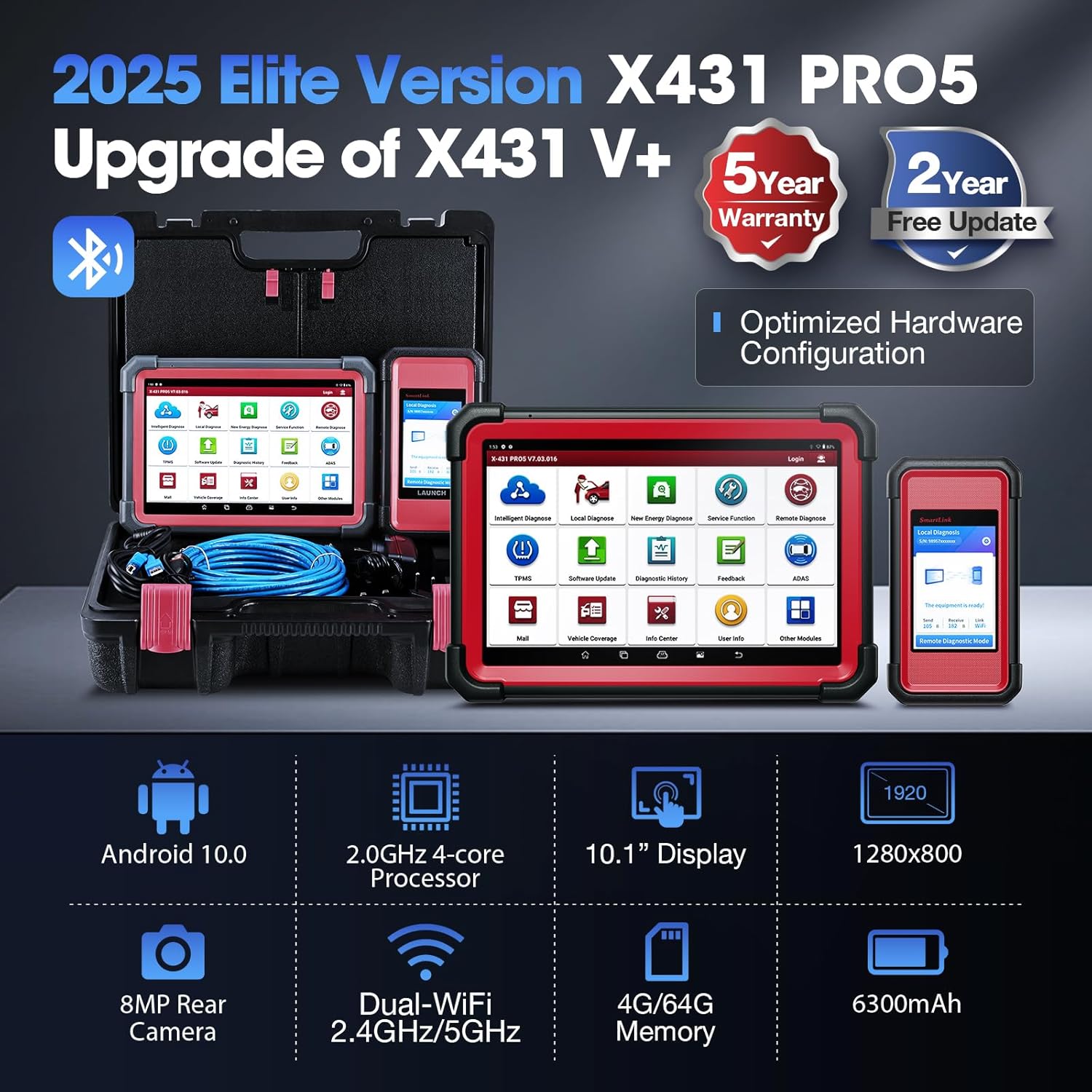
Figure 8.1: Key hardware specifications of the LAUNCH X431 PRO 5.
9. Bermea eta Laguntza
The LAUNCH X431 PRO 5 Scan Tool typically comes with a manufacturer's warranty. Please refer to the warranty card included in your package or visit the official LAUNCH webwebgunean bermearen baldintza zehatzak ikusteko.
- Doako eguneraketak: This product includes 2 years of free software updates from the date of activation.
- Laguntza teknikoa: For technical assistance, troubleshooting, or inquiries regarding product functionality, please contact LAUNCH customer support. Contact information can usually be found on the official LAUNCH website or within the device's "Info Center" application.
- Sareko baliabideak: Utilize online forums, FAQs, and video tutorials provided by LAUNCH for additional support and operational guidance.


