Sarrera
This manual provides essential information for setting up, operating, maintaining, and troubleshooting your Xiaomi Redmi Note 11S smartphone. Please read this guide thoroughly to ensure optimal performance and longevity of your device.
Bat baino gehiagoview of the Redmi Note 11S, highlighting its 108MP pro-grade main camera, 90Hz FHD+ AMOLED DotDisplay, and 33W Pro fast charging capabilities.
Konfigurazioa
1. Unboxing eta Hasierako Ikuskapena
Carefully unpack your Redmi Note 11S. Ensure all items are present:
- Xiaomi Redmi Note 11S Smartphone
- Auto Kargagailu Azkarra
- SIM erretiluaren kanporatzailea
- Hormako kargagailua
2. SIM txartelaren instalazioa
The Redmi Note 11S supports dual nano SIM cards. To install:
- Bilatu SIM txartelaren erretilua gailuaren alboan.
- Sartu SIM txartelaren erretilua ateratzeko tresna erretiluaren ondoko zulo txikian eta sakatu astiro erretilua atera arte.
- Place your nano SIM card(s) into the designated slots on the tray. Ensure the gold contacts face downwards.
- Kontu handiz sartu berriro erretilua telefonoan.
3. Hasierako kargatzea eta piztea
Before first use, it is recommended to fully charge your device. Connect the wall charger to the phone and a power outlet. The Redmi Note 11S supports 33W Pro fast charging for quick recharging of its 5000mAh battery.

Illustration of the 33W Pro fast charging feature for the 5000mAh battery, showing charging efficiency and estimated usage times for video, calling, and music.
To power on, press and hold the power button located on the side of the device until the Xiaomi logo appears.
Funtzionamendu-argibideak
1. Oinarrizko nabigazioa
The Redmi Note 11S features a responsive touchscreen. Use gestures such as tap, swipe, pinch, and spread to navigate the MIUI 12 operating system. The power button controls screen on/off and device power, while the volume buttons adjust audio levels.
2. Pantailaren ezaugarriak
Your device is equipped with a 6.43-inch FHD+ AMOLED DotDisplay with a 90Hz high refresh rate for smooth visuals. It also includes Sunlight Display for readability in bright conditions and Reading Mode 3.0 to reduce eye strain.

The 6.43-inch FHD+ AMOLED DotDisplay of the Redmi Note 11S, emphasizing its 90Hz high refresh rate for a responsive touchscreen experience.
3. Kamera sistema
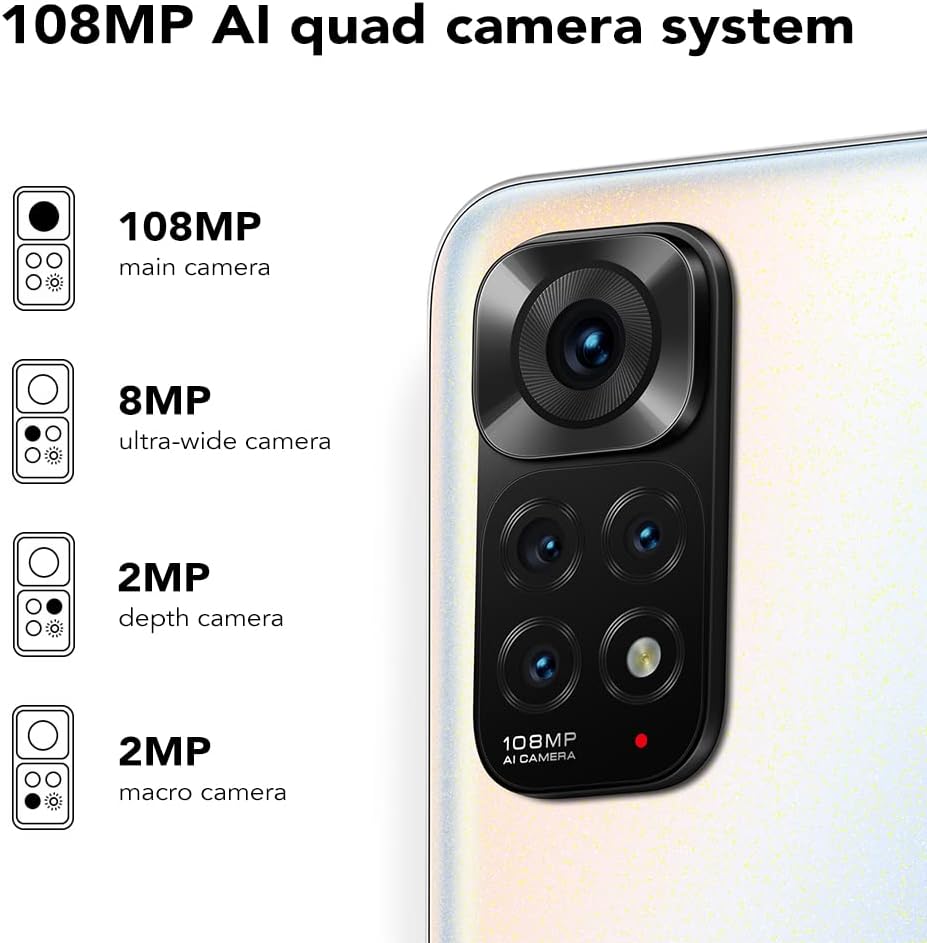
The Redmi Note 11S features a 108MP AI quad camera system on the rear and a 16MP selfie camera. The rear camera setup includes:
- 108MP Kamera Nagusia
- 8MP Kamera ultra-zabala
- 2MP Makro kamera
- 2MP Sakonera kamera
Open the Camera application to access various modes such as Photo, Video, Portrait, Night Mode, and more.

Xehetasuna view of the 108MP AI quad camera system on the Redmi Note 11S, featuring a 108MP main camera, 8MP ultra-wide camera, 2MP depth camera, and 2MP macro camera.
4. Biltegiratzea eta errendimendua
The device comes with 128GB of internal storage, expandable up to 1TB via a microSD card (sold separately). It is powered by the MediaTek Helio G96 processor, ensuring smooth performance for daily tasks and gaming.
5. Konektibitatea
The Redmi Note 11S supports 4G cellular networks, Wi-Fi, and GPS for navigation and location services.
Mantentzea
1. Zure gailua garbitzea
Erabili zapi leun eta pelusik gabeko bat telefonoaren pantaila eta gorputza garbitzeko. Saihestu produktu kimiko gogorrak edo material urratzaileak erabiltzea. Ez jarri gailua hezetasun gehiegiaren eraginpean.
2. Software eguneraketak
Egiaztatu eta instalatu software eguneraketak aldizka, zure gailuak azken funtzioak, segurtasun adabakiak eta errendimendu hobekuntzak dituela ziurtatzeko. Joan honera Ezarpenak > Telefonoari buruz > MIUI bertsioa eguneraketak ikusteko.
3. Bateria zaintzea
Bateriaren iraupena luzatzeko:
- Saihestu muturreko tenperaturak.
- Ez utzi bateria maiz erabat agortzen.
- Erabili gailuarekin batera datorren jatorrizko kargagailua.
4. Beroa xahutzea
The Redmi Note 11S incorporates LiquidCool technology with multiple layers of graphite and copper foil for efficient heat dissipation. Ensure proper airflow around the device during heavy usage to prevent overheating.

Barne bat view illustrating the multi-dimensional heat dissipation system using LiquidCool technology, which incorporates multiple layers of graphite and copper foil for efficient cooling.
Arazoak konpontzea
Atal honek zure Redmi Note 11S-rekin izan ditzakezun arazo ohikoenei buruzko informazioa ematen du.
Gailua ez da pizten
- Ziurtatu bateria kargatuta dagoela. Konektatu gailua kargagailura gutxienez 30 minutuz.
- Berrabiarazte behartua egiteko, sakatu eta eutsi pizteko botoia 10-15 segundoz.
Apps Freezing or Crashing
- Itxi arazoa duen aplikazioa eta ireki berriro.
- Garbitu aplikazioaren cachea eta datuak honen bidez: Ezarpenak > Aplikazioak > Aplikazioak kudeatu > [Aplikazioaren izena] > Garbitu datuak.
- Ziurtatu zure aplikazioak eta sistema eragilea eguneratuta daudela.
Bateriaren bizitza eskasa
- Adjust screen brightness and reduce screen timeout.
- Desgaitu erabili gabeko funtzioak, hala nola Wi-Fi, Bluetooth edo GPSa, beharrezkoak ez direnean.
- Identifikatu eta itxi atzeko planoan exekutatzen ari diren energia-kontsumo handiko aplikazioak.
Sarearen konexio arazoak
- Berrabiarazi gailua.
- Egiaztatu zure SIM txartela behar bezala sartuta dagoen.
- Reset network settings via Ezarpenak > Konexioa eta partekatzea > Berrezarri Wi-Fia, sare mugikorrak eta Bluetootha.
Zehaztapenak
The following table outlines the key specifications for the Xiaomi Redmi Note 11S (Model: 2201117SY).
| Ezaugarri | Zehaztapena |
|---|---|
| Ereduaren izena | NOTE 11s |
| Elementuaren eredu-zenbakia | 2201117SY |
| Marka | XIAOMI |
| Sistema eragilea | MIUI 12 |
| Pantailaren tamaina | 6.43 hazbete |
| Bistaratzeko mota | FHD+ AMOLED DotDisplay, 90Hz Refresh Rate |
| Atzeko kamera | 108MP Main, 8MP Ultra-wide, 2MP Macro, 2MP Depth |
| Aurrealdeko kamera | 16MP |
| RAM | 6 GB |
| Memoria Biltegiratzeko Ahalmena | 128 GB (1 TB arte zabaldu daiteke) |
| Bateria Edukiera | 5000 milioiampordu lehenago (mAh) |
| Kargatzen | 33W Pro Fast Charging (58 minutes for full charge) |
| Teknologia Zelularra | 4G |
| Haririk gabeko garraiolaria | Desblokeatuta garraiolari guztientzat |
| Konektibitate Teknologiak | Wi-Fia, Sare mugikorra |
| Ezaugarri bereziak | Dual SIM, GPS, Smartphone |
| Produktuaren neurriak | 2.9 x 0.32 x 6.29 hazbete |
| Elementuaren pisua | 6.3 ontza (179 gramo) |
| Kolorea | Perla Zuria |

The aesthetic flat-frame design of the Redmi Note 11S, highlighting its slim profile (8.09mm thickness) and light weight (179g) for a comfortable grip.
Bermearen informazioa
Specific warranty terms and conditions for the Xiaomi Redmi Note 11S may vary by region and retailer. Please refer to the warranty card included with your product packaging or visit the official Xiaomi website for detailed warranty information applicable to your purchase. Retain your proof of purchase for warranty claims.
Laguntza
For further assistance, technical support, or service inquiries regarding your Xiaomi Redmi Note 11S, please visit the official Xiaomi support website or contact their customer service. You can typically find contact information and FAQs on the manufacturer's official webgunea.