Sarrera
Thank you for choosing the La Crosse Technology LW3101 Wi-Fi Weather Station. This manual provides detailed instructions to help you set up, operate, and maintain your device, ensuring you get the most accurate weather information and forecasts.
Produktuaren Ezaugarriak
- Ordua eta data: Displays current time and date with language selection and 12/24 hour format options.
- Internet Weather Forecasts: Provides 3-day forecasts at a glance, including 12-hour and 6-day outlooks, predicted weather conditions, and precipitation percentages.
- Barruko/Kanpoko Tenperatura eta Hezetasuna: Displays readings in Celsius or Fahrenheit.
- Alerts & Data Logging: Features alerts and recording for indoor and outdoor data.
- Heat Index & Dew Point: Calculates and displays heat index and dew point values.
- Presio atmosferikoa: Shows atmospheric pressure with 5 trend arrows.
- Wi-Fi konexioa: Connects to the La Crosse View application for additional forecast icons, daily min/max values, and rain probabilities on the screen.
- Expandable Sensors: Allows for the addition of supplementary sensors.
- Atzeko argi erregulagarria: Features adjustable or automatic backlight with an auto-dim function.
- Bateria baxuaren adierazlea: Provides indicators for low battery levels for both the station and its sensor.
Paketearen edukia
The La Crosse Technology LW3101 Wi-Fi Weather Station package includes:
- 1 x LW3101 Weather Station
- 1 x Argibide eskuliburua
- Note: Batteries are not included and are required for operation.
Konfigurazioa
1. Hasierako konfigurazioa
- Piztu: Insert the required batteries (not included) into the weather station and the outdoor sensor. Ensure correct polarity.
- Sentsoreen kokapena: Place the outdoor sensor in a shaded area, protected from direct sunlight and rain, to ensure accurate temperature and humidity readings.
- Geltokiaren kokapena: Position the main weather station indoors, away from direct heat sources or vents, for accurate indoor readings.
2. Wi-Fi konexioa
To access internet-based forecasts and advanced features, connect your LW3101 to your home Wi-Fi network using the La Crosse View aplikazioa.
- Deskargatu aplikazioa: Download the "La Crosse View" app from your smartphone's app store.
- Sortu kontua: Open the app and follow the on-screen instructions to create a new account or log in.
- Gehitu gailua: In the app, select "Add Device" and choose your LW3101 model.
- Jarraitu gomendioak: The app will guide you through connecting your weather station to your Wi-Fi network. Ensure your phone is connected to the 2.4GHz band of your Wi-Fi router during setup.
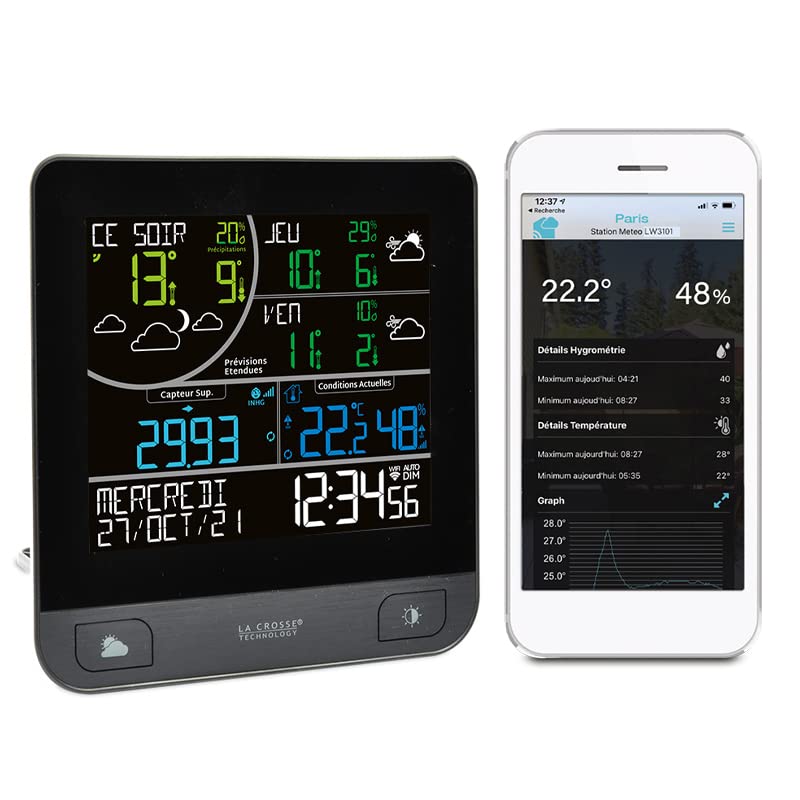
Image: The La Crosse Technology LW3101 weather station display showing current weather data and forecasts, alongside a smartphone screen displaying the La Crosse View application with detailed weather information.
Funtzionamendu-argibideak
1. Erakutsi baino gehiagoview
The main display shows various information:
- Goiko Atala: Internet weather forecasts (3-day, 12-hour, 6-day outlooks).
- Erdiko Atala: Indoor and outdoor temperature/humidity, heat index, dew point.
- Beheko Atala: Atmospheric pressure, time, and date.
2. Time and Date Settings
Once connected to Wi-Fi, the time and date will automatically synchronize. You can adjust the language and 12/24 hour format through the device settings or the La Crosse View aplikazioa.
3. Weather Forecast Display
The station receives weather forecasts via the internet. The display will show icons representing predicted conditions, along with temperature ranges and precipitation probabilities for the coming days.
4. Temperature and Humidity Readings
The station displays both indoor and outdoor temperature and humidity. Ensure the outdoor sensor is properly placed for accurate external readings.

Image: A smartphone screen displaying the La Crosse View application, showing a detailed graph of temperature fluctuations over several hours, along with current temperature and humidity readings.
5. Alertak
You can set customizable alerts for temperature and humidity thresholds through the La Crosse View app. The station will notify you when these thresholds are met.
6. Atzeko argiaren doikuntza
The display backlight can be adjusted manually or set to an automatic dimming function for comfortable viewargiztapen-baldintza ezberdinetan aritzea.
Mantentzea
1. Bateria ordezkatzea
When the low battery indicator appears on the display for either the main station or the outdoor sensor, replace the batteries promptly with new ones of the specified type. Ensure correct polarity during replacement.
2. Garbiketa
Clean the weather station and sensor with a soft, damp oihal. Ez erabili garbitzaile edo disolbatzaile urratzailerik, pantaila edo... kaltetu baitezakete.asing. Keep the devices dry.
Arazoak konpontzea
- Pantailarik/Energiarik ez: Check battery installation and ensure they are fresh. If using an AC adapter (if applicable, not specified here), ensure it is properly connected.
- Kanpoko sentsorearen daturik ez: Ensure the outdoor sensor is within range of the main station and has fresh batteries. Try re-pairing the sensor according to the app instructions.
- Inaccurate Forecasts: Verify your Wi-Fi connection is stable. Internet-based forecasts rely on external data sources; minor discrepancies may occur.
- Wi-Fi deskonexioa: Check your home Wi-Fi network. Restart your router and the weather station. Reconnect through the La Crosse View app if necessary.
- Display Segments Missing: This could indicate a hardware issue. Contact customer support if troubleshooting steps do not resolve the problem.
Zehaztapenak
| Fabrikatzailea | La Crosse Teknologia |
| Modelo zenbakia | LW3101-MEG |
| Paketearen neurriak | 20.9 x 17.1 x 7.9 cm; 600 gramo |
| Kolorea | Grisa |
| Estiloa | Modernoa |
| Materiala | Metala edo plastikoa |
| Energia iturria | Bateriaren bidez |
| Paketearen elementu kopurua | 1 |
| Neurketaren Zehaztasuna | +/- 1 ° C |
| Bistaratzeko mota | LED |
| Ezaugarri bereziak | Wireless, Wi-Fi Connectivity |
| Osagaiak barne | Argibide eskuliburua |
| Pilak barne | Ez |
| Beharrezko bateriak | Bai |
Bermearen informazioa
Specific warranty details for the La Crosse Technology LW3101 are not provided in this manual. Please refer to the warranty card included with your product or visit the official La Crosse Technology webgunea bermearen informazio eguneratuena lortzeko.
Laguntza
For technical assistance, troubleshooting, or further inquiries regarding your La Crosse Technology LW3101 Wi-Fi Weather Station, please visit the official La Crosse Technology support webwebgunera edo jarri harremanetan bezeroarentzako arreta-zerbitzuarekin. Harremanetarako informazioa normalean fabrikatzailearen webgunean aurki daiteke. webgunean edo produktuaren ontzian.


