1. Sarrera
Thank you for choosing the Omega OM0520WB 1600 dpi Wireless Optical Mouse. This manual provides detailed instructions for setting up, operating, maintaining, and troubleshooting your new device. Please read this manual carefully before use to ensure optimal performance and longevity of your mouse.
2. Paketearen edukia
Mesedez, egiaztatu paketea elementu hauek dituen:
- Omega OM0520WB Wireless Optical Mouse
- Erabiltzailearen eskuliburua
- 1 x AA Battery (may be pre-installed or included separately)
3. Produktua amaitu daview
Familiarize yourself with the components of your Omega OM0520WB mouse:
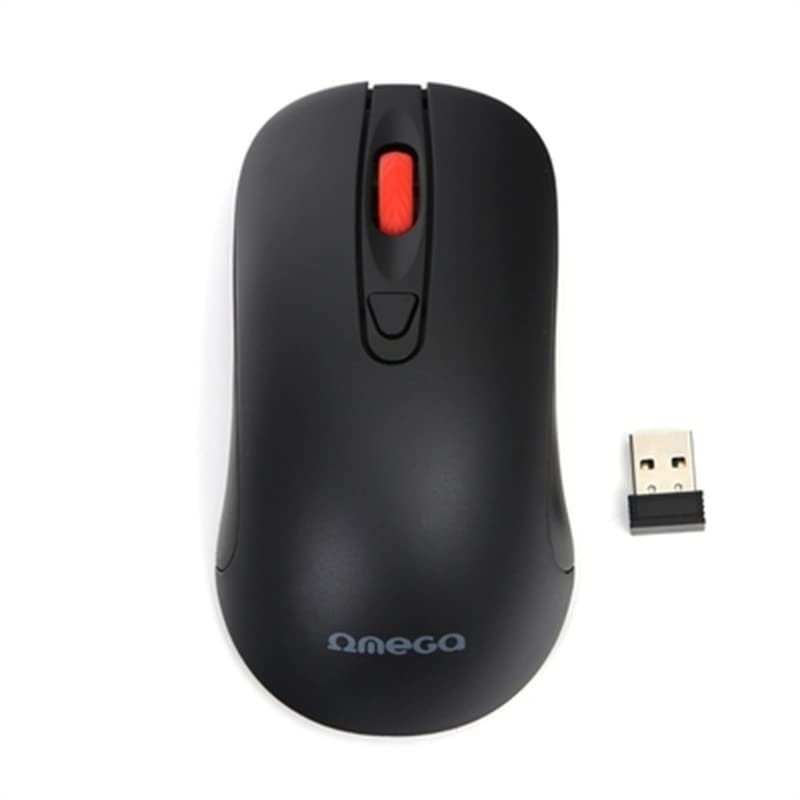
Image: The Omega OM0520WB Wireless Optical Mouse, shown in black. It features a sleek, ergonomic design with standard left and right click buttons, a scroll wheel, and a smooth finish.
- Ezkerreko klik botoia: Klik egiteko funtzio nagusia.
- Eskuineko botoiarekin klik egiteko: Bigarren mailako klik funtzio estandarra.
- Korritzeko gurpila: Korritze bertikalerako eta erdiko botoiarekin klik egiteko funtziorako.
- Sentsore optikoa: Located on the underside, for precise tracking.
- Bateriaren konpartimendua: Located on the underside, for inserting the AA battery.
- Switch potentziala: On/Off switch, usually on the underside of the mouse.
4. Konfiguratzeko argibideak
Follow these steps to set up your Omega OM0520WB mouse:
- Instalatu bateria: Open the battery compartment cover on the underside of the mouse. Insert one AA battery, ensuring the polarity (+/-) matches the diagram inside the compartment. Close the cover securely.
- Aktibatu sagua: Locate the power switch on the underside of the mouse and slide it to the 'ON' position.
- Bluetooth bidez konektatu:
- On your computer or laptop, navigate to the Bluetooth settings.
- Ziurtatu Bluetooth gaituta dagoela.
- Bilatu new devices. The mouse should appear as 'Omega OM0520WB' or similar.
- Select the mouse to pair. Once paired, your mouse is ready for use.
5. Funtzionamendu-argibideak
Your Omega OM0520WB mouse is designed for intuitive use:
- Oinarrizko nabigazioa: Mugitu sagua gainazal lau batean pantailako kurtsorea kontrolatzeko.
- Klik eginez: Use the left button for primary clicks (e.g., selecting items) and the right button for secondary clicks (e.g., opening context menus).
- Korritzea: Biratu gurpila gora edo behera dokumentuetan nabigatzeko eta web pages. Press the scroll wheel for a middle-click function, if supported by your application.
- DPI ezarpena: The mouse operates at a fixed 1600 dpi, providing a balance of speed and precision for most tasks.
- Diseinu anbidistroa: The symmetrical design allows comfortable use for both left-handed and right-handed users.
6. Mantentzea
Saguaren iraupena eta errendimendu optimoa bermatzeko, jarraitu mantentze-jarraibide hauek:
- Garbiketa: Erabili zapi leun eta lehor bat saguaren gainazala garbitzeko. Zikinkeria egoskorra bada, garbitu pixka bat.ampGarbitu zapiarekin urarekin. Saihestu produktu kimiko gogorrak edo garbitzaile urratzaileak erabiltzea.
- Sentsore optikoa: Keep the optical sensor on the underside clean and free from dust or debris.
- Bateria ordezkatzea: When the mouse performance degrades or it stops responding, replace the AA battery. Always use a fresh, high-quality battery.
- Biltegiratzea: When not in use for extended periods, turn off the mouse using the power switch to conserve battery life. Store it in a cool, dry place.
7. Arazoak
If you encounter issues with your Omega OM0520WB mouse, refer to the following solutions:
- Saguak ez du erantzuten:
- Ziurtatu sagua piztuta dagoela.
- Egiaztatu bateria. Beharrezkoa bada, ordezkatu.
- Verify that Bluetooth is enabled on your computer and the mouse is paired. Try re-pairing the mouse.
- Move the mouse closer to your computer to ensure a strong Bluetooth signal.
- Kurtsorearen mugimendu irregularra:
- Garbitu saguaren azpialdeko sentsore optikoa.
- Erabili sagua gainazal garbi, islatzailerik gabeko eta uniforme batean. Sagu-alfonbrak erabiltzea gomendatzen da.
- Konexio-arazoak:
- Berrabiarazi ordenagailua eta saiatu berriro konektatzen.
- Remove the mouse from your computer's Bluetooth device list and then re-pair it.
- Ensure there are no other devices interfering with the Bluetooth signal.
8. Zehaztapenak
| Ereduaren izena | OM0520WB |
| Konektibitate Teknologia | Haririk gabeko (Bluetooth) |
| Mugimenduak detektatzeko teknologia | Optikoa |
| DPI | 1600 ppp |
| Botoi kopurua | 3 (Ezkerrekoa, Eskuinera, Korritzeko gurpila) |
| Eskuen Orientazioa | Anbidistroa |
| Energia iturria | 1 x AA Lithium-ion battery (required) |
| Gailu bateragarriak | Ordenagailu pertsonala, ordenagailu eramangarria |
| Pisua | Gutxi gorabehera 73 g |
| Kolorea | Beltza |
9. Bermea eta Laguntza
Omega products are designed for reliability and performance. For information regarding warranty coverage, technical support, or service, please refer to the warranty card included with your product or visit the official Omega webgunea. Gorde erosketa-agiria erosketaren frogagiri gisa.


