Laser DVD-HD012

Laser DVD CD erreproduzitzailea HD012 erabiltzailearen eskuliburua

Model: DVD-HD012

Produktua amaituview

The Laser DVD CD Player HD012 is a versatile multi-region player designed to provide a comprehensive home entertainment experience. It supports a wide array of disc and digital media formats, ensuring compatibility with your existing media library. Equipped with HDMI and AV outputs, it offers flexible connectivity options for various television setups. Its compact design and user-friendly interface make it an ideal addition to any home cinema system.

Laser DVD CD Player HD012 with remote control

Image: The Laser DVD CD Player HD012, a sleek black unit, is shown with its remote control resting on top. The player features a disc tray, USB port, and a digital display.

Zer sartzen da

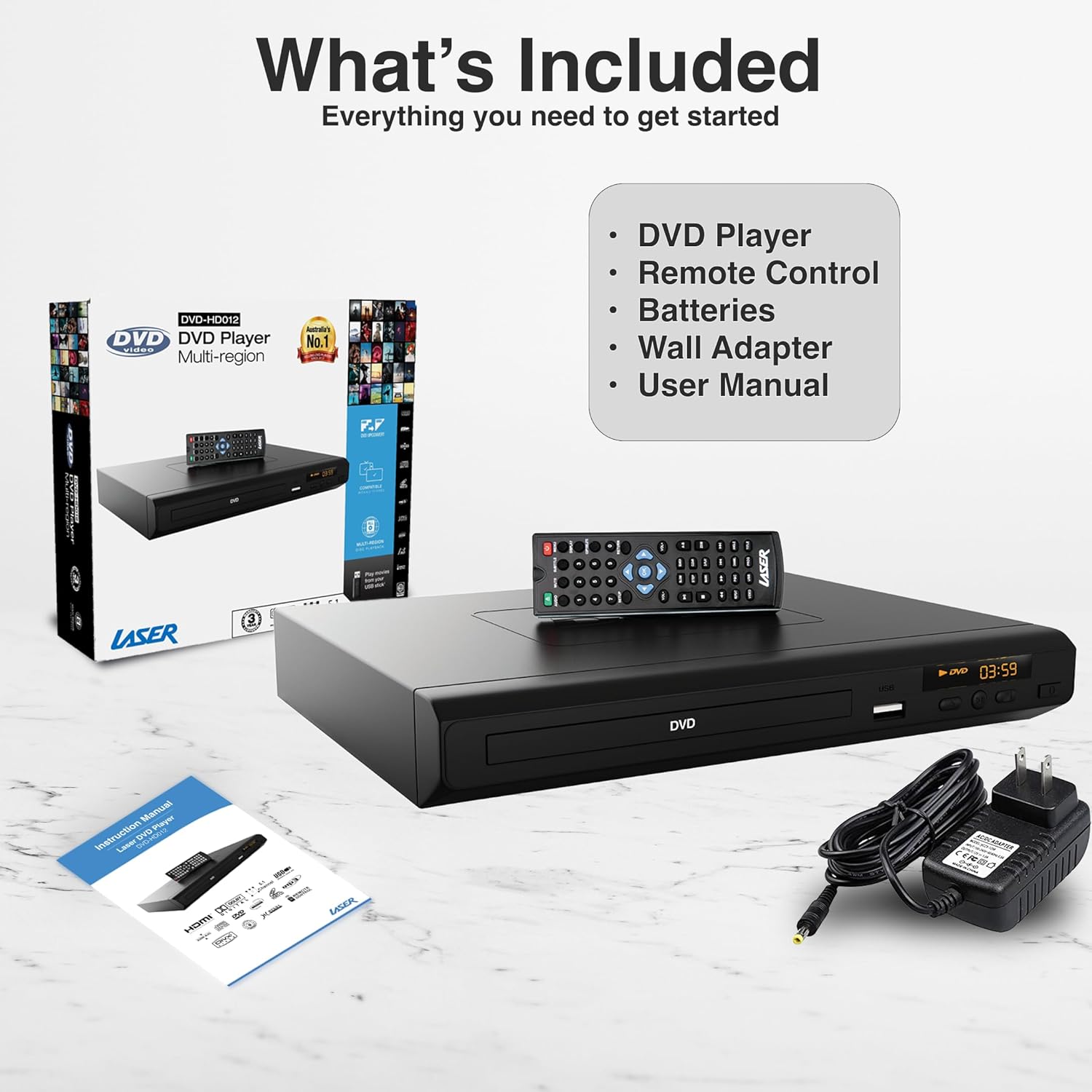
Upon unboxing your Laser DVD CD Player HD012, please verify that all the following components are present:

  • DVD Player (Model: DVD-HD012)
  • Urruneko Kontrola
  • Wall Adapter (Power Supply)
  • Erabiltzailearen eskuliburua (dokumentu hau)
  • Note: Batteries for the remote control are not included and must be purchased separately.
Contents included with the Laser DVD CD Player HD012

Image: A visual representation of the items included in the product package: the DVD player, its remote control, a wall power adapter, and the user manual, alongside the product packaging box.

Konfigurazio Gida

1. Connecting the Player to Your Television

The Laser DVD CD Player HD012 offers multiple connectivity options to suit your television setup:

  • HDMI Connection (Recommended for High Definition): For the best audio and video quality, connect an HDMI cable (not included) from the HDMI OUT port on the DVD player to an available HDMI IN port on your television. This single cable transmits both digital video and audio signals.
  • RCA Composite Connection (Standard Definition): If your television does not have an HDMI port, or if you prefer an analog connection, use an RCA composite cable (not included). Connect the yellow video cable to the VIDEO OUT port on the DVD player and the yellow VIDEO IN port on your TV. Connect the red and white audio cables to the AUDIO OUT (R/L) ports on the DVD player and the corresponding red and white AUDIO IN (R/L) ports on your TV.
HDMI Output connection diagram for Laser DVD Player

Image: An illustration demonstrating the HDMI output capability of the DVD player, showing a television screen displaying content and the DVD player connected via an HDMI cable, emphasizing high-definition video from a single cable.

2. Powering On the Player

  1. Connect the provided wall adapter to the DC IN port on the back of the DVD player.
  2. Entxufatu hormako egokitzailea entxufe elektriko estandar batera.
  3. Sakatu BOTEREA button on the front of the DVD player or on the remote control to turn the unit on. The display will illuminate.
  4. Select the correct input source (HDMI or AV) on your television using your TV's remote control.

Funtzionamendu-argibideak

1. Diskoaren erreprodukzioa

  1. Ensure the player is powered on and connected to your TV.
  2. Sakatu IREKI/ITXI aurrealdeko paneleko edo urrutiko aginteko botoia diskoaren erretilua irekitzeko.
  3. Carefully place a DVD or CD disc onto the tray with the label side facing up.
  4. Sakatu IREKI/ITXI botoia berriro sakatu erretilua ixteko. Erreproduzitzaileak automatikoki hasiko da diskoa irakurtzen.
  5. Use the remote control's JOLASTU/PAUSTU, GELDITU, ATZERATU, eta AURRERA AZKAR erreprodukzioa kontrolatzeko botoiak.
Laser DVD Player supporting multiple media formats

Image: The DVD player and remote are shown with text indicating support for various video and additional media formats, including DVD-RW, VCD, CD-R, DivX, MP3, JPEG, AVI, MPEG, MPEG4, VOB, and FLV.

2. USB multimedia erreprodukzioa

The player supports playback of digital media files from USB memory devices.

  1. Sartu USB flash unitatea DVD erreproduzitzailearen aurrealdeko USB atakan.
  2. The player should automatically detect the USB device and display a menu for selecting media types (e.g., Photo, Music, Movie).
  3. Nabigatu karpetetan zehar eta files using the arrow keys on the remote control and press SARTU hautatzeko.
  4. Sakatu JOLASTU to start playback of the selected file.

3. Urruneko kontrol funtzioak

The included IR remote control provides full functionality for operating your DVD player. Key buttons include:

  • POTENTZIA: Erreproduzitzailea piztu edo itzaltzen du.
  • IREKI/ITXI: Diskoaren erretilua ireki eta ixten du.
  • Erreproduzitu/PAUSTU: Erreprodukzioa hasten edo eten egiten du.
  • GELDITU: Erreprodukzioa geldiarazten du.
  • AURREAN / HURRENEAN: Aurreko edo hurrengo kapitulu/pistara salto egiten du.
  • REW/FF: Rewinds or fast forwards through content.
  • VOL +/-: Adjusts the volume (if connected directly to an audio system or TV via analog output).
  • KONFIGURAZIOA: Sistemaren ezarpenen menura sartzen da.
  • IZENBURUA/MENUA: Accesses the disc title or main menu.
  • USBa: Switches input to USB mode.

4. Region-Free Playback

This DVD player is designed to be multi-region (region-free), allowing you to play DVDs from any region worldwide (Region 0-6). This feature ensures broad compatibility with your international DVD collection.

Region-Free Playback feature of Laser DVD Player

Image: The DVD player and remote are depicted against a global map background, highlighting its "Region-Free Playback" capability, allowing users to enjoy DVDs from any part of the world, supporting both PAL and NTSC formats.

5. Supported Media Formats

The Laser DVD CD Player HD012 supports a wide range of disc and digital media formats:

KategoriaOnartutako formatuak
Disko formatuakDVD-R/-RW, DVD-Video, DVD+R/+RW, CD, CD-R/RW, VCD, SVCD, HDCD
Video Formats (via USB)AVI, DivX, MPEG, MPEG4, VOB, FLV
Audio Formats (via USB/Disc)MP3, WMA, Dolby Digital, DTS
Image Formats (via USB)JPEG

The player also features built-in Anti-Shock and Error-Correction technologies to ensure uninterrupted viewentzuteko eta entzuteko plazerra.

Full HD 1080p immersive audiovisual experience with Laser DVD Player

Image: A living room setup showing the DVD player connected to a large television displaying a movie in Full HD 1080p, indicating an immersive audiovisual experience with Dolby 7.1 Surround Sound support.

Mantentzea

To ensure the longevity and optimal performance of your Laser DVD CD Player HD012, follow these maintenance guidelines:

  • Unitatea garbitzea: Use a soft, dry cloth to wipe the exterior of the player. Do not use liquid cleaners, abrasive cleaners, or chemical sprays, as these can damage the finish.
  • Diskoak zaintzea: Handle discs by their edges. Keep discs clean and free of dust, fingerprints, and scratches. Use a soft, lint-free cloth to wipe discs from the center outwards if cleaning is necessary.
  • Aireztapena: Ensure the player is placed in a well-ventilated area. Do not block any ventilation openings on the unit. Avoid placing it on soft surfaces like carpets or blankets that could obstruct airflow.
  • Biltegiratzea: When not in use for extended periods, disconnect the power adapter and store the player in a cool, dry place away from direct sunlight and extreme temperatures.

Arazoak konpontzea

If you encounter issues with your DVD player, please refer to the following common problems and their solutions:

ArazoaBalizko Kausa / Irtenbidea
Botererik ez
  • Ensure the power adapter is securely connected to the player and the electrical outlet.
  • Egiaztatu entxufea funtzionatzen duen beste gailu bat konektatuz.
  • Press the POWER button on the player or remote control.
Ez dago irudirik telebistan
  • Egiaztatu HDMI edo RCA kableak ondo konektatuta daudela erreproduzitzailera eta telebistara.
  • Ensure your TV is set to the correct input source (e.g., HDMI 1, AV).
  • Check if the disc is inserted correctly and is not damaged.
Soinurik ez
  • Egiaztatu audio kablearen konexioak (HDMI edo RCA).
  • Increase the volume on your TV or audio receiver.
  • Ensure the player's volume is not muted or set too low.
  • Verify the audio settings in the player's setup menu.
Diskoa ez da erreproduzitzen / "Diskorik ez" errorea
  • Ziurtatu diskoa garbi dagoela eta marradurarik edo orbanik gabe dagoela.
  • Ziurtatu diskoa behar bezala sartuta dagoela, etiketa gora begira duela.
  • Check if the disc format is supported by the player (refer to Supported Media Formats section).
Urruneko kontrola ez dabil
  • Ensure fresh batteries are installed correctly (polarity).
  • Point the remote directly at the player's IR sensor.
  • Kendu urrutiko agintearen eta erreproduzitzailearen artean dauden oztopoak.

Irtenbide hauek probatu ondoren arazoa konpontzen ez bada, jarri harremanetan bezeroarentzako arreta-zerbitzuarekin.

Zehaztapen Teknikoak

EzaugarriXehetasuna
MarkaLaserra
EreduaDVD-HD012
Gailu bateragarriakTelebista
Onartutako euskarri motakCD, DVD, VCD (and various digital formats via USB as listed above)
Konektore motakHDMI, RCA (Composite), USB (1 port)
Onartutako audio formatuakMP3, WMA, Dolby Digital, DTS
Audio irteera moduaInguratu
Ezaugarri bereziakAnti-Shock, Error-Correction, Multi-Region Playback
Resolution (Upscaling)Up to 3840x2160 (4K) via HDMI (for compatible media and display)
Energia iturriaKable elektrikoa
Produktuaren neurriak (L x W x H)22 x 18 x 4.5 cm
Elementuaren pisua742 gramo

Bermea eta Laguntza

Your Laser DVD CD Player HD012 comes with a 3 urteko bermea from the date of purchase, providing peace of mind regarding its quality and performance. This warranty covers manufacturing defects and ensures reliable operation under normal use conditions.

For warranty claims, technical assistance, or any inquiries regarding your product, please contact Laser customer support. Keep your proof of purchase (receipt or invoice) readily available as it will be required for any warranty service.

For the most up-to-date support information, including contact details and FAQs, please visit the official Laser webgunea edo erosketa-dokumentazioarekin batera emandako harremanetarako informazioa kontsultatu.

Erlazionatutako dokumentuak - DVD-HD012

Aurreview BLU-BD1080 Eskualde Kodea Aldatzeko Gida - Laser
Ikasi zure Laser BLU-BD1080 erreproduzitzailean DVD eta Blu-ray eskualde kodeak nola aldatu. Gida honek herrialde ezberdinetako diskoen eskualde kodeak ezartzeko urratsez urrats argibideak eskaintzen ditu.
Aurreview Laser DVD Player DVD-HD012 Instruction Manual
Comprehensive instruction manual for the Laser DVD Player model DVD-HD012, covering setup, operation, features, troubleshooting, specifications, and warranty information.
Aurreview Laser DVD-PT-7D Portable DVD Player User Manual
User manual for the Laser DVD-PT-7D 7-inch portable DVD player, covering setup, playback, system settings, troubleshooting, specifications, and warranty information.
Aurreview LASER DVD-PT-7D 7" DVD erreproduzitzaile eramangarriaren erabiltzailearen eskuliburua
LASER DVD-PT-7D 7" DVD erreproduzitzaile eramangarriaren erabiltzailearen eskuliburu osoa, segurtasuna, funtzionamendua, konfigurazioa, arazoak konpontzea eta zehaztapenak jorratzen dituena. Ikasi zure gailua entretenimendu optimoa lortzeko nola erabili.
Aurreview Laser Q13 Personal Media Player FAQ and Troubleshooting Guide
Comprehensive Frequently Asked Questions (FAQ) and troubleshooting guide for the Laser Q13 Personal Media Player, covering setup, file management, audio/video playback, and common issues.
Aurreview Laser Retro Blaster CDBB-166 Quick Guide - Setup, Features, and Troubleshooting
Comprehensive quick guide for the LASER Laser Retro Blaster CDBB-166 boombox. Learn how to set up power, clock, use CD, USB, Bluetooth, and Radio functions, manage timers, record to USB, and find troubleshooting tips. Includes warranty information.