Sarrera
This manual provides essential information for setting up, operating, maintaining, and troubleshooting your Acer Veriton X4680G Desktop Computer. Please read this document thoroughly before using the product to ensure proper function and longevity. Keep this manual for future reference.
Paketearen edukia
Egiaztatu elementu guztiak paketean daudela:
- Acer Veriton X4680G Desktop PC
- USB teklatua
- USB sagua
- Elikatze kablea
- Dokumentazioa (Hasierako Gida Azkarra, Berme Txartela)
Produktua amaituview
Familiarize yourself with the physical components of your desktop computer.
Aurrealdea View
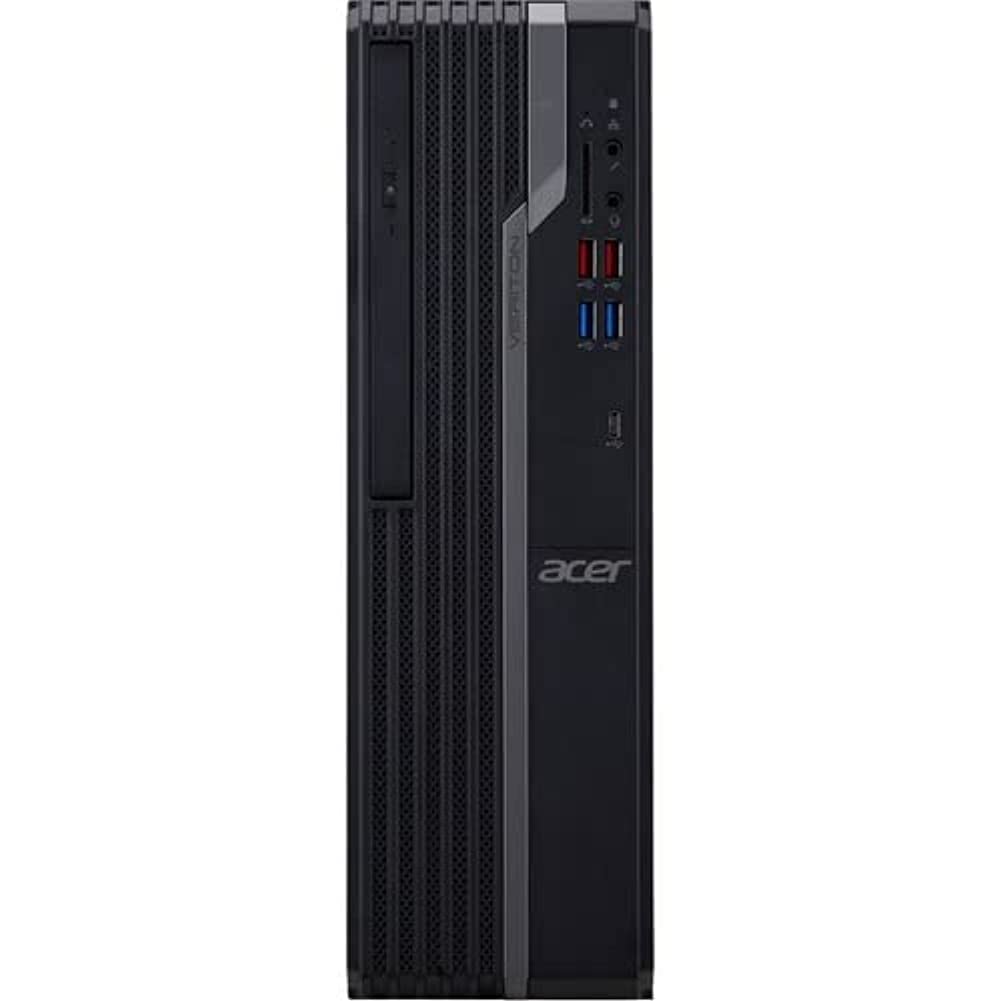
This image displays the front of the Acer Veriton X4680G desktop computer, highlighting the optical drive, front USB ports (including USB 3.2 and USB 2.0), audio jacks, and the power button. The 'Veriton' branding and Acer logo are visible on the chassis.
Atzekoa View

This image shows the rear panel of the Acer Veriton X4680G, detailing the various input/output ports. These include multiple USB ports, Ethernet port, audio jacks, video output ports (VGA, DisplayPort), and the power input connector. Expansion slots are also visible.
Konfigurazioa
Follow these steps to set up your new desktop computer.
1. Periferikoak konektatzea
- Monitorea: Connect your monitor to one of the video output ports (VGA or DisplayPort) on the rear of the computer using the appropriate cable.
- Teklatua eta sagua: Connect the USB keyboard and mouse to any available USB ports on the front or rear of the computer.
- Sarea: For a wired internet connection, connect an Ethernet cable from your router or modem to the Ethernet port on the rear of the computer. For wireless, ensure your system has Wi-Fi enabled.
- Audioa: Connect speakers or headphones to the audio output jack on the front or rear panel.
2. Energia-konexioa
- Connect the power cord to the power input on the rear of the computer.
- Entxufatu korronte-kablearen beste muturra lurreko hartune elektriko batean.
3. Hasierako piztea
- Press the power button located on the front panel of the computer.
- The computer will boot up, and the Windows 10 Pro operating system will load. Follow any on-screen instructions for initial setup, such as language selection and user account creation.
Funtzionamendu-argibideak
Guidance for basic operation of your Acer Veriton X4680G.
Windows 10 Pro
Your computer comes pre-installed with Windows 10 Pro. This operating system provides a familiar interface for managing files, running applications, and browsing the internet. Utilize the Start Menu for quick access to programs and settings.
Using the Optical Drive (DVD-Writer)
The integrated DVD-Writer allows you to read and write CDs and DVDs.
- To open the tray, press the eject button on the drive face.
- Place a disc onto the tray with the label side facing up.
- Gently push the tray back into the computer until it clicks shut.
- The operating system will typically prompt you for action or automatically play media.
USB atakak
The computer features multiple USB 2.0 and USB 3.2 ports for connecting external devices such as external hard drives, printers, and other peripherals. USB 3.2 ports offer faster data transfer speeds.
Mantentzea
Regular maintenance helps ensure optimal performance and extends the lifespan of your computer.
Garbiketa
- Kanpoaldea: Erabili biguna, damp cloth to wipe the exterior surfaces. Avoid harsh chemicals.
- Oihalak: Periodically use compressed air to clear dust from the ventilation grilles to prevent overheating.
- Pantaila: For monitors, use a specialized screen cleaner and a microfiber cloth.
Software eguneraketak
Segurtasuna eta errendimendua bermatzeko, mantendu sistema eragilea eta kontrolatzaileak eguneratuta.
- Windows eguneraketak: Regularly check for and install Windows updates via the Settings app.
- Gidarien eguneraketak: Visit the Acer support website for the latest drivers for your specific model.
Datuen babeskopia
Egin aldian-aldian babeskopia garrantzitsuak filekanpoko disko gogor batera edo hodeiko biltegiratzera gorde datuak galtzea saihesteko.
Arazoak konpontzea
Atal honek aurki ditzakezun arazo ohikoenei heltzen die.
Botererik ez
- Ziurtatu elikatze-kablea ondo konektatuta dagoela bai ordenagailura bai entxufe elektrikora.
- Egiaztatu entxufea funtzionatzen duela beste gailu bat konektatuz.
- Check the power supply unit (PSU) switch on the rear of the computer, if present, to ensure it is in the 'On' position.
Ez dago pantailarik monitorean
- Ziurtatu monitorearen elikatze-kablea konektatuta dagoela eta monitorea piztuta dagoela.
- Check that the video cable (VGA or DisplayPort) is securely connected to both the computer and the monitor.
- Ensure the monitor's input source is set correctly (e.g., VGA, DisplayPort).
Sistemaren moteltzea
- Itxi atzeko planoan exekutatzen ari diren beharrezkoak ez diren aplikazioak.
- Check disk space; a full drive can impact performance.
- Birusen eskaneatzea exekutatu malwarea dagoen egiaztatzeko.
- Ziurtatu Windows eta kontrolatzaileak eguneratuta daudela.
Zehaztapenak
Detailed technical specifications for the Acer Veriton X4680G Desktop Computer.
| Ezaugarri | Zehaztapena |
|---|---|
| Prozesadorea | Intel Core i7-11700 Octa-core (8 Core) 2.50 GHz |
| RAM | 8 GB DDR4 SDRAM |
| Biltegiratzea | 256 GB PCI Express SSD |
| Sistema eragilea | Windows 10 Pro |
| Txartel grafikoa | Intel Iris Xe Graphics |
| Unitate optikoa | DVD-idazlea |
| Haririk gabeko konexioa | 802.11ax, Bluetooth |
| USB 2.0 Portuak | 4 |
| Neurriak (LxWxH) | 16.34 x 19.49 x 6.69 hazbete |
| Elementuaren pisua | 14.52 kilo |
| Kolorea | Beltza |
Bermea eta Laguntza
Your Acer Veriton X4680G Desktop Computer is covered by a limited warranty. Please refer to the warranty card included in your package for specific terms and conditions, including warranty period and coverage details.
For technical support, driver downloads, or further assistance, please visit the official Acer support website or contact Acer customer service. Have your product model number (DT.VWEAA.003) and serial number ready when seeking support.
Oharra: Bermearen baldintzak eskualdearen arabera alda daitezke.


