Sarrera
Thank you for choosing the SINOTIMER TM623 Programmable Astronomical Time Switch. This device is designed for precise time control of various electrical appliances, street lights, and other systems, automatically adjusting switching times based on latitude and longitude. Please read this manual carefully before installation and operation to ensure proper use and longevity of the product.
Ezaugarri nagusiak
- Tenporizadore-etengailu programagarria
- Erlojuaren bistaratzea
- Automatic adjustment of switching time according to latitude and longitude
- 8 ON/OFF settings per day
- 1 minute to 24 hours time control scope
- Internal rechargeable battery for program saving
- DIN Rail Installation (35mm)
Zehaztapenak
| Parametroa | Balioa |
|---|---|
| Elikatze Hornidura | 220V AC 50 / 60Hz |
| Karga Ahalmena | 16A |
| Taldeak ezartzea | 8 ON/OFF egunean |
| Time Control Scope | 1 minute ~ 24 hours |
| Battery for Programs | Inside, rechargeable |
| Energia-kontsumoa | <2W |
| Denbora-errorea | <1s/day |
| Bizitza Mekanikoa | >30,000 aldiz |
| Electric Endurance | >10,000 aldiz |
| Instalazioa | 35 mm-ko DIN erraila |
| Materiala | Metala |
| UPC | 780744817736 |
Produktua amaituview


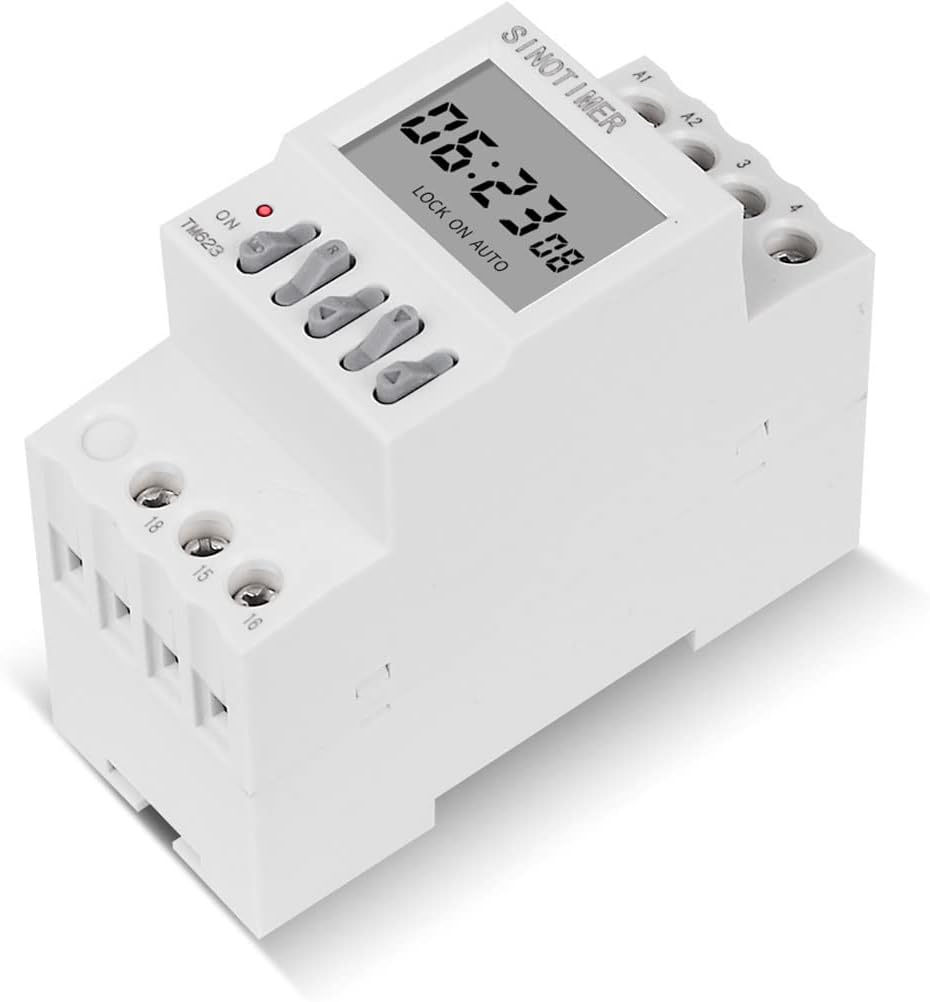


Konfigurazioa eta Instalazioa
Segurtasun-neurriak
- Ensure power is disconnected before any installation or wiring work.
- Instalazioa elektrizista kualifikatu batek egin behar du.
- Do not exceed the maximum load capacity of 16A.
Muntaketa
The TM623 is designed for 35mm DIN rail installation. Snap the device onto the DIN rail securely within your electrical panel or enclosure.
Kableatu-diagrama
Refer to the diagram printed on the side of the device (Figure 4) for detailed wiring instructions. The device has terminals for power input (A1, A2) and switch output (15, 16, 18).
1. Single Phase Wiring
For controlled appliances powered in single-phase, if the working current exceeds the rated value of this switch (16A), an external AC contactor must be used for expansion control. Connect the power supply to A1 and A2. Connect the load through terminals 15, 16, and 18 as per the contactor's requirements.
2. Three Phase Wiring
If the controlled appliance is supplied with three-phase power, an external AC contactor is required. The timer switch will control the coil of the AC contactor, which in turn switches the three-phase load. Connect the timer's output (e.g., 15 and 18) to the contactor's coil terminals.
Funtzionamendu-argibideak
Initial Power-Up and Time Setting
- Upon first power-up, the display will show the current time.
- The internal battery will charge automatically.
- Set the current time and day using the appropriate buttons (refer to the device's button labels for specific functions like 'MD' for mode/menu, arrow keys for adjustment).
ON/OFF orduak programatzea
The TM623 allows for 8 ON/OFF settings per day. The astronomical function automatically adjusts these times based on the programmed latitude and longitude.
- Press the 'MD' button to enter programming mode.
- Use the arrow keys to navigate through the program settings (e.g., 1 ON, 1 OFF, 2 ON, 2 OFF, etc.).
- Set the desired ON time for each program.
- Set the desired OFF time for each program.
- Repeat for up to 8 ON/OFF cycles.
- Exit programming mode to save settings.
Latitude and Longitude Setting
For the astronomical function to work correctly, you must input your geographical coordinates.
- Access the latitude/longitude setting menu (consult the device's specific button sequence, often through the 'MD' button).
- Input the correct latitude for your location.
- Input the correct longitude for your location.
- Save the settings. The device will then calculate sunrise and sunset times daily.
Eskuzko gainidaztea
The device typically has a manual override button (often labeled 'ON/AUTO/OFF' or similar) to temporarily switch the output ON or OFF, or to return to automatic mode.
- ON: Forces the output ON.
- DESaktibatuta: Forces the output OFF.
- AUTOA: Returns to programmed automatic operation.
Mantentzea
- Mantendu gailua garbi eta hautsik gabe. Erabili zapi lehor eta leun bat garbitzeko.
- Ez erabili garbitzaile edo disolbatzaile urratzailerik.
- Ziurtatu gailuaren inguruan aireztapen egokia gehiegi berotzea saihesteko.
- The internal battery is rechargeable and designed for long life. No user maintenance is required for the battery.
Arazoak konpontzea
| Arazoa | Kausa posiblea | Irtenbidea |
|---|---|---|
| Pantaila hutsik dago | No power supply; Internal battery fully discharged. | Check power connections (220V AC). Allow time for internal battery to charge after power is restored. |
| Timer not switching at programmed times | Incorrect programming; Device in manual ON/OFF mode; Incorrect latitude/longitude settings. | Verify program settings (ON/OFF times). Ensure device is in 'AUTO' mode. Double-check latitude and longitude inputs. |
| Output not turning ON/OFF | Overload (if direct connection); Faulty wiring; Internal fault. | If load exceeds 16A, ensure an external contactor is used. Check all wiring connections. If problem persists, contact support. |
| Time error is significant | Environmental factors; Internal clock drift. | The device has a time error of <1s/day, which is normal. If significantly more, contact support. |
Bermea eta Laguntza
For warranty information and technical support, please contact SINOTIMER customer service through their official website or the retailer from whom you purchased the product. Please have your model number (TM623) and UPC (780744817736) ready when contacting support.
For more information, visit the official SINOTIMER store: SINOTIMER Store on Amazon


