1. Sarrera
This manual provides detailed instructions for the safe and efficient operation of your HANMATEK HM305T Programmable DC Power Supply. The HM305T is a high-precision, adjustable DC power supply designed for laboratory, research, and repair applications, offering stable and reliable power output.
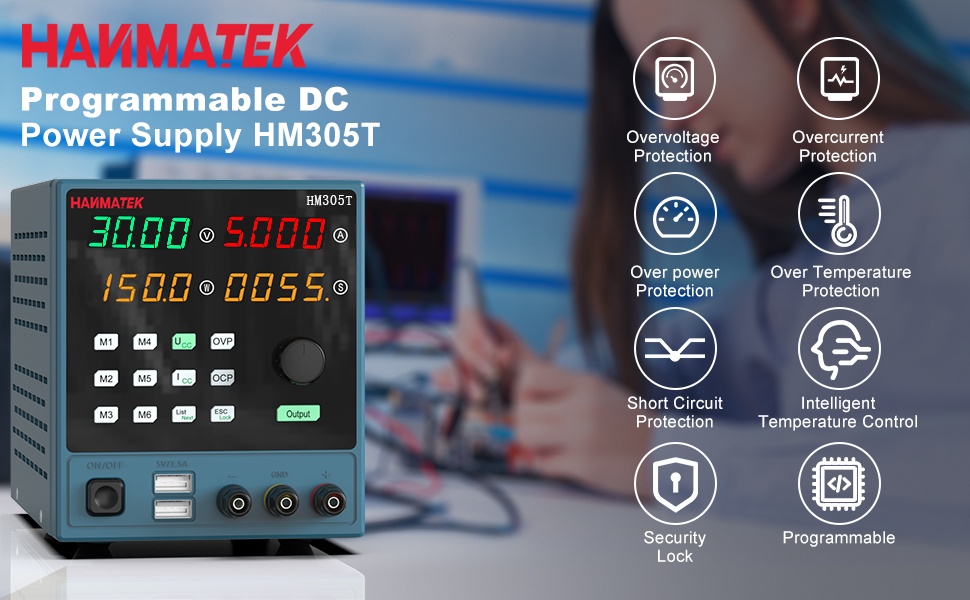
Figure 1: HANMATEK HM305T Programmable DC Power Supply overview, highlighting key features such as overvoltage protection, overcurrent protection, and intelligent temperature control.
2. Ezaugarri nagusiak
The HANMATEK HM305T is equipped with advanced features to ensure precision, safety, and versatility:
- High Precision Output: Provides adjustable voltage from 0-30V and current from 0-5A, with a resolution of 10mV and 1mA.
- Four-Digit Display: Simultaneously displays output voltage, current, power, and time with high accuracy.
- Babes funtzio anitzak: Bolumen baino gehiago barne hartzen ditutage Protection (OVP), Over Current Protection (OCP), Over Power Protection (OPP), Over Temperature Protection (OTP), and Short-Circuit Protection.
- Kontrol programagarria: Connects to a PC via USB for software control and programming functions.
- USB bikoitza kargatzeko ataka: Front-panel 5V 1.5A USB ports for convenient device charging.
- Memoria biltegiratzea: Six groups of parameter shortcut keys (M1-M6) for quick recall of frequently used settings.
- Hozte-haizagailu adimenduna: Automatically adjusts fan speed based on temperature to maintain optimal operating conditions.
- Output ON/OFF Switch: One-key control for output, allowing pre-setting of values before activation.
- Teklatuaren blokeoa: Funtzionamenduan zehar ezarpenetan ustekabeko aldaketak egitea saihesten du.

Figure 2: The HM305T features a high-precision four-digit display for voltage, current, and power, shown alongside other measurement devices for comparison.
3. Paketearen edukia
Egiaztatu elementu guztiak paketean daudela kutxa irekitzean:
- HANMATEK HM305T Programmable DC Power Supply
- Elikatze-kablea
- USB komunikazio kablea
- Test Leads (Alligator clips)
- Argibide eskuliburua
- Software CD (for PC control)

Figure 3: All items included in the HANMATEK HM305T package, neatly arranged.
4. Produktua amaitu daview eta Kontrolak
Familiarize yourself with the front and rear panels of the power supply.

Figure 4: Detailed diagram of the HM305T's front and rear panels, indicating the location and function of all controls and ports.
Aurreko paneleko kontrolak:
- liburukiatage Pantaila: Irteerako bolumena erakusten dutage.
- Uneko pantaila: Irteerako korrontea erakusten du.
- Power/Menu/Status Display: Shows output power, menu options, or status.
- Time/Status Display: Shows output time or status.
- liburukiatage Setting Key (UCV): Press to adjust voltage.
- Current Setting Key (ICC): Press to adjust current.
- Rotating Jog Wheel: Used to adjust values when setting voltage edo korronte.
- Voltage Setting Key (OVP): Sets the overvoltage babes muga.
- Over Current Setting Key (OCP): Sets the overcurrent protection limit.
- Output On/Off Switch: Potentzia irteera txandakatzen du.
- Memory Shortcut Keys (M1-M6): Store and recall up to six sets of voltage eta egungo parametroak.
- List Next/Mode Key: Navigates through lists or changes modes.
- ESC/Keyboard Lock Key: Exits menu or locks/unlocks the keyboard.
- Dual USB Output Charging Key (5V/1.5A): Activates the front USB charging ports.
- Irteerako terminalak: Positive (+), Negative (-), and Ground (GND) connections for load.
Atzeko panelaren osagaiak:
- Hozte haizagailua: Dissipates heat from the unit.
- USB Komunikazio Interfazea: Connects to a PC for software control.
- CA potentzia sarrera: Connects the power supply to the mains electricity.
- Fusiblearen euskarria: Babes-fusiblea dauka.
5. Konfigurazioa
- Lekua: Jarri elikatze-iturria gainazal egonkor eta lau batean, aireztapen egokia duena. Ziurtatu atzeko hozte-haizagailua ez dagoela oztopatuta.
- Potentzia-konexioa: Connect the provided AC power cable to the AC Power Input on the rear panel and then to a suitable mains power outlet.
- USB konexioa (aukerakoa): For PC control, connect the provided USB communication cable from the USB Communication Interface on the rear panel to your computer. Install the software from the included CD or download the latest version from the HANMATEK webgunea.
- Hasierako piztea: Press the Power Button on the front panel to turn on the unit. The display will illuminate.
6. Funtzionamendu-argibideak
6.1 Ezarpena Voltage eta Korrontea
- Ensure the output is OFF (Output button LED is off).
- Sakatu UCV (Voltage Setting) key. The voltage display will start blinking.
- Biratu Rotating Jog Wheel to adjust the desired voltage. Press the jog wheel to move between digits for fine adjustment.
- Sakatu ICC (Current Setting) key. The current display will start blinking.
- Biratu Rotating Jog Wheel to adjust the desired current limit. Press the jog wheel to move between digits.
- Once settings are complete, press the Irteera button to enable the power output. The Output button LED will illuminate.
6.2 Using Memory Functions (M1-M6)

Figure 5: The memory buttons (M1-M6) allow for quick storage and recall of frequently used voltage eta egungo ezarpenak.
- To Save Settings: Ezarri nahi duzun bolumenatage and current. Press and hold one of the memory keys (M1-M6) for approximately 3 seconds until a confirmation beep or display change indicates the settings are saved.
- To Recall Settings: Briefly press the desired memory key (M1-M6). The stored voltage eta uneko balioak kargatuko dira.
6.3 Voltage Protection (OVP) and Over Current Protection (OCP)
These functions protect your connected load from excessive voltage edo korronte.
- Setting OVP: Sakatu OVP key. The OVP value will blink. Use the Rotating Jog Wheel to set the maximum allowable output voltage. Sakatu OVP berriro baieztatzeko.
- Setting OCP: Sakatu OCP key. The OCP value will blink. Use the Rotating Jog Wheel to set the maximum allowable output current. Press OCP berriro baieztatzeko.
6.4 Keyboard Lock
Ezarpenetan ustekabeko aldaketak saihesteko, sakatu eta eutsi ESC/Lock key for 3 seconds to lock the keyboard. Repeat to unlock.
6.5 Using Dual USB Charging Ports

Figure 6: The front panel features two 5V 1.5A USB ports for convenient charging of external devices.
Connect your USB-powered devices to the 5V/1.5A USB ports on the front panel. These ports provide a fixed 5V output at up to 1.5A for charging or powering compatible devices.
6.6 PC Software Control
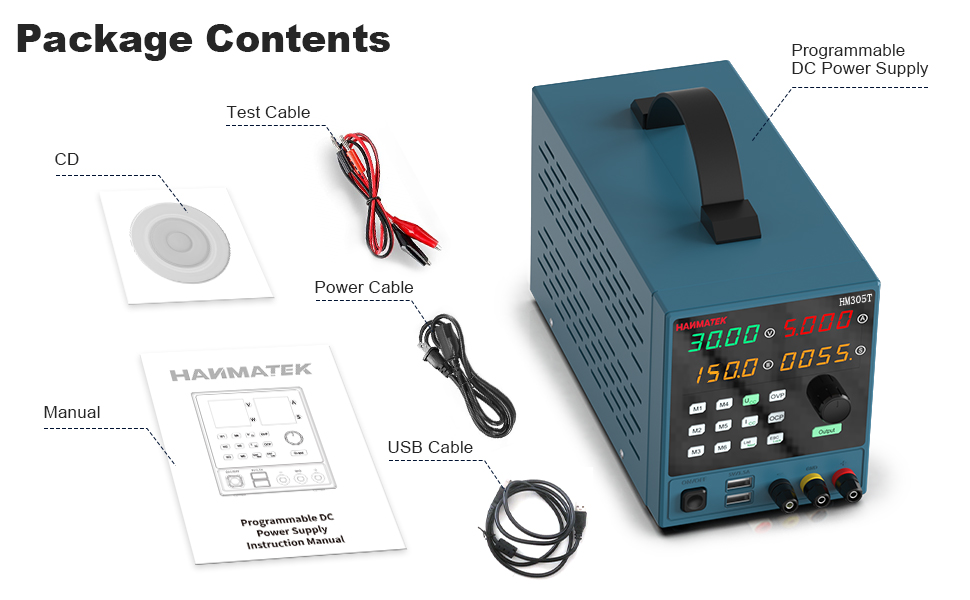
Figure 7: The PC software interface allows for remote control, data logging, and advanced programming of the HM305T power supply.
Install the provided software on your computer. Connect the power supply to your PC using the USB communication cable. The software allows for remote control of voltage and current, data logging, and advanced programming functions. Refer to the software's dedicated help documentation for detailed usage instructions.
7. Mantentzea
7.1 Garbiketa
Regularly clean the exterior of the power supply with a soft, dry cloth. Do not use abrasive cleaners or solvents. Ensure the unit is powered off and disconnected from the mains before cleaning.
7.2 Hozte haizagailua

Figure 8: The rear cooling fan ensures proper heat dissipation for stable operation.
Periodically check the cooling fan and its vents for dust accumulation. Use compressed air to gently clear any dust to ensure proper airflow and prevent overheating. Do not attempt to disassemble the unit to clean the fan.
7.3 Fusiblearen ordezkapena

Figure 9: The fuse holder is located on the rear panel, integrated with the AC power input.
If the unit fails to power on, the fuse may need replacement. Ensure the power supply is disconnected from the mains. Carefully remove the fuse holder from the AC power input socket using a small flat-head screwdriver. Replace the fuse with one of the same type and rating (refer to specifications for details). Reinsert the fuse holder securely.
8. Arazoak
- Potentziarik gabe:
- Check if the power cable is securely connected to both the unit and the mains outlet.
- Verify the mains outlet is functional.
- Check and replace the fuse if necessary (refer to Section 7.3).
- Irteerarik ez Voltage/Gaur egungoa:
- Ziurtatu Irteera button is pressed and its LED is illuminated.
- Check if OVP or OCP limits have been triggered. Adjust limits or reset the unit if protection is active.
- Verify that the load is correctly connected to the output terminals.
- Ziurtatu multzoa voltage and current values are not zero.
- Irakurketa okerrak:
- Ensure proper connection of test leads to the load.
- Compare readings with a calibrated multimeter to verify accuracy. If significant discrepancies exist, contact support.
- Memory Settings Not Saving (M1-M6):
- Ensure you are pressing and holding the memory key for approximately 3 seconds to save. A brief press will recall.
- If issues persist, try a factory reset (refer to manual for specific procedure, if available, or contact support).
- PC Software Connection Issues:
- Egiaztatu USB kablea ondo konektatuta dagoela.
- Ensure the correct drivers are installed on your PC.
- Check the software settings for the correct COM port selection.
9. Segurtasun informazioa
Observe the following safety precautions to prevent electric shock, injury, or damage to the unit:
- Konektatu beti elikatze-iturria lurrera konektatutako entxufe batera.
- Ez erabili unitatea hezetasun edo lehortasun lekuetan.amp baldintzak.
- Ez ireki c-a.asinElikatze-iturriaren g. Barruan ez dago erabiltzaileak konpondu dezakeen piezarik, eta horrek bermea baliogabetzen du eta deskarga elektrikoaren arriskua dakar.
- Ziurtatu aireztapen egokia unitatearen inguruan, gehiegi berotzea saihesteko.
- Ez gainditu gehienezko bolumenatage and current ratings of the power supply or the connected load.
- Utilize the Over Voltage Protection (OVP) and Over Current Protection (OCP) features to safeguard your circuits.
- Disconnect the power supply from the mains before performing any maintenance or connecting/disconnecting loads.
- Mantendu haurrak gailutik urrun.

Figure 10: The internal components of the HM305T are designed with multiple protection features including overvoltage, overcurrent, overpower, overtemperature, and short-circuit protection.
10. Zehaztapenak
| Parametroa | Balioa |
|---|---|
| Eredua | HM305T |
| Irteera boltage Barrutia | 0-30V |
| Irteera-korrontearen barrutia | 0-5A |
| Irteera Potentzia | 150 Watt |
| liburukiatage Ebazpena | 10mV |
| Egungo Ebazpena | 1mA |
| Bistaratzea | 4-digit LED (Voltage, Current, Power, Time) |
| Babes-eginbideak | OVP, OCP, OPP, OTP, Short-Circuit |
| USB kargatzeko atakak | 2 x 5V/1.5A |
| Komunikazio Interfazea | USBa |
| Materiala | PC (polikarbonatoa) |
| Neurriak (L x W x H) | 35.61 x 21.49 x 17.81 cm (gutxi gorabehera 14 x 8.5 x 7 hazbete) |
| Pisua | 2.42 kg (5.34 lb inguru) |

Figure 11: Approximate dimensions of the HM305T power supply.
11. Bermea eta Laguntza
The HANMATEK HM305T Programmable DC Power Supply comes with a standard manufacturer's warranty. For specific warranty terms, please refer to the warranty card included in your package or visit the official HANMATEK webgunea.
For technical support, troubleshooting assistance beyond this manual, or warranty claims, please contact HANMATEK customer service through their official channels. Provide your model number (HM305T) and purchase details when contacting support.


