1. Sarrera
This manual provides detailed instructions for the LFF DAB Plus Digital FM Radio. It covers setup, operation, maintenance, and troubleshooting to ensure optimal performance and user experience. Please read this manual thoroughly before using the device.

Aurrealdea view of the LFF DAB Plus Digital FM Radio, showing the speaker grille, color display, and extended antenna.
2. Paketearen edukia
Mesedez, egiaztatu paketea elementu hauek dituen:
- 1 x LFF DAB Plus Digital FM Radio
- 1 x CA-ko egokitzailea
- 1 x Hasierako gida azkarra
3. Produktua amaitu daview
Familiarize yourself with the radio's components and controls.
3.1 Ezaugarri nagusiak

This diagram illustrates the radio's key functions: DAB+ radio, 60 station presets, FM radio, sleep timer, headphone jack, Bluetooth connectivity, full-color screen, and dual alarm capability.
3.2 Kontrolak eta atakak

Goian eta alboan view of the radio, showing control buttons and knobs on the top panel, and the 3.5mm headphone jack located on the side.
Goiko diagraman ikus daiteke honako hauen kokapena:
- Pizteko botoia: Irratia pizten edo itzaltzen du.
- Modu botoia: Switches between DAB+, FM, and Bluetooth modes.
- Sintonizatu/Hautatu botoia: Rotates to tune stations or navigate menus, press to select.
- Bolumen-eskulekua: Audioaren bolumena doitzen du.
- Aurrez ezarritako botoiak: For saving and recalling favorite stations.
- Alarm/Sleep Timer Button: Alarma eta lo egiteko tenporizadorearen ezarpenetara sartzen da.
- Koloretako pantaila: Geltokiaren informazioa, ordua eta menu aukerak erakusten ditu.
- Aurikularretarako Jack (3.5 mm): Entzun pribaturako.
- DC IN ataka: Korronte alternoko egokitzailea konektatzeko.
- Antena teleskopikoa: Irrati-harrera hobetzeko.
4. Konfigurazioa
4.1 Piztea
The radio can be powered by the included AC adapter or by batteries.
- AC potentzia: Connect the AC power adapter to the DC IN port on the back of the radio and plug it into a wall outlet.
- Bateria Potentzia: Open the battery compartment on the back of the radio and insert 4 x 1.5V AA (LR6) batteries, ensuring correct polarity.
Itzuli view of the radio, detailing the battery compartment for 4x AA batteries, the AC adapter input (5V/1000mA), and the 360° rotatable antenna. Product dimensions are also indicated.
4.2 Antenaren doikuntza
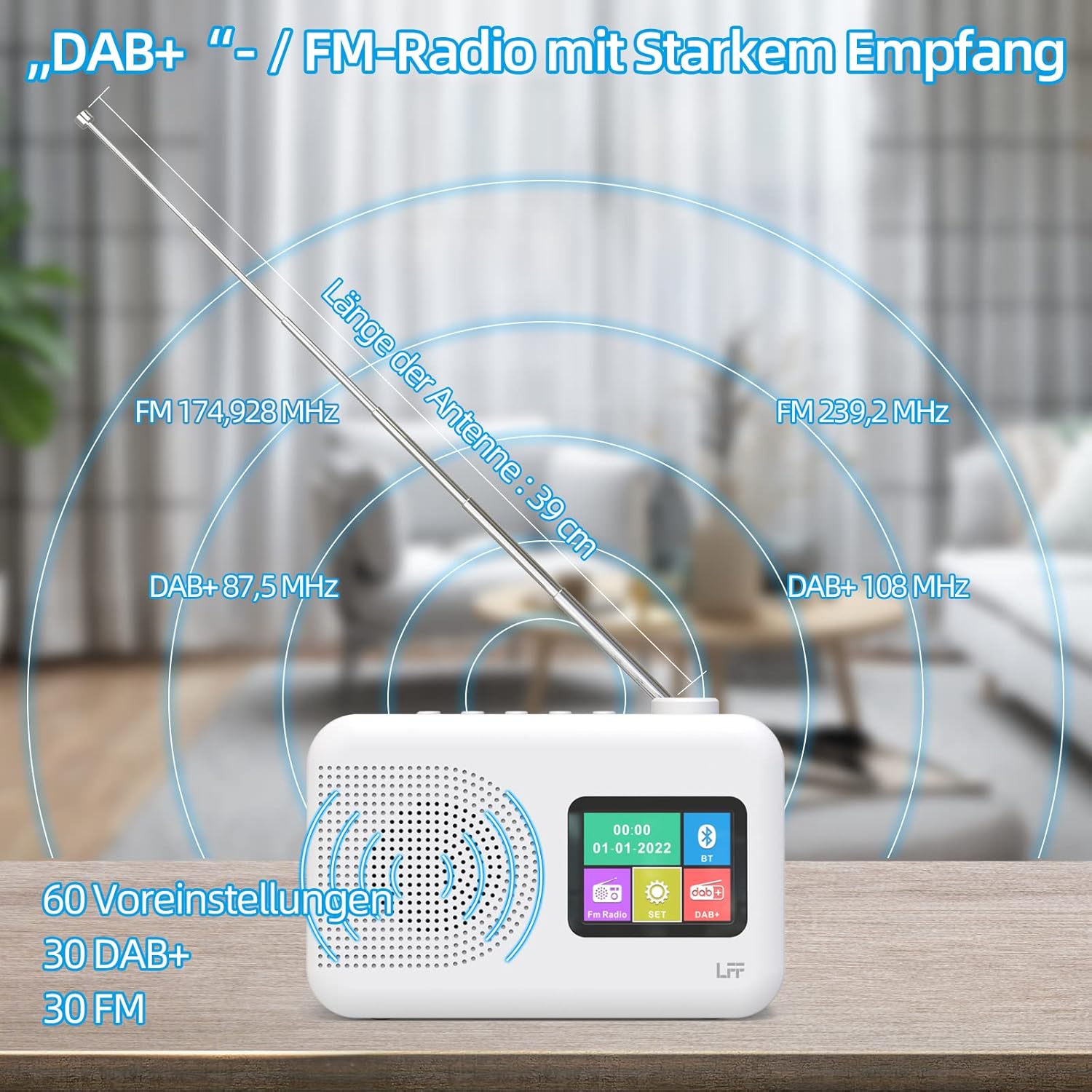
Extend the telescopic antenna fully (approximately 39 cm) and adjust its angle for optimal reception, especially for DAB+ and FM stations.

This diagram illustrates the radio's strong DAB+ and FM reception capabilities with the fully extended 39cm antenna, showing frequency ranges and the capacity for 60 total presets (30 DAB+, 30 FM).
4.3 Hasierako eskaneatzea (DAB+)
- Piztu irratia.
- Ensure the mode is set to DAB+. If not, press the Modua aldatzeko botoia.
- The radio will automatically perform a full scan for available DAB+ stations. This may take a few minutes.
- Once the scan is complete, the radio will display a list of found stations.
5. Funtzionamendu-argibideak
5.1 DAB+ Radio Mode
- Sakatu Modua button to select DAB+ mode.
- Biratu Sintonizatu/Hautatu knob to browse through the available stations.
- Sakatu Sintonizatu/Hautatu botoia estazio bat hautatzeko.
- Aurrez aurreko ezarpenak gordetzea: To save a station, press and hold a Aurrez ezarritakoa button until the display confirms. To recall, briefly press the corresponding Aurrez ezarritakoa button. Up to 30 DAB+ stations can be saved.
5.2 FM Irrati modua
- Sakatu Modua botoia FM modua hautatzeko.
- Biratu Sintonizatu/Hautatu knob to manually tune to a frequency.
- Eduki sakatuta Sintonizatu/Hautatu knob for a few seconds to auto-scan for the next available station.
- Aurrez aurreko ezarpenak gordetzea: Similar to DAB+ mode, press and hold a Aurrez ezarritakoa button to save, and briefly press to recall. Up to 30 FM stations can be saved.
5.3 Bluetooth modua

This diagram illustrates the three primary playback options for the radio: through its internal speaker, via Bluetooth connection to an external device, or using headphones connected to the headphone jack.
- Sakatu Modua botoia Bluetooth modua hautatzeko. Pantailan "Bluetooth parekatzea" edo antzekoa agertuko da.
- Kanpoko gailuan (adibidez, telefono adimendunean), gaitu Bluetooth eta bilatu eskuragarri dauden gailuak.
- Select "LFF Radio" (or similar name) from the list to pair.
- Once paired, you can play audio from your device through the radio's speaker.
- Oharra: This radio acts as a Bluetooth receiver. It does not support connecting to Bluetooth headphones or other Bluetooth speakers.
5.4 Lo egiteko tenporizadorea
Lo egiteko tenporizadoreak irratia automatikoki itzaltzea ahalbidetzen du denbora jakin baten ondoren.

This image depicts the sleep timer function, offering selectable durations of 15, 30, 45, 60, 90, and 120 minutes before the radio automatically powers off.
- Sakatu Alarm/Sleep Timer button repeatedly to cycle through sleep timer options (15 min, 30 min, 45 min, 60 min, 90 min, 120 min, OFF).
- Select your desired duration. The radio will turn off automatically after this time.
5.5 iratzargailua
The radio features a dual alarm function.
- Eduki sakatuta Alarm/Sleep Timer button to enter alarm settings.
- Erabili Sintonizatu/Hautatu knob to set the alarm time, alarm source (DAB+, FM, or buzzer), and volume.
- Sakatu Sintonizatu/Hautatu botoia ezarpen bakoitza berresteko.
- Repeat the process for the second alarm if needed.
5.6 Entzungailuen erabilera
Plug 3.5mm headphones into the headphone jack on the side of the radio for private listening. The internal speaker will automatically mute.
6. Mantentzea
6.1 Garbiketa
- Wipe the radio's surface with a soft, dry cloth.
- Ez erabili garbitzaile, argizari edo disolbatzaile urratzailerik, akabera kaltetu baitezakete.
6.2 Bateria ordezkatzea
When using battery power, replace all four AA batteries when the low battery indicator appears on the display or when performance degrades.
- Ensure the radio is turned off and disconnected from AC power.
- Ireki bateriaren konpartimentuaren estalkia atzealdean.
- Kendu bateria zaharrak eta bota behar bezala.
- Insert new 4 x 1.5V AA (LR6) batteries, observing correct polarity (+/-).
- Itxi bateriaren konpartimenduaren estalkia ondo.
6.3 Screen Protection Film
The radio's display comes with a transparent protective film. For optimal clarity, gently peel off this film before first use.
7. Arazoak
Arazoak badituzu, jo ezazu honako arazo eta irtenbide ohikoenei:
| Arazoa | Kausa posiblea | Irtenbidea |
|---|---|---|
| Botererik ez | AC adapter not connected, batteries depleted or incorrectly inserted. | Check AC adapter connection. Replace batteries or ensure correct polarity. |
| Irrati-harrera eskasa | Antenna not extended, weak signal area, interference. | Fully extend and adjust the telescopic antenna. Move the radio to a different location. Avoid sources of interference. |
| Bluetootha ez da konektatzen | Radio not in Bluetooth mode, device too far, already paired with another device. | Ensure radio is in Bluetooth mode. Keep devices within range. Disconnect from other devices. |
| Soinurik ez | Volume too low, headphones connected, mute activated. | Increase volume. Disconnect headphones. Check if mute is active. |
8. Zehaztapenak
- Marka: LFF
- Eredua: DAB Plus Digital FM Radio
- Kolorea: Zuria
- Konektibitate Teknologia: Bluetootha
- Neurriak (L x W x H): 16.1 cm x 5.9 cm x 10.9 cm
- Doikuntza Teknologia: DAB
- Energia iturria: AC Adapter (5V/1000mA) or 4 x 1.5V AA (LR6) Batteries
- Onartutako irrati-taldeak: DAB+, FM
- DAB+ maiztasun-tartea: 174.928 - 239.2 MHz
- FM maiztasun gama: 87.5 - 108 MHz
- Aurrezarpenak: 30 DAB+, 30 FM
- Antena luzera: 39 cm (extendable)
- Ezaugarri bereziak: DAB Plus Radio, Sleep Timer, Dual Alarm, Headphone Jack, Color Display
- Dakarten osagaiak: DAB Digital Radio, AC Power Adapter, Quick Start Guide
9. Bermea eta Laguntza
For any quality-related issues or technical support, please contact the seller directly. We are committed to resolving any problems you may encounter with your LFF DAB Plus Digital FM Radio.