1. Sarrera
Thank you for choosing the Xigmatek Lux M Micro-ATX Mini Tower PC Case. This manual provides detailed instructions for the installation, operation, and maintenance of your new PC chassis. Please read this manual carefully before beginning the assembly process to ensure proper installation and to maximize the performance and longevity of your system.
The Lux M case is designed to offer a robust and aesthetically pleasing housing for your computer components, featuring a tempered glass side panel, a metallic front panel with a unique cut-out pattern, and pre-installed fixed RGB fans for optimal cooling and visual appeal. It supports Micro-ATX and Mini-ITX motherboards and is compatible with various cooling solutions, including water cooling.
2. Segurtasun informazioa
Mesedez, jarraitu segurtasun neurri hauek instalazioan eta funtzionamenduan zehar:
- Always disconnect the power supply from the wall outlet before installing or removing any components to prevent electric shock.
- Handle all components with care. Avoid touching circuit boards directly; hold them by their edges.
- Wear an anti-static wrist strap when handling sensitive electronic components to prevent electrostatic discharge (ESD) damage.
- Keep the case and components away from liquids, excessive heat, and direct sunlight.
- Ziurtatu ordenagailuaren kaxa behar bezala aireztatuta dagoela gehiegi berotzea saihesteko.
- Mantendu pieza txikiak eta torlojuak haurren eskura ez dauden lekuetan.
3. Paketearen edukia
Egiaztatu elementu guztiak zure paketean daudela. Elementuren bat falta bada edo hondatuta badago, jarri harremanetan zure saltzailearekin.
- Xigmatek Lux M Micro-ATX Mini Tower PC Case
- Accessory box (containing screws, standoffs, cable ties, etc.)
- Erabiltzailearen eskuliburua (dokumentu hau)
4. Produktua amaitu daview
Familiarize yourself with the various parts of your Xigmatek Lux M PC case.
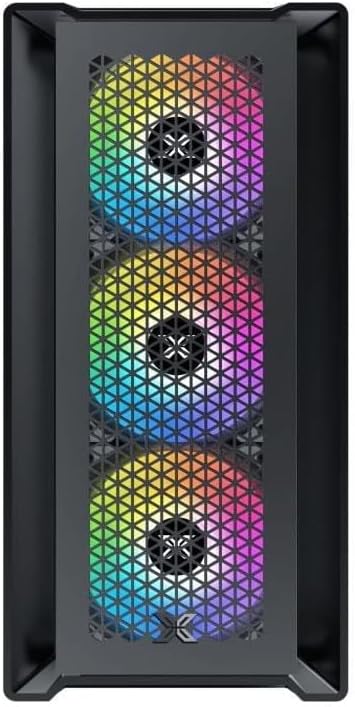
4.1. irudia: Aurrealdea View. This image displays the front of the Xigmatek Lux M case, highlighting the metallic mesh panel with a triangular design and the three pre-installed 120mm fixed RGB fans.

Figure 4.2: Angled Top-Front View. This perspective shows the tempered glass side panel, offering a clear view of the interior, and the top panel with its I/O ports (USB, audio) and power button.
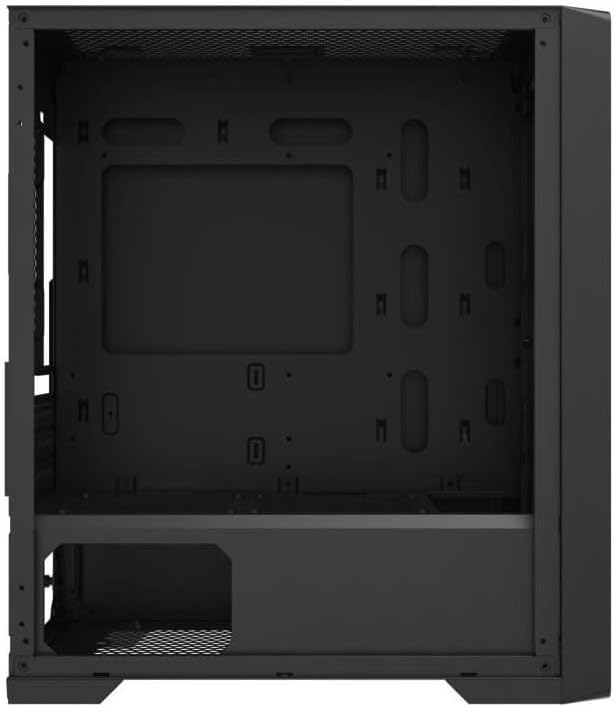
Figure 4.3: Interior Layout. The internal structure of the case, featuring the motherboard mounting tray, cutouts for cable management, and the power supply shroud at the bottom.
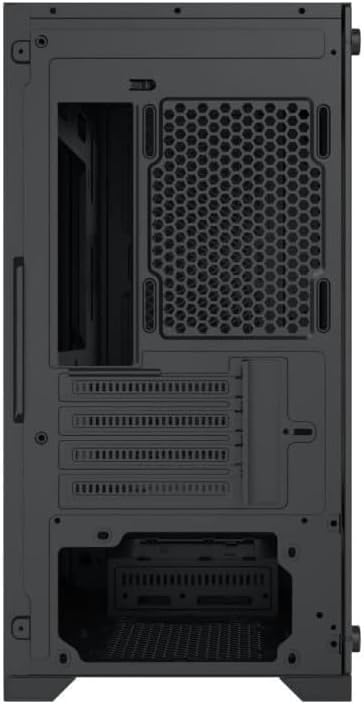
4.4. Irudia: Atzealdea View. This image illustrates the rear of the case, including the expansion slots for graphics cards and other add-in cards, the rear fan mounting area, and the power supply mounting bracket.
5. Konfigurazioa eta instalazioa
Follow these steps to install your computer components into the Xigmatek Lux M case.
5.1. Kasua prestatzea
- Jarri zorroa gainazal lau eta egonkor batean.
- Remove the tempered glass side panel by unscrewing the thumb screws and carefully lifting it off. Set it aside on a soft, non-abrasive surface.
- Remove the opposite steel side panel by unscrewing the thumb screws and sliding it backward.
5.2. Plaka amaren instalazioa
The Lux M supports Micro-ATX and Mini-ITX motherboards.
- Install the I/O shield (if not pre-installed on your motherboard) into the rear opening of the case.
- Align the motherboard with the pre-installed standoffs. Ensure all screw holes on the motherboard match the standoffs.
- Secure the motherboard using the provided motherboard screws. Do not overtighten.
5.3. Elikatze-iturriaren (PSU) instalazioa
The PSU mounts at the rear bottom of the case.
- Sartu elikadura-iturria dagokion konpartimentuan, kaxaren atzealdetik.
- Align the PSU's screw holes with the holes on the case's rear panel.
- Secure the PSU with the provided screws.
5.4. Storage Drive Installation (2.5"/3.5" Drives)
The case supports 2x 2.5"/3.5" storage drives.
- Locate the drive cage beneath the PSU shroud or dedicated 2.5" mounting points behind the motherboard tray.
- For 3.5" HDDs, slide the drive into a drive tray (if applicable) and secure it with screws.
- For 2.5" SSDs, secure them directly to the mounting points using the provided screws.
5.5. Txartel grafikoaren (VGA) eta hedapen-txartelaren instalazioa
Kaxak 320 mm-ko luzera duten txartel grafikoak onartzen ditu.
- Kendu beharrezko hedapen-zirrikituen estalkiak kaxaren atzealdetik.
- Insert your graphics card or other expansion card into the appropriate PCIe slot on your motherboard.
- Secure the card to the case using the expansion slot screws.
5.6. Cooling System Installation (Optional)
The Lux M comes with 4x 120mm X24F fixed RGB fans. It supports additional cooling options.
- CPU hozgailua: Max height of 160mm. Install your CPU cooler according to its manufacturer's instructions.
- Erradiadorearen euskarria: The case supports radiators of 360mm, 240mm, or 120mm. Refer to your radiator's manual for installation. Common mounting locations include the front and top panels.
5.7. Kableen kudeaketa
Erabili plaka basearen erretiluaren atzean dauden kableen bideratze-ebakiak eta lotura-puntuak kableak antolatzeko. Horrek aire-fluxua eta estetika hobetzen ditu.
5.8. Azken Batzarra
- Once all components are installed and cables are managed, reattach the steel side panel and secure it with thumb screws.
- Carefully reattach the tempered glass side panel and secure it with thumb screws.
6. Funtzionamendu-argibideak
After completing the installation, connect your peripherals (monitor, keyboard, mouse) and power cable to the PC. Press the power button located on the top panel of the case to start your system.
The pre-installed X24F RGB fans feature fixed RGB lighting, which will illuminate automatically upon system power-on. No additional software or controller is required for their basic operation.
Ensure that the case's ventilation is not obstructed to maintain optimal airflow and cooling performance.
7. Mantentzea
Mantentze-lan erregularrak zure ordenagailuaren osagaien iraupena eta errendimendu optimoa bermatzen laguntzen du.
- Hautsa garbitzea: Periodically clean dust filters (if present) and the interior of the case using compressed air or a soft brush. Dust accumulation can hinder airflow and lead to overheating.
- Kanpoko garbiketa: Garbitu kanpoko gainazalak leun batekin, damp cloth. Avoid harsh chemicals that may damage the finish or tempered glass.
- Beira tenplatua: Clean the tempered glass panel with a glass cleaner and a microfiber cloth to avoid scratches and streaks.
8. Arazoak
Instalazioan zehar edo ondoren arazoak badituzu, kontuan hartu arazoak konpontzeko ohiko urrats hauek:
- Potentziarik gabe:
- Ziurtatu elikatze-kablea ondo konektatuta dagoela bai elikatze-iturrira bai hormako entxufera.
- Check that the PSU switch is in the 'ON' position.
- Egiaztatu aurrealdeko paneleko pizteko etengailuaren kablea plaka basearen aurrealdeko paneleko goiburura behar bezala konektatuta dagoela.
- Fans Not Spinning / RGB Not Lighting:
- Ensure all fan power cables are securely connected to the motherboard or a fan controller.
- For RGB, confirm that any necessary RGB headers are connected to the motherboard (though the included fans are fixed RGB and should light up with power).
- Ez dago pantaila-irteerarik:
- Verify that your monitor cable is connected to the graphics card (if installed) and not the motherboard's integrated graphics port.
- Berriro sartu grafiko txartela bere PCIe zirrikituan.
- Gehiegizko berotzea:
- Ensure all case fans are spinning and oriented correctly for optimal airflow (intake/exhaust).
- Garbitu hauts-iragazkiak eta barneko osagaiak.
- Verify that the CPU cooler is properly seated and making good contact with the CPU.
For more complex issues, consult your component manuals or seek assistance from Xigmatek support or a qualified technician.
9. Zehaztapenak
| Ezaugarri | Zehaztapena |
|---|---|
| Marka | Xigmatek |
| Ereduaren izena | Lux M |
| Modelo zenbakia | EN48540 |
| Kasu mota | Mini Dorrea |
| Plaka amaren bateragarritasuna | Mikro-ATX, Mini-ITX |
| Materiala | Tempered Glass (side panel), Metal (front panel) |
| Kolorea | Beltza |
| Aurrez instalatutako zaleak | 4 x 120mm X24F Fixed RGB Fans |
| Erradiadorearen euskarria | 360 mm, 240 mm, 120 mm |
| CPU hozgailuaren gehienezko altuera | 160 mm |
| VGA luzera maximoa | 320 mm |
| PSUaren gehienezko luzera | 165 mm |
| Biltegiratze-badiak | 2x 2.5"/3.5" |
| Ezaugarri bereziak | RGB Lighting, Triangular Mesh Front Design |
10. Bermea eta Laguntza
Xigmatek products are manufactured to the highest quality standards. For warranty information and technical support, please refer to the warranty card included with your product or visit the official Xigmatek webgunea. Gorde erosketaren egiaztagiria bermearen erreklamazioetarako.
For further assistance, you may contact Xigmatek customer support through their official channels.


