1. Produktua amaitu daview
The Oladance OWS1 Open Ear Headphones offer a unique open-ear design for comfort and situational awareness. These wireless Bluetooth 5.2 headphones feature dual 16.5mm drivers for high-quality sound and extended battery life, making them suitable for various activities.
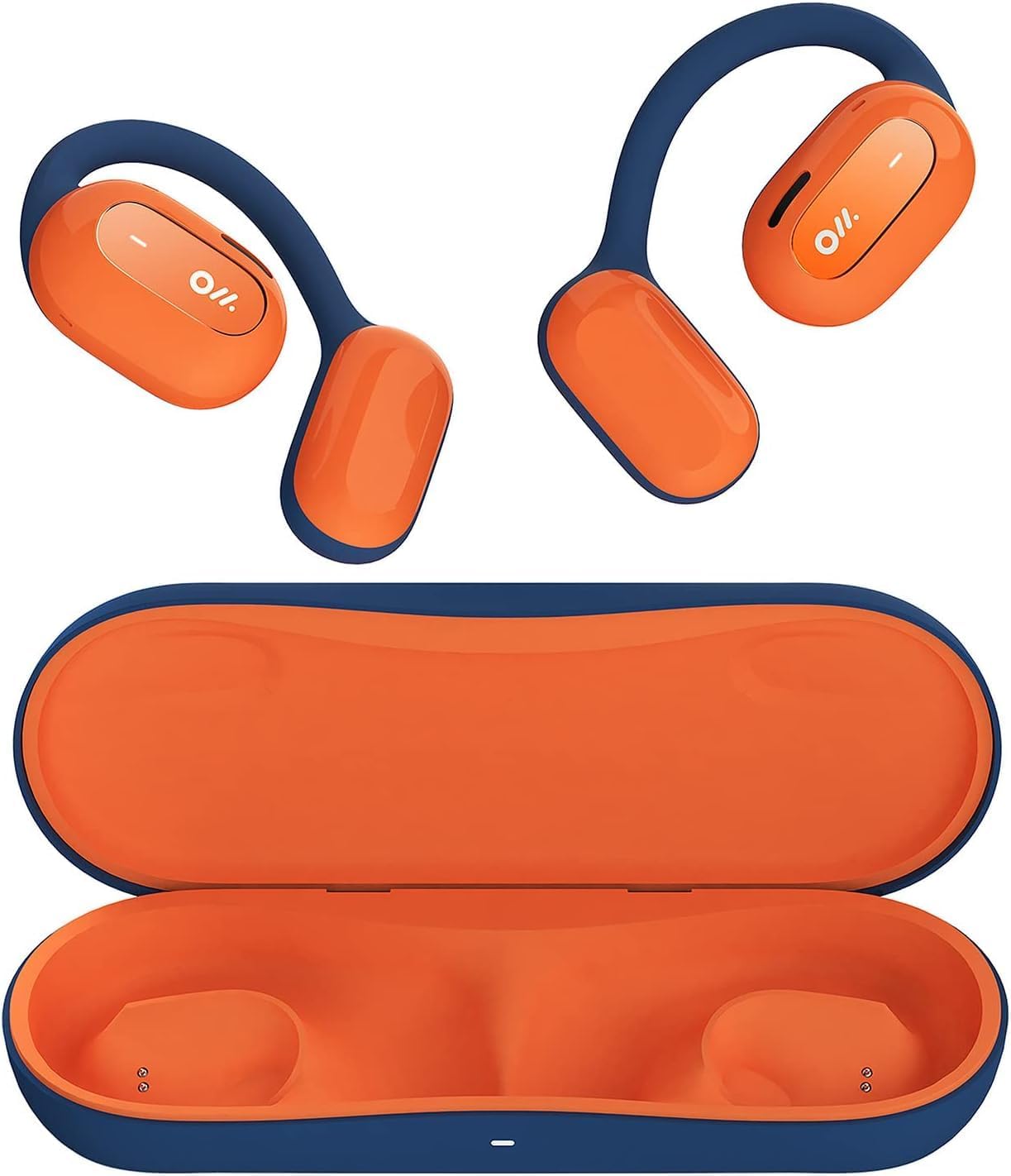
Image 1: Oladance OWS1 Open Ear Headphones and their carry case.
2. Zer dago kutxan
- 1 × Oladance Wearable Stereo (Pair of Open Ear Headphones)
- 1 × Non-charging Carry Case
- 1 × C motako kablea
- 1 × Erabiltzailearen eskuliburua
3. Ezaugarri nagusiak
- Benetako belarri irekiaren diseinua: Earbuds rest gently on top of the ear, avoiding insertion into the ear canal for enhanced comfort and situational awareness.
- 360° Superior Sound: Equipped with dual powerful 16.5mm dynamic drivers and bio-diaphragm technology for rich, clear audio across all volume levels.
- Anti-Hearing Loss Focus: Designed to prevent common health issues associated with traditional earbuds by not blocking the ear canal, reducing pressure and potential hearing damage.
- Extended 16-Hour Playtime: Features a built-in 160mAh battery and low-consumption algorithms, providing up to 16 hours of continuous playback on a single charge. Note: A separate charging case is required for extended playtime beyond the included carry case.
- Egokitze segurua eta erosoa: Multi-point support system distributes weight evenly across the ear, ensuring a stable and comfortable fit for various activities.

Image 2: The Oladance OWS1 headphones are designed for a secure and comfortable fit, ideal for activities like yoga.
4. Konfigurazio gida
4.1 Hasierako karga
Before first use, fully charge your Oladance OWS1 headphones. Connect the provided Type-C cable to the charging port on the headphones and a compatible USB power source. The LED indicator will show charging status.
4.2 Piztu/Itzaltzea
- Pizteko: Press and hold the power button (location typically on one of the earbud units) for approximately 2-3 seconds until you hear an audible prompt or see an LED indicator light up.
- Itzaltzeko: Press and hold the power button for approximately 3-5 seconds until you hear an audible prompt or the LED indicator turns off.
4.3 Bluetooth parekatzea
- Ziurtatu entzungailuak itzalita daudela.
- Press and hold the power button for approximately 5-7 seconds until the LED indicator flashes red and blue alternately. This indicates the headphones are in pairing mode.
- Zure gailuan (telefono adimenduna, tableta, ordenagailua), joan Bluetooth ezarpenetara.
- Bilatu "Oladance OWS1" eskuragarri dauden gailuen zerrendan.
- Select "Oladance OWS1" to connect. Once connected, the LED indicator will typically flash blue slowly or turn off, and you will hear a confirmation tone.

Image 3: The Oladance OWS1 headphones are designed for an ergonomic and stable fit during various activities.
5. Funtzionamendu-argibideak
5.1 Oinarrizko kontrolak
| Funtzioa | Ekintza |
|---|---|
| Erreproduzitu/Pausatu musika | Sakatu behin funtzio anitzeko botoia. |
| Hurrengo Pista | Sakatu bi aldiz funtzio anitzeko botoia. |
| Aurreko Pista | Sakatu hiru aldiz funtzio anitzeko botoia. |
| Bolumena igo | Sakatu behin Bolumen + botoia. |
| Bolumena jaitsi | Sakatu behin Bolumenaren - botoia. |
| Erantzun/Amaitu deia | Single press the Multi-function button during an incoming call or active call. |
| Deia baztertu | Sakatu eta eutsi funtzio anitzeko botoia 2 segundoz sarrerako dei bat jasotzen ari zaren bitartean. |
| Aktibatu Ahots Laguntzailea | Eduki sakatuta funtzio anitzeko botoia 2 segundoz. |
5.2 Puntu anitzeko konexioa
The Oladance OWS1 headphones support multi-point connection, allowing them to be connected to two Bluetooth devices simultaneously. This enables seamless switching between devices without re-pairing.
- Ensure the headphones are paired with the first device.
- Put the headphones into pairing mode again (usually by holding the power button until the LED flashes red and blue).
- On the second device, search for "Oladance OWS1" in the Bluetooth settings and connect.
- The headphones should now be connected to both devices. Audio will automatically switch to the device playing content or receiving a call.

Image 4: The open-ear design allows for comfortable extended wear, even during work or calls.
6. Zainketa eta Mantentzea
- Garbiketa: Erabili oihal leun eta lehor bat entzungailuak garbitzeko. Saihestu produktu kimiko gogorrak edo material urratzaileak erabiltzea.
- Biltegiratzea: Store the headphones in their provided non-charging carry case when not in use to protect them from dust and damage.
- Uraren erresistentzia: The headphones are water-resistant (IPX4 rated). Avoid submerging them in water or exposing them to high-pressure water jets. Dry thoroughly if they get wet.
- Tenperatura: Saihestu entzungailuak tenperatura altuetan (beroan edo hotzean) edo hezetasun handietan jartzea.

Image 5: The included carry case protects your Oladance OWS1 headphones during transport and storage.
7. Arazoak
- Ezin da piztu
- Ziurtatu entzungailuak guztiz kargatuta daudela. Konektatu itzazu energia-iturri batera C motako kablea erabiliz.
- Ezin da gailuarekin parekatu
- Ziurtatu entzungailuak parekatze moduan daudela (LEDa gorri eta urdin keinuka).
- Itzali eta piztu zure gailuaren Bluetooth-a.
- Garbitu aurreko Bluetooth konexioak zure gailuan.
- Hurbildu entzungailuak gailura.
- Ez dago soinurik edo bolumen baxurik
- Egiaztatu entzungailuen eta konektatutako gailuaren bolumen-mailak.
- Ziurtatu entzungailuak behar bezala konektatuta daudela zure gailura.
- Saiatu audioa beste aplikazio edo iturri batetik erreproduzitzen.
- Etengabeko konexioa
- Ziurtatu entzungailuen eta gailuaren artean oztoporik ez dagoela.
- Saihestu interferentzia elektromagnetiko handiak.
- Keep the headphones within the effective Bluetooth range (typically 10 meters).
8. Produktuaren zehaztapenak
| Ezaugarri | Xehetasuna |
|---|---|
| Modelo zenbakia | OLA02 |
| Marka | Oladance |
| Konektibitate Teknologia | Haririk gabekoa (Bluetooth 5.2) |
| Belarrien Kokatzea | Belarri irekia |
| Forma-faktorea | Belarri irekia |
| Gidariaren tamaina | 16.5 mm-ko gidari dinamiko bikoitzak |
| Bateriaren iraupena (batez bestekoa) | Gehienez 16 ordu |
| Kargatzeko Denbora | Gutxi gorabehera 2 ordu |
| Uraren Erresistentzia Maila | Urarekiko erresistentea (IPX4) |
| Mikrofonoaren formatua | Eraikitakoa |
| Kontrol mota | Multimedia kontrola (botoiak) |
| Materiala | Plastikoa |
| Produktuaren neurriak | 13 x 11 x 457.2 cm |
| Elementuaren pisua | 260 g |

Image 6: A close-up of the Oladance OWS1 headphones, highlighting their design and color.
9. Bermea eta Laguntza
Oladance products are covered by a limited warranty. For detailed warranty information, product support, or service inquiries, please refer to the official Oladance webwebgunera edo jarri harremanetan zuzenean bezeroarentzako arreta-zerbitzura. Gorde erosketaren frogagiria berme-erreklamazioetarako.
Laguntza gehiago lortzeko, mesedez bisitatu: www.oladance.com