Sarrera
This manual provides detailed instructions for the operation and maintenance of your Midland T10 FRS Walkie Talkie. The T10 is a compact and user-friendly two-way radio designed for reliable communication in various settings, including family activities, camping, and hiking. It features 22 FRS channels, NOAA Weather Alert, and eVOX hands-free operation. Please read this manual thoroughly to ensure proper use and to maximize the performance of your device.
Produktua amaituview
Ezaugarri nagusiak:
- 22 FRS Channels for clear communication.
- 38 CTCSS Privacy Codes to minimize interference.
- eVOX (Easy Voice and Sound Activated Transmission) for hands-free operation.
- NOAA Eguraldi Eskaneatzea + Alerta eguraldi txarraren eguneratzeetarako.
- Channel Scan and Monitor Mode functions.
- Keystroke Tones and Silent Operation options.
- Up to 20-mile range in open areas.
Zer dago Kutxan:
- Midland T10 Two-Way Radios (quantity as purchased, e.g., 4 radios)
- Belt Clips (one per radio)
- Erabiltzailearen eskuliburua (dokumentu hau)
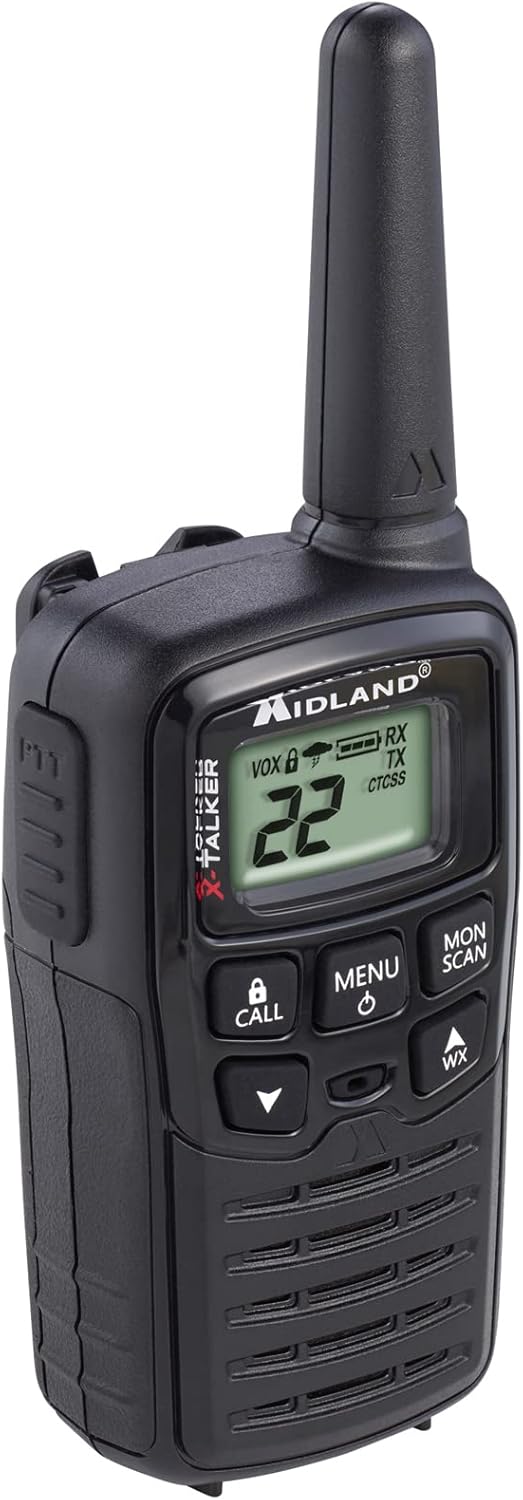
Figure 1: Midland T10 Walkie Talkie, angled front view showing display and buttons.
Konfigurazioa
1. Bateriaren instalazioa
- Ziurtatu irratia itzalita dagoela.
- Bilatu bateriaren konpartimentuaren estalkia irratiaren atzealdean.
- Sakatu fitxa behera eta irristatu estalkia behera kentzeko.
- Insert 3 AAA alkaline batteries (not included) into the compartment, observing the correct polarity (+/-) as indicated.
- Jarri bateriaren konpartimentuaren estalkia gora irristatuz, bere lekuan sartu arte klik egin arte.
Garrantzitsua: Use only AAA alkaline batteries. Do not mix old and new batteries, or different types of batteries.
2. Gerrikoaren klipa erantsi
- Align the belt clip with the grooves on the back of the radio.
- Slide the belt clip upwards until it locks securely into position.
- To remove, push the release tab on the belt clip and slide it downwards.

2. irudia: Aldea view of the Midland T10 Walkie Talkie with the belt clip attached.
Funtzionamendu-argibideak
1. Piztu/Itzali
- Pizteko: Eduki sakatuta MENU/POTENCIA button until the display illuminates and you hear a tone.
- Itzaltzeko: Eduki sakatuta MENU/POTENCIA botoia pantaila itzali arte.
2. Bolumena doitzea
- Sakatu UP (▲) button to increase the volume.
- Sakatu BEHERA (▼) button to decrease the volume.
- The current volume level (1-8) will be displayed.
3. Kanalaren hautaketa
- Irratia piztuta, sakatu MENUA botoia behin. Kanalaren zenbakia keinuka hasiko da.
- Erabili UP (▲) edo BEHERA (▼) buttons to select one of the 22 FRS channels.
- Sakatu MENUA button again to confirm your selection, or wait 5 seconds for the selection to be automatically saved.
4. Transmisioa eta Jasotzea
- Transmititzeko: Eduki sakatuta PTT (Push To-Talk) button located on the side of the radio. Speak clearly into the microphone. Release the PTT button to stop transmitting.
- Jasotzeko: Ziurtatu PTT botoia ez duzula sakatuta. Irratiak automatikoki jasoko ditu seinaleak hautatutako kanalean.
5. Privacy Codes (CTCSS)
Privacy Codes help reduce interference from other users on the same channel. Your radio has 38 CTCSS codes.
- Kanala hautatu ondoren, sakatu botoia MENUA botoia bi aldiz sakatu. Pribatutasun-kodearen zenbakia keinuka hasiko da.
- Erabili UP (▲) edo BEHERA (▼) buttons to select a privacy code (01-38). Code 00 means no privacy code is active.
- Sakatu MENUA button again to confirm, or wait 5 seconds.
Oharra: Bi irratiak kanal eta pribatutasun kode berdinean konfiguratu behar dira komunikatzeko.
6. eVOX (Hands-Free Operation)
eVOX allows you to transmit without pressing the PTT button.
- Sakatu MENUA button three times. The eVOX sensitivity level will flash (oF, 1-3).
- Erabili UP (▲) edo BEHERA (▼) buttons to select a sensitivity level (1 being highest sensitivity, 3 being lowest). Select "oF" to turn eVOX off.
- Sakatu MENUA button again to confirm, or wait 5 seconds.
7. NOAA Weather Scan + Alert
Your radio can receive NOAA Weather Radio alerts.
- To Activate Weather Scan: Sakatu WX button. The radio will scan 10 NOAA weather channels and lock onto the strongest signal.
- To Activate Weather Alert: While in Weather Scan mode, press the MENUA button. The "AL" icon will flash. Use UP (▲) edo BEHERA (▼) to turn the alert ON or OFF. Press MENUA to confirm. When activated, the radio will sound an alarm if a severe weather alert is broadcast.
- To Exit Weather Mode: Sakatu WX botoia berriro.
8. Call Alert
Sakatu DEITU button to send an audible call tone to other radios on the same channel and privacy code.
9. Monitor Function
The Monitor function allows you to temporarily disable the squelch to listen for weak signals or to check for activity on a channel.
- Eduki sakatuta AL / ESKAN button to activate the Monitor function.
- Release the button to deactivate.
10. Eskaneatze funtzioa
The Scan function allows you to scan all 22 channels for activity.
- Sakatu AL / ESKAN button once (do not hold). The radio will begin scanning.
- When activity is detected, the scan will pause on that channel.
- Sakatu AL / ESKAN botoia berriro eskaneatzea gelditzeko.
Mantentzea
- Garbiketa: Erabili biguna, damp oihal bat irratiaren kanpoaldea garbitzeko. Ez erabili garbitzaile edo disolbatzaile urratzailerik.
- Bateria zaintzea: Irratia denbora luzez erabiliko ez bada, kendu bateriak isuriak saihesteko.
- Biltegiratzea: Gorde irratia leku fresko eta lehor batean, eguzki-argitik eta muturreko tenperaturetatik babestuta.
- Uraren erresistentzia: This radio is not water-resistant. Avoid exposure to water or high humidity.
Arazoak konpontzea
| Arazoa | Irtenbide posiblea |
|---|---|
| Botererik ez. |
|
| Poor range or static. |
|
| Ezin da transmititu. |
|
| Hearing other conversations. |
|
Zehaztapenak
| Modelo zenbakia | FBA-4PK-T10 |
| Kanalak | 22 FRS kanalak |
| Pribatutasun kodeak | 38 CTCSS kodeak |
| Maiztasun barrutia | 462.5625 MHz - 462.7250 MHz |
| Hitz egiteko tartea gehienez | Up to 20 Miles (in open areas) |
| Energia iturria | 3 AAA bateria alkalino (ez daude barne) |
| Elementuaren pisua | 1.23 pounds (for the pack of 4) |
| Produktuaren neurriak | 7 x 7 x 4 hazbete |
| Uraren Erresistentzia Maila | Ez Urarekiko Erresistentea |
Bermea eta Laguntza
The Midland T10 FRS Walkie Talkie comes with an industry-leading 3 urteko bermea against defects in materials and workmanship. This warranty covers normal use and service. For warranty claims or technical support, please refer to the contact information provided with your purchase or visit the official Midland webgunea.
For additional information, FAQs, or to register your product, please visit www.midlandusa.com.


