1. Sarrera
Eskerrik asko erosketagatik.asing the Muse MT-106 BT Stereo Turntable. This manual provides essential information for the safe and efficient operation of your new device. Please read it thoroughly before use and retain it for future reference.
The Muse MT-106 BT is a versatile 3-speed (33/45/78 RPM) stereo turntable featuring a Bluetooth receiver, a USB port for playback and encoding, and two integrated speakers. It is designed to play vinyl records and can also stream music from any Bluetooth-compatible device such as a tablet, smartphone, or laptop.
2. Segurtasun-argibideak
- Energia iturria: Ziurtatu elikadura hornidura boltage matches the rating indicated on the unit.
- Ura eta hezetasuna: Do not expose the unit to rain, moisture, or dripping water. Do not place objects filled with liquids, such as vases, on the unit.
- Aireztapena: Ziurtatu aireztapen egokia dagoela. Ez blokeatu aireztapen-irekidurak.
- Beroa: Mantendu unitatea bero-iturrietatik urrun, hala nola erradiadoreetatik, bero-erregistroetatik, sukaldeetatik edo beste beroa sortzen duten gailuetatik.
- Garbiketa: Deskonektatu unitatea hormako entxufetik garbitu aurretik. Erabili zapi leun eta lehor bat. Ez erabili garbitzaile likidorik edo aerosol garbitzailerik.
- Zerbitzua: Ez saiatu produktu hau zuk zeuk ematen. Bidali zerbitzu guztiak zerbitzu kualifikatuko langileengana.
- Lekua: Place the unit on a stable, flat surface to prevent damage from falling.
3. Paketearen edukia
Mesedez, egiaztatu elementu hauek zure paketean sartuta daudela:
- Muse MT-106 BT Stereo Turntable
- Erabiltzailearen eskuliburua
- Elikatze-moldagailua
- 45 RPM egokitzaile
4. Produktua amaitu daview
Familiarize yourself with the components and controls of your Muse MT-106 BT Turntable.

4.1. irudia: Orokorrean view of the Muse MT-106 BT Stereo Turntable. This image displays the turntable from an angled perspective, with its transparent dust cover lifted. The wooden base and integrated speakers are visible, along with the black platter, tonearm, and control knobs on the right side.
4.1 Front and Top Components
- Hauts-estalkia: Platera eta besoa hautsetik babesten ditu.
- Platerua: The rotating platform where records are placed.
- Burua: Diskoa bere lekuan eusten du erretiluan.
- 45 RPM egokitzailea: Erdiko zulo handiak dituzten 7 hazbeteko diskoak erreproduzitzeko erabiltzen da.
- Tonu-besoa: Estiletoa eusten du eta diskoaren ildoak jarraitzen ditu.
- Estiletoa (orratza): The part that reads the record grooves.
- Kue palanka: Lifts and lowers the tonearm.
- Abiadura-hautatzailea: Switch to select 33, 45, or 78 RPM.
- Bozgorailu integratuak: Audio irteerarako bozgorailu integratuak.

4.2. irudia: Kontrol panela. Irudi honek xehetasunak eskaintzen ditu view of the control panel located on the right side of the turntable. It shows three rotary knobs for volume and function selection, along with several buttons for playback control and mode switching.
4.2 Kontrol-panela
- Potentzia/Bolumen botoia: Turns the unit on/off and adjusts the volume.
- Funtzioen hautagailu botoia: Switches between Phono, Bluetooth, USB, and Aux-in modes.
- Erreprodukzioa kontrolatzeko botoiak: Play/Pause, Skip Forward, Skip Backward (for USB mode).
- Geldialdi automatikoaren etengailua: Enables or disables the automatic stop function for vinyl playback.
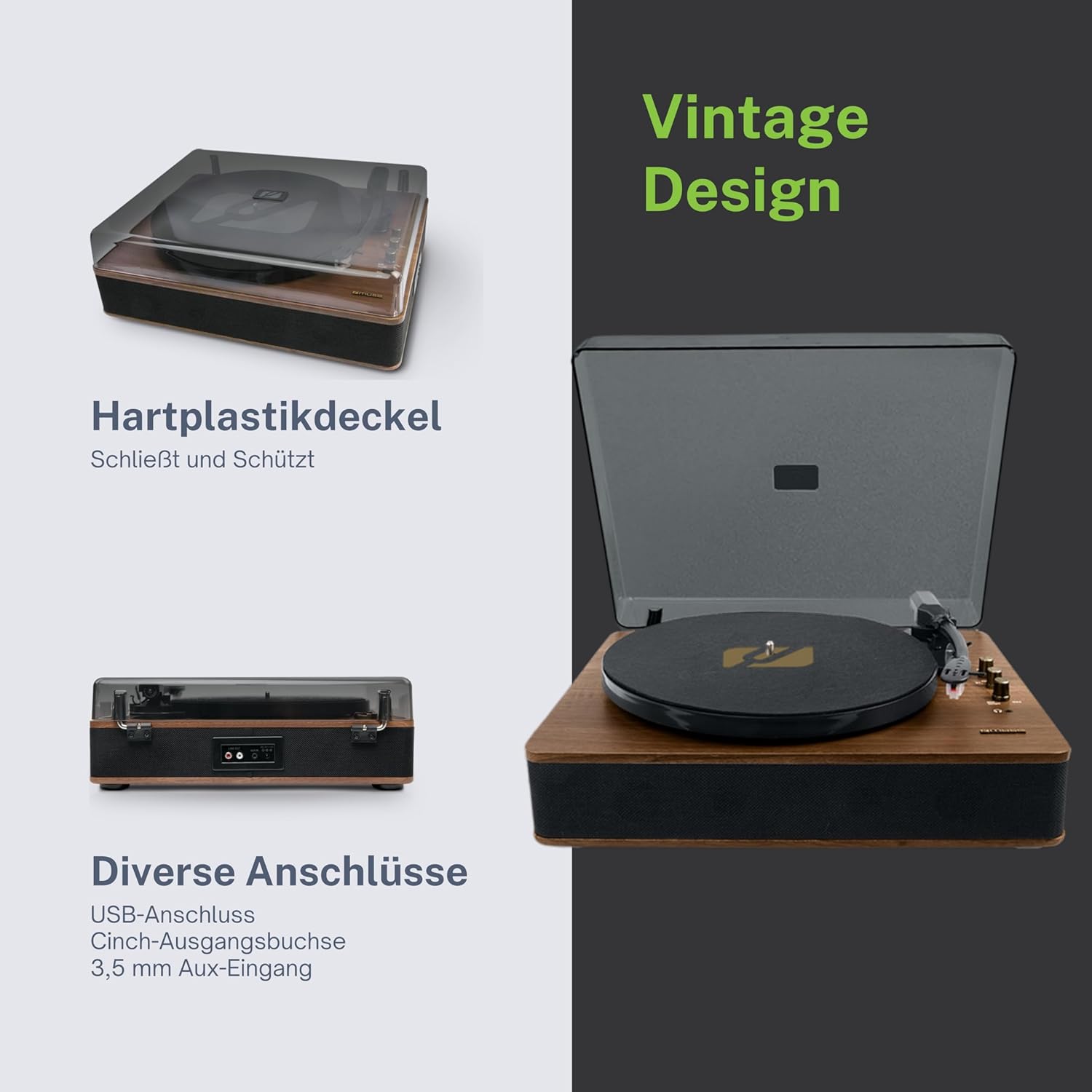
Figure 4.3: Rear Connections. The rear panel of the turntable is shown, featuring various connection ports including RCA audio outputs, a USB port, and an auxiliary input jack, allowing connection to external audio systems or devices.
4.3 Rear and Side Connections
- RCA irteerako konektoreak (E/E): Konektatu kanpoko batera ampargitzaile edo bozgorailu elektrikoak.
- USB ataka: MP3 erreproduzitzeko. files from a USB drive or encoding vinyl to USB.
- AUX sarrerako konektorea (3.5 mm): Konektatu kanpoko audio gailuak.
- DC IN Jack: Konektatu korronte-egokigailua.
- Aurikularretarako Jack (3.5 mm): Entzun pribaturako.

4.4. irudia: Funtzio nagusiakview. An illustrative graphic highlighting the key functions and connectivity options of the turntable. Icons represent features such as USB encoding, MP3 playback via USB, RCA output, auto-stop, integrated speakers, headphone jack, auxiliary input, and AC power input.
5. Konfigurazioa
5.1 Paketatzea
- Kontu handiz kendu unitatea bere ontzitik.
- Kendu ontziratzeko material eta babes-film guztiak.
- Keep the packaging for future transport or storage.
5.2 Jartzea
- Place the turntable on a flat, stable, and level surface.
- Avoid placing it near strong magnetic fields, direct sunlight, or heat sources.
- Ziurtatu unitatearen inguruan nahikoa leku dagoela aireztapen egokia izateko.
5.3 Energia-konexioa
- Connect the supplied power adapter to the DC IN jack on the rear of the turntable.
- Entxufatu korronte-egokitzailea hormako entxufe egoki batera.
5.4 Hauts-estalkiaren instalazioa
- Carefully attach the dust cover to the hinges on the back of the turntable.
- The dust cover protects the unit when not in use. Remove it or lift it fully when playing records.
6. Funtzionamendu-argibideak
6.1 Binilozko diskoak erreproduzitzea
- Altxa hautsaren estalkia.
- Rotate the Power/Volume knob clockwise to turn on the unit.
- Set the Function Selector knob to 'Phono'.
- Place a record on the platter. If playing a 45 RPM single, place the 45 RPM adapter on the spindle first.
- Select the correct speed (33, 45, or 78 RPM) using the Speed Selector switch.
- Kendu arkatz babeslea arkatzatik.
- Altxa besoa tapoiaren palanka erabiliz.
- Mugitu besoa diskoaren nahi duzun hasiera-puntuaren gainetik.
- Gently lower the tonearm onto the record using the cue lever. The music will begin to play.
- Doitu bolumena pizteko/bolumen botoia erabiliz.
- At the end of the record, if the Auto Stop switch is ON, the platter will stop rotating. If OFF, the platter will continue to rotate. Manually lift the tonearm and return it to its rest.
6.2 Bluetooth modua
- Rotate the Power/Volume knob clockwise to turn on the unit.
- Set the Function Selector knob to 'BT' (Bluetooth). The Bluetooth indicator will flash, indicating pairing mode.
- Gaitu Bluetooth-a kanpoko gailuan (smartphone-a, tableta, etab.) eta bilatu eskuragarri dauden gailuak.
- Select 'MUSE MT-106 BT' from the list of devices. Once connected, the Bluetooth indicator will stop flashing and remain solid.
- You can now play music from your external device through the turntable's speakers. Adjust volume using both the turntable's knob and your external device.
6.3 USB Playback and Encoding
6.3.1 USB erreprodukzioa
- Rotate the Power/Volume knob clockwise to turn on the unit.
- Set the Function Selector knob to 'USB'.
- Insert a USB flash drive into the USB port. The unit will automatically detect and begin playing MP3 files.
- Use the Playback Control Buttons (Play/Pause, Skip Forward, Skip Backward) to navigate tracks.
6.3.2 USB Encoding (Recording Vinyl to USB)
The MT-106 BT allows you to convert your vinyl records into digital MP3 files on a USB drive.
- Ensure a USB flash drive is inserted into the USB port.
- Set the Function Selector knob to 'Phono'.
- Start playing your vinyl record as described in section 6.1.
- Press the 'Record' button (refer to Figure 4.2 for button location, typically indicated by a circle or 'REC' label). The recording indicator will illuminate.
- To stop recording, press the 'Record' button again. The recording indicator will turn off.
- The recorded audio will be saved as an MP3 file on your USB drive.
6.4 Sarrera lagungarria (AUX IN)
- Rotate the Power/Volume knob clockwise to turn on the unit.
- Set the Function Selector knob to 'AUX'.
- Connect an external audio device (e.g., MP3 player, CD player) to the AUX IN jack (3.5mm) on the rear of the turntable using an audio cable (not supplied).
- Play audio from your external device. The sound will be output through the turntable's speakers.
6.5 RCA Irteera
To connect your turntable to an external amplifier or powered speakers:
- Ensure the turntable and the external audio system are turned off.
- Connect an RCA audio cable (not supplied) from the RCA Output Jacks (L/R) on the rear of the turntable to the corresponding audio input jacks on your ampargitzaile edo bozgorailu elektrikoak.
- Piztu bira-mahaia eta kanpoko audio-sistema.
- Hautatu sarrera egokia zure kanpoko audio-sisteman.
7. Mantentzea
7.1 Estiletoa garbitzea
- Use a soft brush, specifically designed for stylus cleaning, to gently brush the stylus from back to front.
- Do not use excessive force or brush from side to side, as this can damage the stylus.
- Ordeztu arkatza gutxi gorabehera 300-500 orduko erreprodukzio-ordu bakoitzean, edo soinu-kalitatean beherakada bat nabaritzen baduzu.
7.2 Unitatea garbitzea
- Wipe the exterior of the turntable with a soft, dry, lint-free cloth.
- Ez erabili garbitzaile, argizari edo disolbatzaile urratzailerik, akabera kaltetu baitezakete.
- For the dust cover, use a soft cloth and a mild, non-abrasive cleaner if necessary.
8. Arazoak
If you experience issues with your turntable, please consult the following table before contacting support.
| Arazoa | Kausa posiblea | Irtenbidea |
|---|---|---|
| Botererik ez | Korronte-egokitzailea ez dago konektatuta edo entxufea akastuna da. | Ziurtatu korronte-egokitzailea ondo konektatuta dagoela eta entxufea funtzionatzen duela. |
| Soinurik ez | Volume too low; incorrect function mode; external speakers not connected/powered. | Increase volume; select correct function (Phono, BT, USB, AUX); check external speaker connections and power. |
| Poor sound quality (vinyl) | Dirty or worn stylus; dirty record; incorrect speed selected. | Clean or replace stylus; clean record; select correct RPM. |
| Bluetootha ez da konektatzen | Turntable not in pairing mode; device too far; already connected to another device. | Ensure turntable is in BT mode and flashing; move device closer; disconnect from other devices. |
| USB erreprodukzioa ez da funtzionatzen | USB unitatea ez da behar bezala sartu; ez da bateragarria file formatua; USB unitate akastuna. | USB unitatea berriro sartu; ziurtatu files are MP3 format; try a different USB drive. |
9. Zehaztapenak
| Marka | MUSA |
| Ereduaren izena | MT-106 BT |
| Kolorea | Egurra |
| Materiala | Egurra |
| Elementuaren pisua | 4.3 kilogramo |
| Errotazio Abiadurak | 33, 45, 78 RPM |
| Konektibitatea | Bluetooth, USB, RCA Output, 3.5mm AUX Input, 3.5mm Headphone Jack |
| Ezaugarri bereziak | Integrated Speaker, Dust Protection, Adjustable Speed, USB Encoding |
| Gailu bateragarriak | Smartphone, Tablet |
| Energia iturria | AC Adapter (1 AAAA battery required for unspecified function, likely remote or internal clock) |
| Jatorrizko Herrialdea | Txina |
10. Bermea eta Laguntza
This product is covered by a manufacturer's warranty. Please refer to the warranty card included with your purchase or visit the official MUSE webwebgunean bermearen baldintza zehatzak ikusteko.
For technical support, troubleshooting assistance, or inquiries regarding spare parts, please contact MUSE customer service through their official channels. Information regarding spare parts availability is currently not available.


