1. Sarrera
This manual provides detailed instructions for the installation, configuration, operation, and maintenance of the Lenovo ThinkSystem RAID 5350-8i PCIe 12Gb Adapter. Please read this manual thoroughly before using the product to ensure proper setup and functionality. This adapter is designed to enhance storage performance and data protection in server environments.
2. Segurtasun informazioa
Always observe the following safety precautions when handling and installing the RAID adapter:
- Ensure the server is powered off and disconnected from all power sources before installation.
- Wear an anti-static wrist strap to prevent electrostatic discharge (ESD) damage to the adapter and other components.
- Handle the adapter by its edges; avoid touching the components or connectors.
- Refer to your server's documentation for specific safety guidelines and installation procedures.
- Do not attempt to modify or repair the adapter. Contact authorized service personnel for assistance.
3. Paketearen edukia
Verify that all items are present in the package. If any items are missing or damaged, contact your vendor immediately.
- Lenovo ThinkSystem RAID 5350-8i PCIe 12Gb Adapter
- Dokumentazioa (Hasierako Gida Azkarra, Bermearen Informazioa)
- Optional: SAS cables (may be sold separately depending on configuration)
4. Produktua amaitu daview
The Lenovo ThinkSystem RAID 5350-8i PCIe 12Gb Adapter is a high-performance RAID controller designed for server environments. It supports 12Gb/s SAS connectivity and utilizes a PCI Express 3.0 x8 interface for high data throughput. The adapter features two Mini-SAS HD x4 (SFF-8643) connectors, providing a total of eight internal SAS ports for connecting storage devices.
It supports various RAID levels, including 0, 1, 5, 10, 50, and JBOD, offering flexibility for data protection and performance optimization. This adapter is compatible with Windows, macOS, and Linux operating systems.
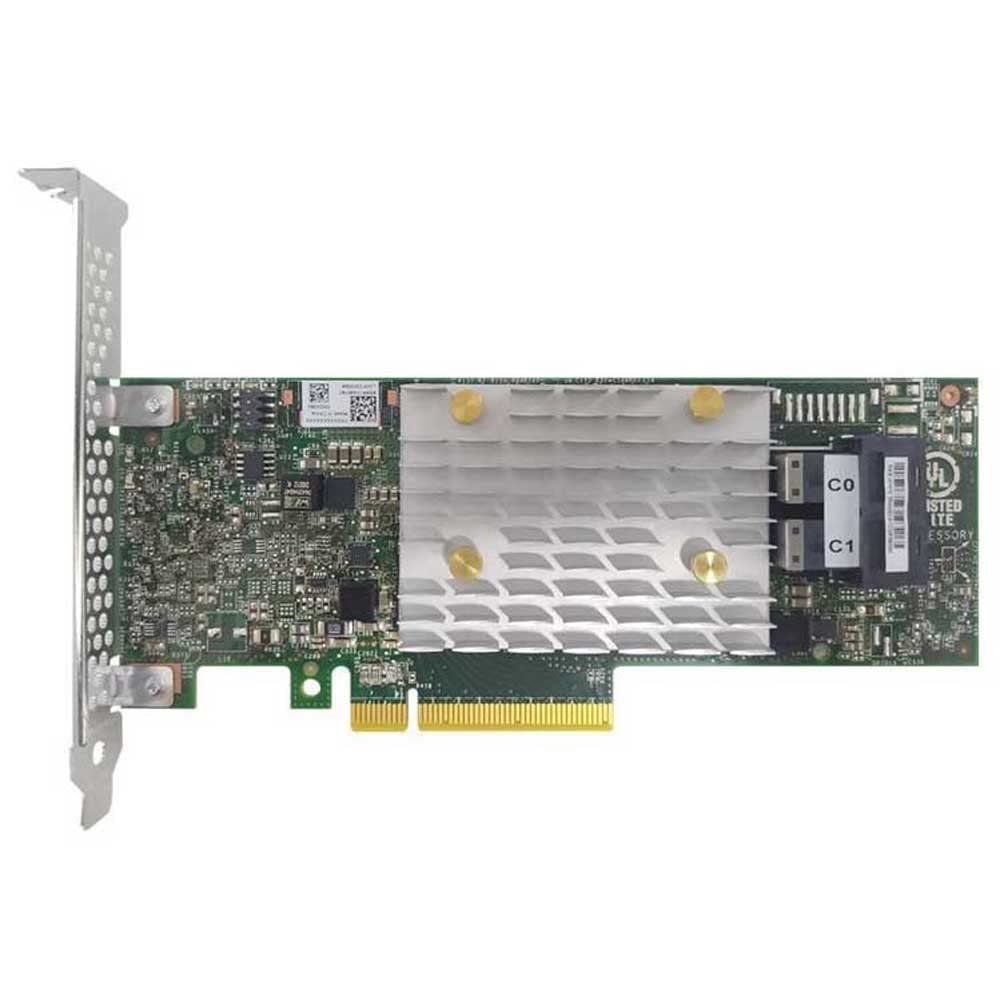
1. irudia: Aurrealdea view of the Lenovo ThinkSystem RAID 5350-8i PCIe 12Gb Adapter, showing the PCIe connector and Mini-SAS HD ports.
5. Instalazioa (Konfigurazioa)
Follow these steps to install the RAID adapter into your server:
- Prestatu zerbitzaria: Power off the server and disconnect all power cords. Open the server chassis according to the manufacturer's instructions.
- Bilatu PCIe zirrikitua: Identify an available PCI Express 3.0 x8 or larger slot on the server's motherboard.
- Instalatu egokitzailea: Carefully align the adapter with the PCIe slot and press down firmly until it is securely seated. Ensure the retention clip or screw is fastened.
- Connect SAS Drives: Connect your SAS hard drives or SSDs to the Mini-SAS HD x4 ports on the adapter using appropriate SAS cables. Ensure secure connections.
- Close the Server: Replace the server chassis cover and reconnect all power cords.
- Piztu: Power on the server. The system should detect the new RAID adapter.
- Gidariaren instalazioa: Install the necessary drivers for your operating system (Windows, macOS, or Linux). Drivers can typically be downloaded from the Lenovo support webgunea.
6. Configuration (Operating)
After physical installation and driver setup, configure the RAID adapter and create storage arrays:
- Access RAID BIOS/UEFI Utility: During server boot-up, press the designated key (e.g., Ctrl+R, F2, F8, or F10, consult your server's manual) to enter the RAID controller's BIOS/UEFI configuration utility.
- Create RAID Arrays: Within the utility, select the physical drives you wish to include in an array. Choose the desired RAID level (0, 1, 5, 10, 50, or JBOD) and configure array parameters such as stripe size and cache policy.
- Initialize Array: After creating the array, it may need to be initialized. Follow the on-screen prompts.
- Sistema eragilea instalatu: Once the RAID array is configured, you can install your operating system onto the logical drive.
- OS-based Management: For ongoing management, use the RAID management software provided by Lenovo or the operating system's built-in storage management tools.
7. Mantentzea
Regular maintenance ensures optimal performance and longevity of your RAID system:
- Firmware eguneraketak: Aldian-aldian egiaztatu Lenovoren laguntza website for updated firmware for your RAID adapter. Firmware updates can improve performance, add features, and fix bugs.
- Gidarien eguneraketak: Keep your RAID adapter drivers updated to ensure compatibility and optimal performance with your operating system.
- Monitoreatu diskoaren osasuna: Use RAID management software to regularly monitor the health status of your connected drives. Replace failing drives proactively.
- Datuen babeskopiak: Implement a robust data backup strategy. RAID provides data redundancy but is not a substitute for backups.
- Ingurumen Kontrola: Ensure the server environment maintains appropriate temperature and humidity levels to prevent hardware degradation.
8. Arazoak
Atal honek aurki ditzakezun arazo ohikoenak jorratzen ditu:
- Egokitzailea ez da detektatu:
- Ensure the adapter is fully seated in the PCIe slot.
- Try a different PCIe slot.
- Verify that the server's BIOS/UEFI settings are configured to detect PCIe devices.
- Ezagutzen ez diren unitateak:
- Check all SAS cable connections between the adapter and the drives.
- Ensure drives are properly powered.
- Verify that the drives are compatible with the RAID adapter.
- RAID Array Failure:
- If a drive fails in a redundant array (RAID 1, 5, 10, 50), replace the failed drive immediately. The array should rebuild automatically.
- Consult the RAID management software for detailed error messages and recovery options.
- Errendimendu arazoak:
- Ensure the latest drivers and firmware are installed.
- Check for other system bottlenecks (CPU, RAM, network).
- Verify that the drives are operating optimally.
For persistent issues, consult the Lenovo support webgunea edo jarri harremanetan laguntza teknikoarekin.
9. Zehaztapenak
| Ezaugarri | Zehaztapena |
|---|---|
| Marka | Lenovo |
| Modelo zenbakia | 4Y37A72482 |
| Interfazea | PCI Express 3.0 x8 |
| Datuen transferentzia-tasa | 12Gb/s SAS |
| RAID mailak onartzen dira | 0, 1, 5, 10, 50, JBOD |
| Barne Portuak | 2x Mini-SAS HD x4 (SFF-8643), 8 Total SAS Ports |
| Neurriak (LxWxH) | 5.25 x 1.25 x 0.02 hazbete |
| Elementuaren pisua | 9.6 ontza |
| Sistema eragile bateragarriak | Windows, macOS, Linux |
| Gailu bateragarriak | Personal Computer (Servers) |
10. Bermea eta Laguntza
The Lenovo ThinkSystem RAID 5350-8i PCIe 12Gb Adapter is covered by Lenovo's standard product warranty. For specific warranty terms and conditions, please refer to the warranty documentation included with your product or visit the official Lenovo support webgunea.
For technical support, driver downloads, firmware updates, and additional documentation, please visit the official Lenovo support portal:
When contacting support, please have your product model number (4Y37A72482) and serial number ready.