1. Sarrera
This manual provides comprehensive instructions for the setup, operation, and maintenance of your Cherry MW 9100 Wireless Rechargeable Mouse. The MW 9100 is a compact, versatile mouse offering dual connectivity options (Bluetooth or 2.4 GHz USB receiver) and a convenient rechargeable battery.
Ezaugarri nagusiak hauek dira:
- Compact design with charging functionality.
- Flexible operation: use while charging via USB-C cable.
- Dual connectivity: Bluetooth or 2.4 GHz USB receiver.
- Magnetic storage for the USB receiver, ideal for travel.
- Adjustable DPI settings for varied usage.
2. Paketearen edukia
Egiaztatu elementu guztiak paketean daudela:
- Cherry MW 9100 Wireless Rechargeable Mouse
- USB-C kargatzeko kablea
- 2.4 GHz USB hargailua
- Babes-poltsa
- Argibide eskuliburua (dokumentu hau)
3. Konfigurazioa
3.1 Sagua kargatzea
The Cherry MW 9100 mouse features a built-in rechargeable battery. Before initial use, or when the battery is low, connect the included USB-C cable to the mouse and to a USB power source (e.g., computer USB port, USB wall adapter). The mouse can be used normally while charging.

3.1. irudia: Goiena view of the Cherry MW 9100 mouse, showing the charging indicator light.
3.2 Sagua konektatzea
The MW 9100 offers two connection methods: 2.4 GHz wireless via USB receiver or Bluetooth.
3.2.1 2.4 GHz-ko haririk gabeko konexioa
- Locate the USB receiver. It is magnetically stored in a compartment on the underside of the mouse.
- Sartu USB hargailua zure ordenagailuko USB ataka erabilgarri batean.
- On the underside of the mouse, slide the switch to the "RF" position.
- Sagua automatikoki konektatu beharko litzateke zure ordenagailura.
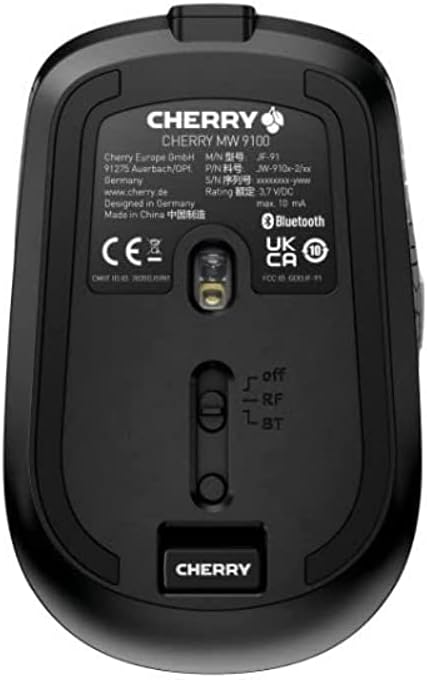
3.2. irudia: Underside of the Cherry MW 9100 mouse, highlighting the USB receiver storage and the connection mode switch.
3.2.2 Bluetooth konexioa
- On the underside of the mouse, slide the switch to the "BT" (Bluetooth) position.
- Press and hold the small pairing button located near the connection switch on the underside of the mouse until the LED indicator on the mouse starts blinking, indicating pairing mode.
- Zure ordenagailuan edo gailuan, ireki Bluetooth ezarpenak eta bilatu gailu berriak.
- Select "Cherry MW 9100" from the list of available devices to complete the pairing process.
4. Funtzionamendu-argibideak
4.1 Oinarrizko funtzioak
The Cherry MW 9100 mouse features standard left and right click buttons, a scroll wheel (which also functions as a middle click button), and two side buttons for navigation (typically forward/back).
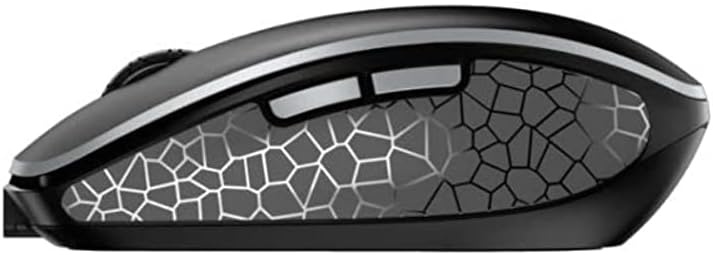
4.1. irudia: Aldea view of the Cherry MW 9100 mouse, illustrating the ergonomic design and side buttons.
4.2 DPI doikuntza
The mouse includes a DPI (Dots Per Inch) button, usually located near the scroll wheel, allowing you to adjust the cursor sensitivity. Press this button to cycle through different DPI settings to match your preference or task requirements.

4.2. irudia: A hand demonstrating the comfortable grip on the Cherry MW 9100 mouse during use.
5. Mantentzea
To ensure optimal performance and longevity of your Cherry MW 9100 mouse:
- Garbiketa: Erabili zapi leun eta lehor bat saguaren gainazala garbitzeko. Zikinkeria egoskorra bada, garbitu zapi pixka bat.amp oihal bat erabil daiteke, baina ziurtatu hezetasunik ez sartzen gailuan. Saihestu produktu kimiko gogorrak edo material urratzaileak.
- Biltegiratzea: When not in use, especially during travel, store the mouse in the provided protective pouch to prevent scratches and damage.
- Bateria zaintzea: Avoid fully discharging the battery frequently. Recharge the mouse when the low battery indicator appears.
6. Arazoak
| Arazoa | Kausa posiblea | Irtenbidea |
|---|---|---|
| Sagua ez du erantzuten | Low battery, incorrect connection mode, USB receiver not connected, Bluetooth not paired. |
|
| Intermittent connection (Bluetooth) | Interference, device driver issues, distance from device. |
|
| Kurtsorearen mugimendua irregularra edo motela da | Dirty optical sensor, low battery, incorrect DPI setting. |
|
7. Zehaztapenak
| Ezaugarri | Xehetasuna |
|---|---|
| Marka | Gerezi |
| Modelo zenbakia | JW-9100US-2 |
| Konektibitate Teknologia | Bluetooth, 2.4 GHz USB Wireless |
| Mugimenduen detekzioa | Optikoa |
| Ezaugarri bereziak | Lightweight, Portable, Rechargeable |
| Produktuaren neurriak | 4 x 3 x 2 hazbete |
| Elementuaren pisua | 6.4 ontza |
| Kolorea | Beltza |
8. Bermea eta Laguntza
Bermeari buruzko informazioa eta laguntza teknikoa lortzeko, jo Cherry ofizialera. website or contact Cherry customer service directly. Keep your proof of purchase for warranty claims.
Fabrikatzailea: GEREZI
Webgunea: www.cherry.de