Sarrera
The TOTOLINK A720R is an AC1200 Wireless Dual Band Router designed for high-traffic online activities, offering enhanced speed and coverage for home and office environments. It complies with the IEEE 802.11ac Wave 2 Wi-Fi standard, providing a total speed of 1167Mbps across dual bands (867Mbps on 5GHz and 300Mbps on 2.4GHz). This manual provides detailed instructions for setting up, operating, maintaining, and troubleshooting your A720R router.
Paketearen edukia
Hasi aurretik, egiaztatu paketean elementu guztiak daudela:
- A720R Wireless Router x 1
- Korronte egokitzailea x 1
- Ethernet kablea x 1
- Instalazio azkarreko gida x 1
Produktua amaituview
Familiarize yourself with the physical components of your TOTOLINK A720R router.

1. irudia: Aurrealdea view of the TOTOLINK A720R router. It features a sleek black design with four adjustable omni-directional antennas and a central LED indicator that glows blue when powered on and operating correctly.

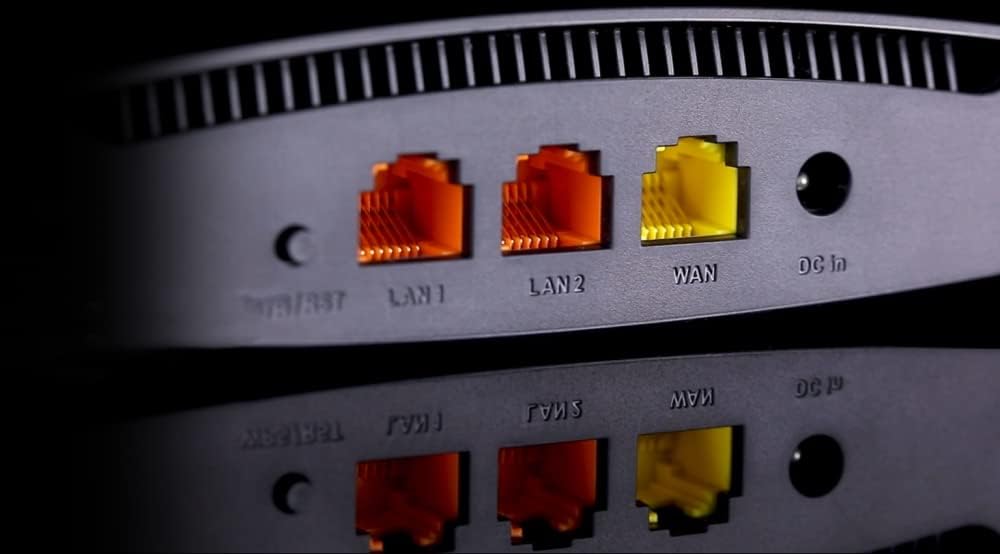
2. irudia: Atzekoa view of the TOTOLINK A720R router, highlighting the connectivity ports. From left to right, you can see the Reset/WPS button, two LAN ports (LAN1, LAN2), one WAN port, and the DC power input.

3. irudia: A detailed close-up of the rear panel ports on the TOTOLINK A720R router. This view clearly shows the two yellow LAN ports, the orange WAN port, and the DC power input, along with the small reset button.
Konfigurazioa
Hardware konexioa
- Potentzia-konexioa: Connect the provided power adapter to the DC In port on the router and plug the other end into a standard electrical outlet. The power LED indicator on the router should light up.
- WAN konexioa: Connect one end of the Ethernet cable from your modem or main internet source to the WAN port (often colored differently, e.g., orange) on the A720R router.
- LAN Connection (Optional): For wired devices, connect one end of an Ethernet cable to a LAN port (LAN1 or LAN2) on the router and the other end to the Ethernet port of your computer or other network device.
- Hasieratze-dataren zain: Allow a few minutes for the router to power on and initialize. The system indicator LED should become stable, indicating readiness.
Hasierako konfigurazioa (Web Interfazea)
Zure bideratzailea konfiguratzeko, sartu bere webOinarritutako kudeaketa interfazea:
- Ensure your computer is connected to the router either via Wi-Fi (look for the default SSID printed on the router's label) or via an Ethernet cable to a LAN port.
- Ireki a web nabigatzailea (adibidez, Chrome, Firefox, Edge).
- In the address bar, type the default IP address of the router (commonly
192.168.1.1or192.168.0.1, refer to the label on your router or the Quick Installation Guide for the exact address) and press Enter. - A login window will appear. Enter the default username and password (commonly
adminbietarako, edo bideratzailearen etiketa zehaztutako moduan). - Follow the on-screen setup wizard to configure your internet connection type (DHCP, Static IP, PPPoE, PPTP, L2TP) and Wi-Fi settings (SSID, password).
Funtzionamendu-argibideak
Wi-Fi sarearen konfigurazioa
After initial setup, you can further customize your Wi-Fi networks:
- SSID igorpena: Enable or disable the broadcast of your Wi-Fi network names (SSIDs) for both 2.4GHz and 5GHz bands.
- Segurtasun ezarpenak: Configure WPA/WPA2 mixed security for robust network protection. It is highly recommended to use a strong, unique password for your Wi-Fi networks.
- Gonbidatuen sarea: Create separate guest networks to provide internet access to visitors without compromising your main network's security.
Ezaugarri aurreratuak
The A720R router supports several advanced features to optimize your network performance and security:
- Beamforming Teknologia: This technology intelligently directs Wi-Fi signals towards connected devices, improving signal strength and reducing dead spots.
- Zerbitzuaren kalitatea (QoS): Prioritize network traffic for specific applications or devices (e.g., online gaming, video streaming) to ensure smooth performance.
- IPTV Function: Enjoy online movies and TV services directly through your router's IPTV functionality.
- IPv6 euskarria: The router supports IPv6, the latest version of the Internet Protocol, ensuring future compatibility and improved efficiency.
- Segurtasun Ezaugarriak: Utilize IP address filtering, port filtering, MAC filtering, URL filtering, and port forwarding to manage network access and enhance security.

4. irudia: An illustration demonstrating Beamforming technology. The router intelligently focuses its Wi-Fi signals directly to connected devices, enhancing coverage and performance throughout a multi-room environment.

5. irudia: The TOTOLINK A720R router positioned in a typical home environment, demonstrating its compact size and aesthetic integration into a living space.
6. irudia: An overhead schematic illustrating the Wi-Fi signal distribution from the TOTOLINK A720R router, showing its ability to provide coverage across various rooms within a home or office layout.
Mantentzea
- Firmware eguneraketak: Regularly check the TOTOLINK official website for the latest firmware updates. Updating firmware can improve performance, add new features, and fix security vulnerabilities. Follow the instructions provided with the firmware download carefully.
- Fabrikaren berrezarpena: If you encounter persistent issues or forget your login credentials, you can perform a factory reset. Locate the Reset/WPS button on the router (often a small pinhole button). With the router powered on, press and hold this button for approximately 5-10 seconds until the indicators flash, then release. The router will revert to its default factory settings.
- Garbiketa: Keep the router clean and free from dust to ensure proper ventilation. Use a soft, dry cloth to wipe the exterior. Do not use liquid cleaners or aerosols.
Arazoak konpontzea
Ez dago Interneteko sarbidea
- Check if the WAN port LED is lit. If not, ensure the Ethernet cable from your modem is securely connected to the router's WAN port.
- Egiaztatu zure modema behar bezala funtzionatzen duela eta Interneteko konexio aktiboa duela.
- Restart both your modem and the router by unplugging them from power for 30 seconds and then plugging them back in.
- Hasi saioa bideratzailearen web interface and check your internet connection settings (WAN settings). Ensure the connection type (DHCP, PPPoE, etc.) is correctly configured according to your ISP.
Ezin da Wi-Fira konektatu
- Ensure the Wi-Fi function is enabled on the router (check the Wi-Fi LED indicator).
- Verify that you are entering the correct Wi-Fi password (WPA/WPA2 key). Passwords are case-sensitive.
- Move closer to the router to ensure you are within range.
- Try restarting your device (laptop, smartphone) and then attempt to connect again.
- If you have enabled SSID broadcast, ensure your device can see the network name. If not, manually add the network.
Wi-Fi abiadura motela
- Ensure your devices are connecting to the 5GHz band if they support it, as it generally offers higher speeds and less interference.
- Reduce the number of devices connected to the network, especially those performing high-bandwidth activities.
- Check for interference from other electronic devices (cordless phones, microwaves) and try changing the Wi-Fi channel in the router settings.
- Position the router in a central location, away from obstructions and reflective surfaces.
Zehaztapenak
| Ezaugarri | Xehetasuna |
|---|---|
| Modelo zenbakia | A720R |
| Haririk gabeko estandarra | IEEE 802.11ac Wave 2, 802.11a/b/g/n |
| Maiztasun Bandak | 2.4GHz and 5GHz (Dual-Band) |
| Haririk gabeko Abiadura | 1167 Mbps (300 Mbps 2.4 GHz-tan, 867 Mbps 5 GHz-tan) |
| Antenak | 4 x Omni-directional Antennas |
| Portuak | 1 x WAN, 2 x LAN (Fast Ethernet) |
| Segurtasuna | WPA/WPA2 Mixed Security |
| Ezaugarriak | Beamforming, QoS, IPTV, IPv6, DHCP, Static IP, PPPoE, PPTP, L2TP, IP/Port/MAC/URL Filtering, Port Forwarding |
| Produktuaren neurriak | 14.2 x 9.5 x 4.1 cm |
| Pisua | 340 g |
| Fabrikatzailea | Zioncom |
Bermea eta Laguntza
The TOTOLINK A720R router comes with a 2 urteko bermea from the date of purchase. This warranty covers manufacturing defects and ensures the product functions as described under normal use.
For technical support, firmware updates, or further assistance, please visit the official TOTOLINK webwebgunera edo jarri harremanetan bezeroarentzako arreta-zerbitzura. Gorde erosketa-agiria berme-erreklamazioetarako.
Informazio gehiago lortzeko, bisitatu: www.totolink.cn


