Sarrera
The WALI GSMU001-W Ultrawide Monitor Arm is designed to provide an ergonomic and space-saving solution for mounting your monitor. This gas spring arm supports screens from 13 to 49 inches, weighing up to 33 lbs, and features VESA 75x75mm and 100x100mm compatibility. It also includes two integrated USB 3.0 ports for convenient connectivity, helping to optimize your workspace.
Segurtasun Informazioa
- Read all instructions carefully before assembly and use. Failure to do so may result in personal injury or product damage.
- Do not exceed the maximum weight capacity of 33 lbs (15 kg). This product is intended for monitors within the specified weight range.
- Ensure the mounting surface (desk) is stable and capable of supporting the combined weight of the mount and the monitor.
- Mantendu pieza txikiak eta ontziratzeko materialak haurren eskura ez dauden lekuetan, itotzeko arriskua izan baitezakete.
- Use only the hardware provided with the product. Using incompatible hardware may cause instability and potential damage.
- If you have any questions or encounter issues during installation or operation, contact WALI customer support for assistance.
Paketearen edukia
Muntaketa hasi aurretik, egiaztatu osagai guztiak daudela:
- WALI Single Monitor Gas Spring Desk Mount (GSMU001-W)
- Mounting Hardware Kit (screws, washers, spacers, Allen wrenches)
- Erabiltzailearen eskuliburua
Konfigurazioa
Step 1: Choose Mounting Option (C-Clamp or Grommet Base)
The monitor arm offers two installation methods to suit your desk type. Both options are compatible with desk thicknesses between 0.39 inches and 1.8 inches (10mm - 45mm).
For grommet mounting, your desk must have a cable grommet hole with a diameter of at least 2.4 inches (60mm).

Image: Installation Flexibility - C-clamp and grommet installation options.
Refer to the detailed instructions in the included user manual for specific steps on C-clamp or grommet base installation.
2. urratsa: VESA plaka monitoreari lotu
Secure the VESA plate to the back of your monitor using the appropriate screws and spacers from the hardware kit. Ensure the plate is firmly attached and aligned with your monitor's VESA mounting holes (75x75mm or 100x100mm).

Image: VESA plate attachment to the monitor.
Step 3: Mount Monitor to Arm
Once the VESA plate is attached to your monitor, carefully lift the monitor and slide the VESA plate onto the monitor arm's mounting head. Secure it in place with the provided locking mechanism.

Image: Monitor mounted on the arm.
Step 4: Connect USB Cables (Optional)
The monitor arm base includes two easily accessible USB 3.0 ports. Connect the integrated USB cables from the arm to your computer's USB 3.0 ports to enable this functionality.

Image: High Speed 3.0 USB Port connection.
Video: WALI Single Monitor Stand Mount Arm (GSMU001-W)
Video: Official WALI video demonstrating the features and installation process for the GSMU001-W monitor arm.
Funtzionamendua
Monitorearen posizioa doitzea
The WALI GSMU001-W monitor arm allows for flexible positioning to achieve optimal viewing angles and ergonomic comfort. You can adjust the monitor head for tilt, swivel, and rotation:
- okertu: Adjust the monitor +45° to -45° vertically.
- Birakaria: Rotate the monitor +90° to -90° horizontally.
- Errotazioa: Rotate the monitor 360° for landscape or portrait orientation.

Image: Angle Adjustment capabilities of the monitor arm.
Gas malgukiaren tentsioa doitzea
The gas spring mechanism allows for smooth and stable height adjustments. If your monitor sags or is difficult to move, you may need to adjust the gas spring tension:
- To adjust for lighter monitors, turn the adjustment screw clockwise.
- To adjust for heavier monitors, biratu doikuntza-torlojua erlojuaren norantzan.
Use the provided Allen wrench to make small adjustments until the arm holds your monitor securely in any position. Ensure the arm is kept in a horizontal level during adjustment.

Image: Gas Spring Tension Adjustment instructions.
Mantentzea
To ensure the longevity and optimal performance of your WALI monitor arm, follow these maintenance guidelines:
- Garbiketa: Wipe the arm and base with a soft, damp oihal. Saihestu akabera kaltetu dezaketen garbitzaile edo disolbatzaile urratzaileak erabiltzea.
- Aldizkako egiaztapenak: Aldian-aldian egiaztatu torloju eta konexio guztiak ondo estututa daudela ziurtatzeko. Beharrezkoa bada, berriro estutu.
- Gas malgukia: If the monitor arm's movement becomes stiff or loose over time, re-adjust the gas spring tension as described in the 'Operating' section.
Arazoak konpontzea
Monitor Sags or Does Not Stay in Position
Irtenbidea: The gas spring tension may be too low for your monitor's weight. Refer to the 'Gas Spring Tension Adjustment' section under 'Operating' and turn the adjustment screw counter-clockwise to increase tension until the monitor holds its position.
Monitor is Difficult to Move Up or Down
Irtenbidea: The gas spring tension may be too high. Refer to the 'Gas Spring Tension Adjustment' section under 'Operating' and turn the adjustment screw clockwise to decrease tension until the monitor moves smoothly.
USB Ports Not Functioning
Irtenbidea: Ensure the USB cables from the monitor arm base are securely connected to the USB 3.0 ports on your computer. Check your computer's device manager to confirm USB drivers are installed correctly.
Zehaztapenak
| Modelo zenbakia | GSMU001-W |
| Pantailaren tamainaren bateragarritasuna | 13 to 49 inches (flat or curved) |
| Pisu Edukiera | Gehienez 33 lb (15 kg) |
| VESA bateragarritasuna | 75x75mm, 100x100mm |
| Mahaiaren lodiera (C-Cl)amp) | 0.39" - 1.8" (10 mm - 45 mm) |
| Mahaiaren lodiera (arandela) | 0.39" - 1.8" (10mm - 45mm), with 2.4" (60mm) diameter hole |
| Inklinazio barrutia | ±45° |
| Bira biraka | ±90° |
| Errotazioa | 360° |
| Altuera Max | 21.7" (55.1 cm) |
| Gehienezko luzapena | 20.2" (51.3 cm) |
| USB atakak | 2 x USB 3.0 |
| Materiala | Metala |

Image: Display Compatibility overview.
Image: Product Dimension - Max Height and Extension.
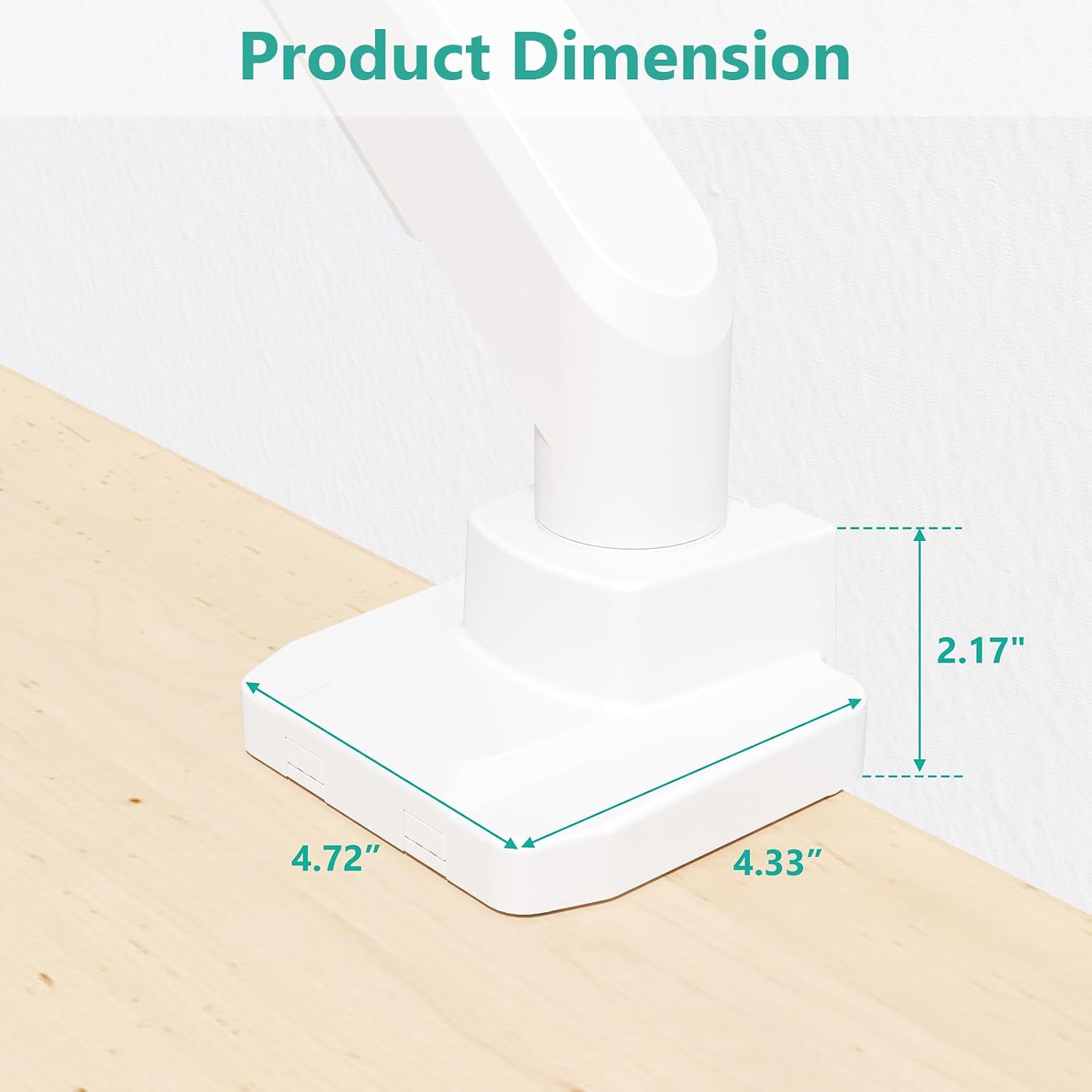
Image: Product Dimension - Base measurements.
Bermea
WALI products are manufactured with quality and durability in mind. For specific warranty details regarding your GSMU001-W monitor arm, please refer to the warranty information provided with your purchase documentation or contact WALI customer support directly. WALI is committed to providing support for its products.
Laguntza
For any questions, technical assistance, or support needs, please contact WALI customer service. Experienced and friendly US-based customer support is available to assist you 7 days a week.
Contact information can typically be found on the WALI official webgunean edo produktuaren ontzian.