Sarrera
Thank you for choosing the iJoy Ultra Wireless Over-Ear Bluetooth Headphones. These headphones are designed to provide a versatile audio experience with multiple connectivity options and comfortable wear. This manual will guide you through the features, setup, and operation of your new headphones.

Image: iJoy Ultra Wireless Over-Ear Bluetooth Headphones, showcasing the sleek design and over-ear cushions.
Kutxan dagoena
Mesedez, ziurtatu elementu guztiak zure paketean daudela:
- iJoy Ultra Wireless Over-Ear Bluetooth Headphones
- USB motako C kargatzeko kablea
- AUX kablea (3.5 mm)
Produktua amaituview
Ezagutu entzungailuen kontrolak eta atakak:

Irudia: Albokoa view of the headphone ear cup, highlighting the control buttons for volume, track skipping, and power/play/pause/call management.
- Volume + / Skip Song: Hold for Volume Up, Press for Next Song.
- Power / Play / Pause / Answer/Reject Calls: Press to Play/Pause or Answer/Reject Calls. Hold to Power On/Off.
- Bolumena - / Aurreko abestia: Hold for Volume Down, Press for Previous Song.
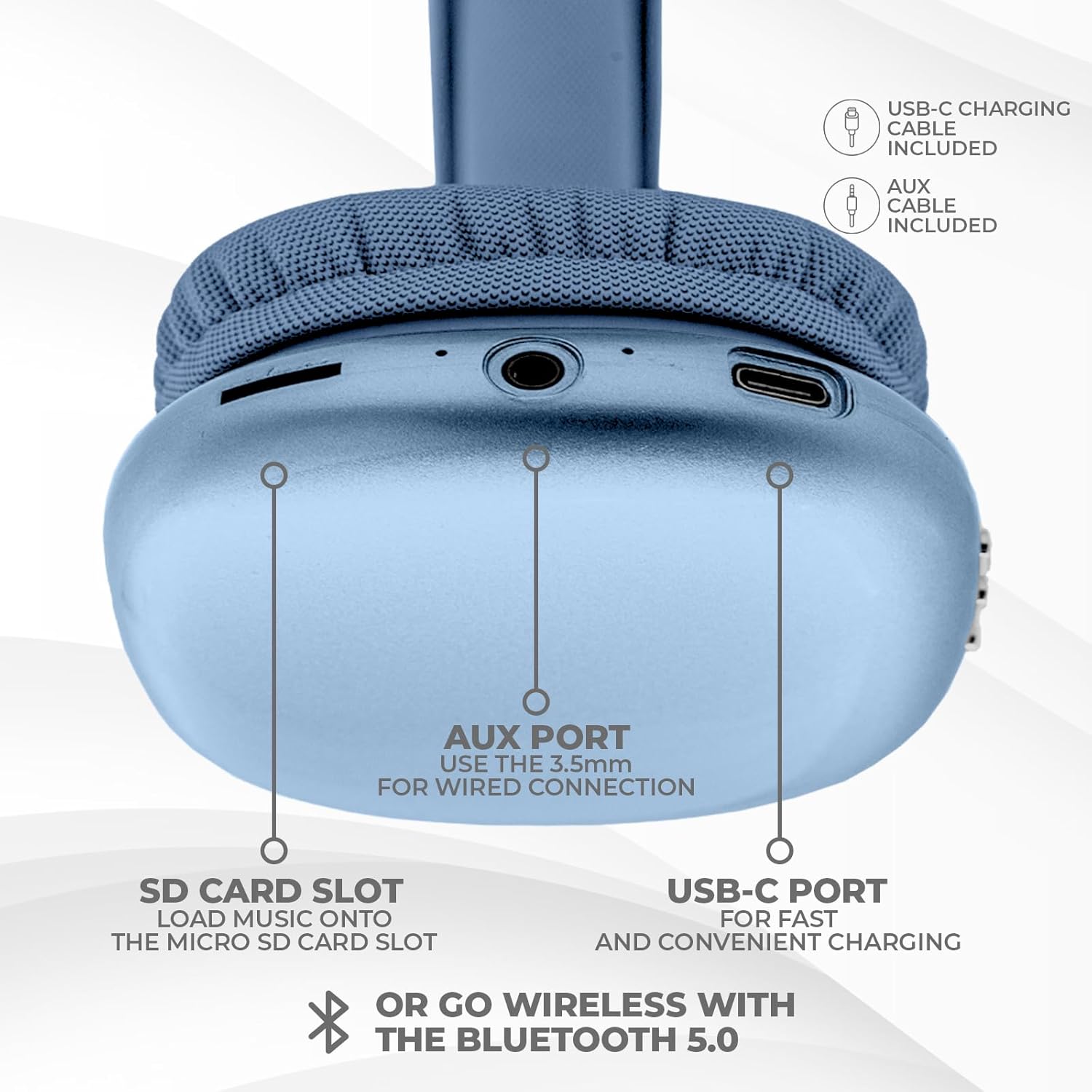
Irudia: Behealdea view of the headphone ear cup, showing the USB-C charging port, AUX port, and SD card slot.
- USB-C ataka: Entzungailuak kargatzeko.
- AUX Port (3.5mm): Kable bidezko audio konexiorako.
- SD txartelaren zirrikitua: For direct audio playback from a Micro SD card.
Konfigurazioa
1. Entzungailuak kargatzea
Lehenengo aldiz erabili aurretik, kargatu guztiz entzungailuak. Karga oso batek 2 ordu inguru behar ditu.
- Connect the provided USB Type C charging cable to the USB-C port on the headphone.
- Konektatu USB kablearen beste muturra USB elikatze-iturri bateragarri batera (adibidez, hormako egokitzailea, ordenagailuko USB ataka).
- LED adierazleak kargatze-egoera erakutsiko du eta itzali edo kolorez aldatuko da guztiz kargatuta dagoenean.
2. Bluetooth parekatzea
Aurikularrak haririk gabe konektatzeko:
- Ziurtatu entzungailuak kargatuta eta itzalita daudela.
- Sakatu eta eutsi pizteko botoia LED adierazlea keinuka hasi arte, parekatze modua adieraziz.
- Zure gailuan (smartphone-a, tableta, ordenagailu eramangarria), gaitu Bluetooth-a eta bilatu eskuragarri dauden gailuak.
- Select "iJoy Ultra" from the list of devices.
- Once connected, the LED indicator will typically show a solid light or slow flash.
Note: The Bluetooth range is approximately 10 meters (33 feet).
3. Kable bidezko konexioa (AUX)
For a non-wireless connection or when the battery is low:
- Connect one end of the provided 3.5mm AUX cable to the AUX port on the headphone.
- Connect the other end of the AUX cable to the 3.5mm audio jack on your device.
- Entzungailuak automatikoki aldatuko dira kable bidezko modura.
4. SD txartelaren erreprodukzioa
Mikro SD txartel batetik musika zuzenean erreproduzitzeko:
- Sartu Mikro SD txartel bat (musika duena) files) into the SD card slot on the headphone.
- Entzungailuek automatikoki detektatuko dute txartela eta musika erreproduzitzen hasiko dira.
- Use the track control buttons to navigate your music.
Funtzionamendu-argibideak
Piztu/Itzali
- Piztu: Sakatu eta eutsi pizteko botoia 3 segundo inguru.
- Itzali: Sakatu eta eutsi pizteko botoia 3 segundo inguru.
Musika erreproduzitzea
- Erreproduzitu/Pausatu: Sakatu pizteko botoia behin.
- Hurrengo ibilbidea: Sakatu Bolumen + botoia behin.
- Aurreko pista: Sakatu Bolumenaren botoia behin.
- Bolumena igo: Hold the Volume + button.
- Bolumena jaitsi: Hold the Volume - button.
Deien Kudeaketa
When connected via Bluetooth:
- Erantzun deia: Sakatu pizteko botoia behin.
- Amaitu deia: Sakatu pizteko botoia behin dei batean zehar.
- Deia baztertu: Sakatu eta eutsi pizteko botoia 2 segundo inguru.
Bateriaren iraupena
The headphones offer up to 10 hours of wireless playtime on a single charge.

Image: Visual representation of the headphones' battery life, indicating up to 10 hours of wireless playtime.
Mantentzea
To ensure the longevity and optimal performance of your iJoy Ultra headphones:
- Garbitu entzungailuak aldizka zapi leun eta lehor batekin.
- Saihestu entzungailuak muturreko tenperaturen, hezetasunaren edo eguzki-argiaren eraginpean jartzea.
- Ez erabili garbitzaile edo disolbatzaile urratzailerik.
- Gorde entzungailuak leku fresko eta lehor batean erabiltzen ez dituzunean.
- Saihestu entzungailuak erortzea edo kolpe gogorren eraginpean jartzea.
Arazoak konpontzea
Entzungailuekin arazoak badituzu, jo ezazu honako ohiko irtenbide hauetara:
| Arazoa | Irtenbidea |
|---|---|
| Entzungailuak ez dira pizten. | Ziurtatu entzungailuak guztiz kargatuta daudela. Konektatu energia-iturri batera USB-C kablea erabiliz. |
| Ezin da Bluetooth bidez parekatu. | Make sure the headphones are in pairing mode (flashing LED). Turn off and on Bluetooth on your device. Ensure no other devices are currently connected to the headphones. Try 'forgetting' the device on your phone and re-pairing. |
| No sound or choppy audio. | Check volume levels on both headphones and your device. Ensure Bluetooth connection is stable or try a wired AUX connection. If using an SD card, ensure it is properly inserted and the files bateragarriak dira. |
| Headphones are uncomfortable or too tight. | Adjust the headband for a better fit. The over-ear cushions are designed for comfort, but individual fit may vary. |
| Cannot connect to multiple devices simultaneously. | These headphones typically support connection to one device at a time. Disconnect from the current device before attempting to connect to another. |
Zehaztapenak
| Ezaugarri | Xehetasuna |
|---|---|
| Ereduaren izena | Ultra |
| Elementuaren eredu-zenbakia | IJHP21 |
| Konektibitate Teknologia | Haririk gabekoa (Bluetooth), Kable bidezkoa (3.5 mm-ko AUX) |
| Haririk gabeko Komunikazio Teknologia | Bluetootha |
| Bluetooth barrutia | 10 metro (33 oin) |
| Aurikularretarako Jack | 3.5 mm Jack |
| Ezaugarri bereziak | SD Card Slot, Soft Cushion Padding, USB Type C |
| Bateriaren iraupena | Gehienez 10 ordu |
| Kargatzeko Denbora | 2 ordu |
| Kontrol mota | Volume Control, Track Management, Call Management |
| Belarrien Kokatzea | Belarri gainean |
| Materiala | Plastikoa |
| Elementuaren pisua | 8 ontza |
| Produktuaren neurriak | 7 x 3 x 8 hazbete |
| UPC | 842700193053 |
Produktuaren bideo ofiziala
Video: An official product video from iJoy Electronics showcasing the features and design of the iJoy Ultra Bluetooth Over-Ear Headphones.
Bermea eta Laguntza
For warranty information or technical support, please refer to the documentation included with your product or contact iJoy customer service directly. Keep your proof of purchase for any warranty claims.


