1. Produktua amaitu daview
The OREI BK-21 is an advanced 8K 2x1 HDMI Switch designed to streamline your audio-visual setup. This device allows you to connect two HDMI source devices to a single HDMI display, providing seamless switching between inputs. It supports high-resolution video and audio formats, making it ideal for gaming, home theater, and professional applications.

Figure 1: OREI 8K 2x1 HDMI Switch (Model BK-21)
Gaitasun nagusiak honako hauek dira:
- Supports resolutions up to 8K@60Hz, 4K@120Hz, and 1080p@240Hz.
- HDMI 2.1 and HDCP 2.3/2.2/1.4 compliant.
- High Speed 48Gbps Video Bandwidth.
- Supports HDR10+, HDR10, Dolby Vision, 3D, and CEC.
- Features VRR (Variable Refresh Rate), ALLM (Auto Low-Latency Mode), and QFT (Quick Frame Transport).
- Dual switching options: Automatic and Manual.
2. Paketearen edukia
Mesedez, ziurtatu elementu guztiak paketean daudela:
- 1x OREI BK-21S HDMI Switcher
- 1x USB kable elektrikoa
- 1x Erabiltzailearen eskuliburua

2. irudia: paketearen edukia
3. Produktuaren ezaugarriak
The OREI BK-21 HDMI Switch offers a robust set of features for high-performance audio and video distribution:
- Bereizmen handiko laguntza: Experience stunning visuals with support for 8K@60Hz, 4K@120Hz, and 1080p@240Hz.
- Advanced HDMI Standards: Fully compliant with HDMI 2.1 and HDCP 2.3/2.2/1.4 for broad compatibility and secure content transmission.
- Banda zabalera handia: Supports 48Gbps video bandwidth for uncompressed high-resolution video.
- Dynamic HDR Support: Compatible with HDR10+, HDR10, and Dolby Vision for enhanced contrast and color.
- Gaming Optimized Features: Includes VRR (Variable Refresh Rate), ALLM (Auto Low-Latency Mode), and QFT (Quick Frame Transport) for a smoother gaming experience.
- Audio laguntza osoa: Delivers exceptional sound quality with LPCM, Dolby True HD, DTS HD Master Audio, Dolby-AC3, and DTS7.1.
- Bateragarritasun zabala: Works with a variety of HDMI devices such as PlayStation 5, Xbox, Roku 4, 4K TV, Amazon Fire TV, Ultra Projector, PS4, Apple TV, Cable box, Blu-ray player, DVD player, PC, and STB.

Figure 3: Supported Video Standards

Figure 4: Audio Support

5. irudia: Gailuen bateragarritasun zabala
4. Konexioak eta konfigurazioa
Follow these steps to connect your OREI BK-21 HDMI Switch:
- Konektatu HDMI iturriak: Plug your two HDMI source devices (e.g., gaming console, Blu-ray player) into the HDMI IN1 and HDMI IN2 ports on the switch.
- Konektatu pantailara: Connect an HDMI cable from the HDMI OUT port on the switch to the HDMI input on your display (TV, monitor, projector).
- Potentzia-konexioa: Connect the provided USB cable to the POWER port on the switch and to a USB power source (e.g., a USB wall adapter, a USB port on your TV or media device). The switch requires 5V DC power.

6 irudia: Atzeko panelaren konexioak
For optimal performance, use high-quality HDMI 2.1 cables under 10 feet. For longer lengths, OREI Fiber Optic HDMI cables are recommended.
Video 1: OREI Direct's overview of the 8K 2x1 HDMI Switch, demonstrating its features and connections.
5. Funtzionamendu-argibideak
The OREI BK-21 HDMI Switch offers both manual and automatic switching modes:
- Eskuz aldatzea: Press the button on the top of the switch to cycle between HDMI IN1 and HDMI IN2. The corresponding LED indicator (1 or 2) will illuminate to show the currently active input.
- Aldaketa automatikoa: The switch supports automatic detection of active HDMI sources. When a new source is activated, the switch can automatically switch to that input. This feature can be enabled or disabled as per user preference to prevent unintended switching.

Figure 7: Top Panel with Selection Button and Indicators
6. Zehaztapen Teknikoak
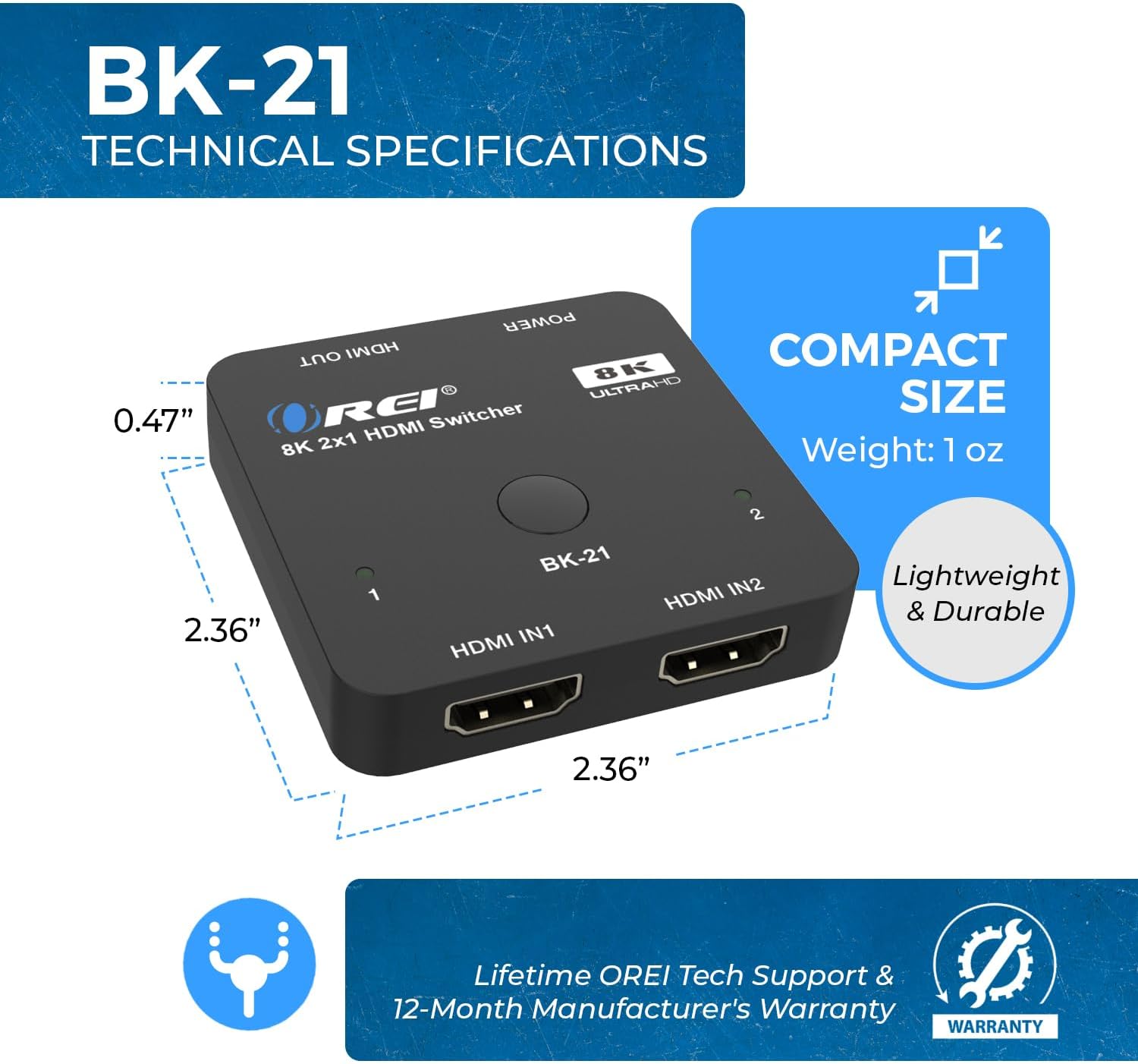
8. irudia: Tamaina eta neurri trinkoak
| Ezaugarri | Deskribapena |
|---|---|
| Modelo zenbakia | BK-21 |
| Produktuaren neurriak | 2 x 4 x 0.5 hazbete |
| Elementuaren pisua | 2.8 ontza |
| Kolorea | Beltza |
| Konektore mota | HDMI |
| Kable mota | HDMI |
| HDMI bertsioa | HDMI 2.1 |
| HDCP bertsioa | HDCP 2.3/2.2/1.4 |
| Max Ebazpena | 8K@60Hz, 4K@120Hz, 1080p@240Hz |
| Video Bytes | 48 Gbps |
| HDR euskarria | HDR10+, HDR10, Dolby Vision |
| Joko Ezaugarriak | VRR, ALLM, QFT |
| Audio formatuak | LPCM, Dolby True HD, DTS HD Master Audio, Dolby-AC3, DTS7.1 |
| Gailu bateragarriak | Blu-Ray Player, DVD Player, Gaming Console (PS5, Xbox), PC, Television, Roku, Amazon Fire TV, Ultra Projector, Apple TV, Cable box, STB |
7. Arazoak
If you encounter issues with your OREI BK-21 HDMI Switch, please refer to the following common troubleshooting steps:
- Seinalerik ez:
- Ensure all HDMI cables are securely connected to both the source devices, the switch, and the display.
- Verify the USB power cable is connected and the power LED on the switch is illuminated.
- Saiatu HDMI iturria zuzenean pantailara konektatzen iturria eta pantaila behar bezala funtzionatzen dutela baieztatzeko.
- Test with different HDMI cables, especially high-quality HDMI 2.1 certified cables.
- Ensure the correct input is selected on your display.
- Seinale keinukaria edo tarteka dagoen seinalea:
- Check cable lengths; for 8K/4K@120Hz, shorter, high-quality HDMI 2.1 cables are crucial.
- Ziurtatu energia-hornidura egonkorra eta nahikoa dela.
- Reduce the resolution or refresh rate of the source device to see if the issue persists.
- Audio-arazoak:
- Confirm that your display's audio settings are correctly configured.
- Egiaztatu zure iturburu-gailuko audio-irteera ezarpenak.
- Ziurtatu HDMI kableek audio transmisioa onartzen dutela.
- Automatic Switching Not Working:
- Some devices may not trigger auto-switching effectively. Try manual switching using the button on the switch.
- Ensure the auto-switching feature is enabled if applicable (refer to specific product manual for details on enabling/disabling).
8. Zainketa eta Mantentzea
To ensure the longevity and optimal performance of your OREI BK-21 HDMI Switch, please follow these guidelines:
- Garbiketa: Use a soft, dry cloth to clean the device. Avoid using liquid or aerosol cleaners.
- Biltegiratzea: Gorde gailua leku fresko eta lehor batean, eguzki-argitik eta muturreko tenperaturetatik babestuta.
- Manipulazioa: Kontu handiz maneiatu gailua. Saihestu erortzea edo kolpe bortitzak jasatea.
- Aireztapena: Ziurtatu gailuak behar adina aireztapen duela gehiegi berotzea saihesteko. Ez blokeatu aireztapen-irekidurarik.
- Potentzia: Always use the provided USB power cable. Disconnect power during electrical storms or when unused for long periods.
9. Bermea eta bezeroarentzako laguntza
The OREI BK-21 HDMI Switch comes with a 1 urteko berme osoa. For any technical assistance, troubleshooting, or warranty claims, please contact OREI Support.
Laguntza gehiago behar baduzu, bisitatu Official OREI Store on Amazon edo kontsultatu zure produktuaren ontzian emandako harremanetarako informazioa.


