Sarrera
This manual provides detailed instructions for the installation, operation, and maintenance of your MYPIN Solar Wireless PTZ Security Camera. Please read this manual thoroughly before using the product to ensure proper function and safety. Keep this manual for future reference.
Produktua amaituview
Zer sartzen da
- MYPIN PTZ Security Camera
- Eguzki-panela
- Rechargeable Lithium-ion Battery (pre-installed or included separately)
- Muntatzeko euskarria eta torlojuak
- USB kargatzeko kablea
- Erabiltzailearen eskuliburua
Ezaugarri nagusiak
- 1080p Full HD bideoa: Bideo argi eta zehatza eskaintzen dutage.
- Kolore Gaueko Ikusmena: Equipped with infrared LEDs and white light for clear night vision, including full-color options.
- Solar Powered & Rechargeable Battery: Continuous power supply through the solar panel, with a built-in rechargeable battery for uninterrupted operation.
- AI Smart Recognition & PIR Motion Detection: Advanced AI technology distinguishes between humans, pets, and vehicles, reducing false alarms.
- Bi norabideko audioa: Built-in speaker and anti-noise microphone allow for real-time two-way communication.
- PTZ funtzionalitatea: Pan 335°, Tilt 90°, and 4x digital zoom for flexible viewangeluak.
- IP65 Eguraldiarekiko erresistentea: Designed to withstand various weather conditions, suitable for outdoor use.
- Haririk gabeko konektagarritasuna: Supports 2.4 GHz Wi-Fi for easy installation (5 GHz Wi-Fi not supported).
- Biltegiratze aukera anitz: Supports cloud storage (7-day free playback, max 1GB) and local storage via Micro SD card (up to 128GB, not included).
- Etxe adimendunaren integrazioa: Amazon Alexarekin bateragarria ahots-kontrolerako eta zuzeneko kontrolarako view.

Image: MYPIN Solar Wireless PTZ Security Camera with its solar panel.
Konfigurazioa
1. Hasierako kargatzea
Before first use, fully charge the camera's built-in battery using the provided USB cable and a 5V/2A power adapter (not included). A full charge ensures optimal performance, especially during initial setup and periods of low sunlight.
2. Aplikazioaren instalazioa eta kontuaren sorrera
- Deskargatu VicoHome aplikazioa zure telefonoaren aplikazio dendatik (iOS edo Android).
- Ireki aplikazioa eta jarraitu pantailan agertzen diren argibideei kontu berri bat sortzeko edo saioa hasteko, dagoeneko baduzu.
3. Kamera aplikazioarekin parekatzea
- Ziurtatu kamera piztuta dagoela.
- In the VicoHome app, tap the "+" icon to add a new device.
- Hautatu zure kameraren modeloa zerrendatik.
- Follow the app's instructions to connect the camera to your 2.4 GHz Wi-Fi network. You may need to scan a QR code displayed on your phone with the camera lens.
- Behin konektatuta, jarri izena kamerari eta osatu konfigurazio prozesua.
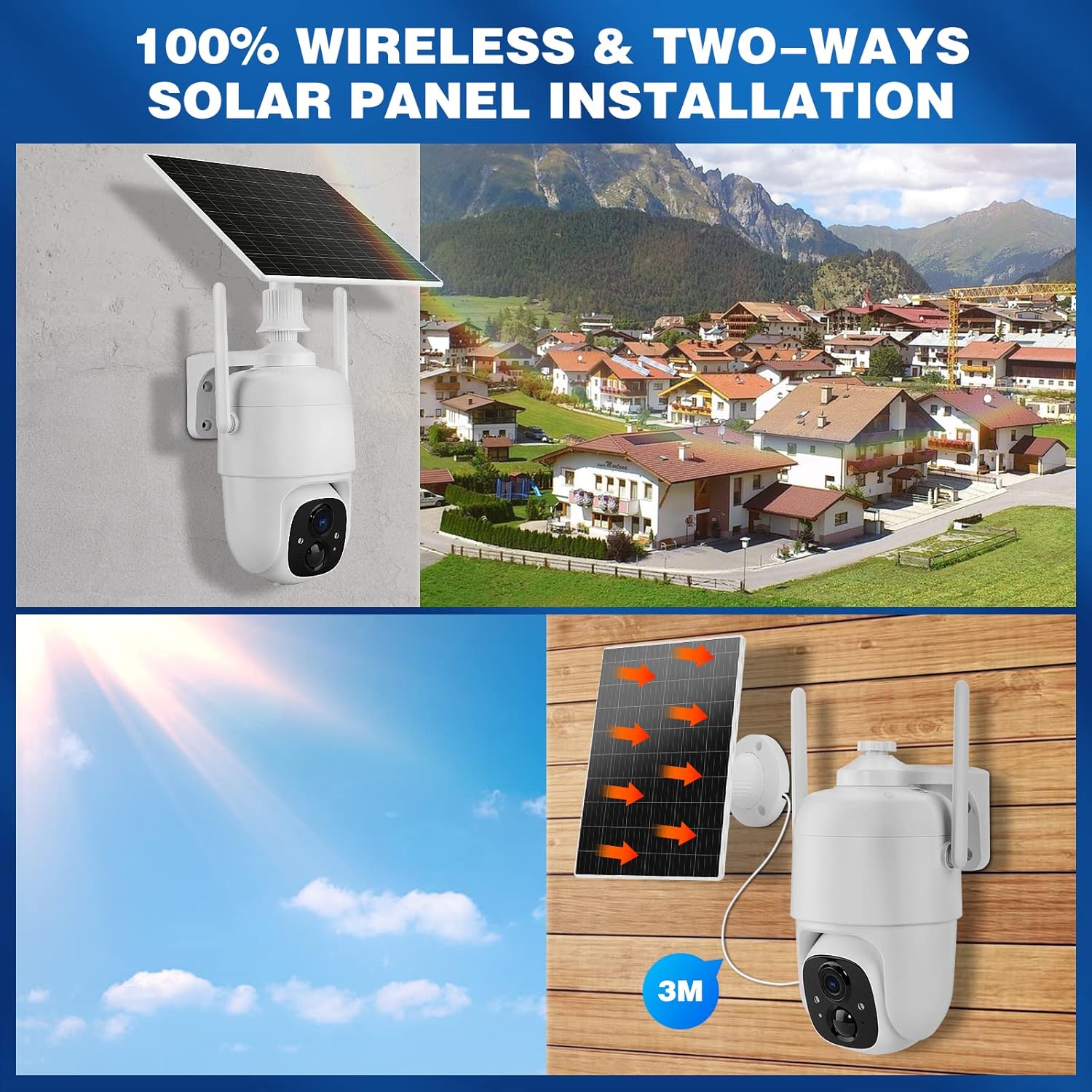
4. Solar Panel and Camera Mounting
The camera and solar panel can be installed in two ways: integrated or separated. Choose a location that provides optimal sunlight exposure for the solar panel and a clear view kamerarentzat.
- Eguzki-panelaren kokapena: Mount the solar panel in a location that receives direct sunlight for several hours daily. Ensure the cable can reach the camera.
- Kameraren kokapena: Use the provided mounting bracket and screws to securely attach the camera to a wall or other stable surface. Adjust the camera angle for optimal surveillance coverage.

Image: Illustration of two installation methods for the solar panel and camera, showing both integrated and separate mounting options.
Funtzionamendu-argibideak
1. Bizi View eta Erreprodukzioa
- Ireki VicoHome aplikazioa eta hautatu zure kamera view zuzeneko jarioa.
- Sartu grabatutako footage through the playback feature in the app.
2. PTZ Kontrola
Zuzenean view interface, use the on-screen controls to pan (335° horizontally) and tilt (90° vertically) the camera lens. You can also use the digital zoom feature to get a closer look.
Irudia: Kameraren mugimendu panoramiko eta inklinazio funtzioak telefono adimenduneko aplikazio bat erabiliz kontrolatzen erakusten du.
3. Bi norabideko audioa
Tap the microphone icon in the app's live view to speak through the camera's speaker. The camera's built-in microphone will capture audio from the camera's vicinity, allowing for two-way communication.

Image: A person speaking through the camera to a delivery person, demonstrating the two-way audio feature.
4. Mugimenduaren detekzioa eta alertak
- Configure motion detection sensitivity and activity zones within the VicoHome app.
- Enable AI Smart Recognition to differentiate between humans, pets, and vehicles for more accurate alerts.
- Jaso berehalako jakinarazpenak zure telefonoan mugimendua detektatzen denean.

Image: A person walking past a gate, triggering a PIR human detection alert on a smartphone.
5. Gaueko ikusmen moduak
The camera offers both infrared (IR) night vision and full-color night vision. You can switch between these modes in the app settings based on your preference and lighting conditions.

Irudia: Zatiketa bat view showing the difference between color night vision and standard IR night vision at night.
6. Biltegiratzeko aukerak
- Hodeiko biltegiratzea: The camera offers 7 days of free cloud playback (up to 1GB). Additional cloud plans may be available through the app.
- Mikro SD txartela: Insert a Micro SD card (up to 128GB, not included) into the designated slot for local video storage.
7. Amazon Alexa Integration
To integrate with Amazon Alexa, enable the VicoHome skill in the Alexa app and link your VicoHome account. You can then use voice commands to view your camera's live feed on compatible Alexa-enabled devices.

Image: A MYPIN camera and an Amazon Echo Show displaying the camera's live feed, illustrating Alexa integration.
Mantentzea
1. Garbiketa
- Garbitu kameraren lentea eta eguzki-panela aldizka zapi leun eta lehor batekin.amp oihala hautsa eta hondakinak kentzeko.
- Ez erabili produktu kimiko gogorrik edo garbigailu urratzailea.
2. Bateria zaintzea
- Ensure the solar panel is free from obstructions to maximize charging efficiency.
- If the camera is stored for an extended period, charge the battery periodically to prevent deep discharge.
3. Firmware eguneraketak
Check the VicoHome app regularly for firmware updates. Keeping your camera's firmware updated ensures optimal performance, security, and access to new features.
Arazoak konpontzea
| Arazoa | Irtenbidea |
|---|---|
| Kamera ez da wifira konektatzen | Ensure your Wi-Fi is 2.4 GHz. Check Wi-Fi signal strength. Restart your router and camera. Re-pair the camera in the app. |
| Bideoaren kalitate eskasa | Check your Wi-Fi connection speed. Clean the camera lens. Ensure adequate lighting for optimal image capture. |
| Bateria ez da kargatzen | Ensure the solar panel is clean and receives direct sunlight. Check the connection cable between the solar panel and camera. Charge directly via USB if necessary. |
| Mugimendu faltsuen alertak | Adjust motion detection sensitivity in the app. Utilize AI Smart Recognition to filter out non-human movements. Define specific activity zones. |
| Bi norabideko audioa ez da funtzionatzen | Check microphone and speaker settings in the app. Ensure your phone's volume is up. Verify network connection stability. |
Zehaztapenak
- Eredua: HS0366
- Bideoaren bereizmena: 1080p full HD
- Pan angelua: 335°
- Inklinazio angelua: 90°
- Zoom digitala: 4x
- Gaueko ikuspegia: Infrared and Color Night Vision
- Haririk gabeko konektagarritasuna: Wi-Fi 2.4 GHz (IEEE 802.11b/g/n)
- Energia iturria: Solar Powered, Rechargeable Lithium-ion Battery (5 Watt-hours)
- Eguraldiarekiko erresistentzia: IP65
- Funtzionamendu-tenperatura: -10 °C eta 45 °C (14 °F eta 113 °F)
- Biltegiratzea: Cloud Storage (up to 1GB free for 7 days), Micro SD Card (up to 128GB, not included)
- Audioa: Bi norabideko audioa (mikrofono eta bozgorailu integratuak)
- Mugimendu-detekzioa: PIR with AI Human/Pet/Vehicle Recognition
- Materiala: Metala
- Neurriak: 20.2 x 19.7 x 13.9 cm gutxi gorabehera
- Pisua: 1.27 kg inguru

Image: The MYPIN camera and solar panel installed outdoors during winter, highlighting its IP65 waterproof rating and operating temperature range.
Bermea eta Laguntza
For warranty information and technical support, please refer to the contact details provided with your purchase or visit the official MYPIN webgunea. Gorde erosketa-agiria erosketaren frogagiri gisa berme-erreklamazioetarako.


