1. Sarrera
The HyperX DuoCast is a versatile USB condenser microphone designed for clear audio capture across various applications, including gaming, streaming, podcasting, and voiceovers. It features customizable RGB lighting, multiple polar patterns, and convenient controls for an optimized user experience.

1.1. irudia: Aurrealdea view of the HyperX DuoCast microphone with its integrated stand and RGB light ring.
2. Paketearen edukia
Egiaztatu elementu guztiak paketean daudela:
- HyperX DuoCast USB Condenser Microphone
- USB motako C motako A motako kablea
- Hasierako gida azkarra

Image 2.1: Contents of the HyperX DuoCast retail package, including the microphone, USB cable, and documentation.
3. Konfiguratzeko argibideak
3.1 Mikrofonoa konektatzea
- Connect the USB Type-C end of the provided cable to the USB-C port on the back of the HyperX DuoCast microphone.
- Connect the USB Type-A end of the cable to an available USB port on your PC, PS5, PS4, or Mac.
- The microphone will automatically be detected by your operating system.
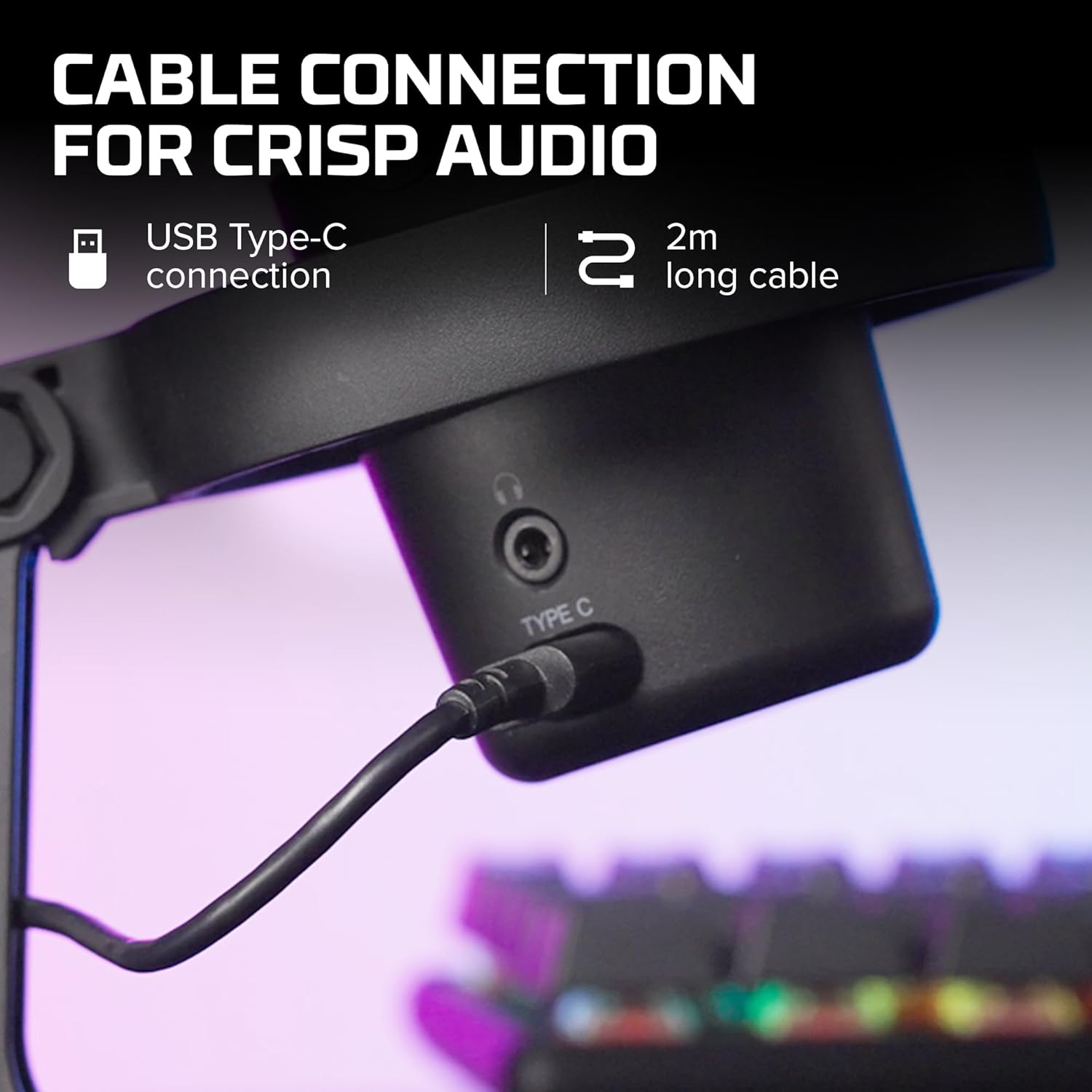
3.1 irudia: Gertuko planoa view of the USB Type-C connection port on the HyperX DuoCast microphone.
3.2 Positioning the Microphone
The DuoCast features a low-profile shock mount to reduce unwanted vibrations. For optimal audio quality, position the microphone directly in front of you, approximately 6-12 inches (15-30 cm) from your mouth.

Image 3.2: HyperX DuoCast microphone positioned on a boom arm for optimal recording, with a user wearing headphones.
3.3 Softwarearen instalazioa (aukerakoa)
For advanced customization of RGB lighting and other settings, download and install the HyperX NGENUITY Software from the official HyperX webgunea. Software hau Windows sistema eragileekin bateragarria da.

Image 3.3: User customizing the RGB lighting of the HyperX DuoCast microphone using the HyperX NGENUITY software interface on a computer screen.
4. Mikrofonoaren erabilera
4.1 Polar Patterns
The DuoCast offers two selectable polar patterns: Cardioid and Omnidirectional. Switch between these patterns using the button located on the microphone.
- Kardioidea: Ideal for single-person recording, such as streaming, podcasts, and voiceovers. It captures sound primarily from the front, reducing background noise.
- omnidirectional: Suitable for multi-person recordings, conference calls, or capturing ambient sounds, as it picks up sound equally from all directions.

Image 4.1: Diagram illustrating the Cardioid and Omnidirectional polar patterns and their recommended use cases.
4.2 Tap-to-Mute Sensor
The microphone features a convenient tap-to-mute sensor on the top. Tapping the top of the microphone will instantly mute or unmute your audio. The RGB light ring will change color to indicate the mute status.

Image 4.2: Close-up of the microphone's top showing the tap-to-mute sensor and the gain control knob.
4.3 Gain Control Adjustment
Adjust the microphone's input sensitivity (gain) using the control knob located on the microphone. Rotate the knob to increase or decrease the gain to achieve optimal audio levels and prevent distortion.
4.4 RGB argiztapena
The DuoCast features a customizable RGB light ring with two zones. The lighting can be personalized using the HyperX NGENUITY Software (Windows only) to match your setup or preference.
4.5 Entzungailuen irteera
A 3.5mm headphone jack is integrated into the microphone for direct monitoring of your audio output. Connect your headphones to this port to hear your voice in real-time.
5. Mantentzea
To ensure the longevity and optimal performance of your HyperX DuoCast microphone, follow these maintenance guidelines:
- Garbiketa: Use a soft, dry cloth to clean the microphone's exterior. Avoid using harsh chemicals, solvents, or abrasive materials.
- Biltegiratzea: When not in use, store the microphone in a clean, dry environment away from extreme temperatures and humidity.
- Manipulazioa: Kontuz ibili mikrofonoarekin. Saihestu erortzea edo kolpe bortitzak jasatea, barneko osagaiak kaltetu baititzake.
6. Arazoak
If you encounter issues with your HyperX DuoCast microphone, refer to the following common solutions:
| Arazoa | Kausa posiblea | Irtenbidea |
|---|---|---|
| Ez dago audio sarrerarik | Mikrofonoa ez dago behar bezala konektatuta Incorrect input device selected Mikrofonoa isilduta | Ziurtatu USB kablea ondo konektatuta dagoela. Verify the DuoCast is selected as the default input device in your system settings. Tap the top of the microphone to unmute. |
| Audio bolumen baxua | Irabaziaren ezarpena baxuegia da System input volume too low | Adjust the gain control knob on the microphone. Increase the microphone input volume in your system's sound settings. |
| Audio distortsionatua | Gain setting too high Mikrofonoa soinu-iturritik oso gertu | Decrease the gain control knob on the microphone. Mugitu mikrofonoa soinu-iturritik. |
| Gehiegizko hondoko zarata | Incorrect polar pattern selected High gain setting | Switch to Cardioid polar pattern for single-person use. Reduce the gain setting. Ziurtatu ingurune lasai batean zaudela. |
| RGB argiak ez du funtzionatzen | Software arazoa USB connection problem | Ensure HyperX NGENUITY Software is installed and updated (Windows only). Berriro konektatu USB kablea. |
7. Zehaztapenak
| Ezaugarri | Xehetasuna |
|---|---|
| Mikrofono Mota | USB kondentsadorea |
| Eredu polarrak | Kardioidea, noranzko guztia |
| Audio sentikortasuna | 6 dezibelio |
| Seinaleen eta zarataren arteko erlazioa | 70 dB |
| Maiztasun Erantzuna | 20 Hz - 20 kHz |
| Grabaketa Ebazpena | 24 biteko / 96kHz |
| Konektibitatea | USB (Type-C to Type-A) |
| Gailu bateragarriak | PC, PS5, PS4, Mac |
| Ezaugarri bereziak | Customizable RGB Light Ring, Tap-to-Mute Sensor, Gain Control, Low-profile Shock Mount, Internal Pop Filter, 3.5mm Headphone Output |
| Neurriak (L x W x H) | 5.5 x 9.3 x 5 hazbete (140 x 236 x 127 mm) |
| Elementuaren pisua | 8.6 ontza (243.2 gramo) |
| Modelo zenbakia | 4P5E2AA |

Image 7.1: Diagram showing the physical dimensions (width, height, depth) and weight of the HyperX DuoCast microphone.
8. Bermea eta Laguntza
For warranty information and technical support, please visit the official HyperX website or contact HyperX customer service. Keep your proof of purchase for warranty claims.
Lineako laguntza: www.hyperx.com/support


