1. Sarrera
Thank you for choosing the Fenge 48x24 Inch Electric Height Adjustable Standing Desk. This manual provides detailed instructions for assembly, operation, maintenance, and troubleshooting to ensure optimal performance and longevity of your desk. Please read this manual thoroughly before use and retain it for future reference.
2. Segurtasun informazioa
- Ziurtatu osagai guztiak daudela eta kalterik gabe muntatu aurretik. Ez erabili piezaren bat falta bada edo hautsita badago.
- Mantendu haurrak eta maskotak mahaitik urrun funtzionamenduan zehar, lesioak saihesteko.
- Ez gainkargatu mahaia. Kontsultatu zehaztapenak gehienezko pisu-ahalmena jakiteko.
- Ensure the power cord is not pinched or damaged. Use only the provided power adapter.
- Saihestu likidoak zuzenean kontrol-panelean edo osagai elektrikoen ondoan jartzea.
- Do not attempt to disassemble or repair the motor or control system yourself. Contact customer service for assistance.
- Jarri mahaia gainazal lau batean egonkortasuna bermatzeko.
3. Paketearen edukia
Egiaztatu osagai hauek guztiak zure paketean sartuta daudela:
- Desktop sections (pre-drilled)
- Desk legs and frame components
- Electric motor and control box
- Control panel with USB charging port
- Korronte egokitzailea eta kablea
- Assembly hardware (screws, washers, Allen wrench)
- Desk hook
- Argibide eskuliburua
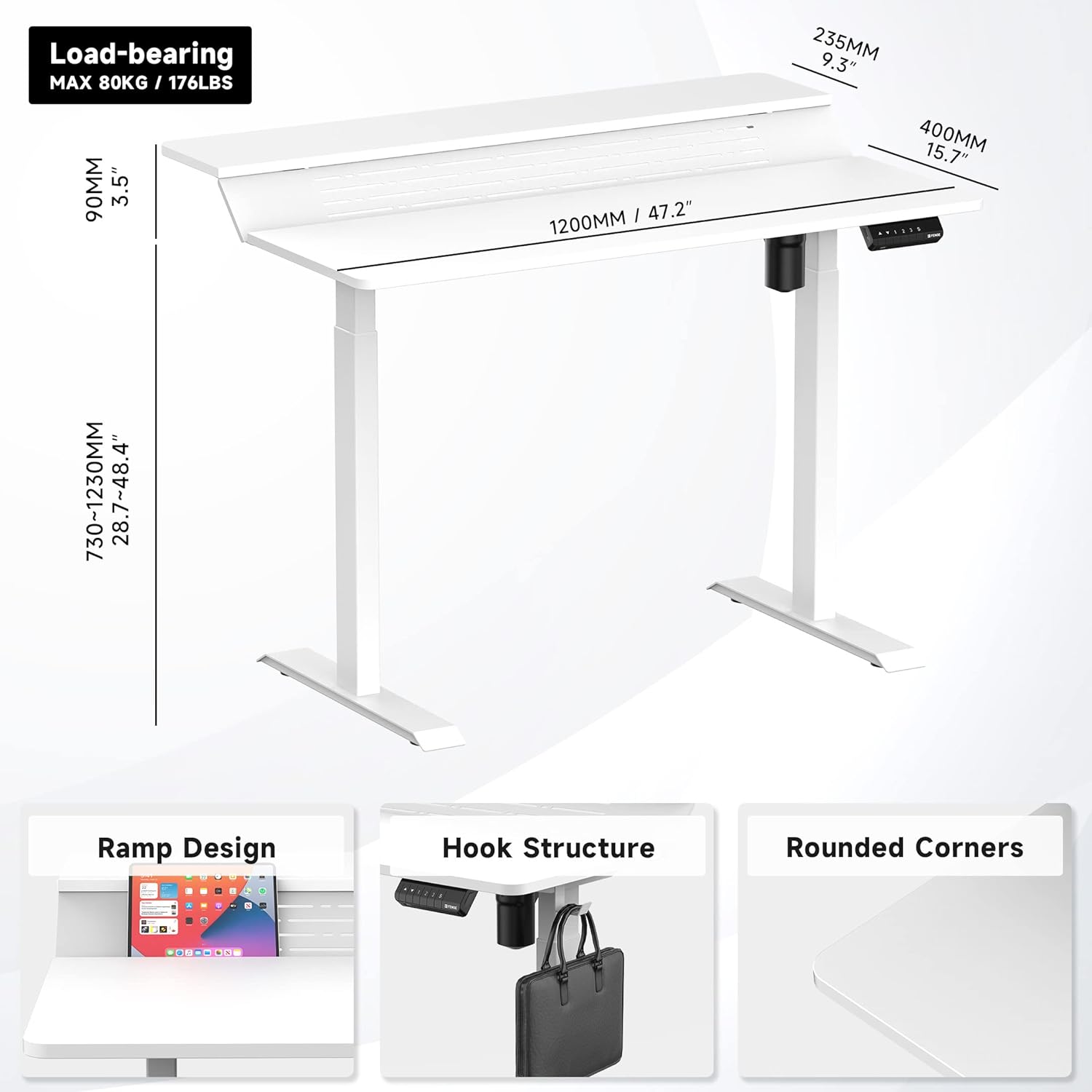
1 Irudia: Gainetikview of desk components and key dimensions.
4. Konfigurazioa eta Muntaketa
The Fenge Standing Desk is designed for simplified assembly. All parts are letter-coded, and the tabletop is pre-drilled. An Allen wrench is included; no additional power tools are required.
4.1 Muntaketa urratsak
- Oinak hanketara lotu: Secure the feet to the bottom of each desk leg using the provided screws.
- Konektatu barra gurutzatua: Attach the crossbar between the two legs. Ensure the hexagonal rod is fully inserted into the motor and the limit ring is no longer visible.
- Alboko euskarriak instalatu: Fasten the side brackets to the top of the legs.
- Mount Desktop Sections: Carefully place the pre-drilled desktop sections onto the assembled frame and secure them with screws.
- Install Control Panel and Power: Attach the control panel to the underside of the desk. Connect the power adapter to the control box and then to a power outlet.
- Attach Desk Hook: Install the desk hook on either side of the desk as desired.
Video 1: Detailed installation guide for the Fenge Standing Desk. This video demonstrates each step of the assembly process, from attaching the legs to connecting the electrical components and securing the desktop.
2 bideoa: Aurrerapen azkar batview of the Fenge Standing Desk assembly process. This video highlights the ease of putting the desk together, showcasing the main steps involved in a concise format.
5. Funtzionamendu-argibideak
Your Fenge Standing Desk features an electric height adjustment system with memory presets and a convenient USB charging port.
5.1 Altuera doitzea
- Erabili Gora (▲) eta Behera (▼) kontrol-paneleko gezi-botoiak mahaiaren altuera eskuz doitzeko.
- The desk height can be adjusted from 28.7 inches to 48.4 inches.
5.2 Memoria aurrezarpenak
The control panel allows you to save up to three preferred height settings:
- Egokitu mahaia nahi duzun altuerara Gora/Behera geziak erabiliz.
- Sakatu "S" button (Save).
- Sakatu berehala zenbaki-botoietako bat ("1", "2", edo "3") uneko altuera aurrezarpen horretan gordetzeko.
- To recall a saved height, simply press the corresponding number button. The desk will automatically move to the saved position.
5.3 USB kargatzeko ataka
The control panel includes a USB charging port to conveniently power your devices.

Figure 2: Close-up of the multifunction control panel, showing height adjustment buttons, memory presets (1, 2, 3, S), and the integrated USB charging port.

Figure 3: A closer look at the USB charging port located on the control panel, providing convenient power for your devices.
6. Ezaugarriak
The Fenge Standing Desk is designed with several features to enhance your workspace:
- 2-Tier Design with 135° Ramp: The unique two-tier desktop with a 135° ramp design provides an ergonomic setup, allowing for optimal monitor placement and increased workspace.
- LED bandak: Integrated LED strips offer customizable lighting to suit your mood or task.
- Kableen kudeaketa: Strategically placed holes and a metal cable management tray (optional, may require separate purchase) help keep your cables organized and out of sight.
- Desk Hook: A convenient hook is included for hanging headphones, bags, or other accessories.
- Funtzionamendu isila: The electric motor operates at less than 49 dB, ensuring a quiet adjustment experience.
- Talkaren aurkako funtzioa: The desk is equipped with a rebound-on-resistance safety feature, stopping movement if an obstruction is detected.

Figure 4: The 135-degree ramp design of the desk, providing an elevated surface for monitors or other items, promoting ergonomic posture.

Figure 5: The Fenge Standing Desk in an ergonomic workspace setup, showcasing the integrated LED strips and ample space for dual monitors and a laptop.
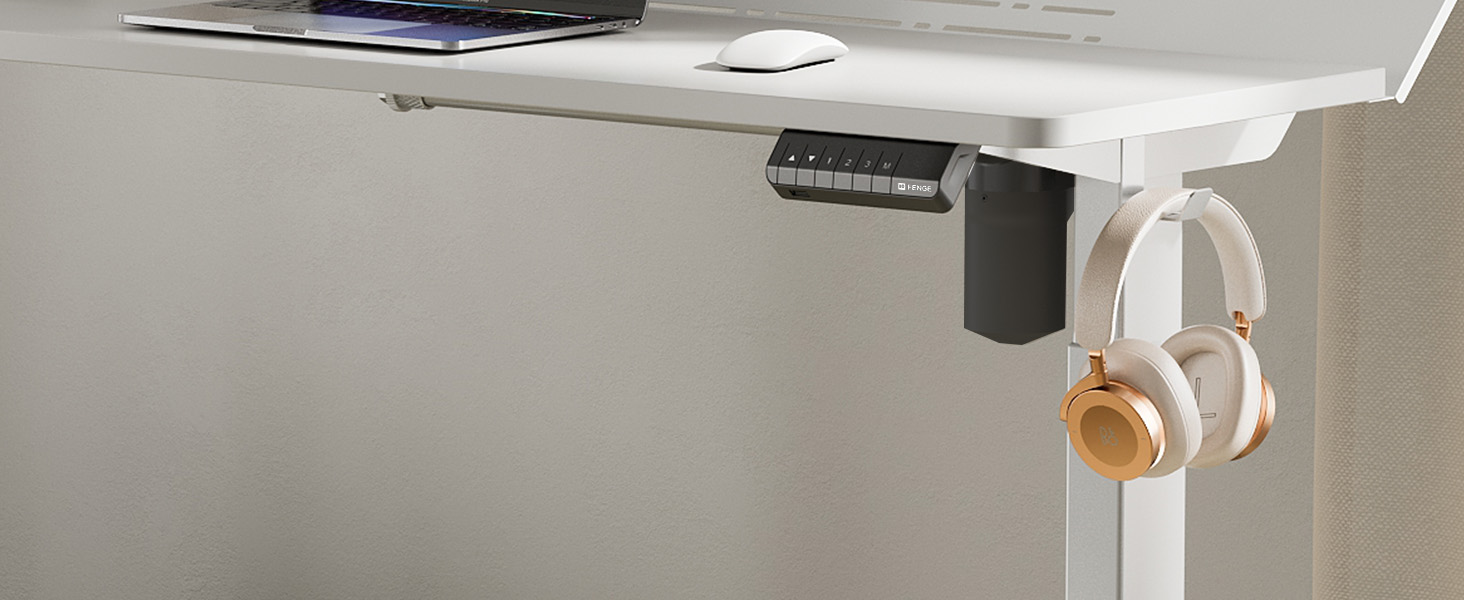
Figure 6: A close-up of the convenient desk hook, ideal for hanging headphones or other personal items, keeping your workspace tidy.
7. Mantentzea
- Garbiketa: Garbitu mahaigaina leun batekin, damp oihal. Saihestu produktu kimiko gogorrak edo garbitzaile urratzaileak.
- Ikuskapena: Aldian-aldian egiaztatu torloju eta konexio guztiak ondo estututa daudela ziurtatzeko. Beharrezkoa bada, berriro estutu.
- Kableen kudeaketa: Regularly organize cables to prevent tangles and damage.
8. Arazoak
If you encounter any issues with your Fenge Standing Desk, please refer to the following common problems and solutions:
| Arazoa | Kausa posiblea | Irtenbidea |
|---|---|---|
| Mahaia ez da mugitzen | Kable elektrikoa deskonektatuta; motorraren errorea; gainkarga. | Check power connections. Unplug and replug the power for 10 seconds. Reduce weight on the desk. |
| Altueraren doikuntza irregularra | Legs not properly aligned; obstruction. | Ensure all screws are tightened. Check for any obstructions under the desk. Perform a reset (refer to control panel instructions if available). |
| Funtzionamenduan zarata | Torloju solteak; motorraren arazoa. | Tighten all assembly screws. If noise persists and is unusual, contact customer service. |
| Memoria aurrezarpenak ez dira funtzionatzen | Gordetzeko prozedura okerra. | Follow the memory preset saving instructions carefully (Section 5.2). |
If the problem persists after trying these solutions, please contact Fenge customer service.
9. Zehaztapenak
| Ezaugarri | Xehetasuna |
|---|---|
| Marka | Fenge |
| Eredua | B0B2JGPRNH |
| Produktuaren neurriak | 24" L x 48" W x 51.9" H |
| Gutxieneko Altuera | 28.7 hazbete |
| Gehienezko Altuera | 48.4 hazbete |
| Gehienezko pisuaren gomendioa | 264 libra (120 kg) |
| Material Mota | Aluminum alloy (Base), Metal (Top) |
| Altxatzeko Mekanismoa | Elektrikoa |
| Zarata Maila | 49 dB azpitik |
| Muntaia Beharrezkoa | Bai (Tresnak barne) |
| Ezaugarri bereziak | LED Strips, 2-Tier Design, Memory Presets, USB Charging Port |
10. Bermea eta Laguntza
Fenge provides the following warranty for your standing desk:
- Mahaiaren markoa: 3 urteko bermea
- Motorra: 5 urteko bermea
This electric desk has obtained TUV, UL, CE, SGS, and other global certifications, ensuring high quality and safety standards.
For any product issues, questions, or warranty claims, please contact Fenge customer service. We are committed to providing prompt responses and practical solutions.
Visit the official Fenge Store for more information and products: Fenge Store on Amazon


