1. Sarrera
The INTERPHONE UCOM3 is a compact and advanced Bluetooth communication system designed for motorcyclists. It offers seamless connectivity, clear audio, and robust performance, ensuring you stay connected and entertained on the road. This manual provides comprehensive instructions for setting up, operating, and maintaining your UCOM3 unit.

Image: The Interphone UCOM3 unit, showcasing its compact design and intuitive button layout.
2. Ezaugarri nagusiak
- Bluetooth 5.1 teknologia: Ensures stable and efficient wireless connections.
- Bateria integratua: Compact design with a long-lasting battery for extended use.
- 2-Rider Intercom: Communicate with another rider up to 500 meters (1640 feet) away.
- 10-Hour Talk Time: Enjoy prolonged conversations and audio playback.
- 32mm HD Speakers: Delivers high-quality audio with rich bass for music and communication.
- DSP and Noise Control: Advanced digital signal processing for clear audio and reduced background noise.
- Iragazgaitza IP67 sailkapena: Hainbat eguraldi-baldintza jasateko diseinatua.
- Bateragarritasun Unibertsala: Works with original OEM helmet systems, most intercoms from other brands (including Sena), TFT displays, and GPS systems.
- Intuitive Multilingual App: Easy control and customization via a dedicated app for iOS and Android.
3. Konfigurazio gida
3.1 Zer sartzen da
Hasi aurretik, ziurtatu osagai guztiak paketean daudela:
- INTERPHONE UCOM3 Main Unit
- Helmet Speakers (32mm HD)
- Boom Mikrofonoa
- Kablezko Mikrofonoa
- Muntatzeko klipa
- Itsasgarri Mendia
- USB kargatzeko kablea
- Erabiltzailearen eskuliburua (dokumentu hau)

Image: Contents of the Interphone UCOM3 package, including the main unit, speakers, microphones, and mounting options.
3.2 Instalazioa
Proper installation is crucial for optimal performance and comfort.
3.2.1 Unitatea muntatzea
Choose between the mounting clip or the adhesive mount based on your helmet type and preference.
- Muntatzeko Klipa: Slide the clip between the helmet shell and the inner padding on the left side. Ensure it is securely fastened.
- Itsasgarriaren muntaia: Clean the desired area on the left side of your helmet. Peel off the protective backing from the adhesive pad and firmly press the mount onto the helmet surface for at least 30 seconds. Allow 24 hours for the adhesive to fully cure before attaching the unit.
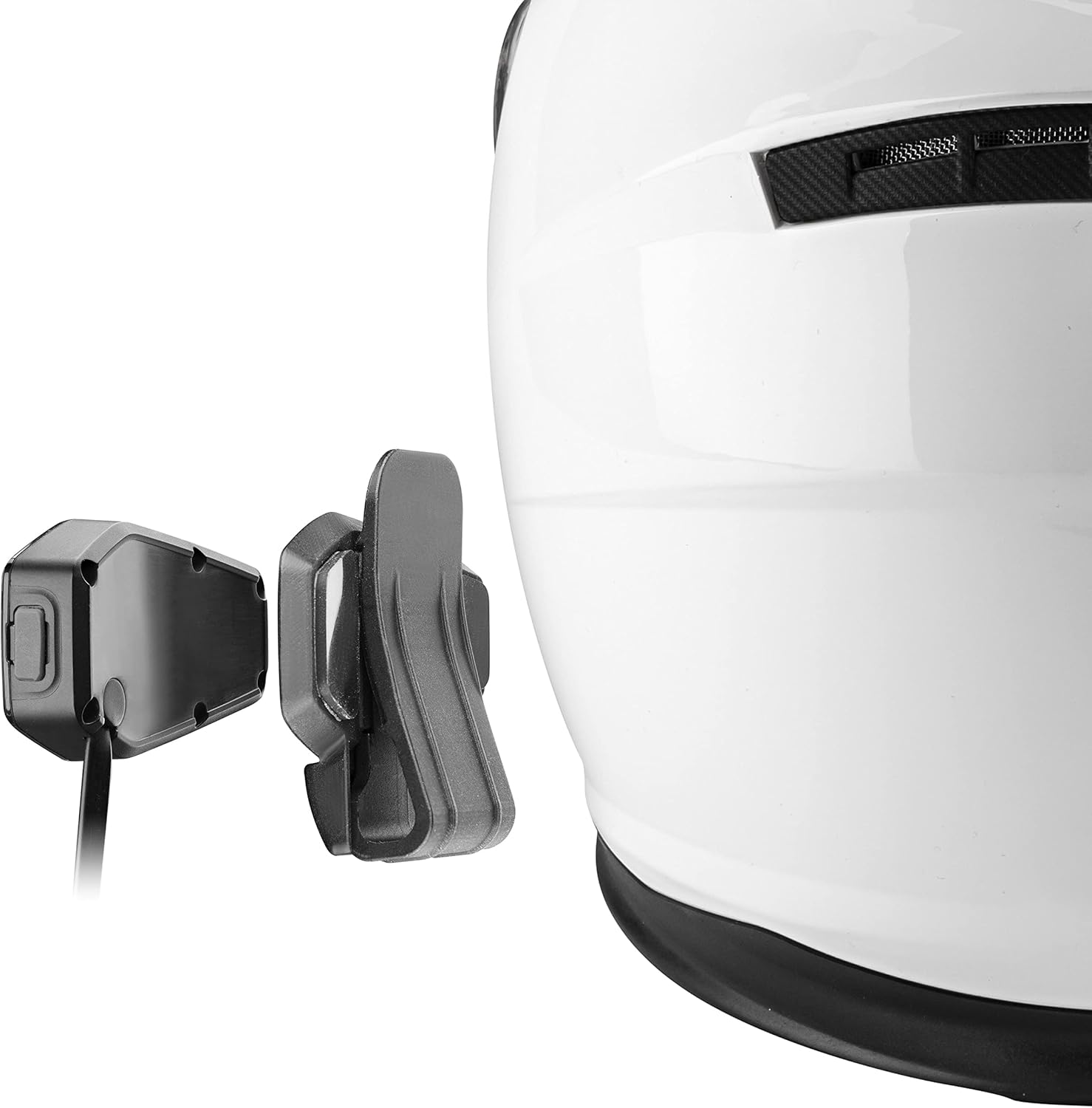
Image: Attaching the UCOM3 unit to a helmet using the secure mounting clip.

Image: Attaching the UCOM3 unit to a helmet using the strong adhesive mount.
3.2.2 Bozgorailuen eta mikrofonoaren kokapena
Install the speakers inside the helmet's ear pockets, ensuring they are centered over your ears for the best audio experience. Route the microphone cable and attach the microphone to the inside of the helmet near your mouth, preferably on the left side, ensuring it does not obstruct your vision or helmet closure.

Image: Internal helmet view demonstrating optimal placement for speakers and microphone for clear audio.
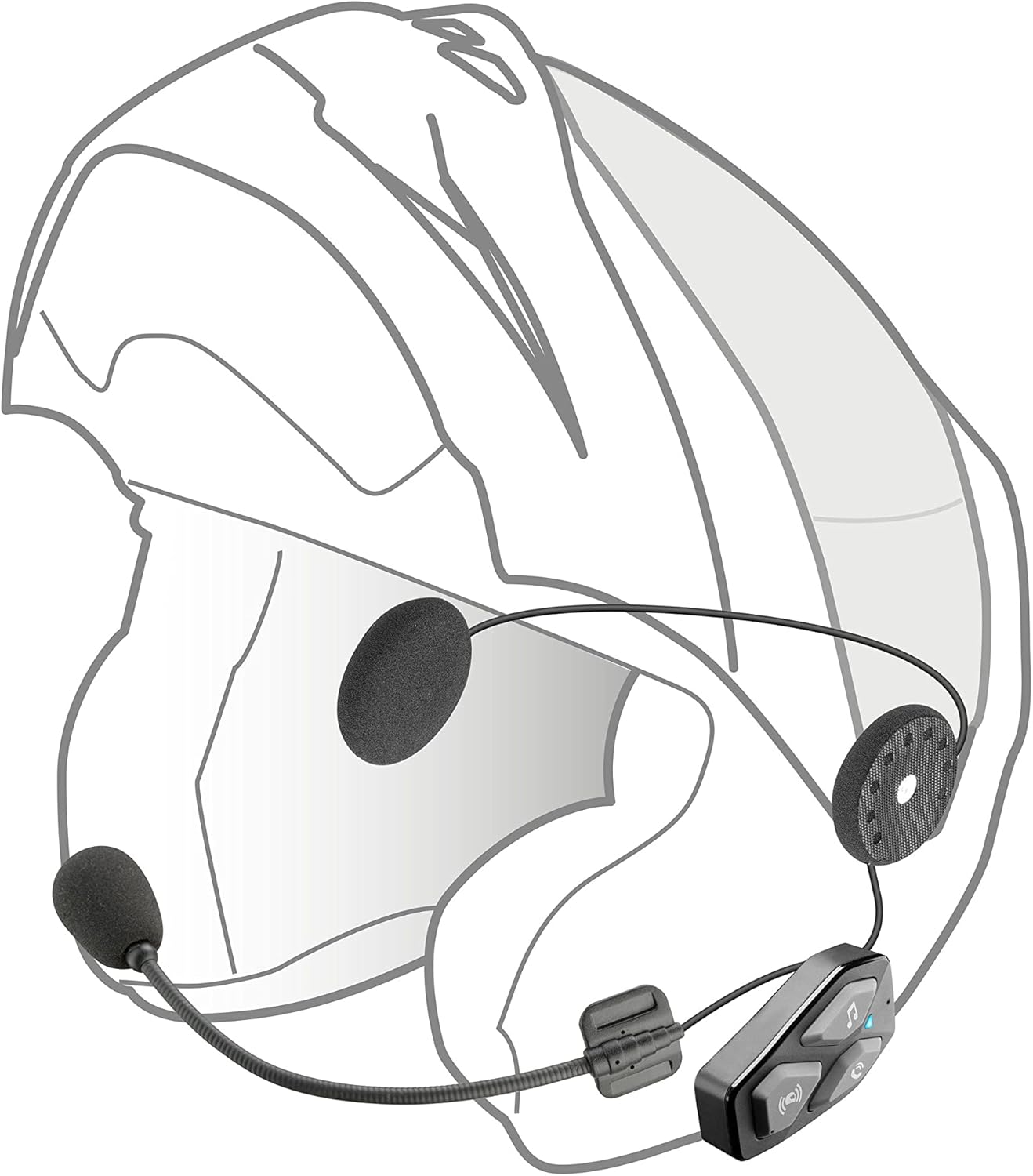
Image: External helmet view showing the UCOM3 unit mounted and the microphone positioned correctly.
3.3 Hasierako karga
Before first use, fully charge the UCOM3 unit. Connect the provided USB cable to the charging port on the unit and to a USB power source. The indicator light will show charging status and turn off when fully charged. A full charge typically takes approximately 2 hours.
4. Funtzionamendu-argibideak
4.1 Piztu/Itzali
- Piztu: Eduki sakatuta Intercomunicador botoia for 3 seconds until the indicator light flashes blue.
- Itzali: Eduki sakatuta Intercomunicador botoia for 5 seconds until the indicator light turns red and then off.
4.2 Bluetooth parekatzea (telefono adimenduna)
- With the UCOM3 off, press and hold the Intercomunicador botoia for 8 seconds until the indicator light flashes red and blue alternately, indicating pairing mode.
- Zure telefonoan, joan Bluetooth ezarpenetara eta bilatu gailu berriak.
- Select "INTERPHONE UCOM3" from the list of available devices.
- Once paired, the indicator light on the UCOM3 will flash blue slowly.
4.3 Interfono bidezko komunikazioa
The UCOM3 supports communication between two riders up to 500 meters (1640 feet) in open terrain.
- Interfonoa abiarazi: Sakatu labur Intercomunicador botoia to start a conversation with a paired UCOM3 unit.
- Amaitu interfonoa: Sakatu labur Intercomunicador botoia again to end the conversation.
4.4 Music and GPS Audio
- Erreproduzitu/Pausatu musika: Sakatu labur Musika botoia.
- Hurrengo ibilbidea: Eduki sakatuta Bolumena igotzeko botoia.
- Aurreko pista: Eduki sakatuta Bolumena jaisteko botoia.
- Bolumenaren doikuntza: Sakatu labur Bolumena igo or Bolumena jaitsi botoiak.
- GPS navigation instructions from your paired smartphone will automatically overlay or temporarily mute music.
4.5 Deien kudeaketa
- Erantzun deia: Sakatu labur Telefonoaren botoia.
- Amaitu deia: Sakatu labur Telefonoaren botoia dei batean zehar.
- Deia baztertu: Eduki sakatuta Telefonoaren botoia 2 segundoz.
- Ahots laguntzailea: Sakatu bi aldiz Telefonoaren botoia to activate your smartphone's voice assistant (Siri, Google Assistant).
4.6 Aplikazioen kontrola
Download the official Interphone UCOM app from the App Store (iOS) or Google Play Store (Android) for advanced settings and control. The app allows for firmware updates, audio settings customization, and managing intercom groups.
Bideoa: Produktu ofizialaren bideo-erakustaldiaasing the features and benefits of the Interphone UCOM3 Motorcycle Bluetooth Headset, including its compact design, integrated battery, Bluetooth 5.1, IP67 waterproof rating, and communication capabilities.
5. Mantentzea
- Garbiketa: Garbitu unitatea leuna batekinamp oihal. Ez erabili produktu kimiko gogorrak edo garbitzaile urratzaileak.
- Uraren erresistentzia: The UCOM3 is IP67 waterproof. While it can withstand rain and splashes, avoid prolonged submersion. Ensure the USB port cover is securely closed.
- Bateria zaintzea: For optimal battery life, avoid fully discharging the unit frequently. Charge it regularly, especially if storing for extended periods.
- Biltegiratzea: Gorde unitatea leku fresko eta lehor batean erabiltzen ez duzunean.
6. Arazoak
| Arazoa | Kausa posiblea | Irtenbidea |
|---|---|---|
| Unitatea ez da pizten | Low battery; Unit frozen | Charge the unit fully; Perform a reset (refer to manual for specific reset procedure, usually holding multiple buttons). |
| Cannot pair with smartphone/intercom | Not in pairing mode; Device already paired; Interference | Ensure unit is in pairing mode (flashing red/blue); Delete previous pairings on both devices and try again; Move away from other electronic devices. |
| Bozgorailuen soinurik ez | Volume too low; Speakers disconnected; Incorrect placement | Increase volume; Check speaker connections; Adjust speaker position inside helmet. |
| Intercom range is short or connection is unstable | Obstructions; Environmental interference; Out of range | Ensure clear line of sight between units; Avoid areas with high electromagnetic interference; Stay within the 500m range. |
If you encounter issues not listed here or if the solutions do not resolve your problem, please refer to the official Interphone support resources or contact customer service.
7. Zehaztapen Teknikoak
| Ezaugarri | Zehaztapena |
|---|---|
| Ereduaren izena | INTERPHOUCOM3 |
| Konektibitate Teknologia | Haririk gabekoa (Bluetooth 5.1) |
| Interfono barrutia | Up to 500 meters (2 riders) |
| Bateriaren iraupena (elkarrizketa denbora) | 10 ordu |
| Uraren Erresistentzia Maila | IP67 (iragazgaitza) |
| Bozgorailuaren tamaina | 32 mm-ko HD |
| Kontrol mota | Noise Control, App Control |
| Elementuaren pisua | 50 gramo (1.76 ontza) |
| Produktuaren neurriak | 2.36 x 1.42 x 0.63 hazbete |
| Gailu bateragarriak | All Helmets, Sena Intercoms, TFT, GPS Systems |
8. Bermea eta Laguntza
The INTERPHONE UCOM3 comes with a manufacturer's warranty. Please refer to the warranty card included in your product packaging for specific terms and conditions. For further assistance, technical support, or to download the latest version of the user manual (PDF), please visit the official Interphone webwebgunean edo jarri harremanetan bere bezeroarentzako zerbitzuarekin.
Erabiltzailearen eskuliburua (PDF) ere aurki dezakezu hemen.


