1. Bukatu daview
The Hoco ES61 Manner Sports Wireless Bluetooth Headset is designed for active lifestyles, offering a blend of comfort, long battery life, and versatile connectivity. This manual provides detailed instructions to help you get the most out of your headset.
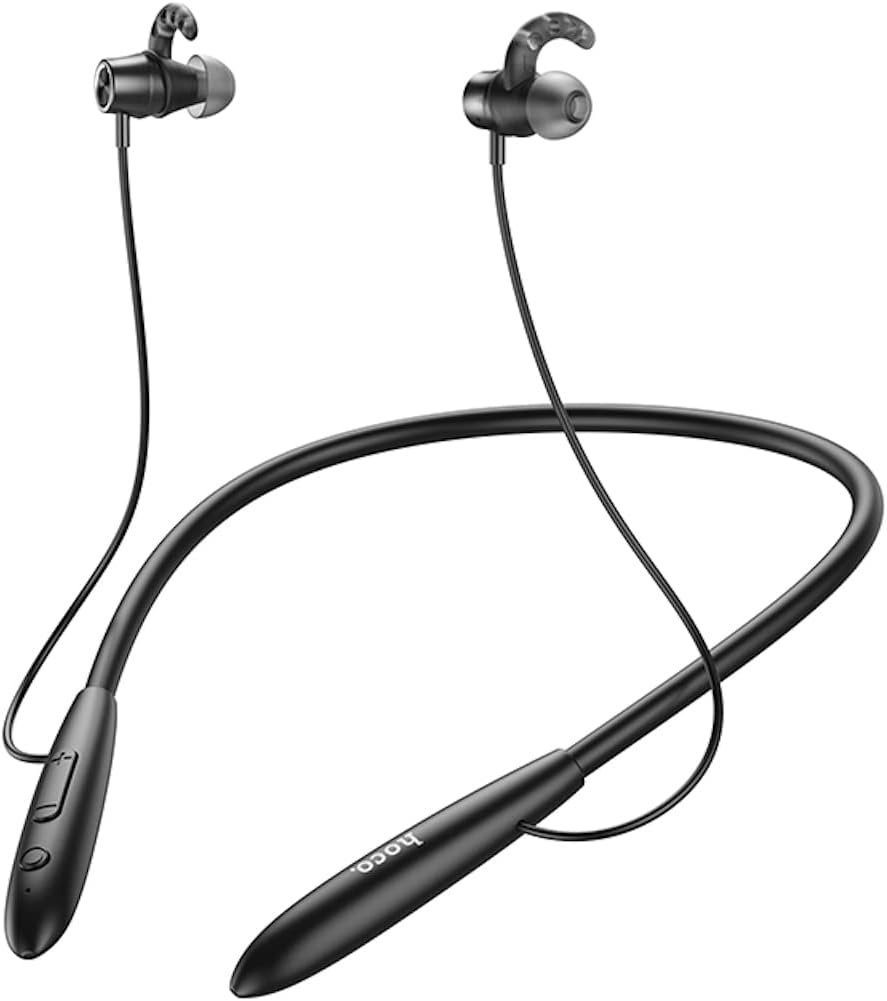
Irudia: Aurrealdea view Hoco ES61 entzungailuen erakustaldiaasing its neckband design and in-ear earbuds.
2. Produktuaren ezaugarriak
- Bluetooth 5.1 konexioa: Equipped with JL AC7006 chip for stable and efficient wireless connection.
- Bateriaren iraupen hedatua: Features a 200mAh battery, providing up to 20 hours of music/talk time and an impressive 330 hours of standby time.
- Karga azkarra: Gutxi gorabehera 2 ordutan guztiz kargatzen da.
- Diseinu arina eta erosoa: The earphone cord measures 85cm in length, and the headset weighs only 22g, ensuring comfort during extended wear.
- Erreprodukzio aukera anitzak: Supports Bluetooth audio streaming and TF card playback (up to 32GB) for direct music listening.
- Multi-language Voice Prompts: Offers voice prompts in both Chinese and English for user convenience.
- Bateragarritasun zabala: Compatible with a broad range of devices including iPhone, Samsung, OnePlus, Huawei, Xiaomi, and Oppo smartphones.

Irudia: Gertuko planoa view of the Hoco ES61 headset, highlighting the integrated TF card slot for direct music playback.
Bideoa: Produktu ofizial baten bideo-erakustaldiaasing the Hoco ES61 Bluetooth Headset's features, including its 20-hour battery life, voice prompts, and compatibility with iOS and Android devices.
3. Konfigurazio gida
3.1 Entzungailuak kargatzea
Before first use, fully charge the headset. Use a standard USB charger (not included) to connect the charging port on the headset to a power source.
- LED adierazleak normalean argi gorri bat erakutsiko du kargatzen ari den bitartean.
- Once fully charged (approximately 2 hours), the LED indicator will turn blue or off.
3.2 Bluetooth parekatzea
To connect your Hoco ES61 headset to a Bluetooth-enabled device:
- Ziurtatu entzungailuak itzalita daudela.
- Press and hold the multi-function button (usually the power button) for approximately 3-5 seconds until the LED indicator flashes red and blue alternately. This indicates pairing mode.
- Zure gailuan (smartphone-an, tabletan, etab.), gaitu Bluetooth-a eta bilatu eskuragarri dauden gailuak.
- Select "Hoco ES61" from the list of found devices.
- Once connected, the LED indicator on the headset will typically flash blue slowly or turn off, and you will hear a voice prompt confirming the connection.
3.3 TF txartelaren erreprodukzioa
The Hoco ES61 supports direct music playback from a TF (MicroSD) card.
- Carefully insert a TF card (up to 32GB) with your music files into the designated TF card slot on the headset.
- The headset will automatically switch to TF card playback mode if a card is detected and contains playable audio files.
- Use the headset controls to manage playback (play, pause, skip tracks).
4. Funtzionamendu-argibideak
4.1 Oinarrizko kontrolak
| Botoia/Ekintza | Funtzioa |
|---|---|
| Funtzio anitzeko botoia (MFB) | Piztu/Itzali, Erreproduzitu/Pausatu, Deia Erantzun/Amaitu |
| Bolumena igo (+) | Increase Volume, Next Track (long press) |
| Bolumena jaitsi (-) | Decrease Volume, Previous Track (long press) |
4.2 Musika erreproduzitzea
- Erreproduzitu/Pausatu: Sakatu labur MFB.
- Hurrengo ibilbidea: Sakatu luze bolumena igotzeko (+) botoia.
- Aurreko pista: Sakatu luze Bolumena Jaisteko (-) botoia.
- Bolumenaren doikuntza: Sakatu labur Bolumena igotzeko (+) edo Bolumena jaitsi (-) botoiak.
4.3 Deien kudeaketa
- Deia erantzun/amaitu: Short press the MFB during an incoming call.
- Deia baztertu: Long press the MFB during an incoming call.
- Berriz markatu azken zenbakia: Double-click the MFB when not on a call.

Image: The Hoco ES61 headset resting on a smartphone, illustrating its use with mobile devices for music and calls.
5. Mantentzea eta Zainketa
- Keep the headset dry. Do not expose it to extreme temperatures or humidity.
- Clean the earbuds and charging port regularly with a soft, dry cloth to prevent dust and debris buildup.
- Saihestu produktu kimiko gogorrak edo garbitzaile urratzaileak erabiltzea.
- Gorde entzungailua leku fresko eta lehor batean erabiltzen ez duzunean.
- Ez saiatu entzungailuak desmuntatzen edo aldatzen, horrek bermea baliogabetuko baitu eta kalteak eragin ditzakeelako.

Image: The Hoco ES61 headset shown with different sizes of silicone ear tips, emphasizing the importance of proper fit for comfort and sound quality.
6. Arazoak
6.1 Headset Not Turning On
- Ensure the headset is fully charged. Connect it to a charger and check the LED indicator.
- Press and hold the multi-function button for a few seconds to power on.
6.2 Ezin da gailuarekin parekatu
- Make sure the headset is in pairing mode (LED flashing red and blue alternately).
- Ziurtatu Bluetooth gaituta dagoela zure gailuan eta irismen-eremuan dagoela (normalean 10 metro).
- Forget/delete "Hoco ES61" from your device's Bluetooth list and try pairing again.
- Berrabiarazi entzungailuak eta gailua.
6.3 Soinurik ez edo bolumen baxua
- Igo bolumena bai entzungailuetan bai konektatutako gailuan.
- Ziurtatu entzungailuak behar bezala konektatuta daudela zure gailura.
- If using TF card, ensure the card is inserted correctly and contains playable audio files.
- Check for any obstructions in the earbud nozzles and clean if necessary.
6.4 Bateriaren iraupen laburra
- Ziurtatu entzungailuak guztiz kargatuta daudela erabili aurretik.
- Bateriaren iraupena alda daiteke bolumen-mailaren eta erabilera-ereduen arabera.
- Saihestu bateria muturreko tenperaturetara ez jartzea.
7. Zehaztapenak
| Ezaugarri | Xehetasuna |
|---|---|
| Bluetooth bertsioa | 5.1 |
| Bluetooth txipa | JL AC7006 |
| Bateria Edukiera | 200mAh |
| Kargatzeko Denbora | Gutxi gorabehera. 2 ordu |
| Musika / Eztabaida Ordua | Gehienez 20 ordu |
| Egonean Denbora | Gehienez 330 ordu |
| Earphone Cord Length | 85 cm |
| Pisua | 22 g |
| TF txartelaren euskarria | Bai, 32 GB arte |
| Ahots-abisuak | txinera eta ingelesa |
| Bateragarritasuna | iPhone, Samsung, OnePlus, Huawei, Xiaomi, Oppo |
8. Bermea eta Laguntza
For warranty information and customer support, please refer to the product packaging or contact your retailer. Keep your purchase receipt as proof of purchase for any warranty claims.


