1. Produktua amaitu daview
The Nutale AirPro Key Finder Tag (Model F11XD) is a Bluetooth-enabled item locator designed to help you find misplaced items such as keys, wallets, backpacks, and tablets. It integrates seamlessly with the Apple Find My app, leveraging the global Find My network for location tracking. This device is compatible exclusively with iOS devices.

Figure 1: Nutale AirPro Key Finder Tag features and Find My App integration.
2. Konfiguratzeko argibideak
2.1. Important iOS System Requirement
To ensure proper functionality and binding of the Nutale AirPro Key Finder Tag, your iOS device must be running iOS 18.0.1 edo berriagoa. Please update your device's operating system if necessary before proceeding with the setup.

Figure 2: iOS system version requirement for tag loteslea.
2.2. Gailua piztea
- Locate the button on your Nutale AirPro Key Finder Tag.
- Luze sakatu botoia gutxi gorabehera 5 segundo.
- The device will emit a beep sound and a light will flash, indicating it has powered on and is ready for pairing.
2.3. Pairing with the Apple Find My App
Follow these steps to pair your Nutale AirPro Key Finder Tag with your iOS device using the Find My app:
- Ireki Bilatu Nire aplikazioa zure iPhone edo iPad-en.
- Nabigatu Elementuak fitxa.
- Sakatu + icon (Add Item).
- Hautatu Beste elementu bateragarri bat aukeretatik.
- The app will search for nearby devices. Once your Nutale AirPro Tag is detected (e.g., "NUTALE-F11X"), tap Konektatu.
- Jarraitu pantailako argibideei Name your item and choose an emoji to represent it.
- Onartu gailua zure Apple IDarekin lotzea.
- Sakatu Amaitu parekatzeko prozesua burutzeko.
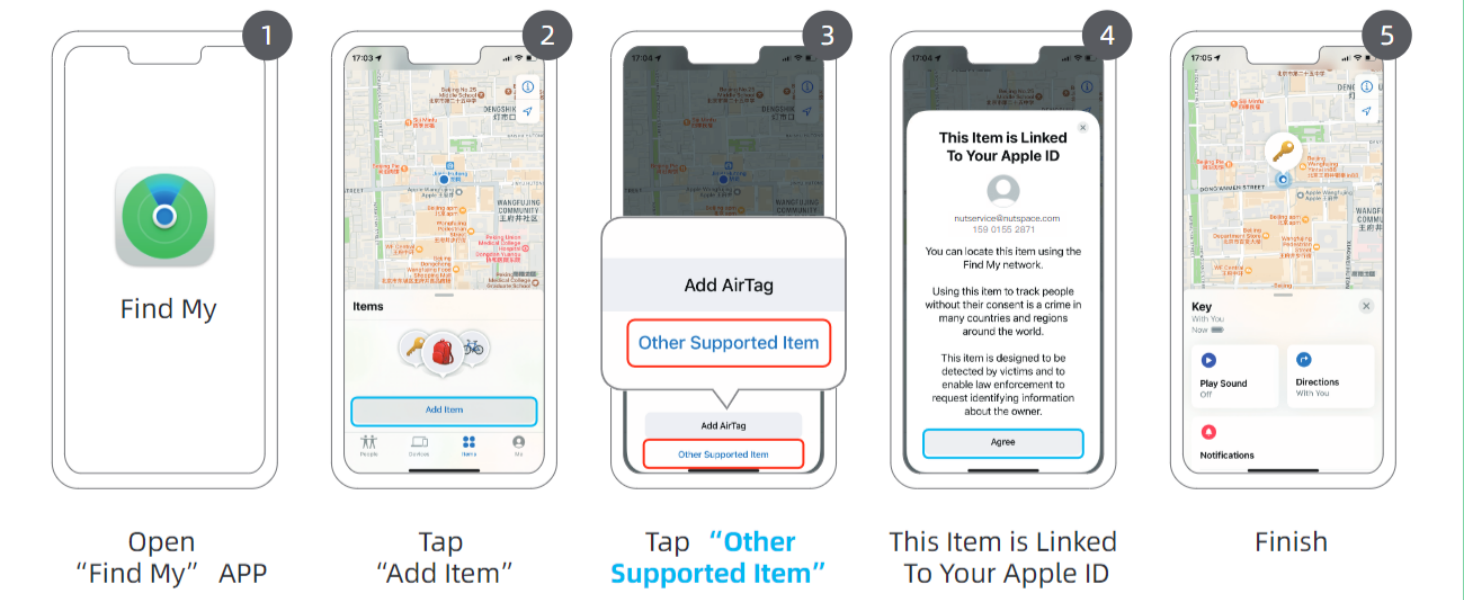
Figure 3: Visual guide for connecting your Nutale AirPro Tag Aurkitu nire aplikaziora.
3. Funtzionamendu-argibideak
3.1. Zure elementua aurkitzea
The Nutale AirPro Key Finder Tag utilizes the Apple Find My network to help you locate your items. This network consists of millions of Apple devices worldwide that can anonymously detect your tag and report its location to you.
- Long-Distance Locating: If your item is far away, the Find My app will display its last known location on a map, updated by the Find My network. You will receive notifications if your item is detected by other Apple devices.
- Nearby Locating (Play Sound): When your item is within Bluetooth range (approximately 20 to 50 meters), you can use the Find My app to play a sound on your Nutale AirPro Tag bere kokapen zehatza zehazteko.

Figure 4: Global positioning and sound features via Find My App and Siri.
3.2. Siri erabiliz
You can also ask Siri to help you find your item. Simply say, "Hey Siri, find my [item name]" (e.g., "Hey Siri, find my keys"), and your Nutale AirPro Tag soinu bat joko du.
3.3. Atzean utzitako jakinarazpenak
The Find My app can alert you if you leave your Nutale AirPro Tag behind at an unfamiliar location. You can customize these notifications within the app settings.
3.4. Lost Mode
If your item is lost, you can enable Lost Mode in the Find My app. This allows you to display a message and contact information to anyone who finds your tag. When someone finds your tag and scans it with an NFC-enabled smartphone, they will see your message and contact details.
Video 1: Official demonstration of Nutale AirPro Key Finder Tag setup and functionality with iOS Find My App.
4. Mantentzea
4.1. Bateriaren informazioa
- The Nutale AirPro Key Finder Tag a erabiltzen du CR2032 txanpon pila.
- The battery life is approximately 10 hilabete under normal usage conditions.
- Produktu paketeak barne hartzen du 4 CR2032 bateriak (one pre-installed, three spares).
4.2. Bateria ordezkatzea
Bateria ordezkatzeko:
- Kokatu bateriaren atzeko aldean tag.
- Ireki bateriaren estalkia astiro-astiro.
- Kendu CR2032 bateria zaharra.
- Sartu CR2032 bateria berri bat alde positiboa (+) gora begira duela.
- Itxi ondo bateriaren estalkia.

Figure 5: Independent battery compartment for easy replacement.
5. Arazoak
- Gailua ez da parekatzen: Ensure your iOS device is updated to iOS 18.0.1 or later. Make sure Bluetooth is enabled on your device. Press and hold the tag's button for 5 seconds until it beeps to ensure it's in pairing mode.
- Ez dago soinurik tag: Egiaztatu tag's battery needs replacement. Ensure the tag zure iOS gailuaren Bluetooth-aren irismenean badago.
- Kokapen zehaztugabea: Location accuracy depends on the density of Apple devices in the Find My network. In areas with fewer Apple devices, location updates may be less frequent or precise.
- Button unresponsive: Apply firm pressure to the button. If the issue persists, try replacing the battery.
6. Zehaztapenak
| Ezaugarri | Xehetasuna |
|---|---|
| Modelo zenbakia | F11XD |
| Neurriak | 1.67"L x 1.67"Z x 0.31"L (4.24 cm x 4.24 cm x 0.79 cm) |
| Elementuaren pisua | 3.2 ontza (90.7 gramo) |
| Materiala | Akrilonitrilo butadieno estirenoa (ABS), plastikoa |
| Bateria mota | CR2032 (barne) |
| Pila kopurua | 4 (1 pre-installed, 3 spares) |
| Bateriaren iraupena | 10 hilabete inguru |
| Bateragarritasuna | iOS devices only (iPhone, iPad) with Find My app |
7. Bermea eta laguntza
7.1. Produktuen bermea
The Nutale AirPro Key Finder Tag batekin dator 1 urteko bermea erosketa-datatik aurrera. Berme honek fabrikazio-akatsak eta erabilera normalaren ondoriozko matxurak estaltzen ditu. Gorde erosketaren egiaztagiria berme-erreklamazioetarako.
7.2. Laguntza Teknikoa
Nutale offers lifetime technical support for the AirPro Key Finder Tag. If you encounter any issues or have questions regarding the product, please contact our customer care team. Contact information can typically be found on the product packaging or the official Nutale webgunea.


