1. Sarrera
The ANCEL BM700 is a diagnostic scan tool designed for comprehensive system analysis of BMW group vehicles. It also provides standard OBD2 engine diagnostics for other vehicle makes and models. This manual provides instructions for setup, operation, maintenance, and troubleshooting of the device.
2. Paketearen edukia
The ANCEL BM700 package includes the following items:
- 1 x ANCEL BM700 Diagnostic Scan Tool
- 1 x 20-pin Female Adapter (for older BMW models)
- 1 x USB Cable (for updates)
- 1 x Erabiltzailearen eskuliburua (dokumentu hau)
3. Produktua amaitu daview
The ANCEL BM700 features a 2.8-inch TFT 262K true color display LCD for clear data presentation. It is designed for ease of use, suitable for both beginners and professionals.

Irudia: Aurrealdea view of the ANCEL BM700 diagnostic tool, displaying its user interface with menu options like OBDII, For BMW, Oil Reset, EPB Reset, BAT, BMS Reset, ETCS Reset, and Tool Setup.
3.1 Gailuaren osagaiak
- Bistaratzeko pantaila: 2.8" TFT 262K true color LCD.
- Nabigazio botoiak: For menu selection and data scrolling.
- Ados botoia: Hautaketak berresten ditu.
- ESC botoia: Exits current screen or cancels operation.
- I/M botoia: I/M Prestutasun egoerara sarbide azkarra.
- OBD2 Cable: Ibilgailuaren OBD2 atakara konektatzen da.
- USB ataka: Software eguneratzeetarako.

Image: Diagram highlighting the user-friendly design of the ANCEL BM700, pointing out the redesigned interface, well-made cover, and USB port for connectivity.
4. Konfigurazioa eta konexioa
To begin using the ANCEL BM700, follow these steps to connect it to your vehicle:
- Aurkitu OBD2 ataka: The 16-pin OBD2 diagnostic port is typically located under the dashboard on the driver's side.
- Connect the BM700: Plug the BM700's OBD2 cable into the vehicle's OBD2 port.
- For Older BMW Models (20-pin port):
- Locate the 20-pin diagnostic port, usually found under the hood.
- Connect the 20-pin female adapter to the vehicle's 20-pin port.
- Connect the BM700's 16-pin OBD2 cable to the 20-pin adapter.
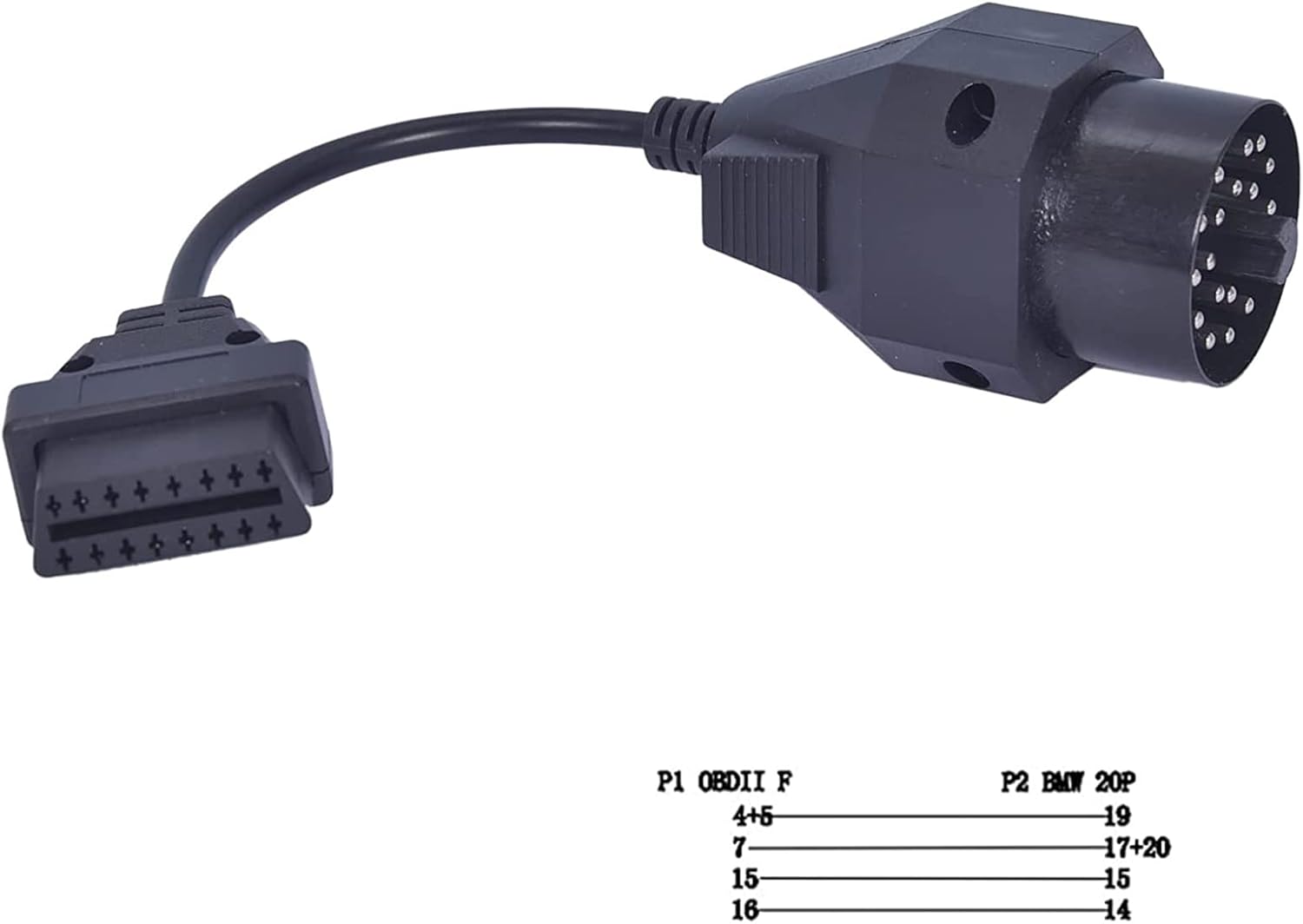
Image: A 20-pin to 16-pin OBD2 adapter cable, used for connecting the BM700 to older BMW vehicles with a 20-pin diagnostic port.

Image: A detailed diagram illustrating the pinout connections between the 16-pin OBDII female connector and the 20-pin BMW male connector on the adapter cable.
- Piztu: Once connected, the BM700 will power on automatically from the vehicle's battery.
- Start Vehicle (Optional): For some diagnostic functions, the vehicle's ignition may need to be in the ON position or the engine running. Follow on-screen prompts.
5. Funtzionamendu-argibideak
5.1 Basic OBD2 Functions (for all compatible vehicles)
The BM700 can perform standard OBD2 diagnostics for engine systems on any OBD2 compliant vehicle (1996 and newer in the USA, 2001 for gasoline vehicles in Europe, 2004 for diesel vehicles in Europe).
- Irakurri kodeak: Ibilgailuaren ordenagailuan gordetako diagnostiko-arazoen kodeak (DTC) bistaratzen ditu.

Image: Screenshot of the ANCEL BM700 display showing the "Read Codes" menu option, which presents diagnostic trouble codes after scanning the vehicle.
- Ezabatu kodeak: Clears DTCs from the vehicle's computer and turns off the Check Engine Light (CEL). Ensure repairs are completed before clearing codes.

Image: Screenshot of the ANCEL BM700 display showing the "Clear Codes" menu option, used to clear fault codes after repairs are performed.
- I / M prest egotea: Isuriekin lotutako monitorizazio-sistemen egoera egiaztatzen du.

Image: Screenshot of the ANCEL BM700 display showing the "I/M Readiness" menu option, which checks the status of emission-related systems.
- Datu korrontea: Displays live sensor data from the vehicle.

Image: Screenshot of the ANCEL BM700 display showing the "Data Stream" menu option, which allows viewing of live sensor data from the vehicle.
- EVAP sistemaren proba: Ibilgailuaren lurruntze-isurien kontrol sistemaren ihes-proba bat hasten du.

Image: A diagram illustrating the components of an EVAP system alongside the ANCEL BM700 screen showing the "Evap System Test" option, which initiates a leak test for the vehicle's EVAP system.
- Ibilgailuen informazioa: Ibilgailuaren identifikazio zenbakia (VIN), kalibrazio IDa eta kalibrazio egiaztapen zenbakia (CVN) berreskuratzen ditu.

Image: The ANCEL BM700 displaying its "Diagnostic Menu" with options like Read Codes, Erase Codes, I/M Readiness, Data Stream, EVAP System Test, and Vehicle Information, along with a sample data stream output.
5.2 BMW Group Vehicle Specific Functions
The BM700 offers advanced diagnostic and service functions specifically for BMW, MINI, and Rolls-Royce vehicles.

Image: The ANCEL BM700 screen displaying icons for various vehicle systems (TPMS, Oil, SAS, Engine, Battery, ABS, Airbag, Transmission, ESP, Immobilizer, Suspension, Drivetrain), indicating its capability for all-system diagnosis on BMW group vehicles.
- Sistemaren diagnostikoa osoa: Accesses and diagnoses all available electronic control units (ECUs) in BMW group vehicles, including engine, transmission, ABS, airbags, etc.
- CBS Berrezarri/Zuzendu: Performs Condition Based Service resets and corrections.
- EPB Berrezarri: Resets the Electronic Parking Brake after service.
- Battery Registration & Testing: Registers a new battery to the vehicle's system and performs battery health checks.

Image: A step-by-step guide demonstrating how to perform BMW battery registration and testing using the ANCEL BM700, including replacing the battery, choosing registration, entering new battery digits, and confirming the process.

Image: A guide for BMW battery management, detailing steps for battery registration, its purpose, and important notes regarding compatibility and battery type matching.
- SAS Learning (Steering Angle Sensor): Zuzendaritza-angeluaren sentsorea kalibratzen du.

Image: A visual representation of the SAS Reset function, showing a steering wheel and indicating that steering angle sensor calibration stores the current steering wheel position and clears fault memory after successful calibration.
- Erregai-ponpa berrezartzea: Resets the fuel pump system (for F-series chassis only). Ensure no fuel leaks before resetting.

Image: A diagram illustrating the fuel system and the Fuel Pump Reset function, noting it is for F-series chassis only and requires checking for fuel leaks before use.
- EGS Egokitzapen Garbia: Clears transmission adaptation values.
- Abiadura inaktiboen doikuntza: Motorraren abiadura alferra doitzen du.
- DPFaren birsorkuntza: Diesel Partikula Iragazkiaren birsorkuntza abiarazten du.

Image: A diagram showing the DPF system and explaining the DPF Reset function, which allows for DPF-related code clearing, light resetting, injection rate management, and particle burn-off.
- TPS doikuntza: Adjusts the Throttle Position Sensor.
- Injektorearen kodeketa: Codes new or replaced fuel injectors.

Image: A diagram illustrating fuel injectors and the Injector Coding function, explaining its importance for addressing issues like leaking or dead injectors that might be missed by other diagnostics.
- Airbag-aren berrezarpena: Clears airbag fault codes and warning lights.

Image: A diagram of a car interior highlighting airbag locations, explaining the Airbag Reset function which reads and clears DTCs, displays live sensor data, and assists in clearing SRS airbag warning lights.
- Olio Zerbitzuaren Berrezarri: Olio-aldaketa baten ondoren olio-bizitzaren abisua berrezartzen du.

Image: A hand pouring oil into a car engine, illustrating the Oil Service Reset function which resets the oil life reminder after an oil change, ensuring proper calculation of the next service interval.
- ABS odoljarioa: Performs ABS bleeding procedures.

Image: A diagram showing brake components and a car chassis, explaining the ABS Bleeding function, which is necessary after changing any part of the brake system to ensure proper brake pedal position.
- Transmisioen Ikaskuntza: Reads and clears transmission fault codes, displays live data, and ensures optimal transmission performance.

Image: A diagram of a car's transmission system, illustrating the Transmissions Learning function, which reads/clears fault codes, displays live data (fluid temperature, clutch actuation, pressure), and optimizes transmission performance.

Image: The ANCEL BM700 displaying its "Special Functions" menu, showcasing advanced features like CBS Reset/Correct, EPB Reset, Battery Registration, SAS Learning, Fuel Pump Reset, EGS Clear Adaption, Idle Speed Adjustment, DPF Regeneration, TPS Adjustment, and Injector Coding.
5.3 Softwarea eguneratzeko prozedura
To ensure optimal performance and access to the latest vehicle data, it is recommended to regularly update the BM700 software.
- Connect the BM700 to a computer using the provided USB cable.
- Bisitatu ANCEL ofiziala webgunea (www.anceltech.com) and navigate to the "Download Center."
- Select the BM700 product model.
- Download the latest update software.
- Follow the on-screen instructions on your computer to install the update.
- Once the update is complete, disconnect the BM700.

Image: A five-step visual guide for updating the ANCEL BM700 software, showing connection to a computer, visiting the ANCEL download center, selecting the product, clicking update, and confirming completion.
6. Ibilgailuen bateragarritasuna
The ANCEL BM700 is compatible with a wide range of BMW, MINI, and Rolls-Royce vehicles. For non-BMW vehicles, it supports standard OBD2 engine diagnostics.
6.1 BMW Series Compatibility

Image: A detailed table outlining the compatibility of the ANCEL BM700 with various BMW 1, 2, 3, 4, 5, 6, 7, and 8 Series models, including chassis codes and manufacturing years.

Image: A detailed table outlining the compatibility of the ANCEL BM700 with various BMW X, Z, and I Series models, including chassis codes and manufacturing years.
6.2 MINI and Rolls-Royce Compatibility

Image: A detailed table outlining the compatibility of the ANCEL BM700 with various MINI and Rolls-Royce models, including chassis codes and manufacturing years.
7. Zehaztapenak
| Pantaila: | 2.8-inch TFT 262K true color LCD |
| Bolumen eragileatage: | 9-18V DC (from vehicle OBD2 port) |
| Konektibitatea: | 16-pin OBD2 standard, 20-pin adapter for older BMW |
| Energia iturria: | Battery Powered (via vehicle) |
| Sistema eragilea: | Proprietary (Windows 7 mentioned for update software compatibility) |
| Neurriak: | Ez da zehaztu |
| Pisua: | Ez da zehaztu |
8. Mantentzea
- Garbiketa: Garbitu gailua leun batekin, damp oihal. Ez erabili garbitzaile edo disolbatzaile urratzailerik.
- Biltegiratzea: Store the device in a dry, cool environment away from direct sunlight and extreme temperatures.
- Kableen zainketa: Avoid bending or twisting the diagnostic cable excessively to prevent damage.
- Software eguneraketak: Regularly update the software as described in Section 5.3 to ensure optimal performance and compatibility.
9. Arazoak
| Arazoa | Kausa posiblea | Irtenbidea |
|---|---|---|
| Gailua ez da pizten. |
|
|
| Ibilgailuarekin komunikazio-errorea. |
|
|
| Pantaila hutsik edo izoztuta dago. |
|
|
10. Bermea eta Laguntza Teknikoa
For warranty information and technical assistance, please refer to the official ANCEL website or contact their customer support directly. Details regarding warranty periods and support channels are typically provided with your purchase documentation or on the manufacturer's webgunea.
Ofiziala Webgunea: www.anceltech.com


