Sarrera
This manual provides instructions for the proper use and maintenance of your Alecto AK-20 Alarm Clock with Thermometer. Please read these instructions carefully before operating the device and retain them for future reference. The AK-20 is designed to display time, date, day, and indoor temperature, featuring multiple alarms, a snooze function, and radio-controlled time synchronization.
Segurtasun Informazioa
- Ez jarri gailua tenperatura altuen, eguzki-argiaren eraginpean edo hezetasun handiaren eraginpean.
- Saihestu gailua erortzea edo kolpe gogorrak jasan.
- Ez saiatu unitatea zeuk desmuntatzen edo konpontzen. Mantendu mantentze-lan guztiak langile kualifikatuen esku.
- Bota ezazu erabilitako bateriak arduraz tokiko araudiaren arabera.
Paketearen edukia
Ziurtatu elementu guztiak bertan daudela eta egoera onean daudela paketea despaketatzean:
- Alecto AK-20 Alarm Clock
- User Manual (NL/EN/DE/FR)
Produktua amaituview
The Alecto AK-20 features a clear digital display and intuitive controls for easy operation.

1. irudia: Aurrealdea view of the Alecto AK-20 Alarm Clock, showing the large digital display with time, date, day, and temperature, along with control buttons at the bottom.

2. irudia: Angeludun view of the Alecto AK-20, highlighting the main display and the alarm ON/OFF switches on the right side.
Controls and Display Elements:
- Pantaila digital handia: Shows time (AM/PM indicator), date, day of the week, and indoor temperature.
- ORDUA EZARRI botoia: Ordua ezartzeko modura sartzeko erabiltzen da.
- - / + Buttons: Used to adjust values (decrease/increase).
- ALARMA EZARRI botoia: Alarma ezarpen moduan sartzeko erabiltzen da.
- ALARM 1-4 ON/OFF Switches: Located on the side for individual alarm activation.
- SNOOZE / LIGHT botoia: Located on top, activates backlight and snooze function.
- AUTO LIGHT Switch: Located on the back, controls automatic backlight.
- Berrezarri botoia: Located on the back, for factory reset.

3. Irudia: Eskuineko aldea view of the alarm clock, showing the physical ON/OFF switches for Alarm 3 and Alarm 4.

4. irudia: Atzealdea view of the alarm clock, showing the battery compartment, RESET button, and AUTO LIGHT switch.
Konfigurazioa
1. Bateriaren instalazioa
- Aurkitu bateriaren konpartimentua erlojuaren atzealdean (ikusi 4 irudia).
- Ireki bateriaren konpartimenduaren estalkia.
- Sartu bi AA pila, polaritate zuzena ziurtatuz (+ eta -).
- Itxi bateriaren konpartimenduaren estalkia ondo.
The display will light up, and the clock will begin searching for the DCF radio signal for automatic time synchronization.
2. Initial Time and Date Synchronization (DCF)
The AK-20 is a radio-controlled clock. Upon battery installation, it will automatically attempt to synchronize with the DCF signal. This process may take several minutes. A signal icon on the display indicates successful reception.
- Jarri erlojua leiho baten ondoan seinalea hobeto jasotzeko.
- Avoid placing it near electronic devices that may cause interference.
3. Manual Time and Date Setting (Optional)
If DCF synchronization is not desired or unsuccessful, you can set the time and date manually:
- Eduki sakatuta ORDUA button until the hour digits start flashing.
- Erabili - or + ordua doitzeko botoiak.
- Sakatu ORDUA berriro ordua berresteko eta minutuetara joateko.
- Errepikatu prozesua minutu, urte, hilabete eta egunetarako.
- Sakatu ORDUA azken aldiz ezarpen modutik irteteko.
4. Hizkuntza Hautaketa
The device supports multiple languages for day display. To change the language:
- Ordua bistaratzeko modu normalean zaudela, sakatu tekla - botoia behin eta berriz.
- The day of the week will cycle through available languages (Dutch, French, German, English, Spanish, Italian, Danish, Russian).
- Stop when your desired language is displayed.
Funtzionamendu-argibideak
1. Alarmak ezartzea
The AK-20 allows setting up to four independent alarms.
- Eduki sakatuta ALARMA MULTZOA button until the alarm time (e.g., ALARM-1) starts flashing.
- Erabili - or + buttons to adjust the desired alarm hour.
- Sakatu ALARMA MULTZOA berriro ordua berresteko eta minutuetara joateko.
- Erabili - or + buttons to adjust the desired alarm minutes.
- Sakatu ALARMA MULTZOA to confirm and move to the next alarm (ALARM-2, ALARM-3, ALARM-4).
- Repeat steps 2-4 for each alarm you wish to set.
- After setting all desired alarms, press ALARMA MULTZOA alarma ezarpen modutik irteteko.
2. Activating/Deactivating Alarms
Each alarm has a dedicated ON/OFF switch on the side of the unit (refer to Figure 3).
- Slide the corresponding switch to ON to activate an alarm. An alarm icon will appear on the display.
- Irristatu etengailua OFF to deactivate an alarm. The alarm icon will disappear.
3. Errepikapen funtzioa
Alarma jotzen duenean, sakatu SNOOZE / ARGIA button on top of the clock. The alarm will temporarily stop and sound again after a few minutes (typically 5-10 minutes, depending on the model's default setting).
4. Atzeko argiztapen funtzioa
The display features a backlight for visibility in low-light conditions.
- Manual Backlight: Sakatu labur SNOOZE / ARGIA botoia sakatu atzeko argia segundo batzuetan aktibatzeko.
- Atzeko argi automatikoa: On the back of the unit, slide the AUTO ARGIA aldatu ON. The backlight will automatically illuminate in dark environments. Slide to OFF funtzio hau desgaitzeko.
5. Tenperatura bistaratzea
The integrated thermometer displays the indoor temperature.
- Celsius (°C) eta Fahrenheit (°F) artean aldatzeko, sakatu + botoia ordua bistaratzeko modu normalean zauden bitartean.
Mantentzea
- Garbitu gailua zapi leun eta lehor batekin. Ez erabili garbitzaile edo disolbatzaile urratzailerik.
- Gailua denbora luzez erabiliko ez bada, kendu bateriak isuriak saihesteko.
Arazoak konpontzea
| Arazoa | Kausa posiblea | Irtenbidea |
|---|---|---|
| Pantaila hutsik edo ilun dago. | Bateriak gutxi daude edo gaizki sartuta daude. | Ordeztu bateriak AA bateria berriekin, polaritate zuzena ziurtatuz. |
| Ordua ez da zuzena. | DCF signal not received or manual time not set. | Ensure the clock is in an area with good signal reception. Manually set the time if necessary. |
| Alarmak ez du jotzen. | Alarma ez dago aktibatuta edo gaizki konfiguratuta. | Check the alarm ON/OFF switch on the side. Verify alarm time settings. |
| Atzeko argia ez dabil. | AUTO LIGHT switch is OFF or batteries are low. | Check the AUTO LIGHT switch on the back. Replace batteries if needed. |
Konponbide hauek saiatu ondoren arazoa konpontzen ez bada, jarri harremanetan bezeroarentzako arreta-zerbitzuarekin.
Zehaztapenak
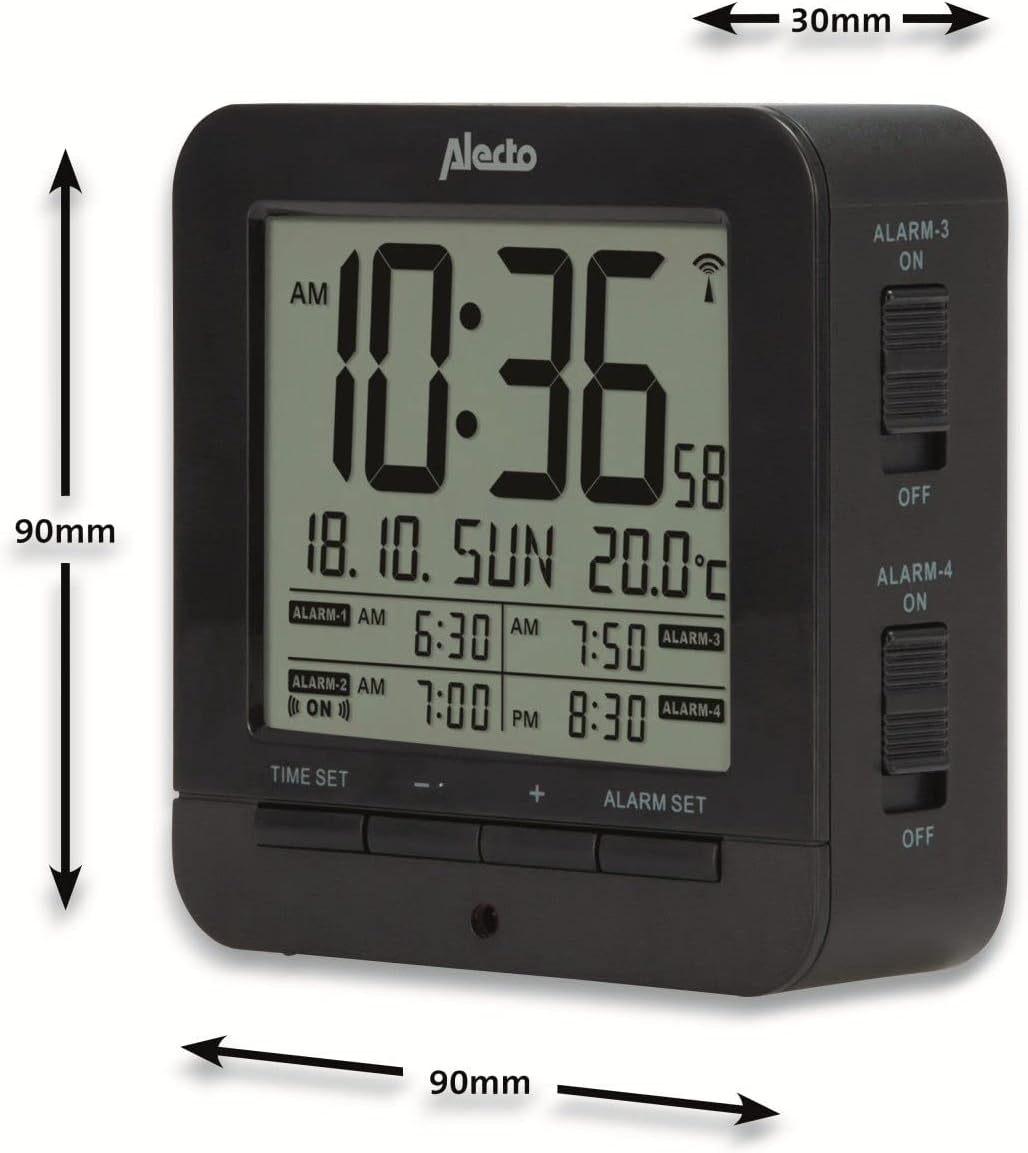
Figure 5: Alecto AK-20 Alarm Clock showing its approximate dimensions: 90mm height, 90mm width, and 30mm depth.
| Ezaugarri | Xehetasuna |
|---|---|
| Modelo zenbakia | AK-20 (A003319) |
| Marka | Alecto |
| Kolorea | Beltza |
| Materiala | Akrilonitrilo Butadieno Estirenoa (ABS) |
| Neurriak (H x W x D) | 9 x 9 x 3 cm (gutxi gorabehera 3.54 x 3.54 x 1.18 hazbete) |
| Pantailaren neurriak | 6.4 x 5.4 cm (approx. 2.52 x 2.13 inches) |
| Pisua | 231 g (gutxi gorabehera 0.51 lb) |
| Energia iturria | 2 x AA pila (ez daude barne) |
| Bistaratzeko mota | Digitala |
| Ezaugarri bereziak | Temperature Display, 4 Alarms, Snooze Function, Backlight, DCF Radio Control |
| Tenperatura Unitateak | °C / °F hautagarria |
| Onartutako hizkuntzak | Dutch, French, German, English, Spanish, Italian, Danish, Russian |
Bermea eta Laguntza
Alecto products are manufactured to high quality standards. For information regarding warranty terms and conditions, please refer to the documentation provided with your purchase or visit the official Alecto website. For technical support or service inquiries, please contact your retailer or the Alecto customer service department.


