1. Sarrera
Thank you for choosing the BLACK+DECKER BD40K27A-JP Cordless Push Driver. This compact and versatile tool is designed for efficient screw tightening and assembly tasks. Featuring a unique push-activated mechanism and integrated LED lighting, it offers convenience and precision for various applications. Please read this manual thoroughly before use to ensure safe and optimal operation.

Image 1.1: The BLACK+DECKER BD40K27A-JP Cordless Push Driver, showcasinbere diseinu ergonomikoa.
2. Segurtasun informazioa
Beti jarraitu oinarrizko segurtasun neurriak tresna elektrikoak erabiltzean, sute, deskarga elektriko eta lesio pertsonalen arriskua murrizteko.
- Irakurri argibide guztiak: Tresnaren funtzionamenduarekin eta segurtasun-jarraibideekin ohitu zaitez.
- Mantendu lan-eremua garbi: Nahasitako guneek istripuak gonbidatzen dituzte.
- Saihestu ingurune arriskutsuak: Ez erabili erreminta elektrikoa damp edo leku hezeak, edo euriaren eraginpean jartzea.
- Utzi haurrak urrun: Bisitari guztiak lan-eremutik segurtasun-urrun egon behar dira.
- Jantzi behar bezala: Do not wear loose clothing or jewelry. Wear protective hair covering to contain long hair.
- Use safety glasses: Erabili beti segurtasun-betaurrekoak.
- Secure work: Erabili clamps edo lanari eusteko morroa praktikoa denean.
- Ez gainditu: Mantendu oin eta oreka egokia uneoro.
- Deskonektatzeko tresnak: Unplug tools when not in use, before servicing, or when changing accessories.
- Saihestu nahi gabe abiarazteak: Ziurtatu etengailua itzalita dagoela konektatu aurretik.
- Erabili gomendatutako osagarriak: Consult the manual for recommended accessories.
- Mantendu tresnak kontu handiz: Mantendu tresnak zorrotz eta garbi errendimendu onena eta seguruena lortzeko.
- Egiaztatu hondatutako piezak: Beste erabilera bat egin aurretik, babes-babes edo kaltetutako beste pieza bat arretaz egiaztatu behar da behar bezala funtzionatuko duen eta bere funtzioa beteko duen zehazteko.
- Do not operate power tools near flammable liquids or gases.
3. Paketearen edukia
Egiaztatu behean zerrendatutako elementu guztiak zure paketean sartuta daudela:
- BLACK+DECKER BD40K27A-JP Cordless Push Driver
- Lithium-Ion Battery (integrated)
- USB kargatzeko kablea
- Aluminum Storage Case
- 26 Types of Screwdriver Bits
- Argibide eskuliburua
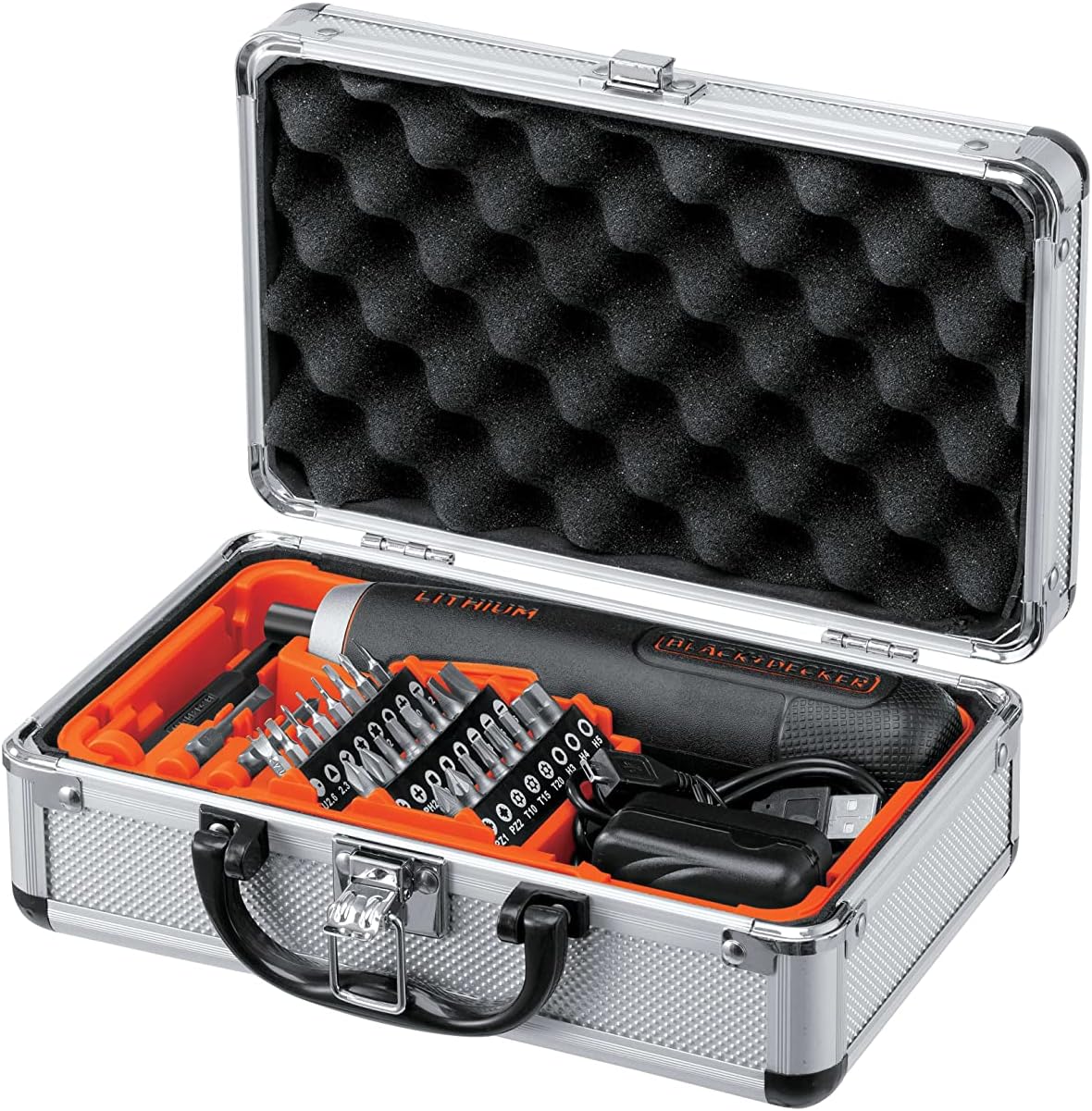
Image 3.1: The BD40K27A-JP Cordless Push Driver kit, including the driver, charging cable, and 26 bits, neatly organized in its aluminum storage case.
4. Produktuaren ezaugarriak
The BD40K27A-JP Cordless Push Driver is engineered with several features to enhance usability and performance:
- Compact and Straight Design: Allows for easy handling and access in tight spaces.
- Push-Activated Mechanism: Automatically rotates when the bit is pressed into the screw, eliminating the need for a traditional trigger switch.
- Litio-ioizko bateria integratua: Provides reliable cordless power.
- 5-Position Adjustable Clutch: Allows for precise torque control to prevent overtightening or damaging fasteners.
- Laneko LED argia: Lan-eremua argitzen du argi gutxiko baldintzetan ikusgarritasun hobea lortzeko.
- Bateria mailaren adierazlea: Gainerako bateriaren karga bistaratzen du.

4.1. irudia: Xehetasuna view of the driver's battery level indicator and forward/reverse switch.

Image 4.2: The driver's integrated LED work light illuminating a dark area.
5. Konfigurazioa
5.1 Bateria kargatzea
The BD40K27A-JP comes with an integrated Lithium-Ion battery. Before first use, fully charge the battery.
- Locate the USB charging port on the driver.
- Connect the provided USB charging cable to the driver's port.
- Konektatu USB kablearen beste muturra USB elikatze-egokitzaile bateragarri batera (ez dago barne) edo ordenagailuko USB ataka batera.
- The battery indicator lights will show charging progress. All lights will illuminate steadily when fully charged.
- Deskonektatu kargagailua kargatzen amaitutakoan.
Oharra: Do not store the tool with a completely discharged battery for extended periods, as this can damage the battery.
5.2 Bitak txertatzea eta aldatzea
The driver uses standard 1/4-inch hex shank bits.
- Ensure the driver is in the OFF position (center position of the forward/reverse switch).
- Push the desired screwdriver bit firmly into the bit holder until it clicks into place.
- To remove a bit, pull it straight out from the bit holder.
5.3 Adjusting the Clutch
The BD40K27A-JP features a 5-position adjustable clutch to control the torque output. This helps prevent overtightening screws or stripping screw heads.
- Rotate the clutch collar located near the bit holder to select the desired torque setting.
- Lower numbers (1-2) are for smaller screws and softer materials, requiring less torque.
- Higher numbers (3-5) are for larger screws and harder materials, requiring more torque.
- Experiment with different settings on scrap material to find the appropriate torque for your task.
6. Funtzionamendu-argibideak
6.1 Aurrerantz/Atzeranzko Biraketa
The forward/reverse switch is located on the side of the driver.
- Slide the switch forward (towards the bit) for forward rotation (tightening screws).
- Slide the switch backward (away from the bit) for reverse rotation (loosening screws).
- Position the switch in the center for the OFF/lock position.
6.2 Using the Push-Activated Mechanism
This driver operates without a traditional trigger. Rotation is activated by applying pressure.
- Ensure the forward/reverse switch is set to the desired direction (forward for tightening, reverse for loosening).
- Place the screwdriver bit onto the screw head.
- Apply firm, steady pressure to the back of the driver, pushing it into the screw. The driver will automatically begin to rotate.
- Release pressure to stop rotation.

Image 6.1: Demonstrating the push-activated mechanism for driving a screw into wood.
6.3 LED lan-argia erabiltzea
The integrated LED light automatically illuminates when the driver is activated by pressure, providing visibility in dark work areas.
7. Mantentzea
7.1 Garbiketa
- Tresnaren aireztapen-zirrikituak garbi mantendu gehiegi berotzea saihesteko.
- Erabili biguna, damp oihal bat tresnaren kanpoaldea garbitzeko. Ez erabili produktu kimiko gogorrik edo garbitzaile urratzailerik.
- Ez murgildu inoiz tresna uretan edo beste edozein likidotan.
7.2 Bateriaren zaintza eta biltegiratzea
- Gorde tresna leku fresko eta lehor batean, eguzki-argitik eta tenperatura altuetatik babestuta.
- Epe luzerako biltegiratzeko, kargatu bateriaren edukieraren % 50 inguru arte.
- Recharge the battery every 3-6 months during long storage periods to maintain battery health.
- Do not store the tool with a completely discharged battery.
8. Arazoak
| Arazoa | Kausa posiblea | Irtenbidea |
|---|---|---|
| Gidaria ez da pizten. | Bateria deskargatuta dago. Forward/reverse switch is in the center (OFF) position. |
Kargatu bateria. Slide the switch to forward or reverse. |
| Insufficient power/torque. | Bateria gutxi dago. Clutch setting is too low. |
Kargatu bateria. Adjust the clutch to a higher setting. |
| Punta torloju-burutik irrist egiten du. | Incorrect bit type/size. Presio nahikoa ez aplikatu da. Clutch setting too high (stripping screw). |
Use the correct bit for the screw. Apply firm, steady pressure. Adjust clutch to a lower setting. |
9. Zehaztapenak
| Modelo zenbakia | BD40K27A-JP |
| liburukiatage | 3.6 Volt |
| Bateria mota | Lithium-Ion (integrated) |
| Enbragearen ezarpenak | 5 posizioak |
| Bit titularra | 1/4 hazbeteko hexagonoa |
| Produktuaren neurriak (L x W x H) | 18.5 x 4 x 4 cm |
| Elementuaren pisua | 280 g |
| Fabrikatzailea | BLACK+DECKER |
10. Bermea eta Laguntza
Bermeari buruzko informazioa eta bezeroarentzako laguntza lortzeko, kontsultatu zure produktuarekin batera datorren berme-txartela edo bisitatu BLACK+DECKER webgune ofiziala. webgunea. Gorde erosketa-agiria erosketaren frogagiri gisa, berme-erreklamazioetarako.
For technical assistance or service inquiries, please contact BLACK+DECKER customer service through their official channels.


