1. Sarrera
The Tenmars TM-901N is a professional LAN cable tester designed for efficient and accurate diagnosis of network cable issues. It is capable of identifying various wiring faults such as discontinuity, short-circuits, incorrect connections, and split pairs in both Shielded Twisted Pair (STP) and Unshielded Twisted Pair (UTP) cables. This device can measure cable lengths up to 265 meters, making it an essential tool for network installers and technicians.
2. Segurtasun informazioa
Mesedez, irakurri eta ulertu segurtasun-jarraibide guztiak gailua erabili aurretik. Jarraibide hauek ez jarraitzen badituzu, lesioak edo gailuari kalteak eragin diezazkiokezu.
- Do not attempt to test live circuits or cables connected to active network equipment.
- Ensure the battery is correctly installed before use.
- Ez jarri gailua hezetasun edo muturreko tenperaturetara.
- Ez ireki gailua casing, honek bermea baliogabetu eta arrisku elektrikoen eraginpean jar zaitzakeelako.
- Bota bateriak tokiko araudiaren arabera.
3. Paketearen edukia
Egiaztatu elementu guztiak zure paketean daudela:
- Tenmars TM-901N Main Unit
- Remote ID Locator (ID 1)
- Erabiltzailearen eskuliburua (dokumentu hau)
- Note: A 9V battery is typically required and may not be included.
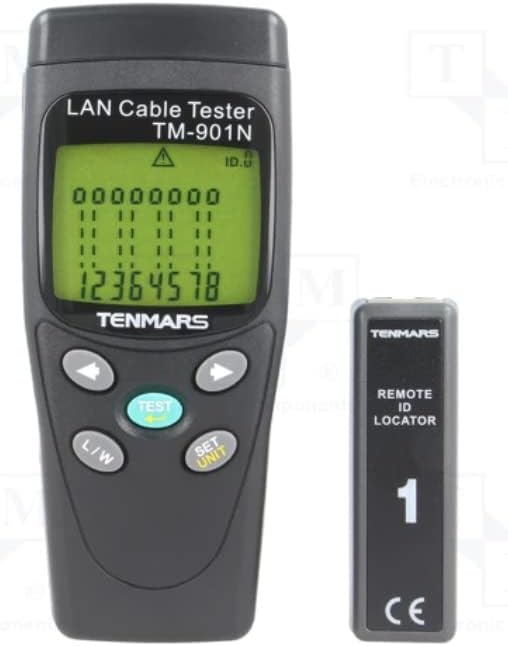
Image 3.1: Tenmars TM-901N Main Unit and Remote ID Locator.
4. Produktua amaitu daview
4.1 Unitate Nagusia
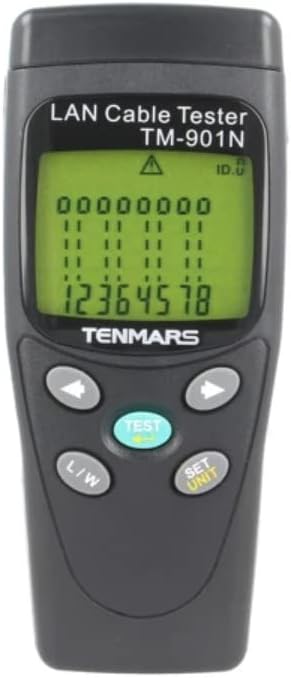
4.1. irudia: Aurrealdea view of the TM-901N Main Unit.
The main unit features an LCD display for showing test results and cable status. It includes several control buttons:
- TEST botoia: Initiates a cable test.
- L/W Button: Toggles between Length measurement and Wiremap display modes.
- SET/UNIT Button: Used to enter settings mode and change measurement units (e.g., meters, feet).
- Arrow Buttons (Left/Right): Used for navigation in settings or for reviewproben emaitzak jasotzea.
4.2 Remote ID Locator

Image 4.2: Remote ID Locator.
The remote ID locator is a passive unit used in conjunction with the main unit to test installed cables. It connects to one end of the cable while the main unit connects to the other. The remote unit is labeled "ID 1" for identification.
4.3 Rear Panel and Wiring Diagram

4.3. irudia: Atzekoa view of the TM-901N Main Unit with wiring diagram.
The rear panel of the main unit includes the battery compartment and a printed wiring diagram for reference, showing standard T568A/B pin assignments for RJ45 connectors.
5. Konfigurazioa
5.1 Bateriaren instalazioa
- Locate the battery compartment cover on the rear of the main unit.
- Slide the cover open or remove it as indicated.
- Sartu 9V-ko bateria berri bat, polaritate zuzena (+/-) ziurtatuz.
- Jarri bateriaren konpartimenduaren estalkia ongi.
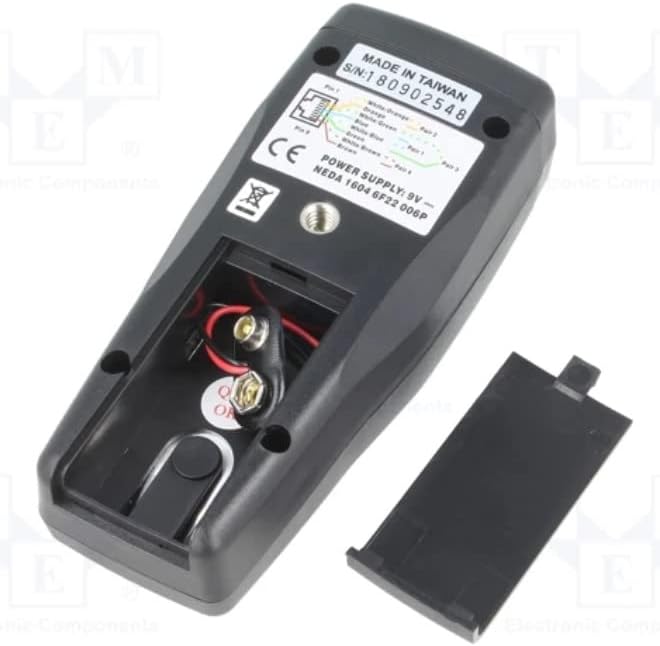
Image 5.1: Battery compartment with cover removed.
5.2 Kableak konektatzea probak egiteko
Before connecting any cables, ensure they are disconnected from all active network devices.
- For patch cables (uninstalled cables): Connect one end of the cable to the RJ45 port on the main unit and the other end to the RJ45 port on the remote ID locator.
- For installed cables: Connect the main unit to one end of the installed cable (e.g., a wall jack) and the remote ID locator to the other end of the cable (e.g., in a patch panel).
6. Funtzionamendu-argibideak
6.1 Piztu/Itzaltzea
The device typically powers on automatically when a cable is connected and the TEST button is pressed, or by pressing the TEST button. It usually powers off automatically after a period of inactivity to conserve battery.
6.2 Performing a Cable Test
- Ensure the cable is properly connected to the main unit and the remote ID locator.
- Sakatu PROBA botoia.
- The tester will automatically scan the cable and display the results on the LCD.
6.3 Interpreting Test Results (Wiremap)
The LCD will display the wiremap, indicating the connection status of each wire pair. Common indications include:
- Pasa: All wires are correctly connected (1-1, 2-2, etc. for straight-through, or appropriate cross-over mapping).
- Open/Discontinuity: A break in one or more wires. The display will show which wire(s) are open.
- Zirkuitulaburra: Two or more wires are touching. The display will indicate the shorted wires.
- Incorrect Connection/Miswire: Wires are connected to the wrong pins at one or both ends. The display will show the incorrect mapping (e.g., 1-3, 2-6).
- Bikote zatituak: A more complex fault where two pairs are swapped, but the wiremap appears correct. The tester is designed to detect this.
6.4 Measuring Cable Length
- After performing a test, press the L/H button to switch to Length measurement mode.
- The display will show the estimated length of the cable.
- To change the unit of measurement (meters, feet), press the SET/UNIT button while in Length mode and use the arrow buttons to select the desired unit. Press SET/UNIT berriro baieztatzeko.
7. Mantentzea
7.1 Garbiketa
Wipe the device with a soft, dry cloth. Do not use abrasive cleaners or solvents. Ensure no moisture enters the device.
7.2 Bateria ordezkatzea
When the battery low indicator appears on the display, replace the 9V battery as described in Section 5.1. Remove the battery if the device will not be used for an extended period to prevent leakage.
7.3 Biltegiratzea
Gorde gailua leku fresko eta lehor batean, eguzki-argitik eta muturreko tenperaturetatik babestuta. Erabiltzen ez duzunean, gorde jatorrizko ontzian edo babes-zorro batean.
8. Arazoak
| Arazoa | Kausa posiblea | Irtenbidea |
|---|---|---|
| Gailua ez da pizten. | Low or dead battery; incorrectly installed battery. | Replace the 9V battery; check battery polarity. |
| Inaccurate length measurement. | Cable not fully extended; incorrect cable type setting (if applicable); cable damage. | Ensure cable is straight; verify cable integrity; check if unit calibration is needed (refer to advanced settings if available). |
| "Open" or "Short" displayed for a new cable. | Faulty cable; improper connection to tester. | Re-seat the cable connectors firmly; try testing a known good cable; inspect cable for visible damage. |
| No display or erratic display. | Bateria baxua; barne-akatsa. | Ordeztu bateria. Arazoak jarraitzen badu, jarri harremanetan bezeroarentzako arreta-zerbitzuarekin. |
9. Zehaztapenak
| Ezaugarri | Zehaztapena |
|---|---|
| Eredua | TM-901N |
| Type of Tester | LAN wiring |
| Measured Cable Length | Gehienez 265m |
| Neurketa Ebazpena | 1m |
| Cable/Adapter Structure | RJ45 entxufea |
| Neurketa Ezaugarriak | Connection map test: discontinuity, short circuit, incorrect connection, split pairs |
| Onartutako kableak | STP / UTP cables |
| Neurketaren Zehaztasuna | ±10% ±1m |
| Elikatze Hornidura | 9V bateria x1 |
| Pisua | 160 g |
| Neurriak | 130x58x35mm |
| Fabrikatzailea | TENMAROAK |
| Jatorrizko Herrialdea | Taiwan |
10. Bermea eta Laguntza
For warranty information and technical support, please refer to the documentation provided with your purchase or contact your local distributor. Keep your proof of purchase for warranty claims.


