1. Sarrera
This manual provides essential information for the safe and efficient operation of your Powertech MB3904 8 Step Intelligent Lead Acid and Lithium Battery Charger. Please read this manual thoroughly before use and retain it for future reference.
2. Segurtasun informazioa
Beti beti segurtasun-neurri hauek:
- Bateriaren konexioak egin edo eten aurretik, ziurtatu kargagailua korronte-iturritik deskonektatuta dagoela.
- Kargagailua ondo aireztatutako guneetan bakarrik erabili.
- Saihestu izoztutako bateriak kargatzea.
- Ez jarri kargagailua euri edo gehiegizko hezetasunera.
- Mantendu haurren eskura.
- This charger is designed for 6V or 12V Lead Acid or LiFePO4 batteries only. Do not use with other battery types.
3. Paketearen edukia
Egiaztatu elementu guztiak paketean daudela:
- Powertech MB3904 8 Step Intelligent Battery Charger Unit
- Bateria Clamp Connectors (Red and Black)
- Ring Terminal Connectors
- AC korronte kablea
- Erabiltzailearen eskuliburua (dokumentu hau)
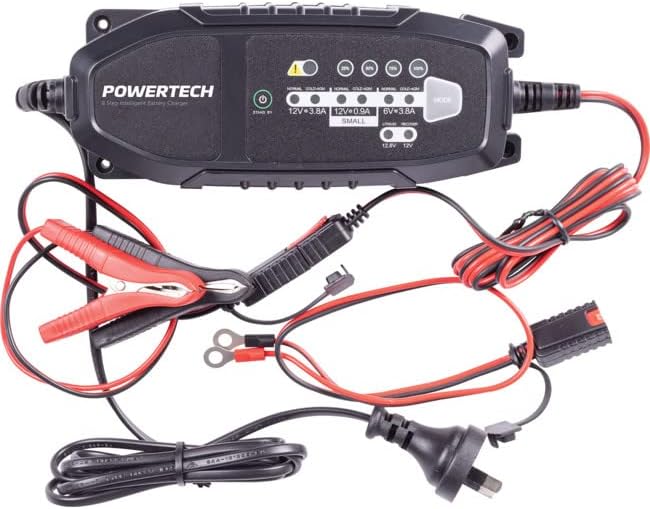
Image: The Powertech MB3904 battery charger unit shown with its various included accessories, including battery clamps, ring terminals, and the AC power cord.
4. Produktuaren ezaugarriak
The Powertech MB3904 charger offers advanced features for optimal battery maintenance:
- 8 urratseko kargatze prozesua: Ensures thorough and efficient charging for various battery types.
- Bolimen anitzekotage Bateragarritasuna: Suitable for both 6V and 12V lead acid and LiFePO4 batteries.
- Babes integrala: Includes overload, short circuit, reverse polarity, safety timer, and wrong battery protection.
- LED adierazle intuitiboak: Clearly display charge status and selected mode.
- Modu hautatzeko botoia: Allows easy switching between charging modes.
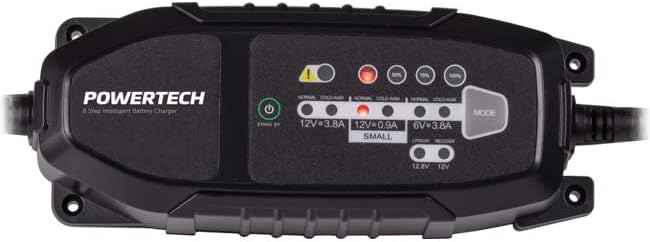
Irudia: Goitik behera view of the Powertech MB3904 charger, highlighting the LED indicators for charge status and the 'MODE' button for selecting charging programs.
5. Konfigurazioa
- Lekua: Place the charger on a stable, flat surface in a well-ventilated area, away from direct sunlight or heat sources.
- Bateria konexioa: Ensure the battery terminals are clean. Connect the red (+) clamp/ring terminal to the positive (+) battery terminal and the black (-) clamp/ring terminal to the negative (-) battery terminal. Ensure a secure connection.
- Potentzia-konexioa: Plug the AC power cord into a suitable wall outlet. The charger will enter standby mode.
6. Funtzionamendu-argibideak
6.1. Selecting Charging Mode
After connecting the battery and power, press the MODUA button to cycle through the available charging programs. The corresponding LED will illuminate to indicate the selected mode:
- 12V 3.8A (Normal): Standard charging for 12V lead acid batteries.
- 12V 3.8A (Cold/AGM): For charging 12V lead acid batteries in cold conditions or AGM batteries.
- 12V 0.9A (Small): For charging smaller 12V lead acid batteries.
- 6V 3.8A: For charging 6V lead acid batteries.
- Lithium (12.8V/12V): For charging 12V LiFePO4 batteries.
- Konponketa: A special mode for desulfation of deeply discharged lead acid batteries.
6.2. Kargatzeko Prozesua
Once a mode is selected, the charger will automatically begin the 8-step charging process. The progress LEDs (25%, 50%, 75%, 100%) will illuminate sequentially to indicate the battery's charge level. When the 100% LED is solid, the battery is fully charged.
6.3. Disconnecting the Charger
- Deskonektatu AC korronte kablea hormako entxufetik.
- Deskonektatu beltza (-) clamp/ring terminal from the negative (-) battery terminal.
- Deskonektatu gorria (+) clamp/ring terminal from the positive (+) battery terminal.
7. Mantentzea
- Garbiketa: Clean the charger casinGarbitu zapi leun eta lehor batekin. Ez erabili garbitzaile edo disolbatzaile urratzailerik.
- Biltegiratzea: Gorde kargagailua leku fresko eta lehor batean erabiltzen ez duzunean.
- Kableen ikuskapena: Periodically inspect the power cord and battery cables for any signs of damage. Do not use the charger if cables are damaged.
8. Arazoak
| Arazoa | Kausa posiblea | Irtenbidea |
|---|---|---|
| Kargagailua ez da pizten. | Ez dago korronterik entxufetik; konexioa soltea. | Egiaztatu entxufea; ziurtatu kablea ondo konektatuta dagoela. |
| Error LED illuminated. | Reverse polarity; short circuit; wrong battery type. | Check battery connections for correct polarity; inspect cables for shorts; ensure battery type matches selected mode. |
| Bateria ez da kargatzen. | Battery deeply discharged/damaged; incorrect mode selected. | Try "Repair" mode for lead acid batteries; test battery with a multimeter; ensure correct charging mode is selected. |
9. Zehaztapenak
- Eredua: MB3904
- Sarrera boltage: 220-240V AC, 50/60Hz
- Irteera boltage: 6V / 12V DC
- Kargatzeko korrontea: 0.9A / 3.8A
- Bateria motak: Lead Acid (WET, MF, CA, EFB, GEL, AGM), LiFePO4
- Babesa: Overload, Short Circuit, Reverse Polarity, Safety Timer, Wrong Battery
- Neurriak: 20.4 x 7.4 x 4.8 cm gutxi gorabehera
- Pisua: Gutxi gorabehera 534 g
- Betetzea: CE
10. Bermea eta Laguntza
This Powertech product is covered by a standard manufacturer's warranty. For specific warranty terms and conditions, please refer to the warranty card included with your purchase or contact your retailer.
For technical support or service inquiries, please contact Jaycar Electronics customer service or visit their official webgunea. Gorde erosketaren egiaztagiria bermearen erreklamazioetarako.
Jaycar Elektronika Webgunea: www.jaycar.com.au


