1. Sarrera
Thank you for choosing the Karlsson LED Mirror Alarm Clock. This digital alarm clock features a modern design with a clear LED display integrated into a silver mirror surface, showing time and temperature. This manual provides essential information for the safe and efficient use of your device.
Zer dago Kutxan:
- Karlsson LED Mirror Alarm Clock
- USB energia kablea

1. irudia: Aurrealdea view of the Karlsson LED Mirror Alarm Clock, showing the time (15:08) and temperature (19°C) on its reflective display.
2. Segurtasun informazioa
- Ez jarri gailua uraren edo gehiegizko hezetasunaren eraginpean.
- Avoid extreme temperatures, direct sunlight, or dusty environments.
- Mantendu haurren eskura.
- Use only the provided USB cable or a compatible power adapter.
- When inserting batteries, ensure correct polarity (+/-).
- Ez nahastu bateria zaharrak eta berriak, edo bateria mota desberdinak.
- Kendu bateriak gailua denbora luzez erabiliko ez bada.
3. Produktua amaitu daview
Ezagutu zure erlojuaren osagaiak eta kontrolak.
Aurrealdeko pantaila:
- Denbora bistaratzea: Shows current time in 12-hour or 24-hour format.
- Tenperatura bistaratzea: Inguruko tenperatura Celsius edo Fahrenheit gradutan erakusten du.
Atzeko kontrolak:
- SET botoia: Used to enter setting modes (time, alarm).
- GORA botoia: Balioak handitzeko edo menuetan nabigatzeko erabiltzen da.
- BEHERA botoia: Balioak txikitzeko edo menuetan nabigatzeko erabiltzen da.
- MODE/V Button: Used to switch display modes or activate voice control (if available).
- Berrezarri botoia: Gailua fabrikako ezarpenetara berrezartzen du.
- DC 5V sarrera: USB kablea konektatzeko.
- Bateriaren konpartimendua: Holds 3 x AAA batteries for backup power.
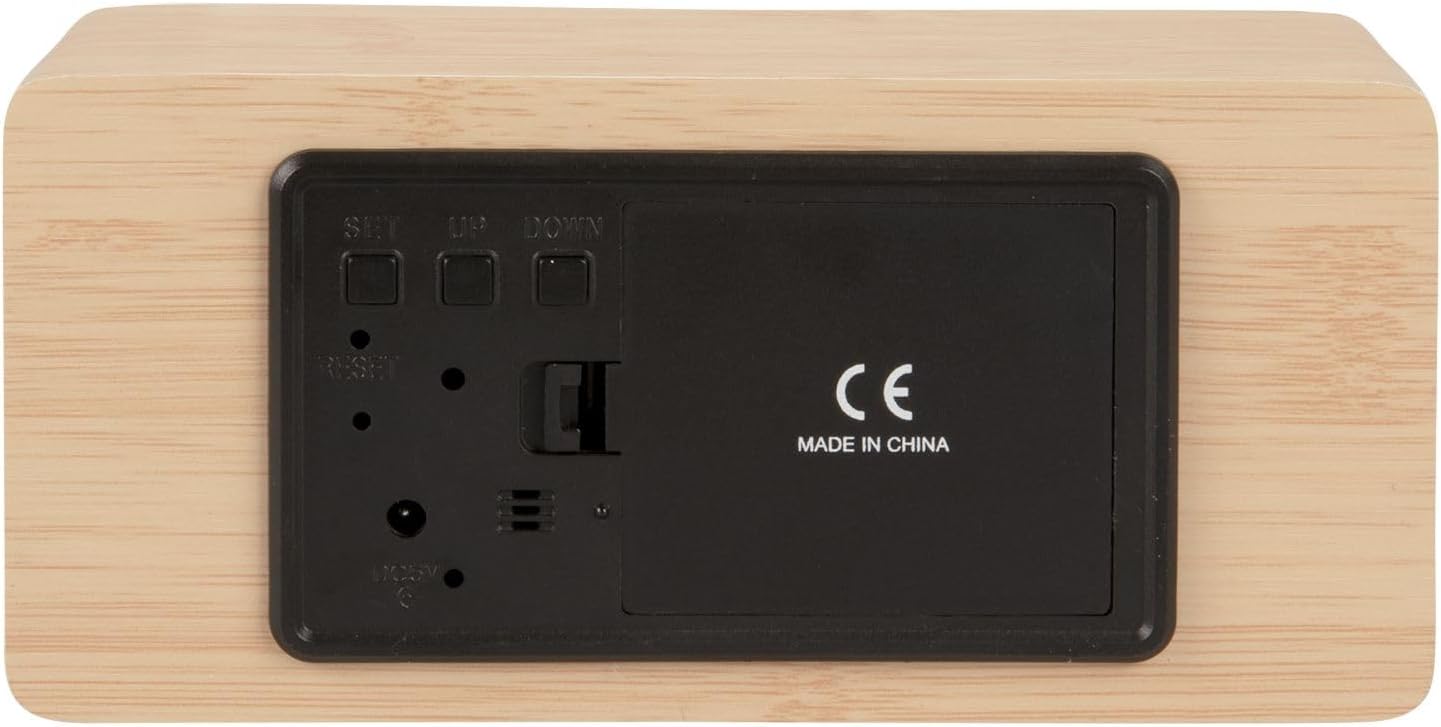
2. irudia: Atzekoa view of the alarm clock, highlighting the SET, UP, DOWN buttons, power input, and battery compartment.
4. Konfigurazioa
Gailua piztea:
The alarm clock can be powered via the included USB cable or by 3 x AAA batteries (not included) for backup.
- USB Power: Connect the small end of the USB cable to the DC 5V input port on the back of the alarm clock. Connect the other end to a USB power adapter (not included) or a powered USB port.
- Bateria babeskopia: Open the battery compartment cover on the back of the clock. Insert 3 x AAA batteries, ensuring correct polarity. Close the cover securely. Batteries are primarily for backup and may not power the display continuously.

3. irudia: The USB power cable provided for connecting the alarm clock to a power source.
5. Funtzionamendu-argibideak
Ordua ezartzea:
- Eduki sakatuta EZARTU botoia sakatu orduko digituak keinuka hasi arte.
- Erabili UP or BEHERA ordua doitzeko botoiak.
- Sakatu EZARTU berriro ordua berresteko eta minutuen ezarpenera joateko.
- Erabili UP or BEHERA minutuak doitzeko botoiak.
- Sakatu EZARTU minutuak berresteko eta ordua ezartzeko modutik irteteko.
Alarma ezartzea:
- Sakatu EZARTU button once (do not hold) to cycle through display modes until 'AL' or an alarm icon appears.
- Eduki sakatuta EZARTU botoia berriro sakatu alarmaren orduko digituak keinuka hasi arte.
- Erabili UP or BEHERA botoiak nahi duzun alarmaren ordua ezartzeko.
- Sakatu EZARTU to confirm the alarm hour and move to alarm minute setting.
- Erabili UP or BEHERA botoiak nahi dituzun alarmaren minutuak ezartzeko.
- Sakatu EZARTU to confirm and exit alarm setting mode.
- Alarma aktibatzeko/desaktibatzeko, sakatu UP button while in normal time display mode. An alarm icon will appear/disappear on the display.
Switching Display Modes (12/24 Hour, Temperature Unit):
- Ordua bistaratzeko modu arruntean, sakatu UP botoia 12 orduko eta 24 orduko formatuen artean aldatzeko.
- Sakatu BEHERA botoia Celsius (°C) eta Fahrenheit (°F) tenperatura unitateen artean aldatzeko.
6. Mantentzea
- Clean the alarm clock with a soft, dry cloth.
- Do not use abrasive cleaners, solvents, or harsh chemicals, as these may damage the mirror surface or casing.
- Ensure the device is unplugged and batteries are removed before cleaning.
7. Arazoak
- Pantaila hutsik dago: Check if the USB cable is securely connected to a power source. If using batteries, ensure they are inserted correctly and are not depleted.
- Alarmak ez du jotzen: Verify that the alarm is set and activated (alarm icon visible on display). Check the alarm volume if adjustable (this model may not have adjustable volume).
- Incorrect time/settings: Sakatu Berrezarri button on the back of the unit using a thin object (e.g., a paperclip) to restore factory settings, then re-set the time and alarm.
- Temperature reading seems inaccurate: Ensure the clock is placed in a location away from direct heat sources or drafts that could affect ambient temperature readings.
8. Zehaztapenak
| Modelo zenbakia | PTG-KA5879WD |
| Materiala | Egur xafla |
| Neurriak (L x W x H) | 15 cm x 7 cm x 4.5 cm (approximately 5.9 x 2.76 x 1.77 inches) |
| Pisua | 245 g (gutxi gorabehera 0.54 lb) |
| Kolorea | Light wood casing, silver mirror display |
| Bistaratzeko mota | LED digitala |
| Ezaugarri Berezia | Alarma |
| Energia iturria | USB powered (cable included), 3 x AAA batteries (not included) for backup |
9. Bermea eta Laguntza
This product is manufactured by Karlsson. For any support inquiries, warranty information, or service requests, please refer to the retailer where the product was purchased or visit the official Karlsson website for contact details. Please retain your proof of purchase for warranty claims.


