1. Sarrera
The MOOER F4 Wireless Footswitch Controller is designed to provide seamless, hands-free control over your MOOER Prime P1, looper, and drum machine functions. This compact and versatile device enhances your performance and practice sessions by allowing quick preset switching, looper management, and drum pattern control. Optimized for clarity and ease of use, the F4 integrates effortlessly into your setup, offering robust wireless connectivity and extensive customization options via its dedicated mobile application.
2. Zer dago kutxan
- MOOER F4 Wireless Footswitch Controller
- USB-C kargatzeko kablea
- Erabiltzailearen eskuliburua (dokumentu hau)
3. Produktua amaitu daview
Familiarize yourself with the physical components and controls of your MOOER F4 Wireless Footswitch Controller.

3.1. irudia: Goiena view of the MOOER F4 Wireless Footswitch Controller, showing the four footswitches (A, B, C, D) and the central display screen.
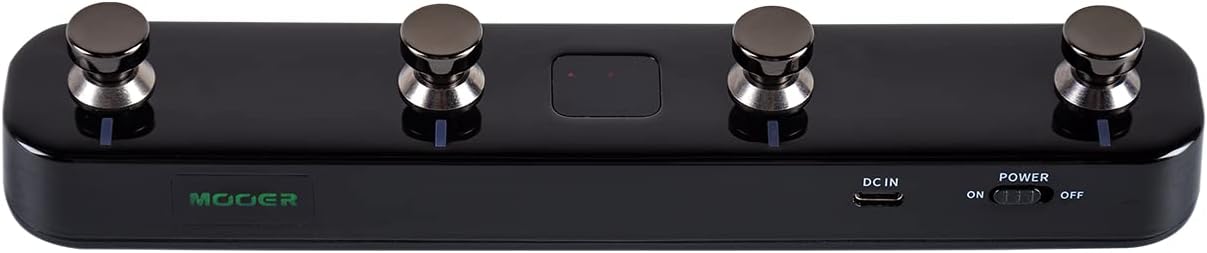
3.2. irudia: Behean view of the MOOER F4 Wireless Footswitch Controller, highlighting the power switch, DC IN port, and USB port.
3.1 Kontrolak eta adierazleak
- Oin-etengailuak (A, B, C, D): Used for preset switching, looper control, drum machine functions, and custom MIDI commands.
- Bistaratzeko pantaila: Shows current bank/preset number, mode, and other relevant information.
- Switch potentziala: Gailua piztu/itzali egiten du.
- DC IN ataka: For external power supply (5V 1A adapter).
- USB ataka: For charging the internal battery and connecting to a computer for firmware updates or MIDI over USB.
- LED adierazleak: Provide visual feedback on battery status, Bluetooth connection, and footswitch activity.
4. Konfigurazioa
4.1 Piztea/itzaltzea eta kargatzea
- Pizteko: Slide the POWER switch to the 'ON' position.
- Itzaltzeko: Slide the POWER switch to the 'OFF' position.
- Kargatzen: Connect the F4 to a 5V 1A USB power adapter using the provided USB-C cable. The battery indicator LED will show charging status. A full charge typically provides several hours of operation.
4.2 Bluetooth parekatzea eta konexioa
The F4 connects wirelessly via Bluetooth to compatible MOOER devices and mobile applications.
- Ensure the F4 is powered on and within range of your MOOER device (e.g., Prime P1/P2) or mobile device.
- On your MOOER device or mobile app, initiate the Bluetooth pairing process.
- On the F4, press and hold footswitches A eta C simultaneously for a few seconds to enter pairing mode. The Bluetooth indicator LED will flash.
- Hautatu
Erlazionatutako dokumentuak - F4

MOOER Hornet 05i Adimentsua Amp Erabiltzailearen eskuliburua
MOOER Hornet 05i Intelligenterako erabiltzailearen eskuliburu osoa Amp, segurtasun neurriak, ezaugarriak, konexioak, hasiera azkarreko gida, aplikazioen integrazioa, oin-etengailuaren kontrola, efektuen zerrenda eta zehaztapen teknikoak biltzen dituena.
Mooer Prime N1 Pedal Adimendunaren Erabiltzailearen Eskuliburua
Mooer Prime N1 Pedal Adimendunaren erabiltzailearen eskuliburua, neurriak, ezaugarriak, diseinua, argibideak, efektuen zerrenda eta zehaztapenak biltzen dituena. Ikasi zure gailua nola konektatu, erabili eta arazoak konpontzen.
MOOER PRIME M2 Pedal Adimendunaren Gida Azkarra
MOOER PRIME M2 Pedal Adimendunaren gida laburra, ukipen-pantailaren funtzioak, hardwarearen ezaugarriak eta funtzionamendu-moduak (looper, drum machine eta tuner, adibidez) zehaztuz. Aplikazioen integrazioari eta FCCren betetzeari buruzko informazioa barne hartzen ditu.
MOOER STUDIO GE300 Softwarearen Erabiltzailearen Gida | Amp Modelatzea eta Efektuen Kontrola
MOOER STUDIO softwarearen erabiltzaileentzako gida osoa, erabiltzaileei aurrezarpenak editatzeko, kudeatzeko aukera ematen diena files, eta MOOER GE300rako firmwarea eguneratu amp modelatzailea eta efektu anitzeko prozesadorea.
MOOER PRIME STOMP S1 Pedal Adimenduna: Erabiltzailearen Eskuliburua
MOOER PRIME STOMP S1 pedal adimendunaren erabiltzailearen eskuliburu osoa, non gitarra-jotzaileentzako ezaugarriak, diseinua, funtzionamendu-argibideak eta zehaztapen teknikoak azaltzen diren.
Mooer SD50A Akustikoa Amplifier Jabearen eskuliburua
Eskuliburu honek Mooer SD50A akustikorako argibide zehatzak ematen ditu. Amplififikatzailea, bere ezaugarriak, funtzionamendua, konfigurazioa eta zehaztapenak azalduz. Ikasi bere kanal bikoitzeko pre-aurkitzaileari buruzamp, built-in effects, looper, drum machine, and connectivity options.