Sarrera
Thank you for choosing the Varmilo MA Series V2 Summit R2 Mechanical Keyboard. This manual provides essential information for setting up, operating, maintaining, and troubleshooting your new keyboard. Please read this manual thoroughly to ensure optimal performance and longevity of your device.
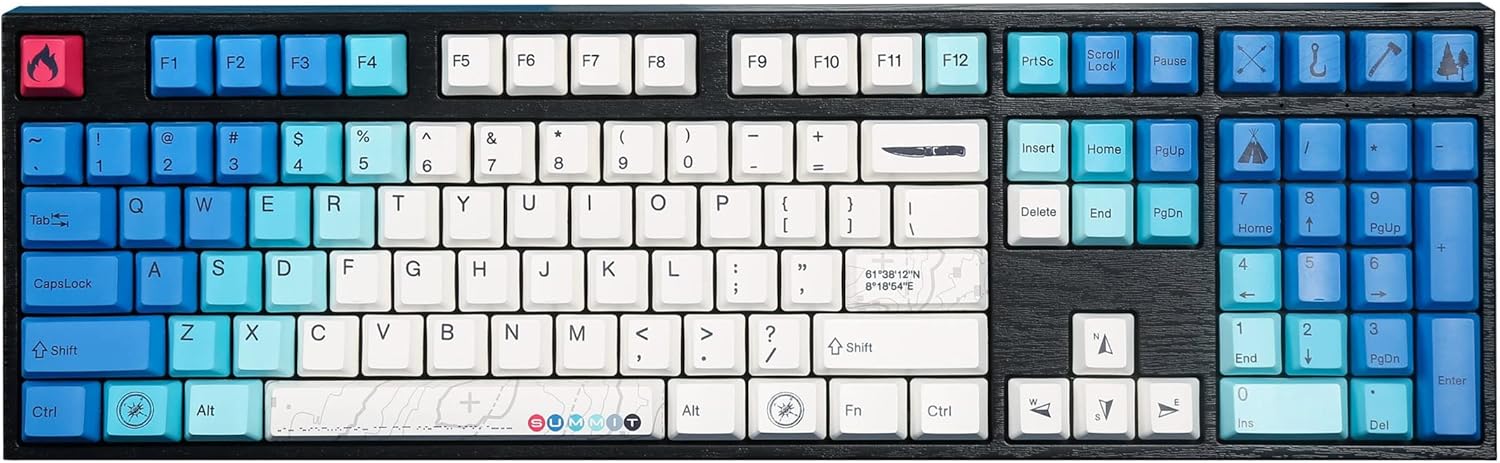
Image: The Varmilo MA Series V2 Summit R2 Mechanical Keyboard, showcasing its full layout and unique keycap design.
Konfigurazioa
1. Deskargatzea
Kontu handiz atera teklatua eta osagarri guztiak paketetik. Ziurtatu elementu hauek daudela:
- Varmilo MA Series V2 Summit R2 Mechanical Keyboard
- USB-C kablea
- Tekla-tapoien erauzgailua (barne badago)
- Erabiltzailearen eskuliburua (dokumentu hau)
2. Teklatua konektatzea
- Bilatu USB-C ataka teklatuaren atzealdean.
- Konektatu emandako USB-C kablearen mutur bat teklatura.
- Konektatu USB-C kablearen beste muturra zure ordenagailuko USB ataka libre batera.
- Teklatua plug-and-play da eta zure sistema eragileak automatikoki ezagutu beharko luke.
3. Teklatuaren angelua doitzea
The Varmilo MA Series V2 features a double-section kickstand, allowing for two different typing angles. Gently flip out the desired sections of the kickstand located on the underside of the keyboard to adjust its height and angle for ergonomic comfort.

Irudia: Alboko profesionalafile of the Varmilo keyboard, illustrating the adjustable kickstand in an extended position.
Funtzionamendu-argibideak
1. Oinarrizko tekla funtzioak
The keyboard features a standard full-size (104-key) layout. All alphanumeric and standard function keys operate as expected. The Varmilo EC Ivy V2 switches provide a smooth and responsive typing experience.
2. Function (Fn) Key Combinations
The Fn key (typically located near the right Alt key) allows access to secondary functions printed on certain keycaps. Hold down the Fn key and press the desired function key simultaneously.
- Fn + F1-F12: Multimedia kontrolak (adibidez, bolumena, erreproduzitu/pausatu, gelditu).
- Fn + Gezi-teklak: LED brightness or effect control (refer to specific keycap legends).
- Fn + Irabazi: Blokeatu/Desblokeatu Windows tekla.

Irudia: Gertutik view of the right side of the Varmilo keyboard, highlighting the special function keys and their legends.
3. LED Backlighting Control
The keyboard features White LED backlighting. Use the Fn key combinations to adjust the brightness and switch between various lighting effects. Specific key legends will indicate the corresponding functions for LED control.
Mantentzea
1. Teklatua garbitzea
Teklatuaren itxura eta funtzionaltasuna mantentzeko:
- Deskonektatu teklatua ordenagailutik garbitu aurretik.
- Erabili lipurrik gabeko zapi leun bat dampened with water or a mild cleaning solution to wipe the keycaps and casing.
- Teklen arteko hautsa eta hondakinak kentzeko, erabili aire konprimatua.
- Avoid using harsh chemicals, abrasives, or solvents, as these can damage the PBT keycaps and finish.
2. Tekla-tapoia kentzea eta ordezkatzea
The keyboard features durable Dye Sub PBT keycaps. If you need to remove keycaps for deep cleaning or customization:
- Use the provided keycap puller (if applicable) or a similar tool.
- Gently attach the keycap puller to the keycap and pull straight up to remove it. Avoid twisting or excessive force.
- Ordezkatzeko, lerrokatu teklaren estalkia etengailuaren zurtoinarekin eta sakatu ondo klik egin arte.

Image: A collection of individual Varmilo keycaps, including special design keycaps, demonstrating their PBT material and dye-sublimated legends.
Arazoak konpontzea
If you encounter issues with your Varmilo keyboard, please refer to the following common solutions:
- Teklatuak ez du erantzuten:
- Ziurtatu USB-C kablea ondo konektatuta dagoela teklatura eta ordenagailura.
- Saiatu teklatua ordenagailuko beste USB ataka batera konektatzen.
- Probatu teklatua beste ordenagailu batean sistemaren arazo espezifikoak baztertzeko.
- Berrabiarazi ordenagailua.
- LEDs Not Working or Incorrect:
- Ensure the LED brightness is not set to the lowest level using Fn key combinations.
- Check if any specific lighting modes are active that might turn off certain LEDs.
- Giltzak ez dira erregistratzen:
- Remove the keycap and inspect the switch for any obstructions.
- Clean around the switch stem with compressed air.
Fabrika berrezarri
If issues persist, a factory reset may resolve them. Consult the Varmilo official website or support for specific reset procedures for your model, as these can vary.
Zehaztapenak
The following are the technical specifications for the Varmilo MA Series V2 Summit R2 Mechanical Keyboard:
| Ezaugarri | Xehetasuna |
|---|---|
| Marka | Varmilo |
| Eredua | MA Series V2 Summit R2 |
| Diseinua | Full-size (104 + 4 keys) |
| Aldatu mota | Varmilo EC Ivy V2 Mechanical Switches |
| Keycap materiala | Dye Sub PBT |
| Konektibitatea | USB-C |
| Atzeko argiztapena | LED zuria |
| Materiala | Polibutileno tereftalatoa, silikona |
| Energia iturria | USB bidez |
| Gailu bateragarriak | Ordenagailua (USB-C bidez) |
Bermea eta Laguntza
Varmilo products are manufactured to high-quality standards. For information regarding warranty coverage, technical support, or service inquiries, please visit the official Varmilo webwebgunera edo jarri harremanetan bezeroarentzako arreta-zerbitzuarekin zuzenean. Gorde erosketa-agiria erosketaren frogagiri gisa berme-erreklamazioetarako.
Official Varmilo Store: Varmilo Store on Amazon