1. Sarrera
The Keysight 4395A is a high-performance instrument integrating network, spectrum, and impedance analysis capabilities into a single unit. Designed for laboratory and manufacturing applications, it provides advanced measurement functions for evaluating components and circuits across a wide frequency range.
This manual provides essential information for the safe and effective operation of your Keysight 4395A analyzer. Please read it thoroughly before using the instrument.
Ezaugarri nagusiak:
- Integrated high-performance network, spectrum, and impedance analysis.
- Built-in IBASIC for automated control.
- GPIB port and Digital I/O port for external connectivity.
- Network Analyzer: Frequency range 10 Hz to 500 MHz, 115 dB dynamic range (at 10 Hz IFBW), ±0.05 dB, ±0.3° dynamic accuracy.
- Espektro analizatzailea: Frequency range 10 Hz to 500 MHz, -145 dBm/Hz sensitivity (at 10 MHz), Time-gated spectrum analysis option (4395A-1D6).
- Impedance Analyzer (Option 4395A-010): Frequency range 100 kHz to 500 MHz, equivalent circuit analysis function, ±40 V or ±100 mA DC bias (Option 4395A-001).
2. Produktua amaitu daview
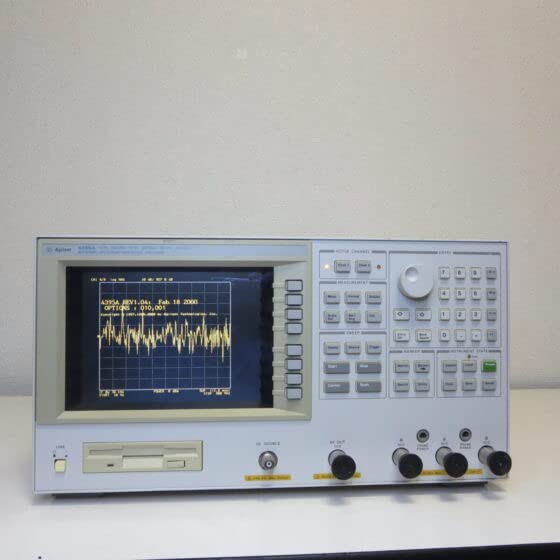
The Keysight 4395A is a versatile measurement device. Below is an image illustrating the front panel of the analyzer, highlighting its display and control interface.
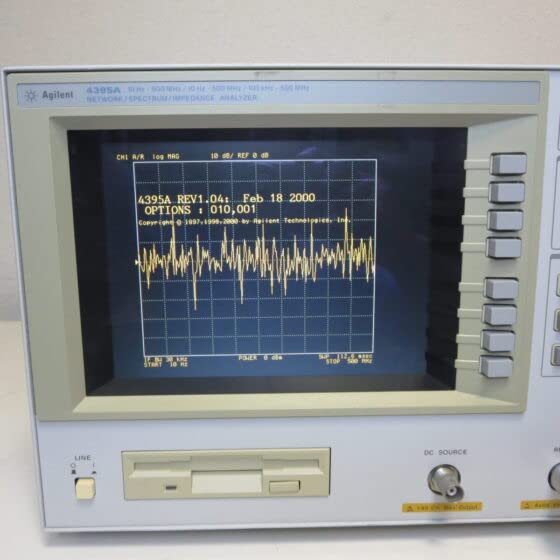
A closer look at the display reveals the measurement interface, where various analysis results are presented.
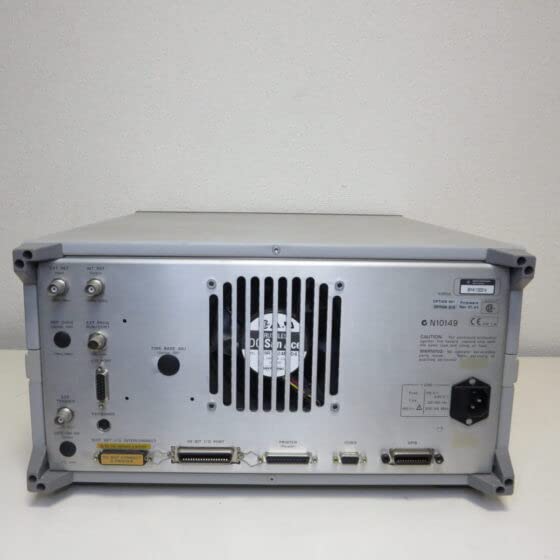
The rear panel provides various input/output ports for connecting to external devices and power.
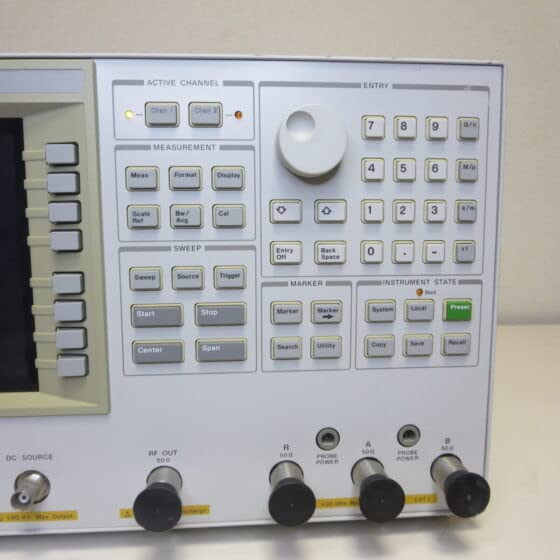
The control panel features a rotary knob and various buttons for navigating menus, setting parameters, and initiating measurements.
3. Konfigurazioa
3.1 Desontziratzea eta ikuskatzea
- Carefully remove the 4395A from its packaging.
- Inspect the instrument for any signs of physical damage. If damage is found, contact your supplier immediately.
- Verify that all accessories listed in the packing list are present.
3.2 Energia-konexioa
- Ziurtatu atzeko paneleko etengailua OFF posizioan dagoela.
- Connect the supplied power cord to the AC inlet on the rear panel of the 4395A.
- Plug the other end of the power cord into a grounded AC power outlet. The instrument supports standard line voltages (e.g., 100-240V AC, 50/60 Hz).
3.3 Hasierako piztea
- Press the power switch on the front panel to turn on the instrument.
- Observe the display for the boot-up sequence. The instrument will perform self-tests.
- Once the boot sequence is complete, the main measurement screen should appear.
3.4 Connecting Test Devices
Depending on the type of analysis (network, spectrum, or impedance), connect your device under test (DUT) to the appropriate RF input/output ports on the front panel. Use high-quality coaxial cables and adapters to ensure accurate measurements.
4. Funtzionamendu-argibideak
The Keysight 4395A offers three primary analysis modes: Network, Spectrum, and Impedance. Each mode has specific setup and measurement procedures.
4.1 Funtzionamendu Orokorra
- Erabili ACTIVE CHANNEL buttons to select the desired measurement channel.
- The rotary knob is used for fine adjustment of parameters and cursor positioning.
- The numeric keypad allows direct entry of values.
- Sakatu Aurrez ezarritakoa button to return the instrument to its default settings.
4.2 Network Analysis Mode
To perform network analysis (e.g., S-parameter, gain, phase, group delay measurements):
- Sakatu NEURKETA botoia, eta gero hautatu Sarea.
- Set the desired frequency range using the Hasi eta Gelditu frequency buttons under the Ekorketa atala.
- Select the measurement parameter (e.g., S21, S11) using the Neurriak botoia.
- Perform a calibration using a suitable calibration kit to ensure measurement accuracy. Access calibration functions via the Cal botoia.
- Connect the DUT to the appropriate RF ports (e.g., RF OUT and RF IN).
- Sakatu Hasi azpian Ekorketa to begin the measurement.
4.3 Spectrum Analysis Mode
To perform spectrum analysis (e.g., signal power, distortion, noise measurements):
- Sakatu NEURKETA botoia, eta gero hautatu Espektroa.
- Set the center frequency and span using the corresponding buttons.
- Adjust the Resolution Bandwidth (RBW) and Video Bandwidth (VBW) using the Bw/Avg botoia.
- Connect the signal source to the RF input port.
- Sakatu Hasi azpian Ekorketa to acquire the spectrum.
4.4 Impedance Analysis Mode (with Option 4395A-010)
To perform impedance analysis (e.g., equivalent circuit analysis):
- Ensure the Impedance Analysis Option (4395A-010) is installed.
- Sakatu NEURKETA botoia, eta gero hautatu Inpedantzia.
- Set the frequency range and other parameters as required.
- Connect the DUT to the impedance test fixture.
- Initiate the measurement to display impedance characteristics.
5. Mantentzea
5.1 Garbiketa
- Garbitu aldizka tresnaren kanpoaldea zapi leun eta lehor batekinamp oihal.
- Do not use abrasive cleaners or solvents that could damage the finish or display.
- Ensure ventilation openings are free from dust and debris to prevent overheating.
5.2 Biltegiratzea
- Store the instrument in a clean, dry environment within the specified operating temperature and humidity ranges.
- Protect the display from direct sunlight and physical impact.
5.3 Kalibrazioa
For optimal measurement accuracy, periodic calibration by qualified personnel is recommended. Refer to the Keysight service manual or contact Keysight support for calibration services and schedules.
6. Arazoak
This section provides solutions to common issues you might encounter with the Keysight 4395A.
| Arazoa | Kausa posiblea | Irtenbidea |
|---|---|---|
| Tresna ez da pizten. | Power cord not connected, power switch off, faulty power outlet. | Check power cord connection. Ensure power switch is ON. Test power outlet with another device. |
| Ez dago seinalerik pantailan. | DUT not connected correctly, incorrect measurement settings, signal source issue. | Verify DUT connections. Check frequency range, amplitude, and measurement parameters. Ensure signal source is active. |
| Neurri okerrak. | No calibration performed, incorrect calibration, faulty cables/connectors. | Perform a fresh calibration. Check the integrity of all cables and connectors. Ensure proper test setup. |
| Errore-mezua pantailan. | Internal fault, parameter out of range. | Note the error code/message. Refer to the detailed service manual for specific error codes. Try restarting the instrument. |
If you encounter persistent issues not covered here, please contact Keysight technical support.
7. Zehaztapenak
The following table outlines the key specifications for the Keysight 4395A Network/Spectrum/Impedance Analyzer.
| Parametroa | Balioa |
|---|---|
| Fabrikatzailea | Keysight |
| Modelo zenbakia | 4395A |
| Network Analyzer Frequency Range | 10 Hz eta 500 MHz artean |
| Spectrum Analyzer Frequency Range | 10 Hz eta 500 MHz artean |
| Impedance Analyzer Frequency Range (Option 4395A-010) | 100 kHz-tik 500 MHz-ra |
| Network Analyzer Dynamic Range | 115 dB (at 10 Hz IFBW) |
| Spectrum Analyzer Sensitivity | -145 dBm/Hz (at 10 MHz) |
| Eraikitako Ezaugarriak | IBASIC, GPIB Port, Digital I/O Port |
| ASIN | B0B7RK35FG |
| First Available Date (Amazon.co.jp) | 2022/07/27 |
8. Bermea eta Laguntza
8.1 Bermearen informazioa
This Keysight 4395A instrument is covered by Keysight's standard product warranty. For detailed terms and conditions, including warranty period and coverage, please refer to the warranty documentation provided with your purchase or visit the official Keysight webgunea.
8.2 Laguntza Teknikoa
For technical assistance, service, or further inquiries regarding the Keysight 4395A, please contact Keysight Technologies directly. Support resources, including FAQs, drivers, software updates, and contact information, are available on the official Keysight webgunea: www.keysight.com.


