Sarrera
This manual provides comprehensive instructions for the safe and efficient use of your WIKO T10 smartphone. Please read this manual carefully before using your device to ensure optimal performance and longevity. Keep this manual for future reference.
Segurtasun informazio garrantzitsua
- Ez jarri gailua tenperatura altuen, eguzki-argiaren eraginpean edo hezetasun handiaren eraginpean.
- Use only WIKO-approved chargers and accessories.
- Saihestu gailua erortzea edo kolpe gogorren eraginpean jartzea.
- Ez saiatu gailua zeuk desmuntatzen edo konpontzen. Jo baimendutako zerbitzu-langileengana.
- Tokiko araudien arabera bota gailua eta bateria arduraz.
Paketearen edukia
Ensure all items are present in your WIKO T10 package:
- WIKO T10 Smartphone
- Kargagailua
- USB motako kablea
- SIM kanporatzeko tresna
- Hasierako gida azkarra
- Segurtasun eta bermeari buruzko informazioa
Produktua amaituview
Familiarize yourself with the physical components of your WIKO T10 smartphone.

1. irudia: Aurrealdea eta Atzekoa View of the WIKO T10 Smartphone. The front features a large display with a dewdrop notch, and the rear shows the camera module and WIKO branding.
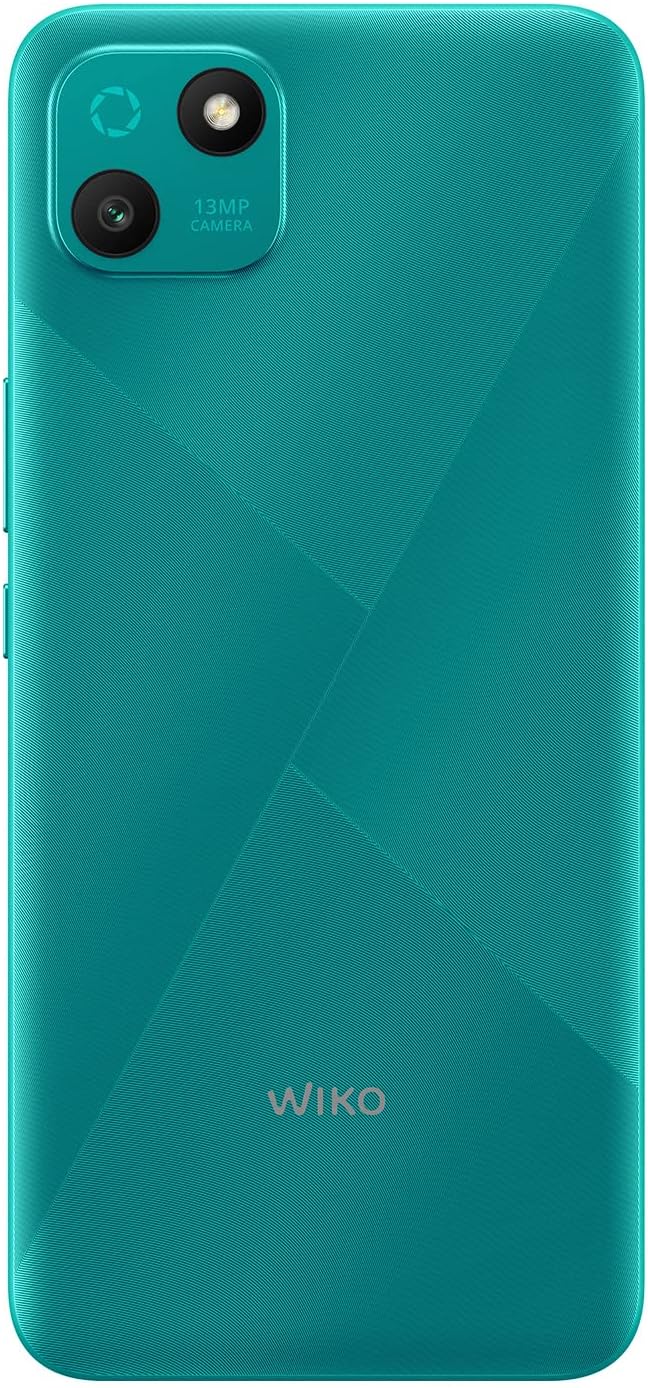
2. irudia: Atzealde zehatza view of the WIKO T10, highlighting the 13MP camera module and textured back panel.

3. irudia: Aldeko profile of the WIKO T10, illustrating its slim design and button placement.
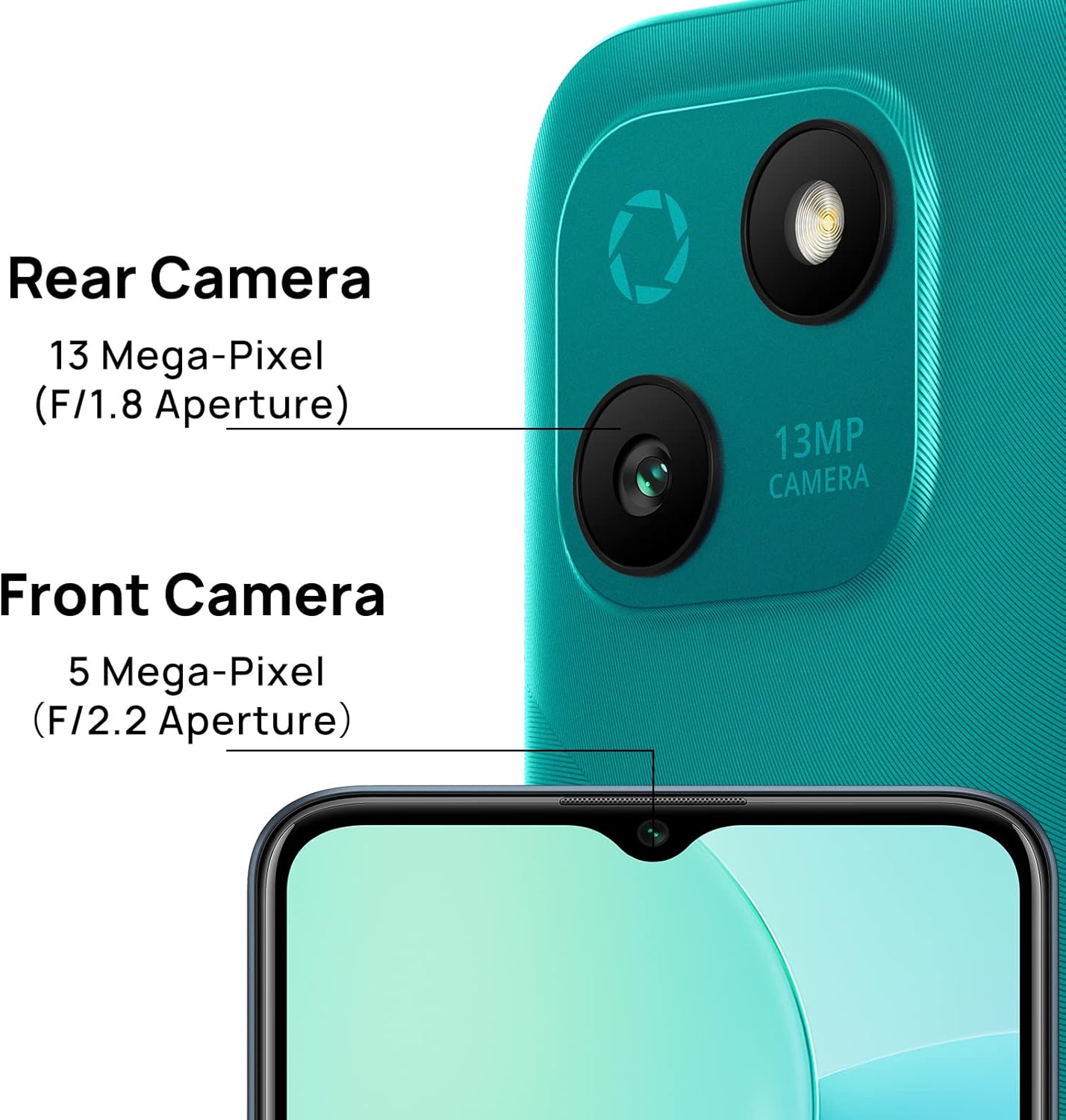
4. irudia: Camera specifications for the WIKO T10, indicating a 13 Mega-Pixel Rear Camera (F/1.8 Aperture) and a 5 Mega-Pixel Front Camera (F/2.2 Aperture).

5. irudia: The WIKO T10 features a 6.5-inch Dewdrop Display, offering an immersive visual experience with minimal bezels.
Konfigurazio Gida
7.1 SIM eta SD txartela sartzea
The WIKO T10 supports Dual SIM functionality. Follow these steps to insert your SIM card(s) and an optional microSD card for expanded storage:
- Bilatu SIM txartelaren erretilua gailuaren alboan.
- Sartu SIM txartela ateratzeko tresna erretiluaren ondoko zulo txikian eta sakatu astiro erretilua atera arte.
- Jarri Nano-SIM txartela(k) eta/edo microSD txartela erretiluko zirrikituetan, urre-koloreko kontaktuak behera begira daudela ziurtatuz.
- Kontu handiz bultzatu erretilua zirrikituan berriro, telefonoaren gorputzarekin berdindu arte.
7.2 Hasierako piztea eta konfigurazioa
To power on your WIKO T10 for the first time:
- Press and hold the Power button (usually on the right side) until the WIKO logo appears.
- Jarraitu pantailan agertzen diren argibideei hizkuntza hautatzeko, Wi-Fi sarera konektatzeko, Google kontua konfiguratzeko eta hasierako beste ezarpen batzuk konfiguratzeko.
7.3 Gailua kargatzea
Before first use, it is recommended to fully charge your WIKO T10.
- Konektatu USB C motako kablea telefonoaren beheko aldean dagoen kargatzeko atakara.
- Connect the other end of the cable to the power adapter, then plug the adapter into a power outlet.
- Karga-adierazlea pantailan agertuko da. Deskonektatu kargagailua bateria beteta dagoenean.
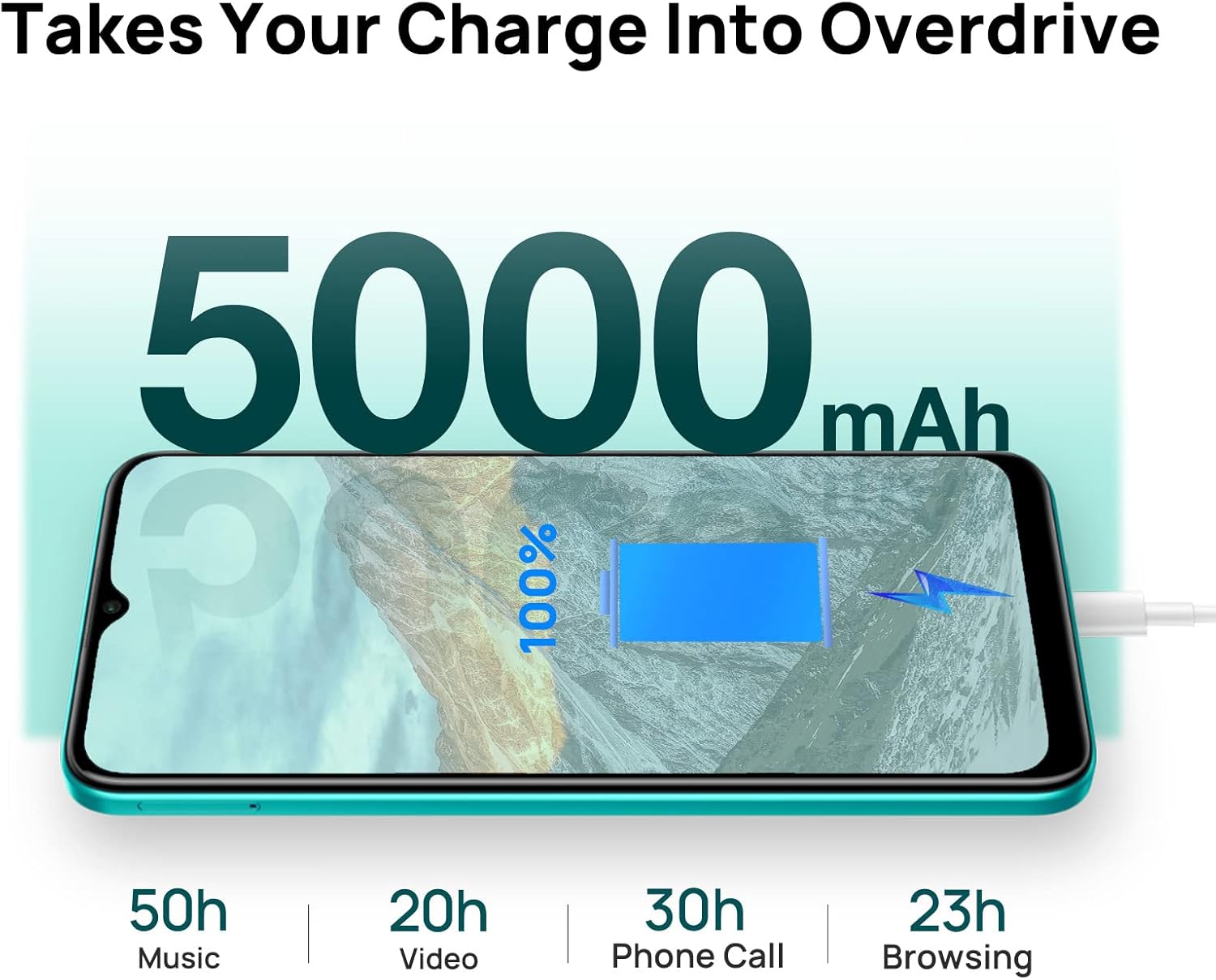
6. irudia: The WIKO T10 features a 5000mAh battery, providing extended usage times such as 50 hours of music, 20 hours of video, 30 hours of phone calls, and 23 hours of browsing on a full charge.
Operating Your WIKO T10
8.1 Oinarrizko nabigazioa
Your WIKO T10 uses a capacitive touchscreen for interaction:
- Sakatu: To open apps, select items, or press on-screen buttons.
- Eduki sakatuta: Testuinguru-menuetara sartzeko edo elementuak mugitzeko.
- Pasatu hatza: To scroll through lists, switch between home screens, or navigate through photos.
- Pixka bat: Irudiak handitu edo txikitzeko eta web orrialdeak.
8.2 Deiak egitea eta mezuak bidaltzea
To make a call, open the Phone app and dial the number or select a contact. To send a message, open the Messages app, start a new conversation, and type your text.
8.3 Sareetara konektatzea
Your WIKO T10 supports Wi-Fi and 4G cellular networks.
- Wi-Fi: Joan zaitez Ezarpenak > Sarea eta internet > Wi-Fi, piztu Wi-Fi-a eta hautatu nahi duzun sarea.
- Datu mugikorrak (4G): Joan zaitez Ezarpenak > Sarea eta Internet > Sare mugikorra and ensure Mobile data is enabled.
8.4 Kamera erabiltzea
The WIKO T10 features a 13MP rear camera and a 5MP front camera. Open the Camera app to capture photos and videos.
- Sakatu obturadorearen botoia argazkia ateratzeko.
- Aldatu argazki eta bideo moduen artean.
- Use the front/rear camera toggle for selfies or main shots.
8.5 Bateriaren kudeaketa
5000 mAh-ko bateriak erabilera luzeagoa eskaintzen du. Bateriaren iraupena optimizatzeko:
- Doitu pantailaren distira.
- Gaitu bateria aurrezteko modua hemen: Ezarpenak > Bateria.
- Itxi atzeko planoan exekutatzen diren erabili gabeko aplikazioak.
8.6 Biltegiratze kudeaketa
Your WIKO T10 comes with 64GB of internal storage. You can expand this using a microSD card.
- Biltegiratze erabilera egiaztatzeko, joan honera Ezarpenak > Biltegiratzea.
- Garbitu aldizka cachea eta beharrezkoak ez direnak files lekua askatzeko.

7. irudia: Key features of the WIKO T10, including its 5000mAh Mega Battery, 6.5" Edgeless Dewdrop Display, 13MP Rear Camera, 64GB Large Storage, and Android 11 operating system.
Mantentzea
9.1 Gailua garbitzea
To keep your WIKO T10 clean and in good condition:
- Erabili zapi leun eta lihorik gabeko bat pantaila eta gorputza garbitzeko.
- Saihestu produktu kimiko gogorrak, garbitzaile urratzaileak edo aerosolak erabiltzea.
- Ez utzi hezetasuna irekiduretan sartzen.
9.2 Software eguneraketak
Egiaztatu aldizka softwarearen eguneraketak zure gailuak azken funtzioak eta segurtasun-adabakiak dituela ziurtatzeko. Joan honera Ezarpenak > Sistema > Sistemaren eguneraketa.
9.3 Bateria zaintzea
To prolong the life of your battery:
- Saihestu bateria maiz erabat deskargatzea.
- Ez utzi telefonoa denbora luzez kargatzen bete ondoren.
- Keep the device within recommended operating temperatures.
Arazoak konpontzea
| Arazoa | Irtenbide posiblea |
|---|---|
| Gailua ez da pizten | Ziurtatu bateria kargatuta dagoela. Berrabiaraztea behartzeko, sakatu eta eutsi pizteko botoia gutxienez 10 segundoz. |
| Ezin da wifira konektatu | Egiaztatu Wi-Fia gaituta dagoen. Berrabiarazi bideratzailea. Ahaztu sarea eta konektatu berriro. |
| Aplikazioak motel doaz edo huts egiten dute | Itxi atzeko planoan dauden aplikazioak. Garbitu aplikazioen cachea. Berrabiarazi gailua. Ziurtatu biltegiratze leku nahikoa dagoela. |
| Bateriaren iraupen eskasa | Reduce screen brightness. Disable unused features (Bluetooth, GPS). Enable Battery Saver mode. |
| Ezin ditut deiak egin edo jaso | Check SIM card insertion. Ensure mobile data is enabled. Contact your network provider. |
Zehaztapenak
| Ezaugarri | Xehetasuna |
|---|---|
| Marka | Wiko |
| Ereduaren izena | T10 |
| Sistema eragilea | Android 11.0 (Go edizioa) |
| Pantailaren tamaina | 6.5 hazbete |
| Ebazpena | 2340 x 1080 (HD+) |
| RAM Tamaina | 2 GB |
| Biltegiratze Ahalmena | 64 GB |
| Atzeko kameraren bereizmena | 13 MP |
| Aurrealdeko kameraren bereizmena | 5 MP |
| Bateria Edukiera | 5000 mAh (litio-polimeroa) |
| Teknologia Zelularra | 4G |
| Konektibitatea | Cellular, USB Type C |
| Ezaugarri bereziak | Integrated GPS, Dual SIM |
| Kolorea | Esmeralda Berdea |
Bermea eta Laguntza
For warranty information and customer support, please refer to the warranty card included in your product package or visit the official WIKO webgunea. Gorde erosketaren egiaztagiria bermearen erreklamazioetarako.
For further assistance, you may contact WIKO customer service through their official channels.


