1. Sarrera
This manual provides essential information for setting up, operating, maintaining, and troubleshooting your Alienware X17 R2 Gaming Laptop. Please read this guide thoroughly to ensure optimal performance and longevity of your device.
The Alienware X17 R2 is designed for high-performance gaming and demanding tasks, featuring advanced cooling technologies, powerful processors, and dedicated graphics.
2. Produktua amaitu daview
The Alienware X17 R2 is engineered to deliver an immersive gaming experience in a thin 17-inch form factor. Key features include:
- Powerful Intel CPUs: Experience high-performance action across all your favorite games with 12th Gen Intel Core processors.
- Next-Gen GPUs: Game unrestrained with NVIDIA GeForce RTX 3070Ti graphics, Dynamic Boost 2.0, and Deep Learning Super Sampling teknologia.
- Patented Quad Cooling: An industry-first design uses four intelligently controlled and programmable fans to dissipate heat.
- Jolasaldi luzatua: Improve battery life with Advanced Optimus technology from NVIDIA—now available on all display options.
- Legend 2.0 Industrial Design: A fresh evolution in design with a high-endurance finish and customizable AlienFX lighting.

2.1. irudia: Aurrealdea view of the Alienware X17 R2 Gaming Laptop displaying a game.
3. Konfigurazioa
3.1 Kutxatik ateratzea eta hasierako ikuskapena
- Kontu handiz atera ordenagailu eramangarria eta osagarri guztiak paketetik.
- Egiaztatu "Zer dago kutxan" atalean zerrendatutako elementu guztiak daudela.
- Egiaztatu ordenagailu eramangarria kalterik duen. Kalterik aurkitzen baduzu, jarri harremanetan zure saltzailearekin berehala.
3.2 Potentzia konektatzea
- Connect the power adapter to the charging port located at the rear of the laptop.
- Entxufatu korronte-kablea hormako entxufe batera.
- The power indicator light will illuminate, indicating the laptop is receiving power.
3.3 Lehenengo abiaraztea eta sistema eragilearen konfigurazioa
- Press the Alienware head power button to turn on the laptop.
- Jarraitu pantailan agertzen diren argibideei Windows 11 Home konfigurazio prozesua osatzeko. Horrek eskualdea hautatzea, Wi-Fi sare batera konektatzea eta erabiltzaile kontu bat sortzea barne hartzen ditu.
- Utzi sistemari beharrezko eguneraketak deskargatzen eta instalatzen.
4. Zure ordenagailu eramangarria erabiltzea
4.1 Teklatua eta ukipen-panela
The Alienware X17 R2 features a backlit keyboard and a responsive touchpad. The AlienFX lighting allows for customizable colors and effects across the keyboard and other zones.

4.1. irudia: Xehetasuna view atzeko argiztapendun teklatuaren eta ukipen-panelekoaren.
4.2 Pantaila eta grafikoak
Enjoy stunning visuals on the 17.3-inch FHD display with a 480Hz refresh rate and 3ms response time. The NVIDIA GeForce RTX 3070Ti graphics card ensures smooth gameplay and high-fidelity rendering. The laptop supports Dolby Vision for optimized color profiles.
4.3 Audioa
Experience immersive 3D sound via Dolby Atmos, designed to deliver audio as studios intended.
4.4 Portuak eta Konexioa
The laptop offers a variety of ports for peripherals and external displays:

4.2. Irudia: Atzealdea view illustrating the various connectivity ports.
- USB 3.0 portuak: 3 ports for connecting various USB devices.
- USB-C atakak: For versatile connectivity, including Thunderbolt 4.
- HDMI2.1: Supports up to 4K/120Hz output for external displays.
- Ethernet: Killer E3100 RJ45 Ethernet for stable wired network connections.
- Haririk gabekoa: Killer Wi-Fi 6 (802.11ax) and Bluetooth for wireless connectivity.
5. Mantentzea
5.1 Garbiketa
- Erabili zapi leun eta lihorik gabeko bat pantaila eta kanpoko gainazalak garbitzeko.
- Saihestu produktu kimiko gogorrak edo material urratzaileak erabiltzea.
- Regularly clean the cooling vents to prevent dust buildup, which can affect performance.
5.2 Software eguneraketak
Ensure your operating system and drivers are kept up-to-date. Windows Update will handle OS updates, and Alienware Command Center can assist with driver and firmware updates.
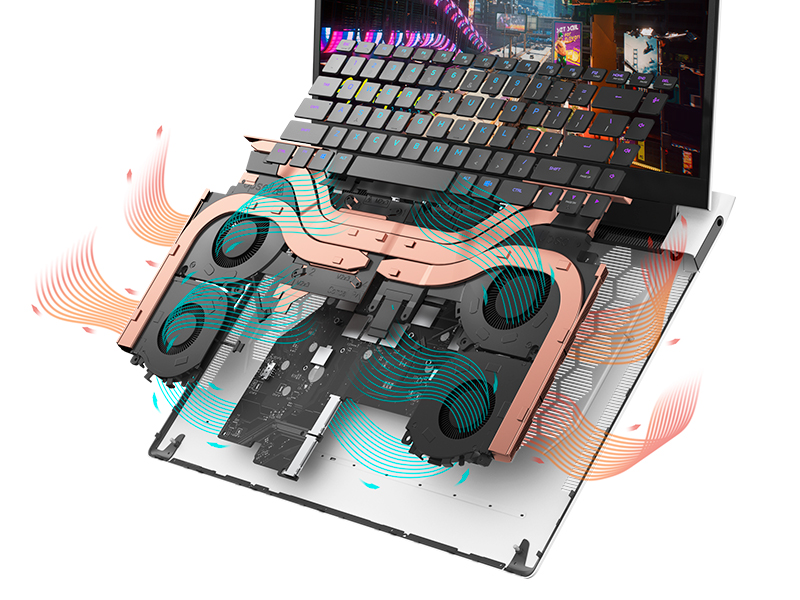
Figure 5.1: Alienware Command Center for system management.
6. Arazoak
If you encounter issues with your Alienware X17 R2, consider the following basic troubleshooting steps:
- Potentziarik gabe: Ziurtatu korronte-egokitzailea ondo konektatuta dagoela ordenagailu eramangarrira eta funtzionatzen duen entxufe batera. Egiaztatu potentziaren adierazlearen argia.
- Bistaratzeko arazoak: If the screen is black, try connecting an external monitor to verify if the issue is with the laptop's display or the graphics card. Update graphics drivers.
- Gehiegizko berotzea: Ensure cooling vents are clear of obstructions. Use Alienware Command Center to monitor temperatures and adjust fan profiles.
- Errendimenduaren moteltzea: Itxi beharrezkoak ez diren aplikazioak. Begiratu CPU edo RAM asko kontsumitzen duten atzeko planoan dauden prozesuak. Ziurtatu SSDan nahikoa leku libre.
- Software arazoak: Restart the laptop. If issues persist, consider performing a system restore or reinstalling the problematic software.
7. Zehaztapenak
| Ezaugarri | Zehaztapena |
|---|---|
| Pantailaren tamaina | 17.3 hazbete |
| Pantailaren bereizmena | 1920 x 1080 pixel (FHD) |
| Prozesadorea | Intel Core i9-12900H (3.8 GHz, 14 Cores) |
| RAM | 16 GB DDR5 (4800 MHz) |
| Disko gogorra | 1 TB SSD (Solid State) |
| Koprozesadore grafikoa | NVIDIA GeForce RTX 3070 Ti (8 GB GDDR6) |
| Sistema eragilea | Windows 11 Home |
| Haririk gabeko mota | 802.11ax (Killer Wi-Fi 6), Bluetooth |
| USB 3.0 Portuak | 3 |
| Elementuaren pisua | 6.82 kilo |
| Produktuaren neurriak | 11.79 x 15.72 x 0.58 hazbete |
8. Zer dago kutxan
- Alienware X17 R2 joko ordenagailu eramangarria
- Elikatze-moldagailua
- Elikatze kablea
- Dokumentazioa
9. Produktu Ofizialen Bideoak
Alienware X17 R2 Gaming Laptop Overview
9.1. bideoa: Ofizial bat amaitu daview of the Alienware X17 R2 Gaming Laptop, highlighting its design, cooling, and performance features.
About Alienware X17 R2 Gaming Laptop
Video 9.2: A detailed look at the Alienware X17 R2 Gaming Laptop, showcasing its features and design elements.
10. Bermea eta Laguntza
Your Alienware X17 R2 Gaming Laptop comes with a standard manufacturer's warranty. For detailed warranty information, please refer to the documentation included with your product or visit the official Alienware support webgunea.
For technical support, driver downloads, and service requests, please visit the Alienware support portal. You can also find FAQs and community forums for additional assistance.


