Sarrera
The One For All URC4810 is a dedicated replacement remote control designed specifically for Samsung televisions. This remote offers 100% compatibility with all Samsung TV models, providing a seamless and intuitive user experience. It features a quick setup process called SimpleSet and a learning function to transfer commands from your original remote, ensuring you retain all necessary functionalities.
Segurtasun Informazioa
- Mantendu bateriak haurren eskura.
- Ez nahastu bateria zaharrak eta berriak, edo bateria mota desberdinak.
- Kendu pilak urrutiko agintea denbora luzez erabiltzen ez bada.
- Avoid exposing the remote control to direct sunlight, heat sources, or excessive moisture.
- Ez saiatu urrutiko agintea desmuntatzen edo aldatzen.
Paketearen edukia
Mesedez, egiaztatu paketea elementu hauek dituen:
- One For All Samsung TV Replacement Remote Control (URC4810)
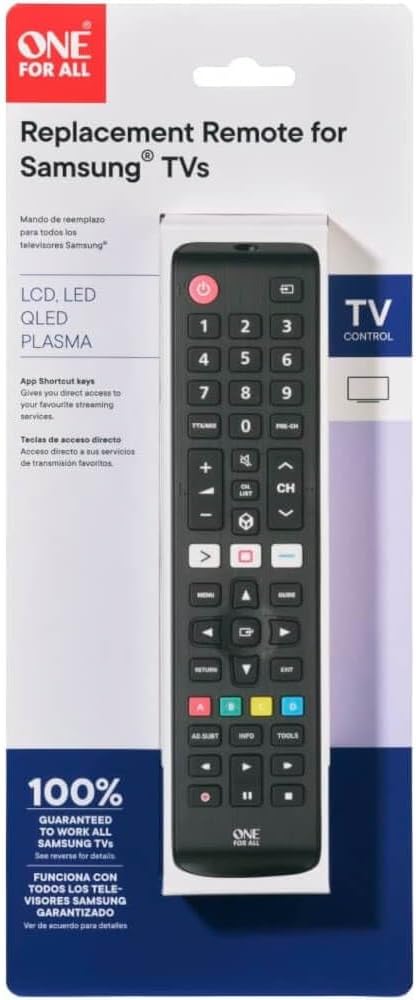
Image: The One For All URC4810 remote control displayed within its retail packaging, showing the product name and key features.
Konfigurazioa
1. Bateriaren instalazioa
The URC4810 remote control requires 2x AAA batteries (not included). Follow these steps to install them:
- Ireki bateriaren konpartimentuaren estalkia urruneko agintearen atzeko aldean.
- Sartu bi AAA pila, ziurtatuz terminal positiboa (+) eta negatiboa (-) konpartimentuaren barruko markekin lerrokatuta daudela.
- Itxi bateriaren konpartimenduaren estalkia ondo.

Irudia: Alboko profesional batfile view of the One For All URC4810 remote control, illustrating its ergonomic design and the location of the battery compartment seam.
2. SimpleSet Setup
The URC4810 remote features SimpleSet, allowing for quick setup in under 30 seconds. No codes are needed.
- Ensure your Samsung TV is turned on.
- Point the One For All remote at your Samsung TV.
- Eduki sakatuta Boterea button on the One For All remote until your TV turns off. This may take a few seconds.
- Telebista itzali ondoren, askatu botoia Boterea button immediately. The remote is now set up.
- Test other functions like Volume Up/Down and Channel Up/Down to confirm full functionality.

Irudia: Aurrealde zuzena view One For All URC4810 urrutiko agintearen erakusleihoaasing its full button layout, including the power button at the top.
3. Learning Feature (Optional)
The learning feature allows you to copy functions from your original Samsung TV remote to the URC4810. This is useful for any specific buttons not covered by the default setup.
- Place the One For All remote and your original Samsung remote on a flat surface, facing each other, about 1-2 inches apart.
- On the One For All remote, press and hold the KONFIAZIOA button (if available, otherwise refer to the specific manual for learning mode entry, typically a combination of buttons like MAIUSKUA + IKASI or similar) until the LED blinks twice and then stays lit.
- Press the button on the One For All remote that you wish to program (e.g., a specific app button). The LED will blink rapidly.
- On your original Samsung remote, press the corresponding button you want to copy. The LED on the One For All remote will blink twice to confirm successful learning.
- Repeat steps 3 and 4 for any other buttons you wish to learn.
- Ikasteko modutik irteteko, sakatu KONFIAZIOA button again (or the button used to enter learning mode). The LED will turn off.

Irudia: Angelu formakoa view One For All URC4810 urrutiko agintearen erakusleihoaasing its comfortable grip and button placement.
Funtzionamendu-argibideak
Once set up, the URC4810 remote functions like your original Samsung TV remote. Here are some common button functions:
- Pizteko botoia (botoi gorria): Telebista pizten edo itzaltzen du.
- Zenbaki-botoiak (0-9): Zuzeneko kanal hautaketa.
- Bolumena igo/behera (+/-): Telebistaren bolumena doitzen du.
- Kanala gora/behera (CH +/-): Telebistako kateak aldatzen ditu.
- Ezkutatu: Telebistaren soinua aktibatzen edo isilarazten du.
- Menua: Telebistaren menu nagusira sartzen da.
- Navigation (Arrow Buttons): Menuetan eta aukeretan nabigatzen du.
- Ados/Sartu: Hautaketak berresten ditu.
- Itzuli/Itzuli: Aurreko pantailara edo menura itzultzen da.
- Irteera: Uneko menutik edo aplikaziotik irteten da.
- Koloretako botoiak (gorria, berdea, horia, urdina): Functionality varies by TV model and application.
- Etxe/Gune Adimenduna: Accesses the TV's Smart Hub or Home screen.
Mantentzea
Garbiketa
To clean your remote control, use a soft, dry cloth. Do not use abrasive cleaners, waxes, or solvents. Avoid spraying liquids directly onto the remote.
Bateria ordezkatzea
If the remote control's range decreases or buttons become unresponsive, it may be time to replace the batteries. Follow the "Battery Installation" steps in the Setup section to replace the old batteries with new AAA alkaline batteries.
Arazoak konpontzea
| Arazoa |
Kausa posiblea |
Irtenbidea |
| Remote does not work after setup. |
Incorrect setup or dead batteries. |
Ensure batteries are correctly inserted and charged. Repeat the SimpleSet process carefully. |
| Botoi batzuek ez dute funtzionatzen. |
Button not recognized by SimpleSet or not learned. |
Use the Learning Feature to copy the function from your original remote. Ensure the remote is pointed directly at the TV. |
| Urruneko irismena eskasa da. |
Bateria gutxi edo oztopoa. |
Replace batteries. Ensure there are no obstructions between the remote and the TV's IR receiver. |
| LED on remote does not light up. |
No batteries or incorrect battery insertion. |
Check battery orientation and ensure they are new and correctly inserted. |
Zehaztapenak
| Marka |
Guztientzako Bat |
| Modelo zenbakia |
URC4810 |
| Gailu bateragarriak |
Samsung telebistak |
| Energia iturria |
Battery Powered (2x AAA, not included) |
| Kolorea |
White (Note: Product images show black, but specification states white. Please refer to product packaging for exact color.) |
| Elementuaren pisua |
3.52 ontza (100 gramo inguru) |
| Produktuaren neurriak (L x W x H) |
Approx. 4"D x 3"W x 1"H (Note: Dimensions may refer to packaging or a specific part. Actual remote dimensions are typically longer and narrower.) |
| UPC |
810209030940 |
Bermea eta Laguntza
One For All products are designed and manufactured to the highest standards. For information regarding warranty, technical support, or frequently asked questions, please visit the official One For All webgunera edo jarri harremanetan zuzenean bezeroarentzako arreta-zerbitzuarekin.
For the most up-to-date support information, please refer to the manufacturer's official channels:
- Guztientzako Bat Webgunea: www.oneforall.com
- Bezeroarentzako arreta: Ikusi webeskualdeko harremanetarako datuak lortzeko gunea.
Sarrera
The One For All URC4810 is a dedicated replacement remote control designed specifically for Samsung televisions. This remote offers 100% compatibility with all Samsung TV models, providing a seamless and intuitive user experience. It features a quick setup process called SimpleSet and a learning function to transfer commands from your original remote, ensuring you retain all necessary functionalities.
Segurtasun Informazioa
- Mantendu bateriak haurren eskura.
- Ez nahastu bateria zaharrak eta berriak, edo bateria mota desberdinak.
- Kendu pilak urrutiko agintea denbora luzez erabiltzen ez bada.
- Avoid exposing the remote control to direct sunlight, heat sources, or excessive moisture.
- Ez saiatu urrutiko agintea desmuntatzen edo aldatzen.
Paketearen edukia
Mesedez, egiaztatu paketea elementu hauek dituen:
- One For All Samsung TV Replacement Remote Control (URC4810)
Image: The One For All URC4810 remote control displayed within its retail packaging, showing the product name and key features.
Konfigurazioa
1. Bateriaren instalazioa
The URC4810 remote control requires 2x AAA batteries (not included). Follow these steps to install them:
- Ireki bateriaren konpartimentuaren estalkia urruneko agintearen atzeko aldean.
- Sartu bi AAA pila, ziurtatuz terminal positiboa (+) eta negatiboa (-) konpartimentuaren barruko markekin lerrokatuta daudela.
- Itxi bateriaren konpartimenduaren estalkia ondo.
Irudia: Alboko profesional batfile view of the One For All URC4810 remote control, illustrating its ergonomic design and the location of the battery compartment seam.
2. SimpleSet Setup
The URC4810 remote features SimpleSet, allowing for quick setup in under 30 seconds. No codes are needed.
- Ensure your Samsung TV is turned on.
- Point the One For All remote at your Samsung TV.
- Eduki sakatuta Boterea button on the One For All remote until your TV turns off. This may take a few seconds.
- Telebista itzali ondoren, askatu botoia Boterea button immediately. The remote is now set up.
- Test other functions like Volume Up/Down and Channel Up/Down to confirm full functionality.
Irudia: Aurrealde zuzena view One For All URC4810 urrutiko agintearen erakusleihoaasing its full button layout, including the power button at the top.
3. Learning Feature (Optional)
The learning feature allows you to copy functions from your original Samsung TV remote to the URC4810. This is useful for any specific buttons not covered by the default setup.
- Place the One For All remote and your original Samsung remote on a flat surface, facing each other, about 1-2 inches apart.
- On the One For All remote, press and hold the KONFIAZIOA button (if available, otherwise refer to the specific manual for learning mode entry, typically a combination of buttons like MAIUSKUA + IKASI or similar) until the LED blinks twice and then stays lit.
- Press the button on the One For All remote that you wish to program (e.g., a specific app button). The LED will blink rapidly.
- On your original Samsung remote, press the corresponding button you want to copy. The LED on the One For All remote will blink twice to confirm successful learning.
- Repeat steps 3 and 4 for any other buttons you wish to learn.
- Ikasteko modutik irteteko, sakatu KONFIAZIOA button again (or the button used to enter learning mode). The LED will turn off.
Irudia: Angelu formakoa view One For All URC4810 urrutiko agintearen erakusleihoaasing its comfortable grip and button placement.
Funtzionamendu-argibideak
Once set up, the URC4810 remote functions like your original Samsung TV remote. Here are some common button functions:
- Pizteko botoia (botoi gorria): Telebista pizten edo itzaltzen du.
- Zenbaki-botoiak (0-9): Zuzeneko kanal hautaketa.
- Bolumena igo/behera (+/-): Telebistaren bolumena doitzen du.
- Kanala gora/behera (CH +/-): Telebistako kateak aldatzen ditu.
- Ezkutatu: Telebistaren soinua aktibatzen edo isilarazten du.
- Menua: Telebistaren menu nagusira sartzen da.
- Navigation (Arrow Buttons): Menuetan eta aukeretan nabigatzen du.
- Ados/Sartu: Hautaketak berresten ditu.
- Itzuli/Itzuli: Aurreko pantailara edo menura itzultzen da.
- Irteera: Uneko menutik edo aplikaziotik irteten da.
- Koloretako botoiak (gorria, berdea, horia, urdina): Functionality varies by TV model and application.
- Etxe/Gune Adimenduna: Accesses the TV's Smart Hub or Home screen.
Mantentzea
Garbiketa
To clean your remote control, use a soft, dry cloth. Do not use abrasive cleaners, waxes, or solvents. Avoid spraying liquids directly onto the remote.
Bateria ordezkatzea
If the remote control's range decreases or buttons become unresponsive, it may be time to replace the batteries. Follow the "Battery Installation" steps in the Setup section to replace the old batteries with new AAA alkaline batteries.
Arazoak konpontzea
| Arazoa |
Kausa posiblea |
Irtenbidea |
| Remote does not work after setup. |
Incorrect setup or dead batteries. |
Ensure batteries are correctly inserted and charged. Repeat the SimpleSet process carefully. |
| Botoi batzuek ez dute funtzionatzen. |
Button not recognized by SimpleSet or not learned. |
Use the Learning Feature to copy the function from your original remote. Ensure the remote is pointed directly at the TV. |
| Urruneko irismena eskasa da. |
Bateria gutxi edo oztopoa. |
Replace batteries. Ensure there are no obstructions between the remote and the TV's IR receiver. |
| LED on remote does not light up. |
No batteries or incorrect battery insertion. |
Check battery orientation and ensure they are new and correctly inserted. |
Zehaztapenak
| Marka |
Guztientzako Bat |
| Modelo zenbakia |
URC4810 |
| Gailu bateragarriak |
Samsung telebistak |
| Energia iturria |
Battery Powered (2x AAA, not included) |
| Kolorea |
White (Note: Product images show black, but specification states white. Please refer to product packaging for exact color.) |
| Elementuaren pisua |
3.52 ontza (100 gramo inguru) |
| Produktuaren neurriak (L x W x H) |
Approx. 4"D x 3"W x 1"H (Note: Dimensions may refer to packaging or a specific part. Actual remote dimensions are typically longer and narrower.) |
| UPC |
810209030940 |
Bermea eta Laguntza
One For All products are designed and manufactured to the highest standards. For information regarding warranty, technical support, or frequently asked questions, please visit the official One For All webgunera edo jarri harremanetan zuzenean bezeroarentzako arreta-zerbitzuarekin.
For the most up-to-date support information, please refer to the manufacturer's official channels:
- Guztientzako Bat Webgunea: www.oneforall.com
- Bezeroarentzako arreta: Ikusi webeskualdeko harremanetarako datuak lortzeko gunea.
Sarrera
The One For All URC4810 is a dedicated replacement remote control designed specifically for Samsung televisions. This remote offers 100% compatibility with all Samsung TV models, providing a seamless and intuitive user experience. It features a quick setup process called SimpleSet and a learning function to transfer commands from your original remote, ensuring you retain all necessary functionalities.
Segurtasun Informazioa
- Mantendu bateriak haurren eskura.
- Ez nahastu bateria zaharrak eta berriak, edo bateria mota desberdinak.
- Kendu pilak urrutiko agintea denbora luzez erabiltzen ez bada.
- Avoid exposing the remote control to direct sunlight, heat sources, or excessive moisture.
- Ez saiatu urrutiko agintea desmuntatzen edo aldatzen.
Paketearen edukia
Mesedez, egiaztatu paketea elementu hauek dituen:
- One For All Samsung TV Replacement Remote Control (URC4810)
Image: The One For All URC4810 remote control displayed within its retail packaging, showing the product name and key features.
Konfigurazioa
1. Bateriaren instalazioa
The URC4810 remote control requires 2x AAA batteries (not included). Follow these steps to install them:
- Ireki bateriaren konpartimentuaren estalkia urruneko agintearen atzeko aldean.
- Sartu bi AAA pila, ziurtatuz terminal positiboa (+) eta negatiboa (-) konpartimentuaren barruko markekin lerrokatuta daudela.
- Itxi bateriaren konpartimenduaren estalkia ondo.
Irudia: Alboko profesional batfile view of the One For All URC4810 remote control, illustrating its ergonomic design and the location of the battery compartment seam.
2. SimpleSet Setup
The URC4810 remote features SimpleSet, allowing for quick setup in under 30 seconds. No codes are needed.
- Ensure your Samsung TV is turned on.
- Point the One For All remote at your Samsung TV.
- Eduki sakatuta Boterea button on the One For All remote until your TV turns off. This may take a few seconds.
- Telebista itzali ondoren, askatu botoia Boterea button immediately. The remote is now set up.
- Test other functions like Volume Up/Down and Channel Up/Down to confirm full functionality.
Irudia: Aurrealde zuzena view One For All URC4810 urrutiko agintearen erakusleihoaasing its full button layout, including the power button at the top.
3. Learning Feature (Optional)
The learning feature allows you to copy functions from your original Samsung TV remote to the URC4810. This is useful for any specific buttons not covered by the default setup.
- Place the One For All remote and your original Samsung remote on a flat surface, facing each other, about 1-2 inches apart.
- On the One For All remote, press and hold the KONFIAZIOA button (if available, otherwise refer to the specific manual for learning mode entry, typically a combination of buttons like MAIUSKUA + IKASI or similar) until the LED blinks twice and then stays lit.
- Press the button on the One For All remote that you wish to program (e.g., a specific app button). The LED will blink rapidly.
- On your original Samsung remote, press the corresponding button you want to copy. The LED on the One For All remote will blink twice to confirm successful learning.
- Repeat steps 3 and 4 for any other buttons you wish to learn.
- Ikasteko modutik irteteko, sakatu KONFIAZIOA button again (or the button used to enter learning mode). The LED will turn off.
Irudia: Angelu formakoa view One For All URC4810 urrutiko agintearen erakusleihoaasing its comfortable grip and button placement.
Funtzionamendu-argibideak
Once set up, the URC4810 remote functions like your original Samsung TV remote. Here are some common button functions:
- Pizteko botoia (botoi gorria): Telebista pizten edo itzaltzen du.
- Zenbaki-botoiak (0-9): Zuzeneko kanal hautaketa.
- Bolumena igo/behera (+/-): Telebistaren bolumena doitzen du.
- Kanala gora/behera (CH +/-): Telebistako kateak aldatzen ditu.
- Ezkutatu: Telebistaren soinua aktibatzen edo isilarazten du.
- Menua: Telebistaren menu nagusira sartzen da.
- Navigation (Arrow Buttons): Menuetan eta aukeretan nabigatzen du.
- Ados/Sartu: Hautaketak berresten ditu.
- Itzuli/Itzuli: Aurreko pantailara edo menura itzultzen da.
- Irteera: Uneko menutik edo aplikaziotik irteten da.
- Koloretako botoiak (gorria, berdea, horia, urdina): Functionality varies by TV model and application.
- Etxe/Gune Adimenduna: Accesses the TV's Smart Hub or Home screen.
Mantentzea
Garbiketa
To clean your remote control, use a soft, dry cloth. Do not use abrasive cleaners, waxes, or solvents. Avoid spraying liquids directly onto the remote.
Bateria ordezkatzea
If the remote control's range decreases or buttons become unresponsive, it may be time to replace the batteries. Follow the "Battery Installation" steps in the Setup section to replace the old batteries with new AAA alkaline batteries.
Arazoak konpontzea
| Arazoa |
Kausa posiblea |
Irtenbidea |
| Remote does not work after setup. |
Incorrect setup or dead batteries. |
Ensure batteries are correctly inserted and charged. Repeat the SimpleSet process carefully. |
| Botoi batzuek ez dute funtzionatzen. |
Button not recognized by SimpleSet or not learned. |
Use the Learning Feature to copy the function from your original remote. Ensure the remote is pointed directly at the TV. |
| Urruneko irismena eskasa da. |
Bateria gutxi edo oztopoa. |
Replace batteries. Ensure there are no obstructions between the remote and the TV's IR receiver. |
| LED on remote does not light up. |
No batteries or incorrect battery insertion. |
Check battery orientation and ensure they are new and correctly inserted. |
Zehaztapenak
| Marka |
Guztientzako Bat |
| Modelo zenbakia |
URC4810 |
| Gailu bateragarriak |
Samsung telebistak |
| Energia iturria |
Battery Powered (2x AAA, not included) |
| Kolorea |
White (Note: Product images show black, but specification states white. Please refer to product packaging for exact color.) |
| Elementuaren pisua |
3.52 ontza (100 gramo inguru) |
| Produktuaren neurriak (L x W x H) |
Approx. 4"D x 3"W x 1"H (Note: Dimensions may refer to packaging or a specific part. Actual remote dimensions are typically longer and narrower.) |
| UPC |
810209030940 |
Bermea eta Laguntza
One For All products are designed and manufactured to the highest standards. For information regarding warranty, technical support, or frequently asked questions, please visit the official One For All webgunera edo jarri harremanetan zuzenean bezeroarentzako arreta-zerbitzuarekin.
For the most up-to-date support information, please refer to the manufacturer's official channels:
- Guztientzako Bat Webgunea: www.oneforall.com
- Bezeroarentzako arreta: Ikusi webeskualdeko harremanetarako datuak lortzeko gunea.


