1. Sarrera
This manual provides essential information for the proper setup, operation, and maintenance of your Sharp 32FG6EA 32-inch HD Android TV. The Sharp 32FG6EA offers a wide range of connection options and features the Android TV operating system, providing a modern and intuitive television experience. It functions as an all-in-one entertainment hub, integrating Google Assistant for a smarter viewing experience. Users can quickly access entertainment, control smart devices, and obtain on-screen information using voice commands.
2. Segurtasun informazioa
Mesedez, irakurri arretaz segurtasun-jarraibide guztiak telebista erabili aurretik. Gorde eskuliburu hau etorkizunean erreferentzia gisa.
- Elikatze-iturria: Ziurtatu telebista bolumen egokia duen energia-iturri batera konektatuta dagoelatage. Ez gainkargatu entxufeak.
- Aireztapena: Ez blokeatu aireztapen-irekidurak. Utzi nahikoa leku telebistaren inguruan aire-fluxu egokia izan dadin eta gehiegi berotzea saihesteko.
- Ura eta hezetasuna: Do not expose the TV to rain, moisture, or excessive humidity. Avoid placing objects filled with liquids on or near the TV.
- Garbiketa: Deskonektatu telebista garbitu aurretik. Erabili zapi leun eta lehor bat. Ez erabili garbitzaile likidorik edo aerosol-sprayrik.
- Lekua: Place the TV on a stable, level surface. If wall-mounting, ensure the mount is securely installed and can support the TV's weight.
- Zerbitzua: Ez saiatu telebista zeuk konpontzen. Konponketa guztiak zerbitzu-langile kualifikatuei eskatu.
3. Paketearen edukia
Egiaztatu elementu guztiak ontzian daudela:
- Sharp 32FG6EA 32-inch HD Android TV
- Urrutiko agintea (2 AAA pilekin)
- Stand Type Base
- Argibide eskuliburua
- Elikatze-kablea
4. Konfigurazioa
4.1 Paketatzea
Kontu handiz atera telebista eta osagarri guztiak paketetik. Gorde ontziratzeko materialak etorkizunean garraiatzeko edo konpontzeko.
4.2 Standa lotzea
If you are not wall-mounting the TV, attach the included stand base:
- Jarri telebistaren pantaila beherantz gainazal bigun eta lau batean, kalteak saihesteko.
- Lerrokatu euskarriaren oinarria telebistaren behealdeko muntaketa-zuloekin.
- Lotu euskarria emandako torlojuak erabiliz. Ziurtatu euskarria ondo lotuta dagoela.
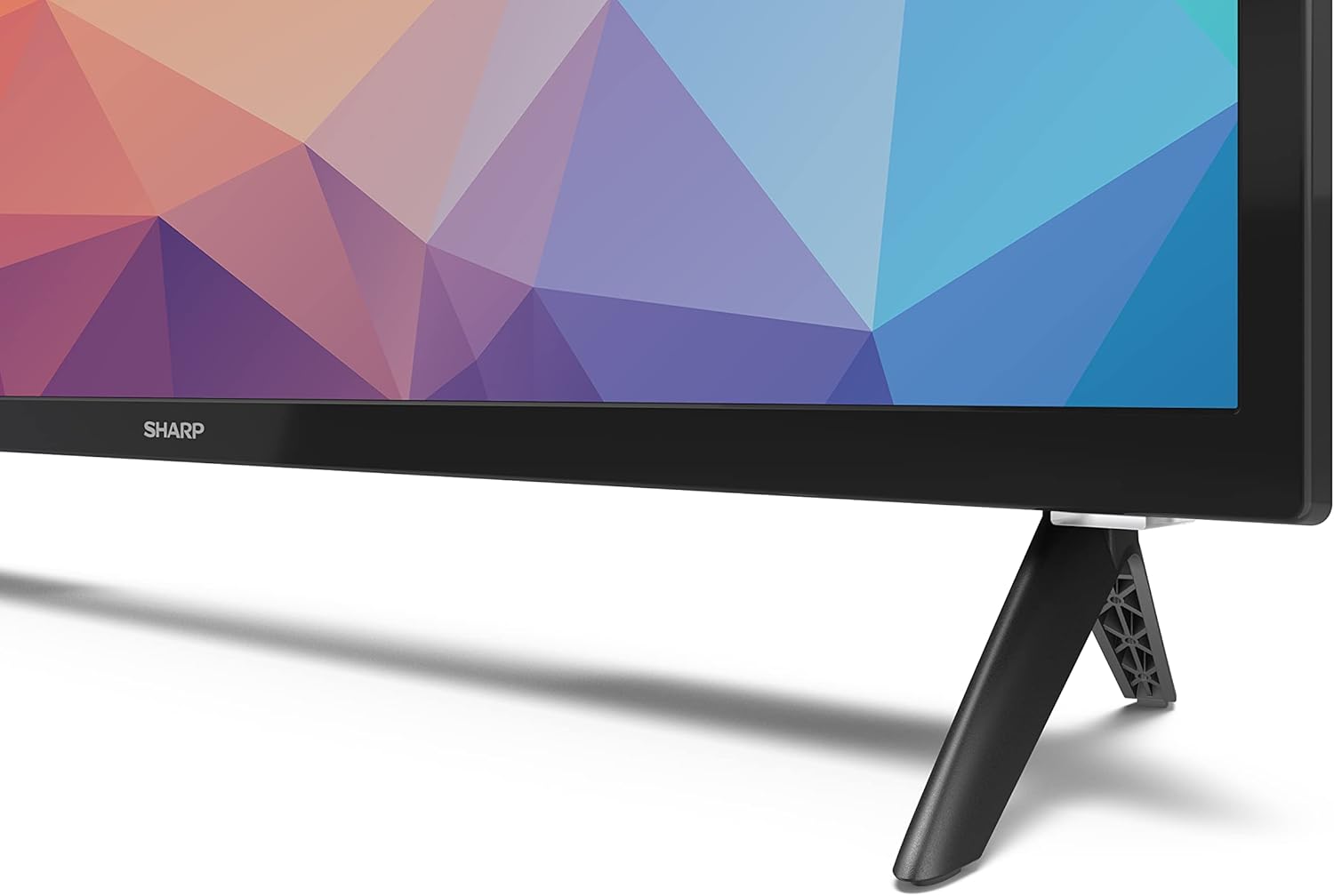
Image: Close-up of the TV stand attachment.
4.3 Horman muntatzea
The Sharp 32FG6EA supports VESA wall mounts with dimensions of 75 x 75 mm. Wall mount hardware is not included. Follow the instructions provided with your wall mount kit.
4.4 Kanpoko gailuak konektatzea
Zure telebistak hainbat ataka ditu hainbat gailu konektatzeko:
- HDMI: Connect Blu-ray players, game consoles, or set-top boxes to the 2 HDMI ports.
- USBa: Connect USB storage devices for media playback to the 2 USB ports.
- Antena/Kablea: Connect an antenna or cable TV source for broadcast channels.
- Ethernet: Interneteko kable bidezko konexio baterako.
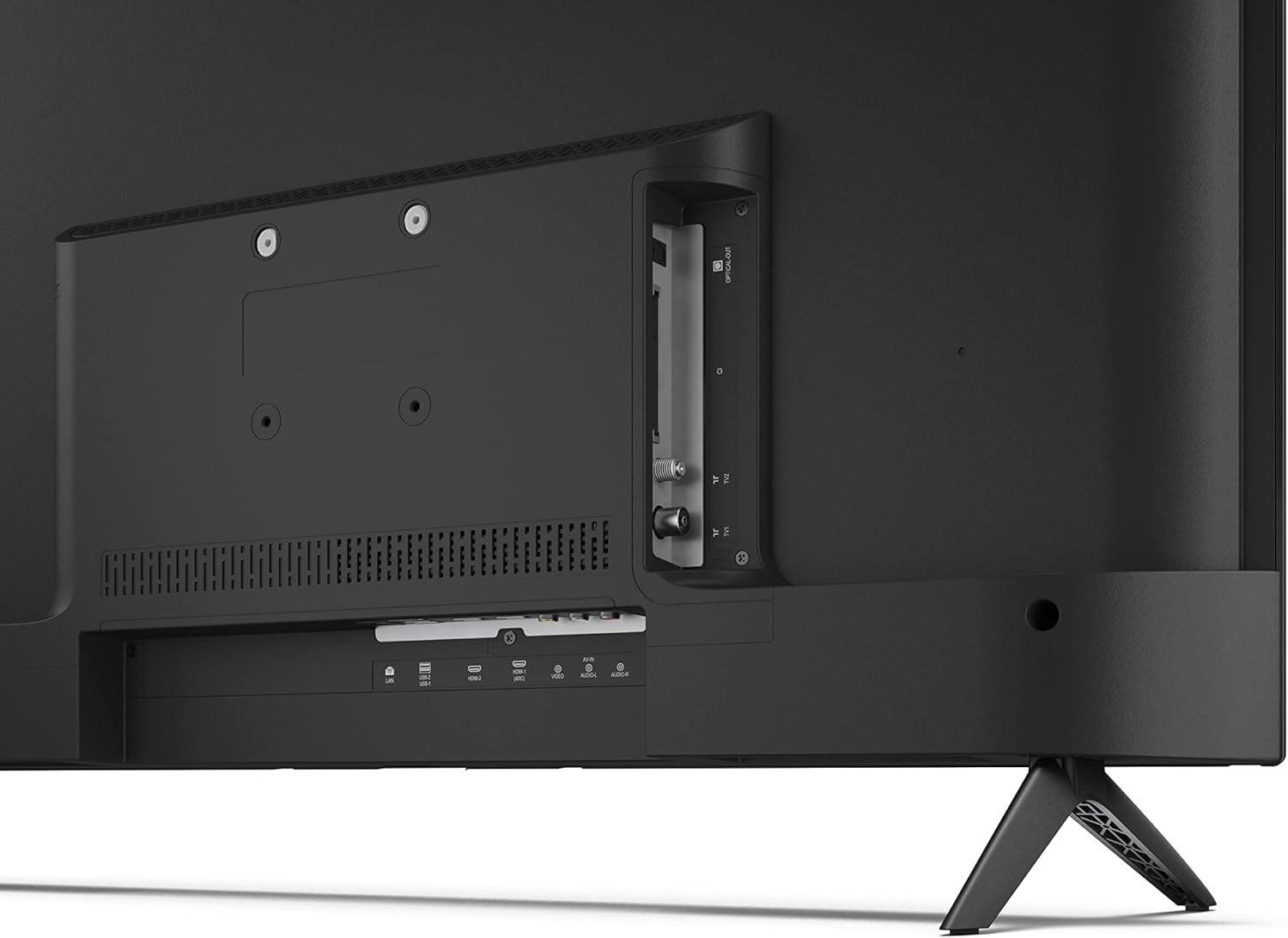
Irudia: Atzealdea view telebistaren konexio-atakak.
4.5 Energia-konexioa
After connecting all necessary devices, plug the power cable into the TV and then into a wall outlet.
4.6 Hasierako konfigurazio-morroia
Lehen aldiz piztean, telebistak hasierako konfigurazio prozesu batean gidatuko zaitu. Honek honako hauek barne hartzen ditu:
- Hizkuntza hautatzea.
- Sare konexioa (Wi-Fi edo Ethernet).
- Google account sign-in (required for full Android TV features).
- Kanalen eskaneatzea.
5. Funtzionamendua
5.1 Urruneko kontrola baino gehiagoview
The included remote control allows you to navigate the TV's features. Insert the 2 AAA batteries into the remote control before use.
- Pizteko botoia: Telebista pizten edo itzaltzen du.
- Directional Pad (D-Pad) & OK Button: Menuetan nabigatu eta hautaketak berretsi.
- Atzera botoia: Aurreko pantailara itzultzen da.
- Hasierako botoia: Android TV-ren hasierako pantailara sartzen da.
- Bolumena igo/behera: Audioaren bolumena doitzen du.
- Kanal gora/behera: Telebistako kateak aldatzen ditu.
- Google Laguntzailearen botoia: Ahots-kontrola aktibatzen du.
- Aplikazioaren lasterbideen botoiak: Netflix, Prime Video eta YouTube bezalako streaming zerbitzu ezagunetarako botoi dedikatuak.
5.2 Android TV Interface Navigation
The Android TV home screen provides access to your installed apps, recommended content, and settings. Use the directional pad on your remote to navigate through the interface.
5.3 Google Laguntzailea
Press the Google Assistant button on your remote and speak into the microphone to:
- Bilatu filmak, saioak edo informazioa.
- Etxe adimenduneko gailuak kontrolatu.
- Ireki aplikazioak.
- Telebistaren ezarpenak doitu.
5.4 Chromecast integratua
The TV includes Chromecast built-in, allowing you to cast content from compatible apps on your smartphone, tablet, or computer directly to the TV screen.
5.5 Bluetooth konexioa
Connect Bluetooth devices such as headphones or speakers to your TV for a personalized audio experience. Navigate to the TV's settings menu to pair new Bluetooth devices.
5.6 Audio ezarpenak
The TV supports Dolby Audio with 2 x 6 W RMS speakers. You can adjust audio settings, including sound modes and equalizer, through the TV's settings menu.
6. Mantentzea
6.1 Telebista garbitzea
Telebistaren pantaila eta armairua garbitzeko:
- Deskonektatu korronte-kablea hormako entxufetik.
- Use a soft, lint-free cloth to gently wipe the screen and surfaces.
- Marka egoskorretarako, apur bat dampGarbitu oihala urarekin edo pantaila-garbitzaile espezializatu batekin (aplikatu oihalean, ez zuzenean pantailan).
- Ez erabili garbitzaile urratzailerik, argizaririk edo disolbatzailerik.
6.2 Software eguneraketak
Baliteke zure Android telebistak aldizkako software eguneraketak jasotzea errendimendua hobetzeko eta funtzio berriak gehitzeko. Ziurtatu telebista Internetera konektatuta dagoela eguneratze hauek jasotzeko. Eskuz egiaztatu ditzakezu eguneratzeak telebistaren ezarpenen menuan.
7. Arazoak
Telebistarekin arazoak badituzu, jo ezazu honako arazo eta irtenbide ohikoenei:
- Potentziarik gabe: Ziurtatu kablea ondo konektatuta dagoela telebistan eta hormako entxufe funtzional batean. Saiatu beste entxufe batekin.
- Irudi/soinurik ez: Check that the correct input source is selected. Verify all cables (HDMI, antenna) are properly connected.
- Urruneko kontrola ez dabil: Egiaztatu bateriak eta ziurtatu behar bezala sartuta daudela. Zuzendu urrutiko agintea zuzenean telebistaren IR sentsorerantz.
- Irudiaren kalitate eskasa: Check antenna/cable connections. Adjust picture settings in the TV menu. For streaming content, ensure a stable internet connection.
- Ez dago Interneteko konexiorik: Verify Wi-Fi password or Ethernet cable connection. Restart your router and the TV.
- Aplikazioak ez dute funtzionatzen: Ensure the TV's software is up to date. Try clearing the app's cache or reinstalling the app.
If problems persist, consult the Sharp support webwebgunean edo jarri harremanetan bezeroarentzako zerbitzuarekin.
8. Zehaztapenak
| Ezaugarri | Zehaztapena |
|---|---|
| Modelo zenbakia | 32FG6EA |
| Marka | Zorrotza |
| Pantailaren tamaina | 32 hazbete (81 cm diagonalean) |
| Bistaratzeko Teknologia | LED |
| Ebazpena | 720p (1366 x 768 pixel) |
| Aspektu-erlazioa | 16:9 |
| Freskatze tasa | 50 Hz |
| Sistema eragilea | Android TV 11 |
| Ezaugarri bereziak | Android TV, Google Assistant, Chromecast built-in |
| Audio Irteera | 2 x 6 W RMS, Dolby Audio |
| HDMI atakak | 2 |
| USB atakak | 2 |
| Konektibitatea | Wi-Fi, Bluetooth, Ethernet |
| VESA hormako muntaia | 75 x 75 mm |
| Neurriak euskarriarekin (W x H x D) | 731 x 486 x 177 mm |
| Zutik gabe neurriak (W x H x D) | 731 x 433 x 68 mm |
| Produktuaren neurriak (L x W x H) | 16 x 73 x 46.4 cm (approximate, with stand) |
| Pisua | 3.9 kg |
| Energia Eraginkortasun Klasea | E |

Image: TV dimensions diagram.

Image: Energy Label. For more details, visit EPREL Datu-basea.
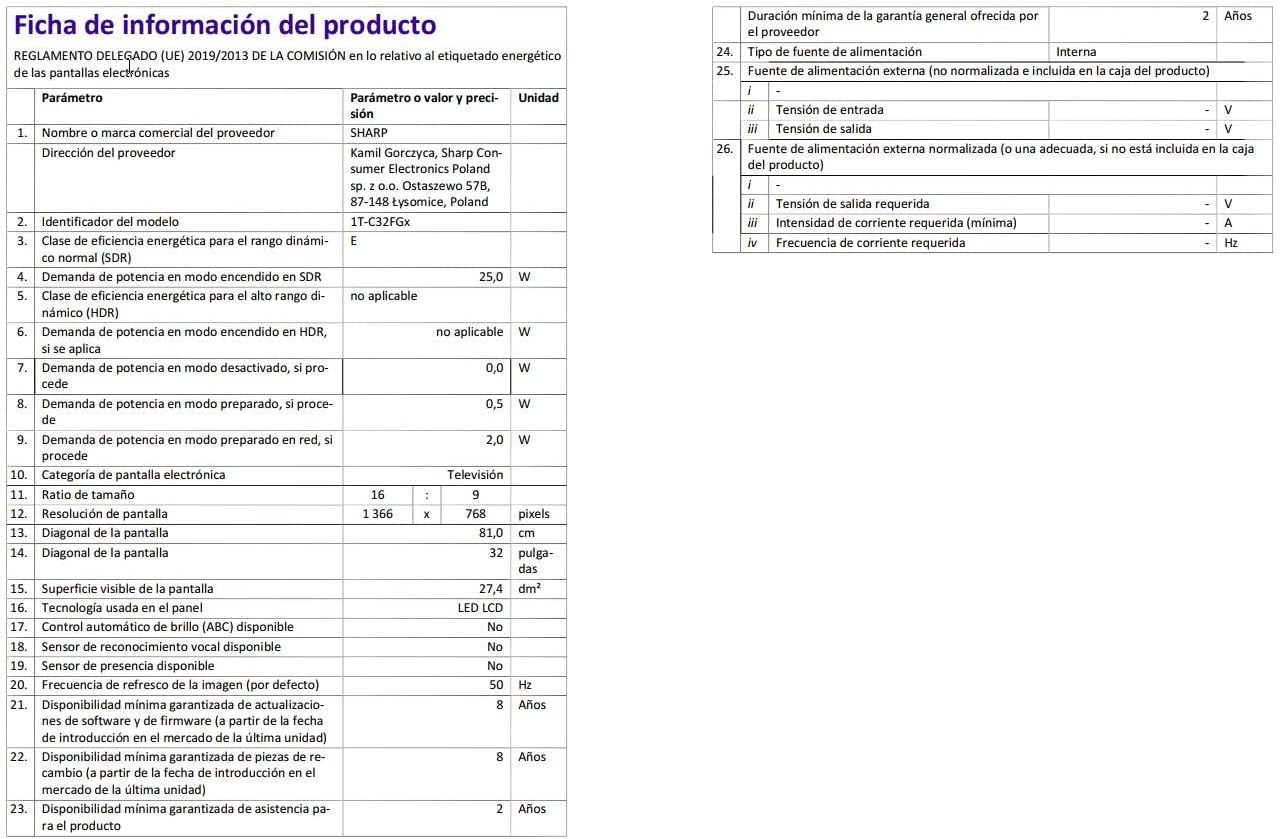
Image: Detailed product information sheet.
9. Bermea eta Laguntza
The Sharp 32FG6EA television comes with a minimum general warranty duration of 2 years from the provider.
For technical support, warranty claims, or further assistance, please refer to the contact information provided with your purchase documentation or visit the official Sharp support webzure eskualderako gunea.


