1. Sarrera
The AIHOOR A4ANC Wireless Earbuds offer a premium audio experience with advanced features designed for daily use and active lifestyles. Key features include Hybrid Active Noise Cancelling, wireless charging capability, deep bass sound, and enhanced call clarity.

Figure 1: AIHOOR A4ANC Wireless Earbuds and Charging Case. The image shows the dark blue earbuds resting in their open charging case, highlighting their sleek design and compact form factor.
Ezaugarri nagusiak:
- Zarata Ezeztapen Aktibo Hibridoa (ANC): Long press for 2 seconds to activate ANC, canceling ambient noise by 30dB for an immersive listening experience.
- Haririk gabeko karga: Conveniently charge your earbuds and case wirelessly.
- Shocking Deep Bass: Expertly tuned sound delivering high-quality stereo with extra bass, rounded vocals, and surprising highs.
- Enhanced Calls: Six microphones with Environmental Noise Cancellation (ENC) technology ensure clear voice pickup.
- Bateragarritasun Unibertsala: Easily pair with iOS/Android phones, Mac or Windows laptops/desktops, or smart TVs via Bluetooth 5.1.
2. Zer dago kutxan
- 1 x Pair of Bluetooth Earbuds (Left & Right)
- 1 x USB-C kargatzeko zorroa
- 1 x USB-C Charging Cable (20cm/0.8in)
- 4 x Pairs of Eartips (L*2, M*2 (Installed), S*2, XS*2)
- 1 x Gift Carton Packaging
3. Konfigurazioa
3.1 Entzungailuak eta zorroa kargatzea
Before first use, fully charge the earbuds and charging case. The case can be charged via the included USB-C cable or wirelessly using a compatible wireless charging pad.
- Aurikularrak kargatzeko denbora: Approximately 15 minutes for 5 hours of playtime (when placed in the charging case).
- Kasua kargatzeko denbora: Gutxi gorabehera 2 ordu karga osoa lortzeko.
- The charging case provides up to 3 full charges for the earbuds.

Figure 2: The AIHOOR A4ANC earbuds charging wirelessly on a charging pad, alongside a smartphone and smartwatch also charging. This illustrates the convenience of wireless charging for the earbuds.
Video 1: Experience Using AIHOOR A4 ANC Bluetooth Wireless Earbuds. This video demonstrates the charging process and general usage of the earbuds, including placing them in the charging case and observing the indicator lights.
3.2 Zure gailuarekin parekatzea
The earbuds are designed for universal compatibility with various Bluetooth-enabled devices.
- Ziurtatu entzungailuak kargatuta daudela eta kargatzeko zorroan sartuta daudela.
- Ireki kargatzeko zorroa. Entzungailuak automatikoki sartuko dira parekatze moduan (aurikularretan dauden argi keinukariek adierazten dute).
- On your device (smartphone, laptop, etc.), go to Bluetooth settings.
- Select "AIHOOR A4" from the list of available devices to connect.
- Once connected, you will hear an audio prompt, and the earbud lights will stop flashing.
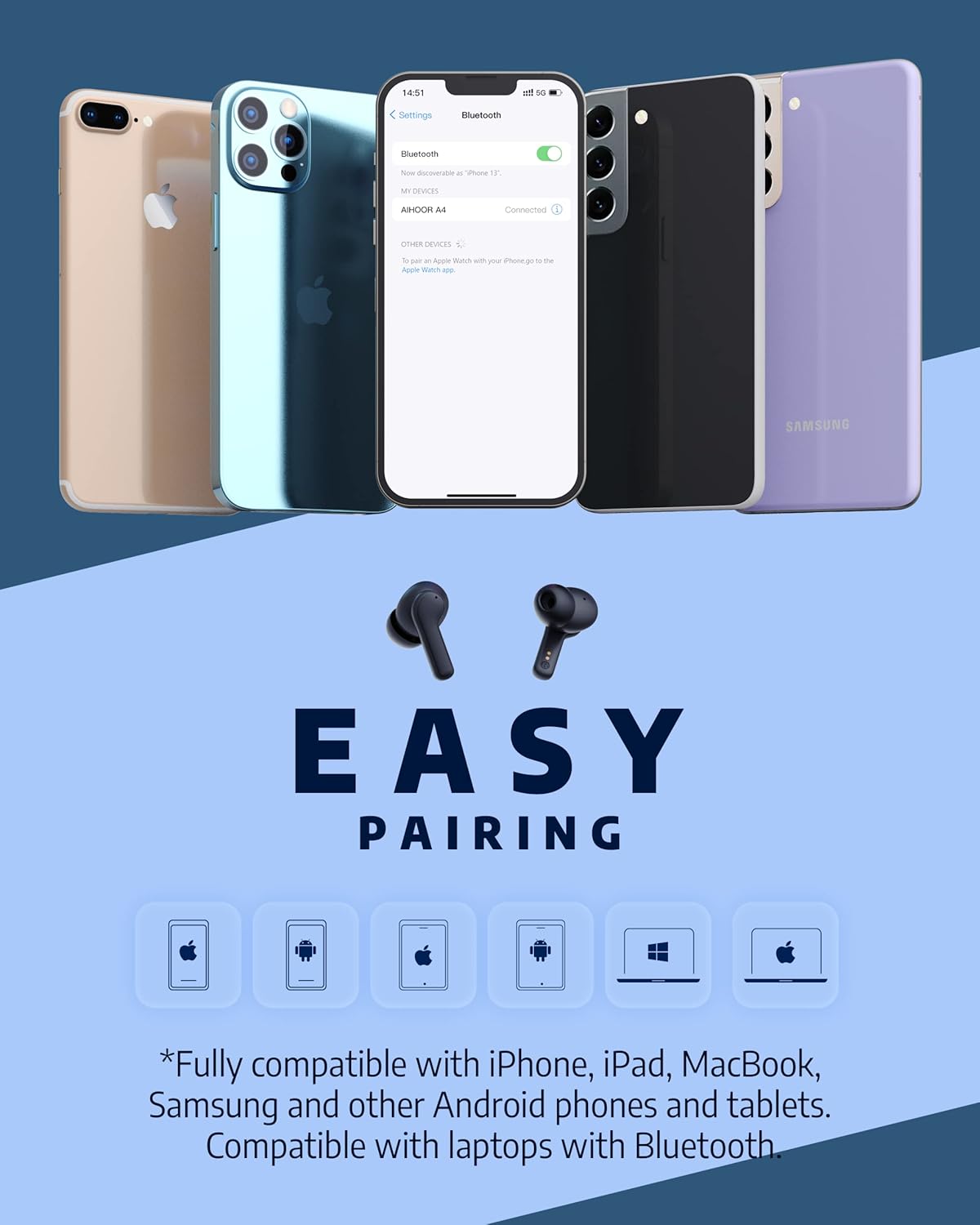
Figure 3: The AIHOOR A4ANC earbuds demonstrating easy pairing with various devices including iPhones, Android phones, and laptops. This image highlights the broad compatibility of the earbuds.
4. Funtzionamendu-argibideak
4.1 Ukitu Kontrolak
The AIHOOR A4ANC earbuds feature intuitive touch controls on each earbud for easy management of audio and calls.
- Erreproduzitu/Pausatu: Sakatu behin entzungailuetako edozein.
- Hurrengo ibilbidea: Sakatu birritan eskuineko aurikularra.
- Aurreko pista: Sakatu birritan ezkerreko aurikularra.
- Bolumena igo: Sakatu luze eskuineko entzungailua.
- Bolumena jaitsi: Sakatu luze ezkerreko entzungailua.
- Aktibatu ahots-laguntzailea (Siri/Google Assistant): Sakatu hiru aldiz entzungailuetako bat.
Video 2: Honest Review & Touch Control Demonstration. This video provides a clear demonstration of the touch controls for managing music playback, volume, and calls directly from the earbuds.
4.2 Deien kudeaketa
The earbuds are equipped with 6 microphones and Environmental Noise Cancellation (ENC) for clear hands-free calls.
- Deia erantzun/amaitu: Sakatu behin entzungailuetako edozein.
- Deia baztertu: Luze sakatu aurikularretako bat 2 segundoz.
4.3 Zarata Ezabatze Aktiboa (ANC)
Activate ANC to minimize ambient noise and enhance your listening experience.
- Aktibatu ANC: Long press either earbud for 2 seconds. You will hear an audio prompt confirming ANC activation.
- ANC reduces ambient noise by up to 30dB.

Figure 4: A visual representation of the earbuds' Active Noise Cancelling feature, showing a person enjoying quiet on an airplane. The image emphasizes the ability to reduce 35dB of ambient noise.
5. Mantentzea
Proper maintenance ensures the longevity and optimal performance of your AIHOOR A4ANC earbuds.
- Garbiketa: Garbitu aldizka entzungailuak eta kargatzeko zorroa oihal leun, lehor eta lihorik gabeko batekin. Saihestu produktu kimiko gogorrak edo material urratzaileak erabiltzea.
- Belarri-orriak: Remove and clean the eartips periodically with water and mild soap. Ensure they are completely dry before reattaching.
- Uraren erresistentzia: The earbuds have an IPX5 water resistance level, meaning they are protected against low-pressure water jets from any direction. They are not designed for submersion in water. Avoid exposing them to excessive moisture or liquids.
- Biltegiratzea: Erabiltzen ez dituzunean, gorde entzungailuak kargatzeko zorroan babesteko eta kargatuta mantentzeko.
6. Arazoak
6.1 Konexio arazoak
- Entzungailuak ez dira parekatzen: Ensure both earbuds are in the charging case, then open the lid to activate pairing mode. Check your device's Bluetooth settings to ensure "AIHOOR A4" is visible.
- Entzungailu bakarra konektatzen da: Place both earbuds back into the charging case, close the lid, wait a few seconds, then open it again. This often resets the connection. If the issue persists, try forgetting the device on your phone's Bluetooth settings and re-pairing.
- Konexio etengabea: Ensure your device is within the Bluetooth range (10 meters/33 feet) and there are no significant obstacles between the earbuds and your device.
6.2 Kargatzeko arazoak
- Aurikularrak ez dira kargatzen, baldin eta: Ensure the charging contacts on both the earbuds and inside the case are clean and free of debris. Make sure the earbuds are properly seated in the case.
- Kaxa ez da kargatzen: Verify the USB-C cable is securely connected to both the case and the power source. If using wireless charging, ensure the case is correctly positioned on the charging pad.
6.3 Soinuaren kalitatearen arazoak
- Bolumen baxua edo soinu eskasa: Ensure the eartips are the correct size for a snug fit in your ear canal. Clean the earbud mesh to remove any wax or debris that might be obstructing sound. Adjust volume on both your device and the earbuds.
- Audio distortsionatua: Move closer to your connected device to avoid interference. Try disconnecting and reconnecting the earbuds.
7. Zehaztapenak
| Ezaugarri | Zehaztapena |
|---|---|
| Ereduaren izena | A4-FT001 |
| Konektibitate Teknologia | Haririk gabekoa (Bluetooth 5.1) |
| Zarata Kontrola | Zarata aktiboaren baliogabetzea (ANC) |
| Mikrofonoak | 6 (ENC-rekin) |
| Bateriaren iraupena (entzungailuak) | Gehienez 5 ordu karga bakoitzeko |
| Jolas-denbora osoa (zorroarekin) | Gehienez 30 ordu |
| Kargatzeko denbora (kasua) | 2 ordu |
| Haririk gabeko kargatzea | Onartua |
| Uraren Erresistentzia Maila | IPX5 |
| Kontrol-metodoa | Ukitu |
| Belarrien Kokatzea | Belarrian |
| Produktuaren neurriak | 2.28 x 1.93 x 1.18 hazbete |
| Elementuaren pisua | 2.39 ontza |
8. Bermea eta Laguntza
AIHOOR products are designed with quality and reliability in mind. For warranty information, technical support, or any inquiries regarding your AIHOOR A4ANC Wireless Earbuds, please refer to the contact information provided in your product packaging or visit the official AIHOOR webgunea.
Note: Specific warranty terms and conditions may vary by region. Please retain your proof of purchase for warranty claims.


